fxDreema

    • Register
    • Login
    • Search
    • Back to the main page
    • Categories
    • Recent
    • Tags
    • Popular
    • Search
    1. Home
    2. trader.philipps
    3. Posts
    T
    • Profile
    • Following 3
    • Followers 38
    • Topics 20
    • Posts 1001
    • Best 91
    • Controversial 2
    • Groups 0

    Posts made by trader.philipps

    • RE: I am trying to limit trades to only 4

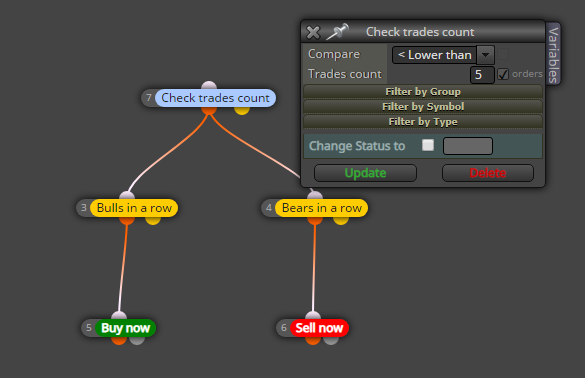
      @jzfusion I just tested the project you posted above. I think the EA behaves as you configured it. Look at your Check trades count block.

      0_1575429582484_5543094e-a859-4c3f-8de8-bf6e5544445f-image.png

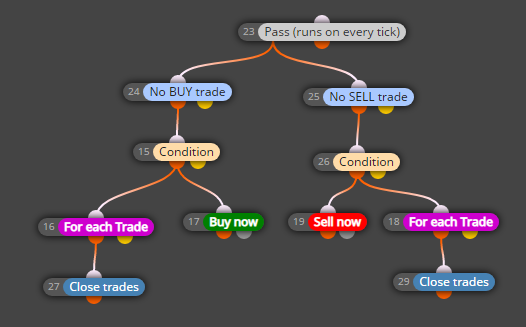
      This becomes true (orange dot) If there are 0-4 trades open. Asuming you have 4 trades already open, it passes the true condition another time (as 4 trades are less than 5 trades) and opens the 5th trade as one of both conditions are always true and will open a trade.

      Does that makes sense?

      So change it to < 4 and you'll only have 4 trades maximum.

      posted in Questions & Answers
      T
      trader.philipps
    • RE: Is there a way to configure the EA to wait for 3 consecutive losses and then enter orders?

      @rafaels919 Here is the latest version of the EA.

      Changes:

      • Added Phases (1-3) including control block
      • 3rd Phase looks for n virtual wins after Phase 2 (real trades) ended with max consec. losses
      • did some cleanup

      Project Link

      0_1575428806515_virtual_trades_count.mq4

      I did some basic testing and it looks as it performs as it should. However, there may be more testing required as it takes some time to get through all the phases.

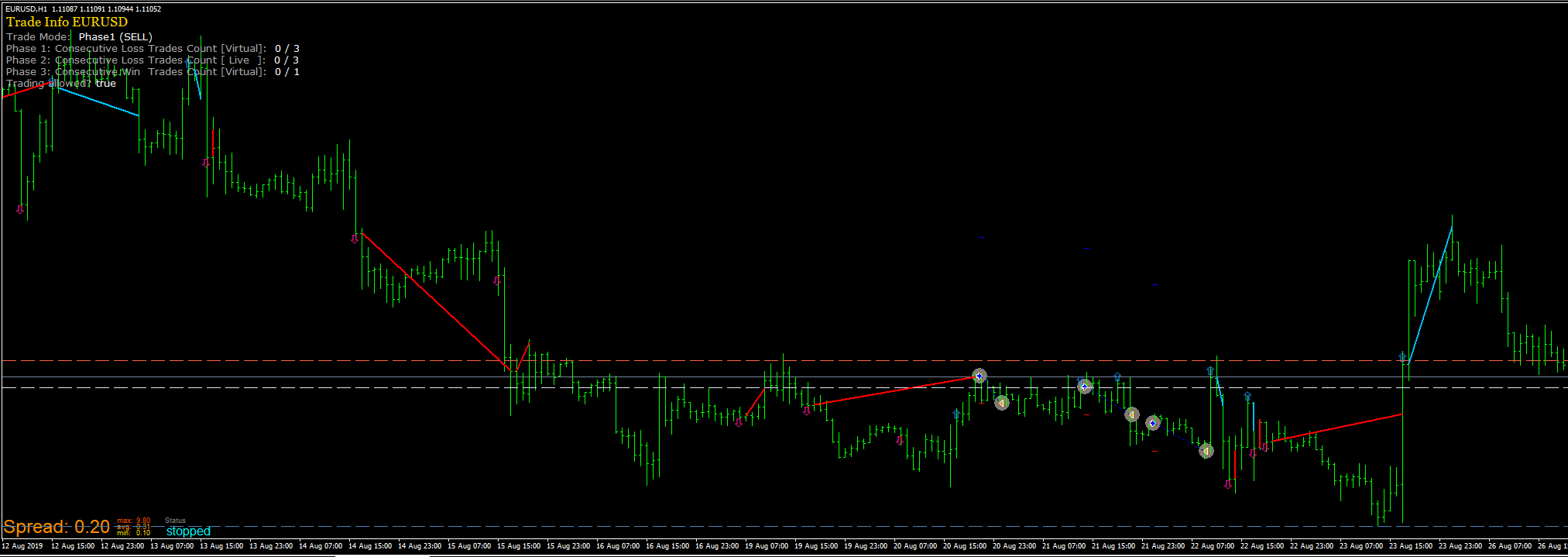
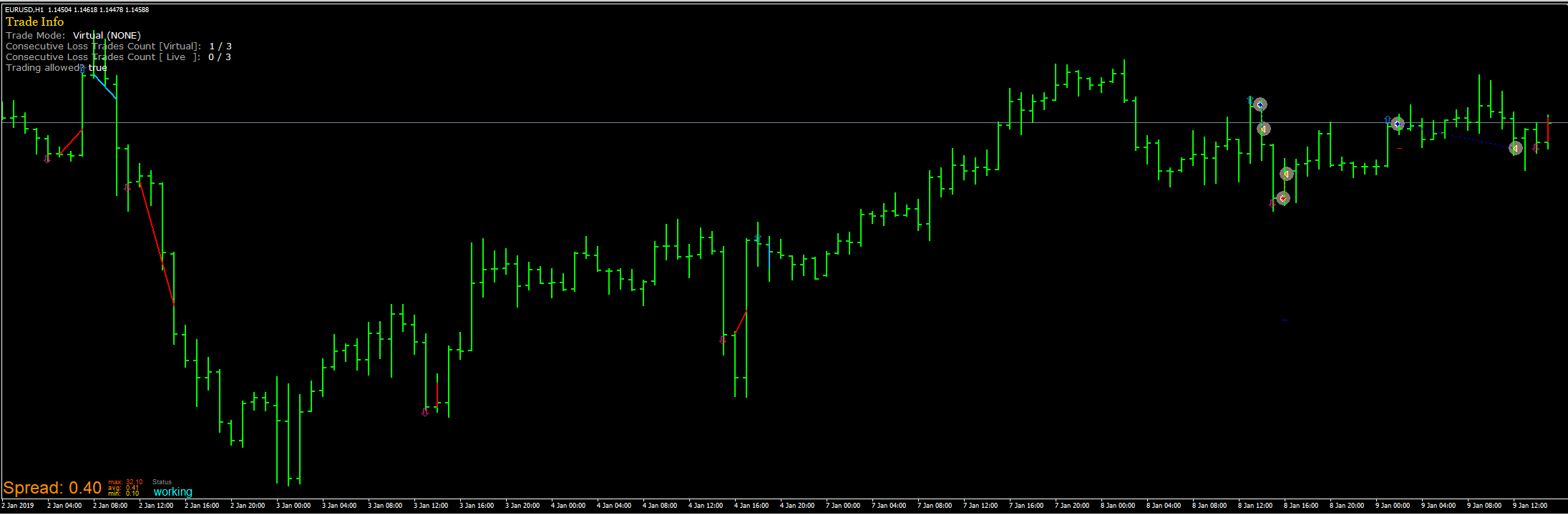
      That's how it looks now:

      0_1575429020371_fbf65f53-ed00-4956-a7fa-f067c9f75114-image.png

      posted in Questions & Answers
      T
      trader.philipps
    • RE: EA with BBands

      @giovanni Be careful with the BBands as they produce false signals in range markets a lot!

      posted in Questions & Answers
      T
      trader.philipps
    • RE: How to exit on parabolic sar

      @charlie66 Make your if trade blocks sepperately. That should do what you want to achieve. You may put a once per bar before them. Further I'd use candle ID1 instead of ID0 on the conditionsblock and the candle close lookup.

      posted in Questions & Answers
      T
      trader.philipps
    • RE: How can I connect bull in a row to a condition to buy

      @siempre If Bulls in a row and the condition block at the same time should trigger the buy, just chain them after each other (orange dot) and connect the last to the buy niw block.

      posted in Questions & Answers
      T
      trader.philipps
    • RE: How to stop a buy or sell order when the condition is met with one per tick?

      @khalids222 The pass block is run once per tick in my example. so that block wouldn't make a difference!?!

      posted in Questions & Answers
      T
      trader.philipps
    • RE: How to stop a buy or sell order when the condition is met with one per tick?

      @khalids222 Okay, here you go. But I'd really advice to go for candle ID1 on conditions and replace the pass block by a once per bar block. But up to you and your strategy.

      0_1575385776033_7f37768f-89ca-4222-8d38-dc0fafdb57ee-image.png

      0_1575385800380_khalid.mq4

      posted in Questions & Answers
      T
      trader.philipps
    • RE: How to stop a buy or sell order when the condition is met with one per tick?

      @khalids222 Okay. Can there be sell and buy at the same time?

      posted in Questions & Answers
      T
      trader.philipps
    • RE: How to stop a buy or sell order when the condition is met with one per tick?

      @khalids222 Is it necessary to work only on current candle? I think the x> x< function will not work propperly on candle ID0.

      Is it a must that a sell follows a buy and vice versa?

      posted in Questions & Answers
      T
      trader.philipps
    • RE: Setting up time filters...no trading 2hrs before and after market open and no trading on fridays

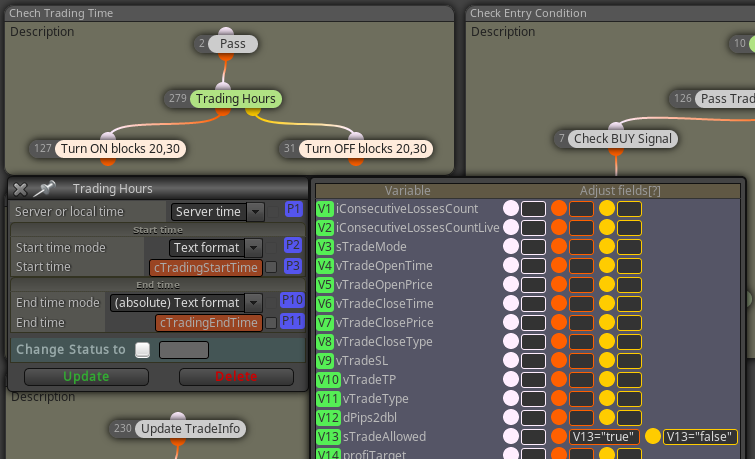
      @mynds9 Usually you'd tray to avoid that the EA is opening new trades in that time, right? In one of my recent projects I did both, enable/disable the signal calculating blogs and set a variable (In that case to display the current status in the chart)
      0_1575379814140_431ec0a4-bdf9-41f5-a1e8-e38b5dd35af9-grafik.png

      You can find my project here https://fxdreema.com/forum/topic/8177/is-there-a-way-to-configure-the-ea-to-wait-for-3-consecutive-losses-and-then-enter-orders/23

      posted in Questions & Answers
      T
      trader.philipps
    • RE: how to have TP as indicator level .

      @reader1 That doesn't work lite that. TP must be known when you enter the trade. So you need to check the condition and close the trade by yourself seperately.

      posted in Questions & Answers
      T
      trader.philipps
    • RE: Is there a way to configure the EA to wait for 3 consecutive losses and then enter orders?

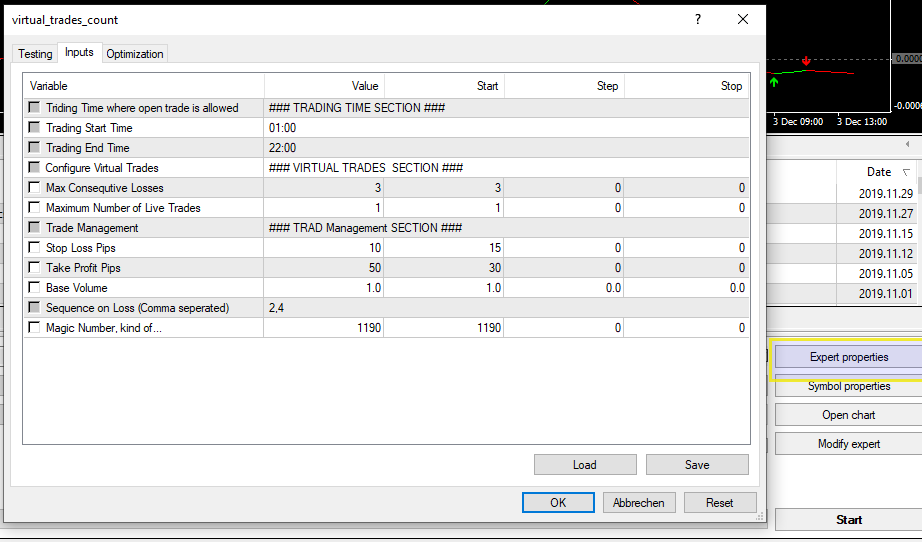
      @rafaels919 Here are the settings when using tester.

      0_1575376082991_b281c7dd-0c76-44d4-b951-efbe04a82c7d-image.png

      posted in Questions & Answers
      T
      trader.philipps
    • RE: Is there a way to configure the EA to wait for 3 consecutive losses and then enter orders?

      @rafaels919 Here is the updated version.

      For all others here....
      DON'T USE THIS ON REAL ACCOUNT!! THE ENTRY CONDITIONS ARE SET TO GET MANY LOOSING TRADES!!

      Changes:

      1. Implemented Spread Betting Sequence
      2. Tokenize Sequence in order to calculate max consecutive losses
      3. Implemented Virtual Trades as trendlines in chart (thanks to @CPxiom for inspiring me). The issue was that I used datetime datatype in the trendline open instead of a string datatype)

      Bugs fixed:

      1. Fixed a glitch when changing from live to virtual trades. Cannot use Max Consequtive losses in combination with virtual trades.
      2. Fixed an issue when virtual trade variables were cleared too early
      3. Removed some debug stuff

      0_1575349650831_virtual_trades_count.mq4

      Link to project

      And that's how it looks like now.

      0_1575349917721_8ad02f5f-bad2-4852-8a2a-f849092c4fb6-image.png

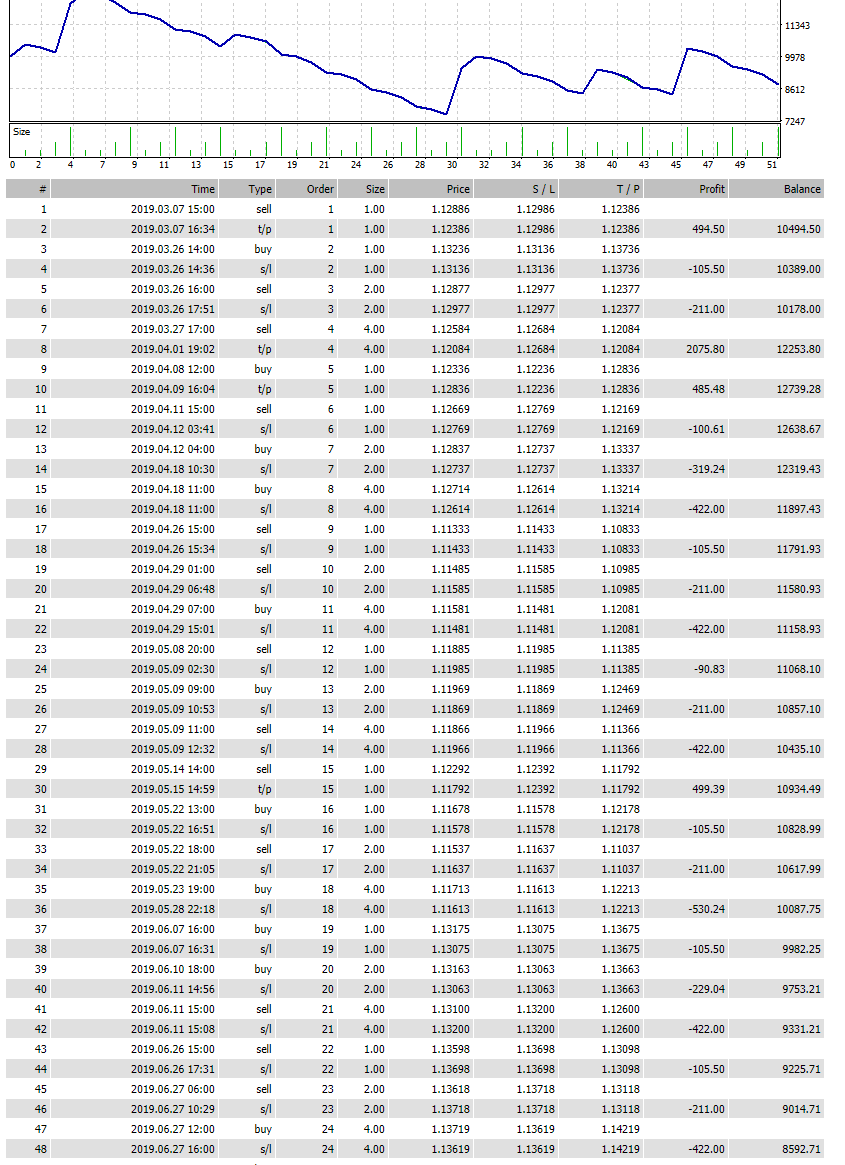
      Here is an extract of a tester run in order to check lot sizes in correct order.

      0_1575350290781_8ed720f0-35df-407f-8ca7-b1fb65b56592-image.png

      posted in Questions & Answers
      T
      trader.philipps
    • RE: Heikin Ashi: Close trade based on current candle current price or prev candle close price

      @l-andorrà I think 2 conditions are necessary maybe due to gaps - not sure, just a guess.

      posted in Questions & Answers
      T
      trader.philipps
    • RE: Saving inputs on the EA

      @gbyers Click on reset in your screenshot. It will load the constant values you speciefied in fxdreema.

      posted in General Discussions
      T
      trader.philipps
    • RE: How to set Open Buy or Sell After 500 points of every opening Candle

      @fxamoneymaker Okay, if I understand you right, you want to trade the body of the prvious candle, where entry is 50 pips above / below the candle close and you want to exit 50 pips before previous candle close. Right?

      Furthermore if previous candle was a bear candle, you make a Buy trade. If it was a Bull candle, you do a Sell trade. Still right?

      Minimum candle size would be in your example 100 Pips + some minimum profit. Still everything right?

      If so, those would be the steps to do ..

      1. Get body size of candle ID1
      2. Check body size of candle ID1 > than 100 Pips (Plus some minmum profit maybe)
        For Buys:
        3.a) Check if Candle ID1 was a Bear candle
        3.b) Calculate entry price leven (candle close ID1 + 50 Pips)
        3.c) Calculate take profit level (candle open ID1 - 50 Pips)
        3.d) Place pending order or wait until price is at entry level

      For Sells:
      4.a) Check if Candle ID1 was a Bull candle
      4.b) Calculate entry price leven (candle close ID1 - 50 Pips)
      4.c) Calculate take profit level (candle open ID1 + 50 Pips)
      4.d) Place pending order or wait until price is at entry level

      Did I forget something? SL maybe, but you didn't mention what that should be.
      posted in Questions & Answers
      T
      trader.philipps
    • RE: How to have my SL and TP be based on ADR?

      @mischa If you'd have used the search function, you would have found this https://fxdreema.com/forum/topic/7603/how-can-i-set-a-stop-loss-based-on-atr

      posted in Questions & Answers
      T
      trader.philipps
    • RE: EA with BBands

      @cpxiom Yes, you're right. Here is the advanced version. 0_1575333611385_BBandsStop.mq4

      And the Project Link.

      I was not sure about the trailing so I did both classic trading and BBands trailing to choose from.

      posted in Questions & Answers
      T
      trader.philipps
    • RE: EA alerts, need help!

      @luka21 I don't have exactly the versions of indicators you are using. However, for the AllAverages one it looks like some values are not set such as MA Mode and Price Mode. Ary you sure your indicators are working fine with your EA?

      posted in Questions & Answers
      T
      trader.philipps
    • RE: close trade on CCI level

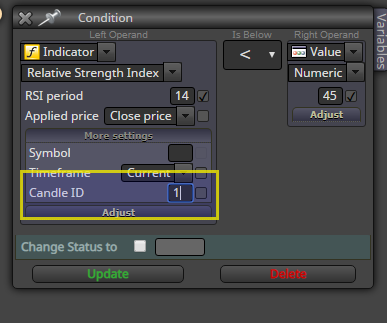
      @charlie66 Check all blue blocks for group definition! There are some without. Same for the Buy and Sell block! Furthermore all condition blocks are using candle ID 0 (no candle ID specified). This candle is not closed and indicators may change their values.. Better way would be to use candle ID 1 for instance. Here an example how that would look like.

      0_1575311865065_0e1bbd27-baff-47ee-a437-ba057d49d367-image.png

      If you don't see that option, click on "More settings" label.

      posted in General Discussions
      T
      trader.philipps
    • 1
    • 2
    • 28
    • 29
    • 30
    • 31
    • 32
    • 50
    • 51
    • 30 / 51