@ambrogio how would you set the lot size at 2 percent risk ? other then the freeze percent

@ambrogio how would you set the lot size at 2 percent risk ? other then the freeze percent
@ambrogio nope the lot size is still the same , only thing that changed was the sl , now it placed the sl at 1000 pips instead of 100 pips
@ambrogio 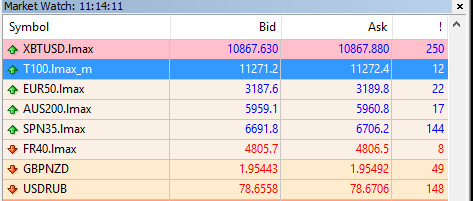
T100.lmax is the nasdaq
@ambrogio
what will be the rule for single digit ?
@ambrogio nope i didnt know that
i am testing something on NASDAQ and when i try and have the ea open the trade based on "freeze % of Equity" and set the value to "2" the lots size seems to be wrong
my testing account have the balance of 103000 and the lot it used was 0.92 when the sl value is 100 pips
which i think is wrong considering its less then 1 percent risk
i think the issue is with the digit after the decimal cuz most brokers have 2 digits after the decimal but my broker has 1 digit after the decimal.
so how can i avoid this issue ?
Hi @fxdreema
I was just wondering if you are done with the development of the platform? I mean are you still implementing new features? From what I can tell almost everything is already included.
So the question is will you be implementing some sort of blocks to help with neural networks or machine learning stuff? I am sure it's not an easy task but I was just curious.
It will be a great feature if you do decide to go there, I am no programmer and I don't know how difficult it will be but I am sure it's not easy, I have been researching Fann2mql neural network package for mql4 which seems like a way to go if it's not outdated.
NN or ML is the future of automated trading, and this future is already here 
@l-andorrà Looks like they are 
anybody around?? desperately waiting for help 
@everjn17 I agree with @l-andorrà use fewer blocks , and with each block use a comment block so you can know on which block the EA is stopping the execution
@l-andorrà yeah sure a little bit of custom code is always dope and i have added some code according to my understanding (only MathCeil(); function )
here is what i have done so far :
https://fxdreema.com/shared/XBrXfjEIc
and by the looks of it , its working fine to some extent , the only issue with this ea is that it misses some of the levels after placing lines on few levels , so let say it places lines on 3 levels then it will skip the 4th level and place line at 5th level then it will repeat the same after few levels again
@l-andorrà yes correct , what i wanna do is make sort of a grid by placing horizontal lines every one pip but on the round numbers (last two digits)
@biztet
I am Away from my computer at the moment , so wont be able to make a practical sample EA but i will try to explain the steps to the best of my ability
let say your two EAs are "x" and "y" now attach the EA "x" to the chart and save the template with let say 1 , and now attach the EA "y" to the chart and then save the template with the different name let say 2 ,
now on fxdreema create a loader EA , set your condition for each EA as to when you wanna initiate which EA
once the conditions are set then add a block "apply template" at the end of both conditions (trending and ranging )
when the EA detects that your condition is true then it will apply the template with the ea attached
however there is a drawback to this approach which is once the ea apply a template then you wont be able to apply another template , cuz the loader EA will be removed from the chart
this can be resolved if you load it on one chart and then apply the template on the other chart of the same symbol , but you will need some programming knowledge for that
@everjn17 i am not sure , but i never looked for the errors in the journal tab , so maybe try the expert tab : because i always find errors in the expert tab : 
maybe both experts and journal show the error logs , but i never cared much about it , because in most cases fxDreema prints a message in the experts tab which is very useful to understand whats going on inside the EA itself
secondly you might wanna simplify your project, and use the comment block after each significant block to see where exactly is the execution messing up , once you pick up the block which is causing the issue then you will be able to resolve the issue easily
but more importantly , simplify the project to the bare minimum blocks so we can understand your project otherwise its gonna be tough to help you out....i would suggest create a new project and only use the blocks related to your problem in this new project and get rid of all other blocks like "Formula TP" "Formula SL" "TP" "SL" Trailing etc.....and then shhare the new project here so e can understand better , once the problem is solved then you can use the solution into your main project
@everjn17 sometimes going through the error log of mt4 can help a lot 
@doug-l you have got a Bazooka in form of FXDREEMA then why waste money in paying someone else to use this bazooka
just upload the indicator on fxdreema and use indicator buffers
@biztet the first problem in whole idea is how will you identify if the market is ranging or not ? some times market ranges in weird way....
the most simplest approach will be to save two templates , one with each EA , then create and EA in fxdreema and make that ea load the required template
i am looking for a way to draw horizontal lines on the price levels
meaning 50 lines above the current price and then 50 line below the current price , i can do that but what i cant figure out is what if i want to draw lines only on the levels that are divisible by 10 ?
meaning levels like these : let say current price is 0.86225 now how do i make it place the lines above that price at 0.86230 ------ 0.86240 ------ 0.86250 ------ 0.86260 ------ 0.86270 ------ 0.86280 ------ 0.86290 ------ 0.86300 ...... .... ... .. .
and then the lines below the current price at: 0.86220 ------ 0.86210 ------ 0.86200 ------ 0.86190 0.86180 ------ 0.86170 ------ 0.86160 ------ 0.86150 ------ 0.86140 ....... ..... .... ... .. .
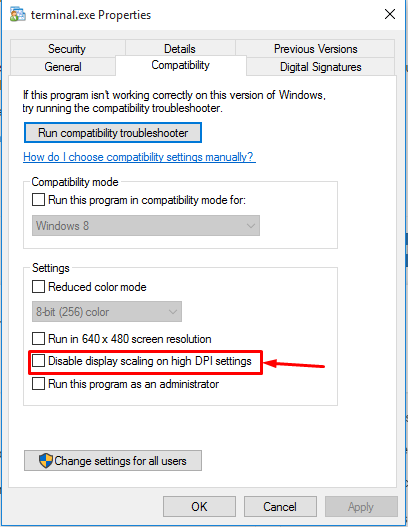
@floridabrazil this is probably due to the screen resolution
open the mt4 properties ( make sure you arent opening the properties of the shortcut )
then head on to the compatibility tab and then turn on (tick mark) the option shown in the below screenshot