@tipsywisdom I believe once per bar may cause to lose the best entry position.
Z
Posts made by ZhAhZ
-
RE: Controlling the opening time of new trades while a trade is open (dodging "No position" block)posted in Tutorials by Users
-
Controlling the opening time of new trades while a trade is open (dodging "No position" block)posted in Tutorials by Users
Hey guys,
I had quite a hard time triggering my signals again while a trade was currently open, mainly because of "No position" block. The issue was that by using "No position" block I was missing all the other signals if I had a trade open. And not using it caused to open hundreds of new trades in a second!
Now, however, I have overcome this issue with a time formula and I believe I should share it as a thank you to all others who support in this forum free of charge.
You basically can adjust the period during which you don't want your signal trigger any trade (bypassing that hundreds trades in a second) and then after that your EA can freely search for new signals while your previous trade is still open.This looked easy in the beginning but since the way time works in the code, causes a lot of complications. I don't wanna go into that discussion now. So you can use the below link for your projects and only need to input the constant Delay-seconds based on your preferences. Just remember, regardless of timeframe you are trading in, the delay must be input in seconds. So if you just opened a new trade and you want no new trade during the next 3 candles in a 15 Min timeframe, simply put 2700 (= 60 * 15 * 3).
https://fxdreema.com/shared/RUqysmxQ
Good luck
-
RE: Triple exponential average oscillator cross over 0 not working at allposted in Questions & Answers
@jstap I think I just delete and install my MT5 again. I can't think of anything else....
Anyway thanks a loooot guys. -
RE: Triple exponential average oscillator cross over 0 not working at allposted in Questions & Answers
@jstap there you go:
https://fxdreema.com/shared/mXNWafTib
By the way I really apricate your time guys, thanks for support
-
RE: Triple exponential average oscillator cross over 0 not working at allposted in Questions & Answers
@ambrogio @jstap guys, guys, I may not know how to solve the issue but I am also not that armature :))))
Of course I redefined the variable and also tried with SL and TP tp make sure nothing is hidden also checked trade history and journal but it just doesn't work. In addition tried different time frame, different time period and different currency but nope.Could be there something in the website as decimal count for calculations? this is my last guess that maybe calculation are done only to 3 decimal or less and that's why it never detect above or below 0
I can only think of something to be turned OFF or ON somewhere in setting of something!
-
RE: Triple exponential average oscillator cross over 0 not working at allposted in Questions & Answers
@jstap Just tested ambrogio project on a different broker terminal and same results, no trade:)))))))))
does it also works on your MT5?
-
RE: Triple exponential average oscillator cross over 0 not working at allposted in Questions & Answers
@jstap I did copy your project in a new project with no extra blocks and sent you the picture. I am frustrated at this moment, I even tried a simple MA cross over to make sure my MT5 is working properly and did worked with no issue. Also tried all the possible conditions for triggering the trade but it only works if I set it = 0. Any other case would just do nothing...
@ambrogio I have no idea then why it does not work for me cause I also exactly copy paste your project into a new file and tested.
-
RE: Triple exponential average oscillator cross over 0 not working at allposted in Questions & Answers
@ambrogio I tried this version too, but no trade is triggered.
-
RE: Triple exponential average oscillator cross over 0 not working at allposted in Questions & Answers
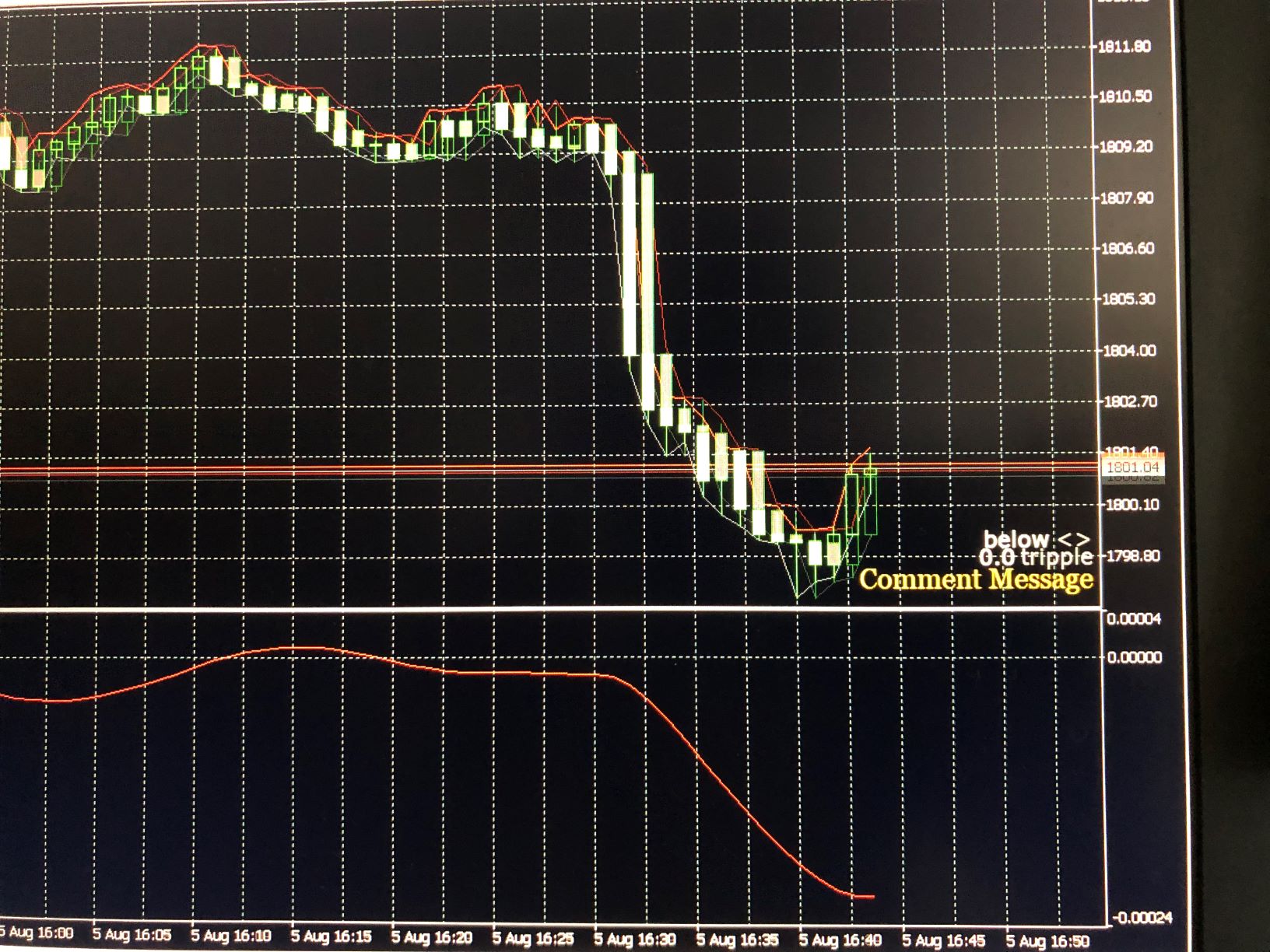
@jstap I tried your code and from the beginning to the end of the period (1 month, M1) the comment was like below picture. No change at all no matter the oscillator crossed above or below zero.
-
RE: Triple exponential average oscillator cross over 0 not working at allposted in Questions & Answers
@jstap I just did and the value is constantly 0.0, no change despite the fact that you can see the Oscillator moves above and below the 0.
-
RE: Triple exponential average oscillator cross over 0 not working at allposted in Questions & Answers
@jstap No this is the Oscillator and on the MT5 has a clear 0 line and plays around it with a tolerance of +-0.00007 (roughly). The one you mentioned is a the trend indicator which will appear on the chart.
-
RE: Triple exponential average oscillator cross over 0 not working at allposted in Questions & Answers
@ambrogio Did it work for you? cause for me it didn't trigger any trade just like before.
I just noticed that if I set the condition to bigger or less than zero or unequal to zero will also not work. The only way it works is when I set the condition equal to zero. That means the value of this indicator is always ZERO!!!!
I believe this is a bug which needs to be addressed @FXDREEMA
-
Triple exponential average oscillator cross over 0 not working at allposted in Questions & Answers
Hey guys,
I am trying to trigger a buy trade when triple exponential average oscillator crosses above 0 but it just does not work!!!! very simple but not working, no trade happens. can anyone support?
https://fxdreema.com/shared/ExGP8qoIc -
RE: How to check if the last 30 candles are closed above moving average?posted in Questions & Answers
Thanks a lot guys, this forum is very supportive. Really appreciate that.
I didn't had the time to check your solutions, was busy developing a new idea which actually worked out and is very simple. The only drawback is that it won't work on the first X candle. Other than that pretty strait forward and easy, please check it, could be very useful for many different indicators:
-
RE: How to check if the last 30 candles are closed above moving average?posted in Questions & Answers
@bk7 thanks for the reply.
I tried to realize this but couldn't understand some parts. up-counter and dn-counter I have no idea why they are there. Plus how the loop connects to buy or sell.Would you please also mention what is wrong with my logic? thanks.
-
RE: How to check if the last 30 candles are closed above moving average?posted in Questions & Answers
@tipsywisdom thanks for the support.
I tried this but not working. The cross width is only for comparing the chosen candle ID with candle X in the past (cross width X). So in case there is a candle ID smaller than X which has touched the MA we won't find it and will output false results. -
RE: How to check if the last 30 candles are closed above moving average?posted in Questions & Answers
@bk7 I made the below loop based on an advice from one of the forum members. However, it does not work when I run the program. No orders will placed if I activate this loop. Please see below link (disregard the first 3 block on top, just put something in there to show you what is the general trend of my EA).
https://fxdreema.com/shared/eCeLfRnE -
How to check if the last 30 candles are closed above moving average?posted in Questions & Answers
Hi, I would like to put condition to check whether the last 30 candles are closed above 100 Moving average. So far could not realize a practical way. Does someone know how to do that?
The current condition block only compares the current value of the moving average with older candles, but this does not translate to the fact that the those past candles have been above the MA in their own time. -
RE: Opening new trades with a time delay from current trade if conditions are metposted in Questions & Answers
Thanks for the effort and reply. But unfortunately it didn't work. So I tried the hard way, I went for defining variables and formulas to capture the time and it did paid off after 8 hours reading searching and trying :))))
-
RE: Opening new trades with a time delay from current trade if conditions are metposted in Questions & Answers
@tipsywisdom my original setup was exactly like what you said (below link). But as I mentioned this cause the program to remain inactive as long as there is a open position and ignore all the other opportunities. I need to be able to skip the next few candles after current entry and then let the program run to find the next signal and place next order regardless of previous order status (close or open).
I also found this block: check distance, but very difficult to set it for checking time distance or candle distance.As for trails, one is for stop loss and the other one for take profit. Your last question I didn't get it.