fxDreema

    • Register
    • Login
    • Search
    • Back to the main page
    • Categories
    • Recent
    • Tags
    • Popular
    • Search

    Orhpaned constants when running EA

    Questions & Answers
    3
    19
    534
    Loading More Posts
    • Oldest to Newest
    • Newest to Oldest
    • Most Votes
    Reply
    • Reply as topic
    Log in to reply
    This topic has been deleted. Only users with topic management privileges can see it.
    • D
      doeveR last edited by

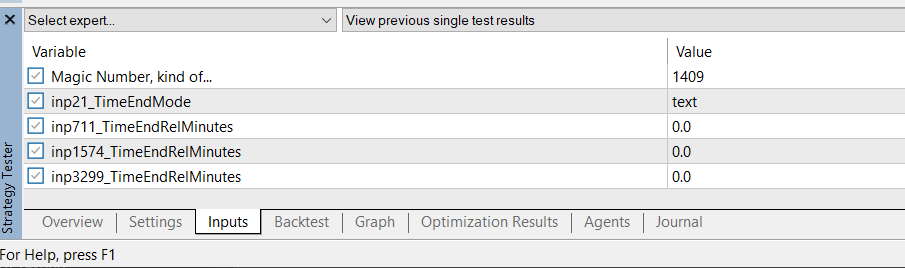
      9bada9f4-0d86-4934-9fc7-44f1388e4140-image.png

      I see some input variables that are definitely not part of my EA project. I do remember removing constants that I no longer used and I am not sure why they appear here and don't know how to remove them. Anyone ?

      1 Reply Last reply Reply Quote 0
      • D
        doeveR last edited by

        Anyone from @fxDreema @jstap

        1 Reply Last reply Reply Quote 0
        • jstap
          jstap last edited by

          Magic no is always there, the rest are created by boxes you have ticked in a block or two.

          Learn fxDreema Without the Wait!

          My comprehensive book, available on Amazon, is packed with examples and invaluable insights to help you fast-track your learning journey.

          The paperback and hardback editions include MT4 & MT5 QR codes for easy access to all prebuilt projects and robots, including my latest gold trading robot!

          Don’t miss out

          Click here➡️ https://mybook.to/fxDreema to get your copy today!

          Enjoy! 😊

          jstap 1 Reply Last reply Reply Quote 1
          • D
            doeveR last edited by doeveR

            The ones with names starting with "inp" are definitely not defined-as-such or used by me. I know that I used a couple of constants/parameters and variables that I removed from my variable /constant list and one can only remove them if they are nog actively used anywhere. But apparently these are some garbage entries that I can not get rid of. Any idea how I can get rid of this ?

            Using the Meta Editor I can find these and they are Global Variables. I have no idea how they got defined as such. In Fxdreema builder, I can no where access them.

            //--
            // Externs (Global Variables)
            input string inp21_TimeEndMode = "text";
            input double inp711_TimeEndRelMinutes = 0.0;
            input double inp1574_TimeEndRelMinutes = 0.0;
            input double inp3299_TimeEndRelMinutes = 0.0;
            class _externs
            {
            public:
            static string inp21_TimeEndMode;
            static double inp711_TimeEndRelMinutes;
            static double inp1574_TimeEndRelMinutes;
            static double inp3299_TimeEndRelMinutes;
            };
            string _externs::inp21_TimeEndMode;
            double _externs::inp711_TimeEndRelMinutes;
            double _externs::inp1574_TimeEndRelMinutes;
            double _externs::inp3299_TimeEndRelMinutes;

            l'andorrà 1 Reply Last reply Reply Quote 0
            • jstap
              jstap last edited by

              Add a shared link to look at

              Learn fxDreema Without the Wait!

              My comprehensive book, available on Amazon, is packed with examples and invaluable insights to help you fast-track your learning journey.

              The paperback and hardback editions include MT4 & MT5 QR codes for easy access to all prebuilt projects and robots, including my latest gold trading robot!

              Don’t miss out

              Click here➡️ https://mybook.to/fxDreema to get your copy today!

              Enjoy! 😊

              1 Reply Last reply Reply Quote 1
              • l'andorrà
                l'andorrà @doeveR last edited by

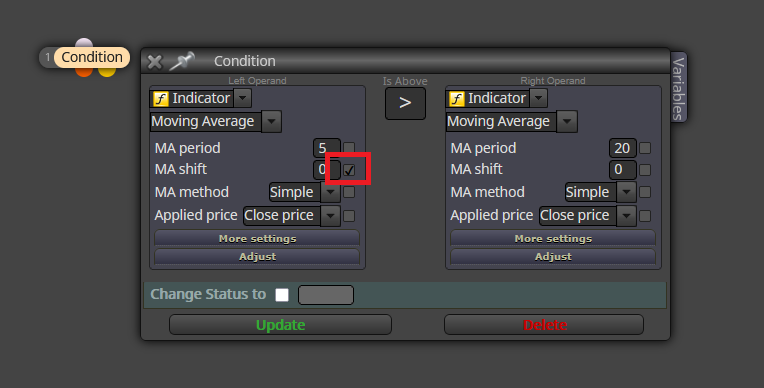
                @doeveR All those variables were created because their boxes are ticked like this:
                01.png

                Just untick them and they will disappear.

                (English) I will try to help everyone in these fxDreema forums. But if you want to learn how to use the platform in depth or more quickly, I can help you with my introductory fxDreema course in English at https://www.theandorraninvestor.eu.

                (Català) Miraré d’ajudar tothom en aquests fòrums d’fxDreema. Tanmateix, si vols aprendre a fer servir la plataforma amb més profunditat o més de pressa, t’hi puc ajudar amb el meu curs d’introducció a fxDeema en català a https://www.theandorraninvestor.eu/ca.

                (Español) Intentaré ayudar a todo el mundo en estos foros de fxDreema. Sin embargo, si quieres aprender a usar la plataforma en profundidad o más deprisa, te puedo ayudar con mi curso de introducción a fxDreema en español en https://www.theandorraninvestor.eu/es.

                D 1 Reply Last reply Reply Quote 1
                • D
                  doeveR last edited by

                  https://fxdreema.com/shared/ccFu9xFC

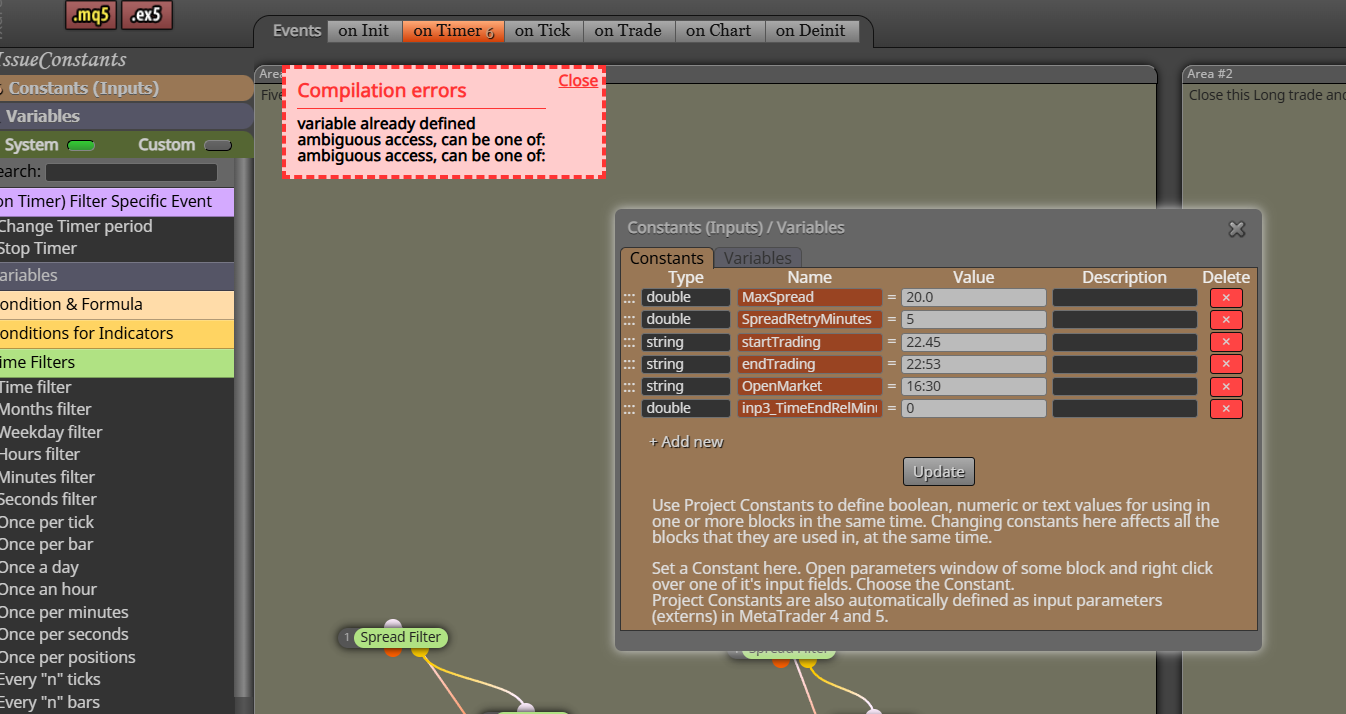
                  I stripped down my project (since it is very large) and in here you see inp3_TimeEndRelMinutes - It is nowhere defined so I can't get rid of it. I did a normalize IDs a couple of times to get rid of obsolete constants but it left me with a perfect example. @jstap

                  1 Reply Last reply Reply Quote 0
                  • D
                    doeveR last edited by

                    image.png
                    Tried something "smart": so here it shows I can not use the name anymore even though the constant / variable is not defined through the FXD builder.....

                    1 Reply Last reply Reply Quote 0
                    • D
                      doeveR @l'andorrà last edited by

                      @l-andorrà So there must be boxes where there are "ticks" that I don't realize. I never used that option since I never asked myself what it did. WIll have to search all my "boxes" them ?

                      1 Reply Last reply Reply Quote 0
                      • jstap
                        jstap last edited by

                        terminal64_Fc3V0zZhxQ.pngCompiled fine for me...

                        Learn fxDreema Without the Wait!

                        My comprehensive book, available on Amazon, is packed with examples and invaluable insights to help you fast-track your learning journey.

                        The paperback and hardback editions include MT4 & MT5 QR codes for easy access to all prebuilt projects and robots, including my latest gold trading robot!

                        Don’t miss out

                        Click here➡️ https://mybook.to/fxDreema to get your copy today!

                        Enjoy! 😊

                        1 Reply Last reply Reply Quote 0
                        • D
                          doeveR last edited by

                          Yes, compilation was fine for me to. @l-andorrà pointed me in the right direction. On the Timefilter box there was an option that I examined without using it but apparently I ticked a box next to an option which resulted in a global variable being created. After using the numbers in the variable names I corrected the 'issue' (box being ticked) and the variables were gone !!
                          Thanks everybody who took the time to trigger my brains....

                          1 Reply Last reply Reply Quote 0
                          • jstap
                            jstap @jstap last edited by jstap

                            @jstap Good mate, glad you sorted it. I said that first...
                            "Magic no is always there, the rest are created by boxes you have ticked in a block or two".

                            Learn fxDreema Without the Wait!

                            My comprehensive book, available on Amazon, is packed with examples and invaluable insights to help you fast-track your learning journey.

                            The paperback and hardback editions include MT4 & MT5 QR codes for easy access to all prebuilt projects and robots, including my latest gold trading robot!

                            Don’t miss out

                            Click here➡️ https://mybook.to/fxDreema to get your copy today!

                            Enjoy! 😊

                            1 Reply Last reply Reply Quote 1
                            • D
                              doeveR last edited by

                              Ah @jstap you said it - agreed: I just did not know what it meant when I read it. Well, I know you are very "on it" - I can tell from all the posts that I read so now and then so Thanks again !

                              1 Reply Last reply Reply Quote 0
                              • D
                                doeveR last edited by

                                One more question - not directly related to the original question. Is there a way to move the magic number as parameter up as the first input variable rather than the last ?

                                1 Reply Last reply Reply Quote 0
                                • jstap
                                  jstap last edited by jstap

                                  Magic number is always set, in settings you can change it. if for example you set magic number to 0, then every trade and block is set to say 2345, then the used magic number would be magic (0) + group (2345), so your used magic number would be 2345.

                                  Learn fxDreema Without the Wait!

                                  My comprehensive book, available on Amazon, is packed with examples and invaluable insights to help you fast-track your learning journey.

                                  The paperback and hardback editions include MT4 & MT5 QR codes for easy access to all prebuilt projects and robots, including my latest gold trading robot!

                                  Don’t miss out

                                  Click here➡️ https://mybook.to/fxDreema to get your copy today!

                                  Enjoy! 😊

                                  1 Reply Last reply Reply Quote 0
                                  • D
                                    doeveR last edited by

                                    Hi @jstap, I meant the order of appearance in the list of parameters. It is now the last after all my defined constants (input parameters). Can I make it to appear as first parameter ?

                                    1 Reply Last reply Reply Quote 0
                                    • jstap
                                      jstap last edited by

                                      Do you mean magic number is bottom of your input list?

                                      Learn fxDreema Without the Wait!

                                      My comprehensive book, available on Amazon, is packed with examples and invaluable insights to help you fast-track your learning journey.

                                      The paperback and hardback editions include MT4 & MT5 QR codes for easy access to all prebuilt projects and robots, including my latest gold trading robot!

                                      Don’t miss out

                                      Click here➡️ https://mybook.to/fxDreema to get your copy today!

                                      Enjoy! 😊

                                      1 Reply Last reply Reply Quote 0
                                      • D
                                        doeveR last edited by

                                        Yes....that is exactly what I mean. I am asking because I have seen EA where the magic number came first. I wonder how "they" did it.....

                                        1 Reply Last reply Reply Quote 0
                                        • jstap
                                          jstap last edited by

                                          As far as I know on FX it is fixed, to change you would have to amend the code.

                                          Learn fxDreema Without the Wait!

                                          My comprehensive book, available on Amazon, is packed with examples and invaluable insights to help you fast-track your learning journey.

                                          The paperback and hardback editions include MT4 & MT5 QR codes for easy access to all prebuilt projects and robots, including my latest gold trading robot!

                                          Don’t miss out

                                          Click here➡️ https://mybook.to/fxDreema to get your copy today!

                                          Enjoy! 😊

                                          1 Reply Last reply Reply Quote 0
                                          • 1 / 1
                                          • First post
                                            Last post

                                          Online Users

                                          C
                                          N

                                          17
                                          Online

                                          146.7k
                                          Users

                                          22.4k
                                          Topics

                                          122.6k
                                          Posts

                                          Powered by NodeBB Forums | Contributors