example: Save variables into file and read them back [advanced]
-
important note:
... be sure that each EA must have own variables file (1 EA >> 1 variables file), otherwise there will be a big fight between EAs .... 1.EA>>varSave1.txt ... 2.EA>>varSave2.txt ....
Sometimes we deal with situation, when EA have few critical variables and MT4 terminal must be restarted or was restarted by incident, these variables are no longer available and it can cause problems.
Values from history trades can be obtained from trades history, but sometimes can be calculation very complicated. For this situation exist another way how to avoid loss of variables. They can be stored into text file with every variable change. For this situation I prepared small example how to do it.Example EA have two buttons. Try with tester.
https://fxdreema.com/shared/HtX9lP51c
After click on the button trade is opened (buy or sell). Here is small management with lots. When EA is inserted into chart, variable "varLotsBuy" get value from input parameter initLots1. After button click first trade (buy) is opened with "varLotsBuy". If this trade is closed with SL, variable "varLotsBuy" get value multiplied by input parameter "Lots1Multiplier". After new button click, next trade is opened with new value from variable "varLotsBuy". When trade is closed with TP, variable "varLotsBuy" is reseted from first value (initLots1).- Summary: initLots1=0.1, Lots1Multiplier=1.6
- Buy: Lots=0.1, closed by SL
- Buy: Lots=0.1*1.6=0.16, closed by SL
- Buy: Lots=0.16*1.6=0.25, closed by TP
- Buy: Lots=0.1
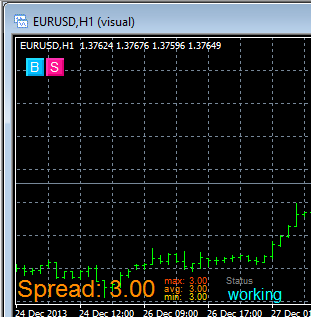
Example EA in chart:
EA is using few input parameters:

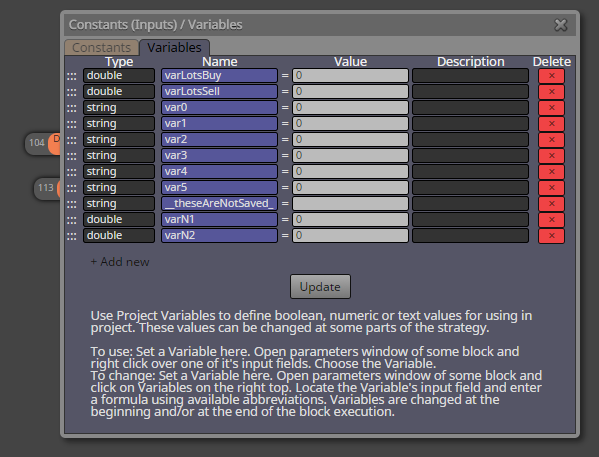
and few variables: (used are only varLotsBuy and varLotsSell, next variables are only as example)
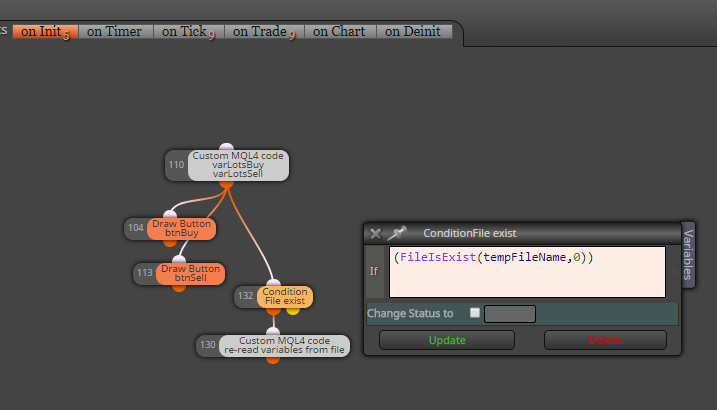
on Init section draw two buttons and with Condition block (File exist) it check existence of "file with variables", if this file does not exist, EA continue with normal start (with nulled variables), but if file exist, custom code read and initialize variables from this file:
this is how code looks like:

strArr[20] is simple temporary array where values are readed from file, each line is one variable (size of array 20 can be increased to any higher size, depends on how much variables you need, it can by much more higher as count of variables, there is no strict rule)
at bottom of code are variables one after another, in my case they are:
varLotsBuy = (double)strArr[0];
varLotsSell = (double)strArr[1];
var0 = strArr[2];
var1 = strArr[3];
var2 = strArr[4];
var3 = strArr[5];
var4 = strArr[6];
var5 = strArr[7];
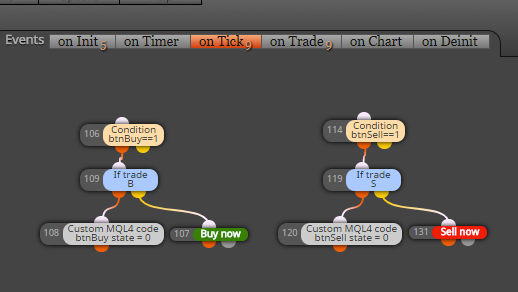
important are order and type of variables (order must be same as in file-write code)on Tick section just open trades after button click:
and in on Trade section is calculation where variables are calculated/changed and re-saved into file:
(this saving into file can be done everywhere you need, in on Tick section, on Timer, on Chart ...)
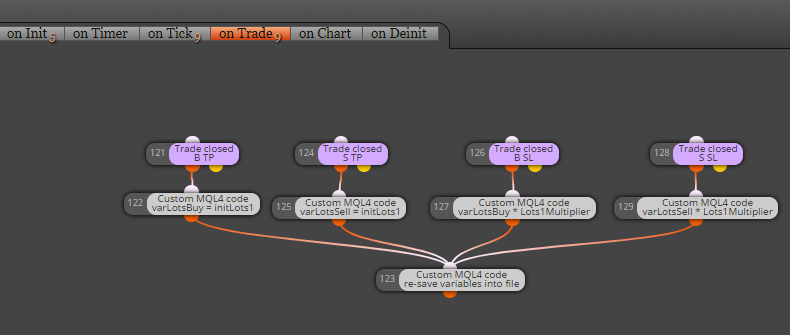
and this how code for save into file looks like:

you see, pretty easy, nothing complicated .. variables are writed one after another with FileWrite function into new lines in file ... (once again, order of values in file is important, it must be compatible with file-read code)File with variables is saved into MQL folder:

in case of tester it is file: tester\files\yourFileName.txt
in case of normal EA in chart: MQL4\files\yourFileName.txtNote, that this file can be opened and edited also manually:

And when you need full reset of variables, before you place EA into chart, delete this file (or create input parameter for delete function, function for this is simple:
FileDelete(fileName,0);I hope my explanation was not very complicated ... have a fun ...
Cheers ...
-
@miro1360
hey thanks for the tutorial
can you help me with this : https://fxdreema.com/forum/topic/5162/any-way-to-do-this -
@miro1360 you re a genius! I work with EAs that depend greatly on variables and you don't know how many times I had a blackout hampering the workings of said EA. I had been thinking in a workaround to this but this is THE solution. Many thanks!

-
@Andermaiden2nd perfect! try if is it working because I did it "on the fly" without some serious testing

Between trading and gambling is a very small gap, be careful.
-
Let us know when you have finished writing an FX Dreema course Miro.....

I'll sign up now...
A,
-
@miro1360 I tested it and it works well (at least haven't found any bug so far and tested it with different types of variables). This effectively adds more value to variables as they can now be relied upon to store (and manipulate) more vital information.
-
@Andermaiden2nd thanks for info ... if you find something not working, give reply and I (or we
) try to find solution
... be sure that each EA must have own variables file (1 EA >> 1 variables file), otherwise there will be a big fight between EAsBetween trading and gambling is a very small gap, be careful.
-
@miro1360 yes, I'm aware that when using more than one EA on an account it is needed to give a different name to the constant "tempFileName" like varSave2.txt instead of varsave1.txt (or any other name). It is still important to leave that point clarified for anyone who tries this, so thaks again! :simple_smile:
-
@Andermaiden2nd note added into first post

-
Just wanted to say: "You are awesome!!".
-
I have not tried it yet, but with variables file it can be done (or maybe also with terminal variables) ... problem still to find perfect strategy
-
An old post, but Thank you again @miro1360

-
Nice tutorial on Storing Variables...
Perfect!
Thank you again @miro1360 -
Thanks for the post. I know it's old, but if you were using MT5 instead of MT4, is this a more feasible route than using the "Global Variables" in MT5? Are there pros and cons to weighing each approach? I've never tried either, but a lot of criteria I like to use relies on variables and it's super aggravating when they're lost due to resetting something.
-
They are both very similar, especially when it comes to FX.
Learn fxDreema Without the Wait!
My comprehensive book, available on Amazon, is packed with examples and invaluable insights to help you fast-track your learning journey.
The paperback and hardback editions include MT4 & MT5 QR codes for easy access to all prebuilt projects and robots, including my latest gold trading robot!
Don’t miss out
Click here➡️ https://mybook.to/fxDreema to get your copy today!
Enjoy! 😊
-
@jstap Thanks!
-
I've still not learned any actual "coding" yet really (hence why I'm using Dreema).
How similar is this in MQL5? I don't really know how different their syntax is, but it seems like these functions would be so basic that they might possibly be the same in both languages?
-
The code is about 98% the same, a little different though.
-
Hi is it possible to save bool variables instead of double variables?
-
Just create type bool