Limit trades
-
Hi @l-andorrà,
I would like to seek your guidance again on a situation I've encountered.
Basically, what I am trying to accomplish is to limit the number of trades to be executed WHEN Yellow line crosses below the Red line.- I want it to only make three sell trades. Then no sell trade to be open after the 3rd trade even if the conditions were met. I want this to happen every time Yellow line crosses below the Red line.
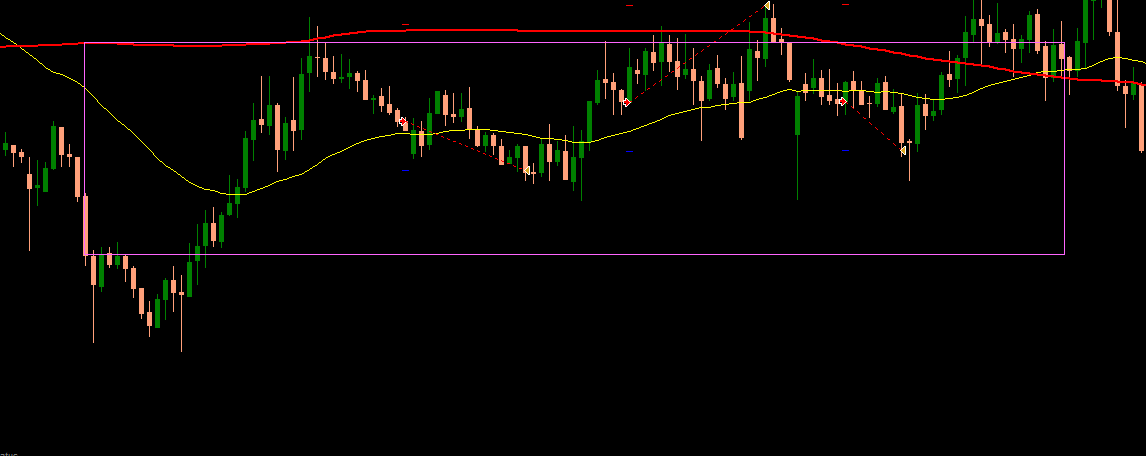
Kindly refer to this simple EA: https://fxdreema.com/shared/O0MnAXm2c
Regards,
-
@fideld003 Do you mean three trades at teh same time or one after the other?
-
@l-andorrà, it should be one after the other, but limited to only three trades.
-
"Check Trades Count" Block
-
@jsauter86, yeah ... I tried that but I can't seem to make it work. If you don't mind, could you give an example using the simple project I provided?
https://fxdreema.com/shared/O0MnAXm2c -
Hi @fideld003 , try change No Trade block with Trade Count block. You can also try change Once per bar block with Once per tick block. I think that should solve the problem.
-
@biztet if I remove the "No trade" block, then it will open multiple trades at a time right? What I want is one order at a time only though.
-
@fideld003 then you should have the Once per bar block and Count trades block set to <3.
-
@biztet I tried it, but it still opened more than three orders and even opens when there is still an order open.
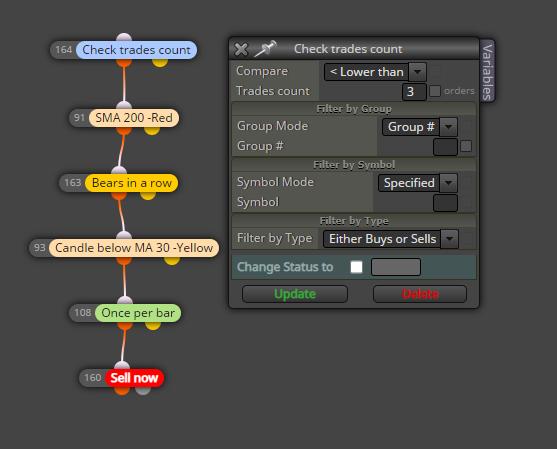

I'll experiment for a while. Thanks for the assistance.
-
@fideld003 from what i see in your pic, everything is correct. The open trade still not more than 3 trades. 4/5/6 trade open after the previous trade is closed. So the current open trade still not exceed 3 trades. If that's what you really need.
-
@biztet hmm, I see so that's how the "Count Trade" block works. What if the Order needs to close first before opening up another order and be limited to only three when Yellow line is below the Red line?
-
@fideld003 , then you should have other rules and the Close Trades block to close all 3 trades and the open new 3 trades.
-
From what I understand, once the yellow MA is below the red MA, maximum 3 trades are allowed, no matter for how long the yellow line is below the red line. Then, when the yellow line goes above, everything resets and we are waiting for it to go below the red line again.
Probably the best way to do this is when the yellow line is below, to count for how many bars it was below. While doing that, also count how many trades were closed in that whole period. If they are less than 3 - continue and make a new one. But thе EA Builder is not very good at making such loops. There is a block for making a loop (basically repeating itself multiple times), but there is no block for breaking this loop (to stop it), which is needed. Otherwise there is a block "(loop) break", but it works only for those "For each..." blocks right now.
Here is another idea: https://fxdreema.com/shared/OpEWBBHjc
Here I detect the cross with blocks 1 and 2 and I create an arrow with name SellSellSell (block 3). Additionaly I create one vertical line, only to then see where crosses happened. If there is no trade I search for that object SellSellSell. If there is none, nothing else will happen. But if there is one, I count how many closed trades were closed after the object (blocks 6 and 7). The object's Time property is used for that (in block 6). And if less than 3 trades were closed, I can create a new one (blocks 7, 8 and 9). Block 8 is whatever the extra condition needs to be, I chose something simple for the example. Otherwise I delete the SellSellSell object (the link between 7 and 10). Technically I can Not delete it here, but I guess this could help a little bit with the speed of testing. I also delete the object when the fast MA is > the slow MA (blocks 11 and 10). I can use crossover for this as well, but imagine that the EA is restarted... I just want to be sure. -
Well, I found that unfortunately the example above is very slow. I always try to find a solution that can work with some kind of permanent memory - to use the trades themselves, maybe some objects. But the results are often very slow. Here is another idea that uses a single Variable, which is a temporary memory and that EA would reset if restarted, but the backtesting is much faster: https://fxdreema.com/shared/yqieqWzAb
The idea is that the variable keeps the number of opened trades - when a new trade is opened, the variable increments. And the variable is reset back to 0 when the fast MA is above the slow MA.
-
All, thank you for the response.
@fxDreema I'll review this for a while. Thanks.


