Variable uses and examples
-
Hi fxDreema Community,
I'm trying to learn the use of Variables and the likes of it, but I'm not really sure about their usefulness. Do you guys very much use variables and the likes on your projects? How do you use them for? Do you use them to initiate Buy/Sell orders, store values, etc? Appreciate it if someone could also provide sample files for learning and inspiration purposes.
Thanks,
-
@fideld003 you will need variables for any math calculations, communication between blocks, storing values over time. You can do basic projects without variables too, but mastering them will open up 100x more possibilities for you.
Anyway, its probably best for you to just keep making your own designs, and learn variables once you actually need them.
-
@roar Yeah, that 100x possibilities are what I'm actually looking for. The kind of like the, "Ahhh" moment. Maybe I'm looking for how to use variables because ... Where I am right now is kind of the basic stuff. I know if I get more examples using variables then maybe I could get ideas or inspiration that I could use on my current project or future project. Do you have some kind of a variable related example on how to open trade or close a trade?
-
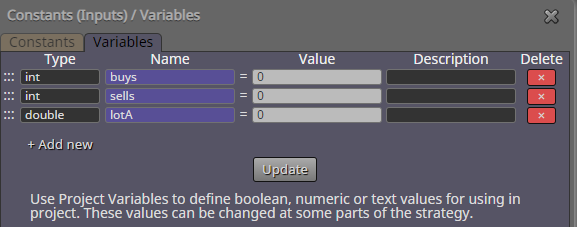
@fideld003 all right, here's an example project. It keeps track of order counts, and uses that value to calculate lot size. Its a dangerous betting strategy, just for example - dont trade it.
https://fxdreema.com/shared/IQDWzM8qc
-
@roar Thanks for the example.
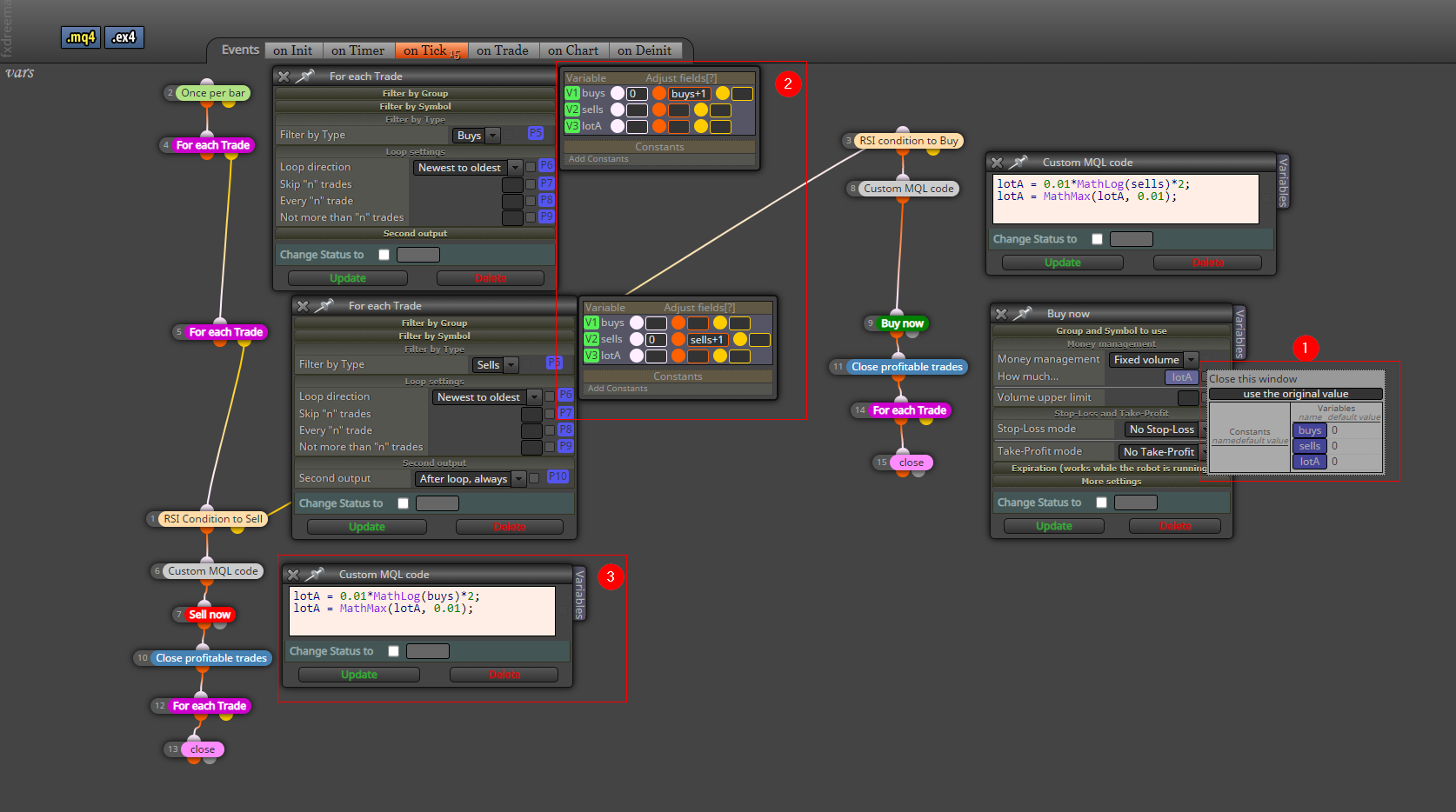
Let's see if I got it right ...
- So you've created three variables which are, "buys, sells, and lotA" with a value of zero.
- Zero meaning that's the starting value, right?
- On the "For each Trade" block, there's this orange field that says buys+1
- This is where the counting happens right? So meaning 0 +1(count of buy) +1(count of buy)
- The white box there is related to what we defined on the variables tab right?
- What's the use of the yellow box?
- On the "Custom MQL code" block, there's kind of an equation. Upon checking https://docs.mql4.com/math/, these seem to be Math Functions available on MQL4.
- In layman's term could you describe to me how these lines work? I tried to read the description of those two functions but I just couldn't get it.
lotA = 0.01*MathLog(buys)*2;
lotA = MathMax(lotA, 0.01);
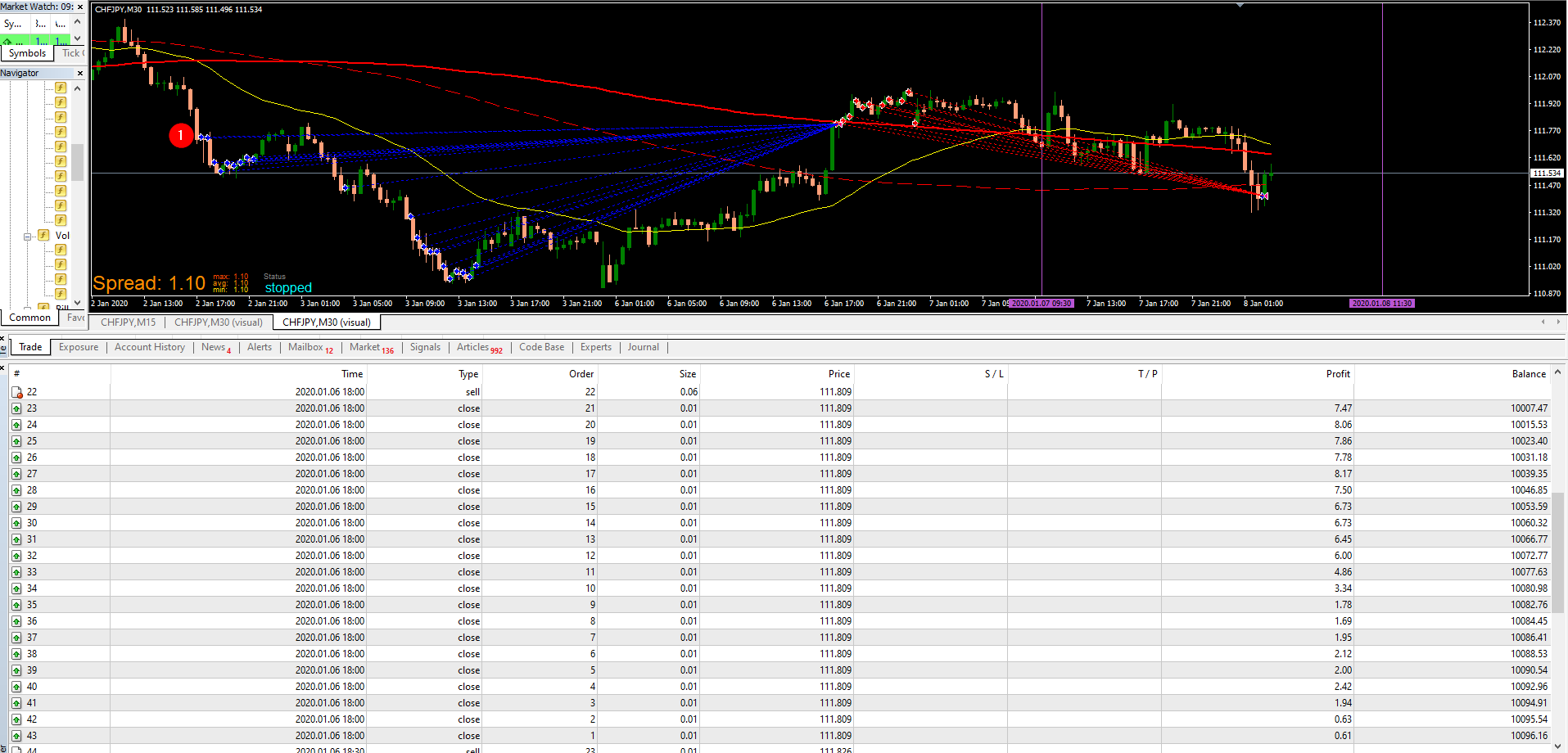
For reference as well, this is the closed trades for Buy.
-
@fideld003 I see youre a fast learner - this isnt the most simple example lol
-
Yes, its usually best to set variables zero at the beginning, you will modify them later anway - thats why they are called variables

-
The color fields are a quick way to set new values for the variables. White, orange and yellow fields correspond to the half circles around the blocks: white is something that happens before the block, orange and yellow are outputs depending on block type. In case of a loop ("for each..."), orange is something that happens on each loop iteration, and yellow is the "exit door". So, to count buys:
- reset buys variable to 0 before beginning the loop, to erase any earlier calculations
- for each buy trade found with the loop block, increase buys by 1
- when loop is complete, take exit from yellow output and move to next part of the project
- The custom code has a logarithm calculation. Logarithms basically scale big numbers to smaller numbers. If youre using chrome, you can try "ln(20)" in the adress bar - it gives 2.99.
So, if there is 20 buys open, the lot value for next sell order will be
0.01* 2.99 * 2 = 0.0598 = 0.06 (just as in your picture)
The 2nd line is just a lower limit for the lot amount. MathMax function picks the bigger value in the parenthesis. So, the line reads as "set lotA as itself or 0.01, whichever is bigger".
-
-
@roar ohhh, I got it. Yeah, the example was nicely done so I was able to grasp at least 80% of it. Thank you for this awwweeeesome example.