fxDreema

    • Register
    • Login
    • Search
    • Back to the main page
    • Categories
    • Recent
    • Tags
    • Popular
    • Search

    Buy/Sell Market at Horizontal Line

    Questions & Answers
    3
    9
    1358
    Loading More Posts
    • Oldest to Newest
    • Newest to Oldest
    • Most Votes
    Reply
    • Reply as topic
    Log in to reply
    This topic has been deleted. Only users with topic management privileges can see it.
    • M
      Mohamed80 last edited by Mohamed80

      Hello,

      I want the EA to buy or sell only once when the price touches a horizontal line that I named "Line". Initially, I had a string constant called "Line" but then I removed it thinking it is the reason the EA is not working.
      Anyway, I am attaching the EA here as I am not sure what is causing it to not work.

      https://fxdreema.com/shared/OvVUL4Y2c


      In the meantime, I am sharing a simple EA that will instantly execute a buy/sell for only once with trailing features and risk percentage. This one is working fine for me and thought some may need it.

      https://fxdreema.com/shared/h1rVdqbge

      Thanks,

      1 Reply Last reply Reply Quote 0
      • TipsyWisdom
        TipsyWisdom last edited by

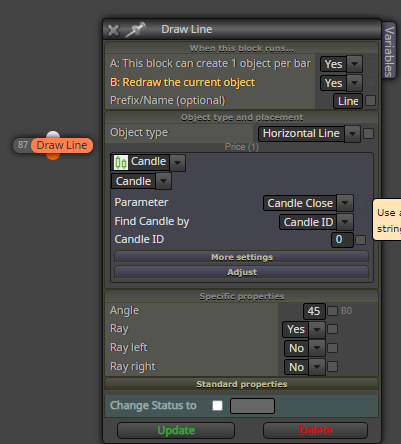
        you need to draw the line in order to reference it, your condition references a line but its never created.
        0_1626319474295_e0885940-1e66-43c3-be9e-6fd8684058ba-image.png

        M 1 Reply Last reply Reply Quote 0
        • TipsyWisdom
          TipsyWisdom last edited by TipsyWisdom

          just put it under a pass or wherever you see fit. It should be drawn before you reference it, obviously (# of the blocks will matter)

          1 Reply Last reply Reply Quote 0
          • M
            Mohamed80 @TipsyWisdom last edited by

            @jsauter86
            Thank you for your reply.

            Initially, I wanted to use (Draw Line) but saw that I have to specify where to draw it. But I want to be able to drag the line manually and then the EA recognizes it.

            That is why I named it "Line" in the EA and at the same time, I have manually put a Horizontal line on the chart and named it "Line". I also chose (Objects on Chart) and this means it should pick up the name from the Chart. That was my logic.

            Not sure how to define the Horizontal Line in the (Draw Line) Block. If I defined it by Candle ID, it will not be draggable. Or If I define it by Market Property, it will still be not draggable. Maybe I can try Objects on Chart again in the Draw Block? I will see.

            1 Reply Last reply Reply Quote 0
            • TipsyWisdom
              TipsyWisdom last edited by TipsyWisdom

              Good luck, I'm not too keen on drawing objects.

              Perhaps this needs to be done in the (OnChart) tab rather than OnTick? I found that fixed an issue I was having

              1 Reply Last reply Reply Quote 0
              • M
                Mohamed80 last edited by

                I am still unable to figure out how to use "Draggable" Horizontal lines for Entry Orders.

                Does anyone have an idea or has tried it before?

                TipsyWisdom 1 Reply Last reply Reply Quote 0
                • TipsyWisdom
                  TipsyWisdom @Mohamed80 last edited by

                  @mohamed80 I would suggest not reinventing the wheel and manually place a stop or limit order. If youre manually creating a line anyways, why take the time to code it?

                  M 1 Reply Last reply Reply Quote 0
                  • M
                    Mohamed80 @TipsyWisdom last edited by

                    @jsauter86
                    It helps a lot with changing the stop loss and partial targets when done with lines on the chart.

                    1 Reply Last reply Reply Quote 0
                    • B
                      belgam last edited by

                      Hello,

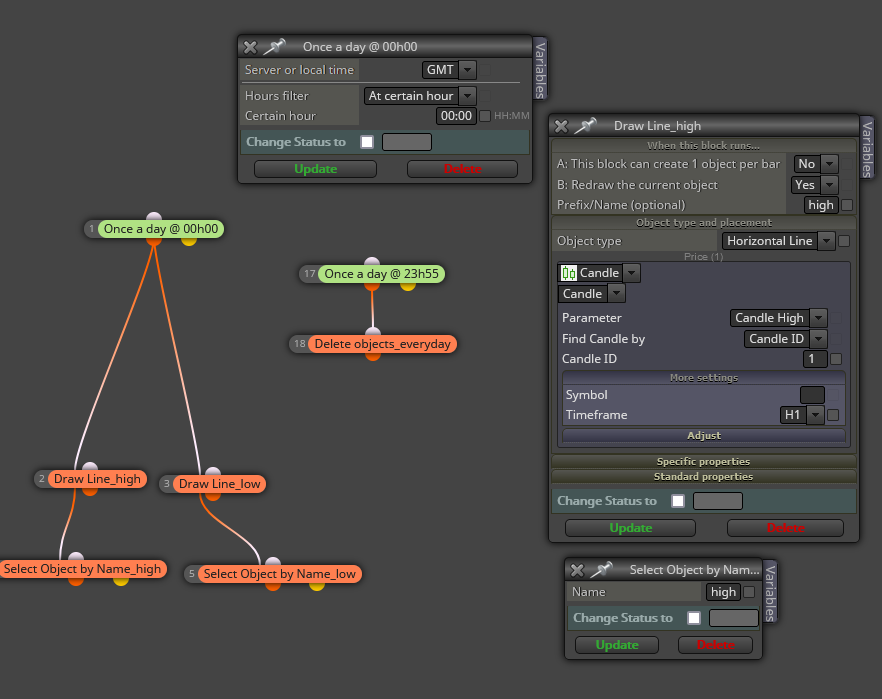
                      I have create project with line at open market. I will create another subject for help too.
                      0_1626422288068_Capture.PNG

                      1 Reply Last reply Reply Quote 1
                      • 1 / 1
                      • First post
                        Last post

                      Online Users

                      A
                      B
                      S
                      E
                      W
                      M
                      M
                      A
                      A

                      19
                      Online

                      146.6k
                      Users

                      22.4k
                      Topics

                      122.6k
                      Posts

                      Powered by NodeBB Forums | Contributors