fxDreema

    • Register
    • Login
    • Search
    • Back to the main page
    • Categories
    • Recent
    • Tags
    • Popular
    • Search

    Using a Constant within a Terminal Variable name

    Questions & Answers
    2
    39
    5068
    Loading More Posts
    • Oldest to Newest
    • Newest to Oldest
    • Most Votes
    Reply
    • Reply as topic
    Log in to reply
    This topic has been deleted. Only users with topic management privileges can see it.
    • Sauce
      Sauce last edited by Sauce

      @jstap so I tried to expand this across multiple timeframes, but I feel like there is a better way to do this than having 20+ variables? I'm trying to check each timeframe to make sure they all agree with each other (i.e. Base >50 and Quote <50 across multiple timeframes).

      I figured I need multiple variables to specify the Base or Quote AND each timeframe combination, but I imagine there is a better way to specify without loading multiple charts and different timeframes or having 40+ variables for each TF and Base or Quote check combination?

      Can you show me a better way to do this?

      Shared project link: https://fxdreema.com/shared/VVRdXGxRd
      Screenshot:
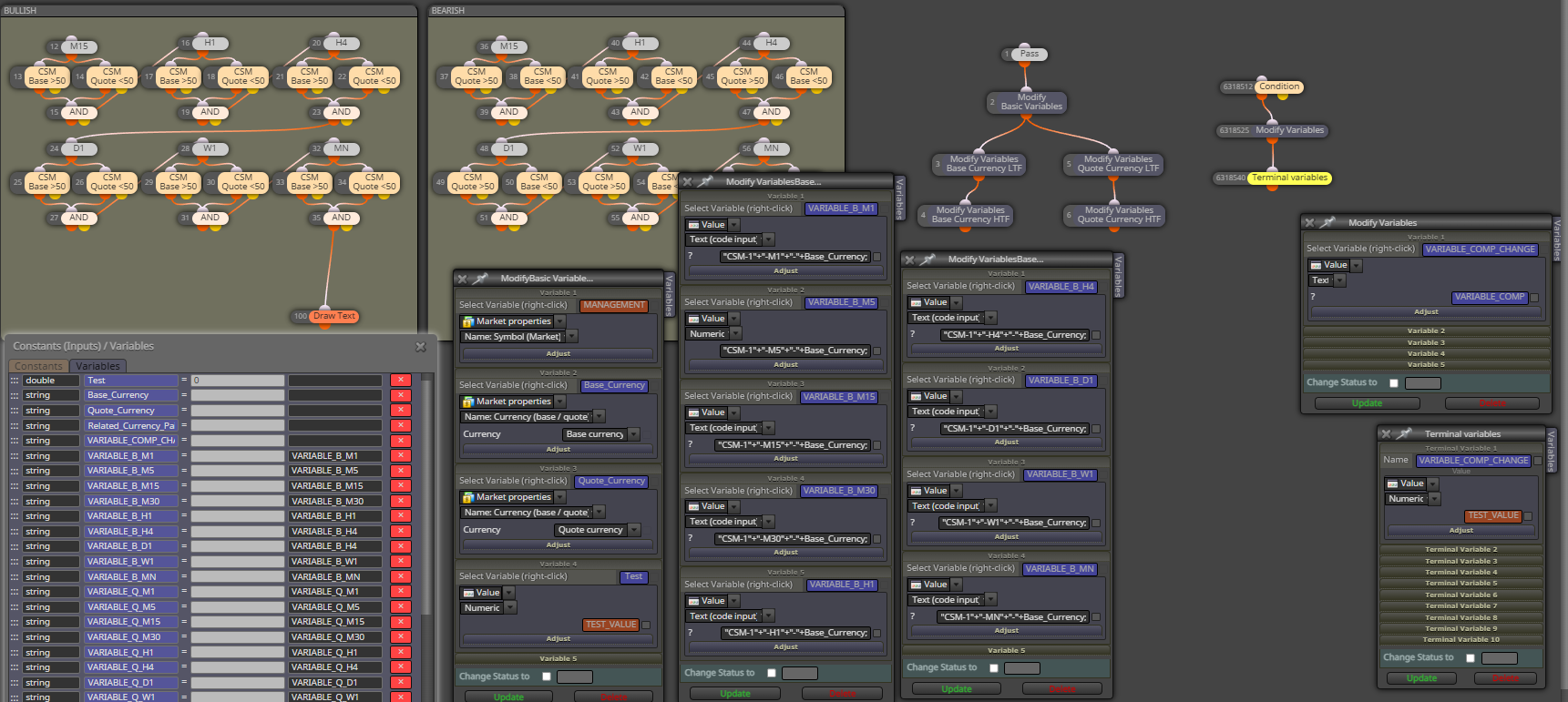
      0_1646607591988_a1618c23-3145-4aa7-90fb-4d7b4a681e80-image.png

      0_1646607456185_e5533247-8b36-44fa-9e1a-4e227da5e445-image.png

      jstap 1 Reply Last reply Reply Quote 0
      • jstap
        jstap @Sauce last edited by

        @sauce I too would use multiple variables, you could create a list and get the data from there but I do not know how.

        Learn fxDreema Without the Wait!

        My comprehensive book, available on Amazon, is packed with examples and invaluable insights to help you fast-track your learning journey.

        The paperback and hardback editions include MT4 & MT5 QR codes for easy access to all prebuilt projects and robots, including my latest gold trading robot!

        Don’t miss out

        Click here➡️ https://mybook.to/fxDreema to get your copy today!

        Enjoy! 😊

        1 Reply Last reply Reply Quote 0
        • Sauce
          Sauce last edited by

          @jstap okay thanks! Would I need individual variables for VARIABLE_COMP_CHANGE since each VARIABLE_COMP is now more specified?
          I've created the individual VARIABLE_COMP variables as we talked about, but I'm confused on whether any other individualized blocks need to be created?

          jstap 1 Reply Last reply Reply Quote 0
          • jstap
            jstap @Sauce last edited by

            @sauce For every variable that contains something different needs a new but, if the data is only relevent to something that is specific to something like the chart EA is attached to, a variable can be shared, it just needs a condition like base = USD change variable to ???, if different change to ???, in this case yellow dot can be used to check the next condition.

            Learn fxDreema Without the Wait!

            My comprehensive book, available on Amazon, is packed with examples and invaluable insights to help you fast-track your learning journey.

            The paperback and hardback editions include MT4 & MT5 QR codes for easy access to all prebuilt projects and robots, including my latest gold trading robot!

            Don’t miss out

            Click here➡️ https://mybook.to/fxDreema to get your copy today!

            Enjoy! 😊

            1 Reply Last reply Reply Quote 0
            • Sauce
              Sauce last edited by

              @jstap OK Let’s do this instead… I will just create blocks for each time frame instead of doing multiple variables.

              Can you show me how to have code input “CSM-1-M1-???” update the code input so that it updates the ??? with the base and the quote? (Forget about the timeframe)

              jstap 1 Reply Last reply Reply Quote 0
              • jstap
                jstap @Sauce last edited by

                @sauce I will gladly show you but is this not the same as what you have done already?

                Learn fxDreema Without the Wait!

                My comprehensive book, available on Amazon, is packed with examples and invaluable insights to help you fast-track your learning journey.

                The paperback and hardback editions include MT4 & MT5 QR codes for easy access to all prebuilt projects and robots, including my latest gold trading robot!

                Don’t miss out

                Click here➡️ https://mybook.to/fxDreema to get your copy today!

                Enjoy! 😊

                1 Reply Last reply Reply Quote 0
                • Sauce
                  Sauce last edited by Sauce

                  @jstap I got confused with trying to add the timeframe which made it too complicated for me to be honest.
                  Will you please fix this if needed? I don't understand how the VARIABLE_COMP_CHANGE variables are working? What is the purpose of he TEST_VALUE as constant?

                  I've tried my best here with my limited understanding of modifying variables. Please feel free to rearrange/optimize this since I really don't know what I'm doing lol.

                  SHARED PROJECT: https://fxdreema.com/shared/HUU0g5Cjc

                  You may have provided it already with other stuff added in, but can you show me just simply how to make it that the EA auto-inputs the Base and auto-inputs the Quote currencies into their respective "CSM-1-M1-(BASE)" and "CSM-1-M1-(QUOTE)? I will manually update the timeframe in the code input instead of making variables for each one separately.

                  1 Reply Last reply Reply Quote 0
                  • jstap
                    jstap last edited by

                    @sauce The TEST was just so you could see how to add data from a constant,
                    Where you have (QUOTE) and (BASE) move to the other side of " and change for the variable.

                    Learn fxDreema Without the Wait!

                    My comprehensive book, available on Amazon, is packed with examples and invaluable insights to help you fast-track your learning journey.

                    The paperback and hardback editions include MT4 & MT5 QR codes for easy access to all prebuilt projects and robots, including my latest gold trading robot!

                    Don’t miss out

                    Click here➡️ https://mybook.to/fxDreema to get your copy today!

                    Enjoy! 😊

                    1 Reply Last reply Reply Quote 0
                    • Sauce
                      Sauce last edited by Sauce

                      @jstap will this work? feel free to edit any mistakes.

                      shared project: https://fxdreema.com/shared/II6e2wU5c

                      UPDATE: it doesn't appear to be working, I'm lost again 😞

                      jstap 1 Reply Last reply Reply Quote 0
                      • jstap
                        jstap @Sauce last edited by

                        @sauce Your modify variables blocks should work, put into a comment to check, Your condition blocks are checking global variables but you have no global variables being set, check with comment, set the global variables.

                        Learn fxDreema Without the Wait!

                        My comprehensive book, available on Amazon, is packed with examples and invaluable insights to help you fast-track your learning journey.

                        The paperback and hardback editions include MT4 & MT5 QR codes for easy access to all prebuilt projects and robots, including my latest gold trading robot!

                        Don’t miss out

                        Click here➡️ https://mybook.to/fxDreema to get your copy today!

                        Enjoy! 😊

                        1 Reply Last reply Reply Quote 0
                        • Sauce
                          Sauce last edited by Sauce

                          @jstap I'm sorry, I'm not sure what you mean by set global variables? Can you show me an example via the shared project above? I figured I'd at least start the shared project and see if you could revise it. (I'm not trying to have you do the work for me, but I'm certainly lost at this point and need clear examples/directions).

                          here is a link to the CSM custom indicator for future reference anyone that comes along looking for it: https://www.forexfactory.com/thread/852082-csm-indicator-hanover

                          Not sure if this would help at all, but this is part of the indicator's inputs...
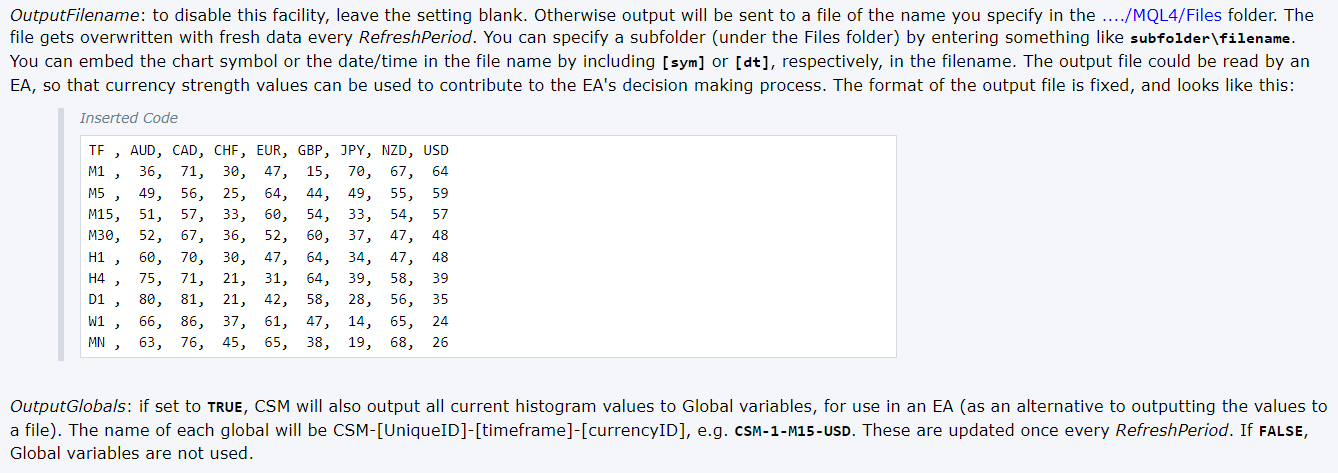
                          0_1646920431495_0ca56707-3da5-4cf9-9982-57dd4ee436ba-image.png

                          1 Reply Last reply Reply Quote 0
                          • jstap
                            jstap last edited by

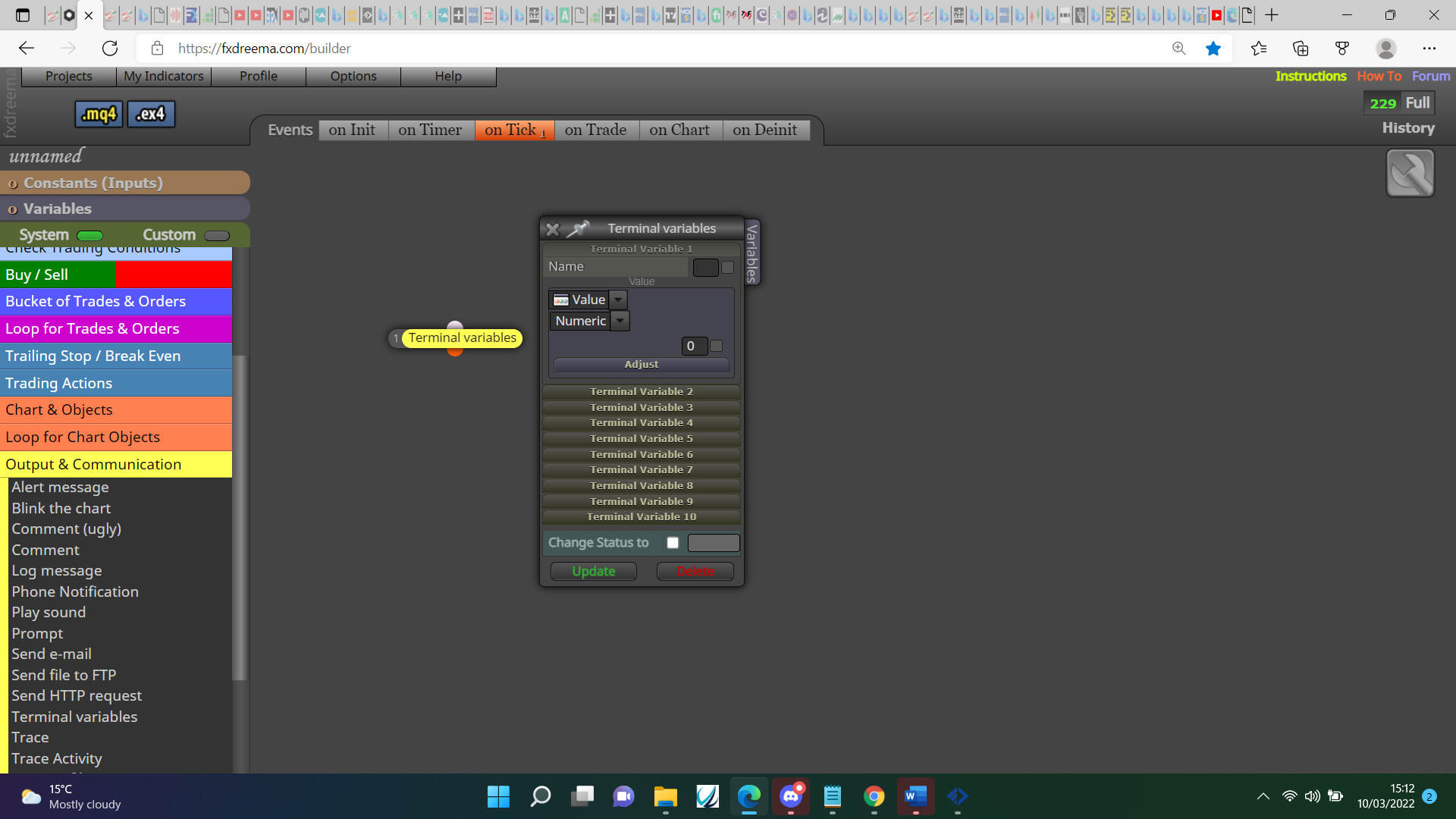
                            @sauce This is how you set global variables on fx:0_1646925466592_e387f030-9471-43b6-9c84-daa01b9fee86-image.png

                            If that indicator fills the global variables push F3 to check all is as needed.

                            Learn fxDreema Without the Wait!

                            My comprehensive book, available on Amazon, is packed with examples and invaluable insights to help you fast-track your learning journey.

                            The paperback and hardback editions include MT4 & MT5 QR codes for easy access to all prebuilt projects and robots, including my latest gold trading robot!

                            Don’t miss out

                            Click here➡️ https://mybook.to/fxDreema to get your copy today!

                            Enjoy! 😊

                            1 Reply Last reply Reply Quote 0
                            • Sauce
                              Sauce last edited by

                              @jstap this is what I see for Global Variables when press F3
                              Do I need to put these all into Terminal Variables?
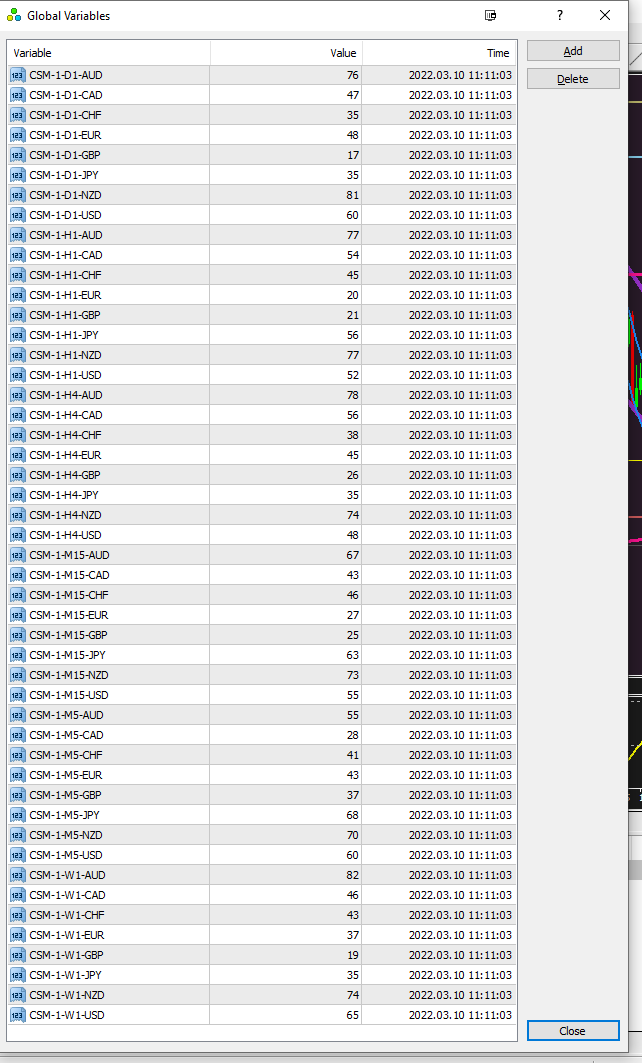
                              0_1646928728733_c67b4e29-a047-4a04-9fab-3a53d2e7d744-image.png

                              jstap 1 Reply Last reply Reply Quote 0
                              • jstap
                                jstap @Sauce last edited by jstap

                                @sauce No this shows you what the indicator is doing, what I would do is put a couple into a condition block with something like > 50, I would then draw text from the orange dot to say over 50 and one connecting to the yellow dot saying under 50 so when I press F3 I can visually check, once this is working you will know what to do to use the global (terminal) variables, you then could add custom code to get the descriptions you need into a variable, put this in a comment to check, you can then use this variable in the condition block. At this point you and then in a tree so all is doing as wanted, then copy and mimic all because you know it works.

                                Learn fxDreema Without the Wait!

                                My comprehensive book, available on Amazon, is packed with examples and invaluable insights to help you fast-track your learning journey.

                                The paperback and hardback editions include MT4 & MT5 QR codes for easy access to all prebuilt projects and robots, including my latest gold trading robot!

                                Don’t miss out

                                Click here➡️ https://mybook.to/fxDreema to get your copy today!

                                Enjoy! 😊

                                1 Reply Last reply Reply Quote 0
                                • Sauce
                                  Sauce last edited by Sauce

                                  @jstap I've used this indicator previously, so I already know it works correctly with >50 with manually saving 28 different EAs according to each pair. Takes forever to update every block with a pair's base and quote currencies!

                                  I'm trying to simply make CSM-1-H1-AUD change the AUD part to whatever the current chart's Base currency is and for CSM-1-H1-CAD change the CAD part to whatever the current chart's Quote currency is. I am trying to avoid saving 28 unique versions of the EA to specify each pair.

                                  "once this is working you will know what to do to use the global (terminal) variables... you then could add custom code to get the descriptions you need into a variable" -- I do not know what to do.

                                  can you please show me one example of the coding and block setup for both a Base and a Quote currency and I will duplicate the rest of the timeframes?

                                  jstap 1 Reply Last reply Reply Quote 0
                                  • jstap
                                    jstap @Sauce last edited by jstap

                                    @sauce Add this to variable as text code input: "CSM-1-H1-"+base variable; and this in another "CSM-1-H1-"+quote variable, by base and quote variable I mean how I shoved you before to add to a variable.

                                    Learn fxDreema Without the Wait!

                                    My comprehensive book, available on Amazon, is packed with examples and invaluable insights to help you fast-track your learning journey.

                                    The paperback and hardback editions include MT4 & MT5 QR codes for easy access to all prebuilt projects and robots, including my latest gold trading robot!

                                    Don’t miss out

                                    Click here➡️ https://mybook.to/fxDreema to get your copy today!

                                    Enjoy! 😊

                                    1 Reply Last reply Reply Quote 0
                                    • Sauce
                                      Sauce last edited by

                                      @jstap still can't get it to work for some reason. Variables with text code input as you said, but won't draw text.

                                      shared: https://fxdreema.com/shared/qClzIUx7

                                      jstap 1 Reply Last reply Reply Quote 0
                                      • jstap
                                        jstap @Sauce last edited by

                                        @sauce I am unsure why the only thing I can assume it that the condition block isn't getting the global data.

                                        I have put all into a comment to check but all seemed correct:

                                        https://fxdreema.com/shared/hzj5ZuQT

                                        Learn fxDreema Without the Wait!

                                        My comprehensive book, available on Amazon, is packed with examples and invaluable insights to help you fast-track your learning journey.

                                        The paperback and hardback editions include MT4 & MT5 QR codes for easy access to all prebuilt projects and robots, including my latest gold trading robot!

                                        Don’t miss out

                                        Click here➡️ https://mybook.to/fxDreema to get your copy today!

                                        Enjoy! 😊

                                        1 Reply Last reply Reply Quote 0
                                        • Sauce
                                          Sauce last edited by Sauce

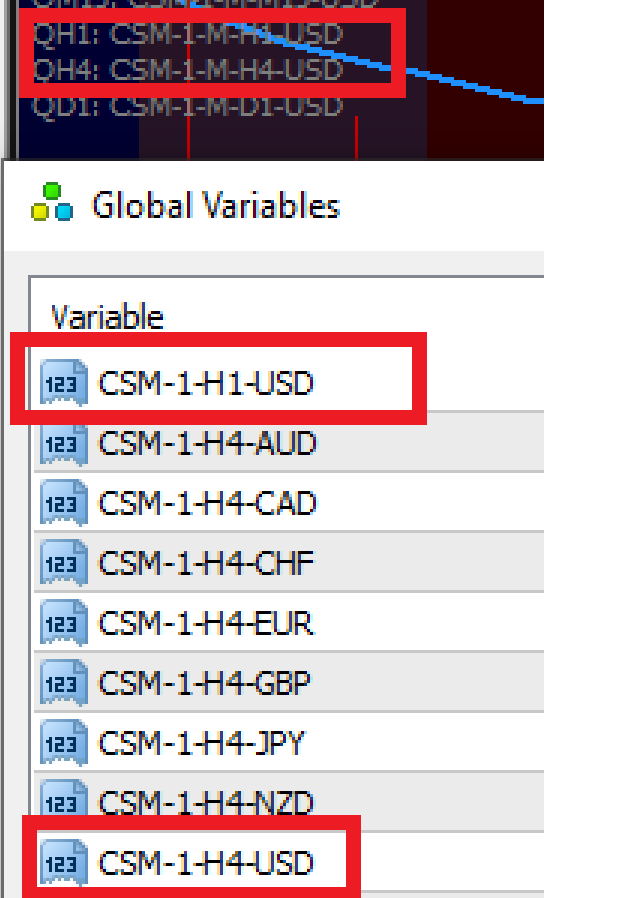
                                          @jstap I think I found the error... might help if the variable code matched the global variable 😄 (fixed it)
                                          Now shouldn't this produce a value/number and not the text code? I'm thinking it still won't work because we are comparing "CSM-1-H1-USD" > 50 ?? Shouldn't there be a value to compare to >50?
                                          0_1647053074128_bfa58720-23da-4a6c-ab52-3e8c7f44d6c4-image.png

                                          1 Reply Last reply Reply Quote 0
                                          • 1
                                          • 2
                                          • 2 / 2
                                          • First post
                                            Last post

                                          Online Users

                                          E
                                          B
                                          P
                                          S
                                          S

                                          17
                                          Online

                                          146.6k
                                          Users

                                          22.4k
                                          Topics

                                          122.6k
                                          Posts

                                          Powered by NodeBB Forums | Contributors