fxDreema

    • Register
    • Login
    • Search
    • Back to the main page
    • Categories
    • Recent
    • Tags
    • Popular
    • Search

    Don't Open New (Positions/Orders) If There Is Any Open Ones

    Questions & Answers
    4
    12
    781
    Loading More Posts
    • Oldest to Newest
    • Newest to Oldest
    • Most Votes
    Reply
    • Reply as topic
    Log in to reply
    This topic has been deleted. Only users with topic management privileges can see it.
    • T
      Trade Journey last edited by

      Hello Guys,

      I have made this basic example EA trying to make the EA to not open new positions or orders even if the trading conditions are met while there is open positions/ orders, till they be closed rather manually or they reach TP or SL. Hope you could help me about it with the best regards, Thanks in advance.

      EA Link: https://fxdreema.com/shared/oXZ71wOte

      jstap 1 Reply Last reply Reply Quote 0
      • jstap
        jstap @Trade Journey last edited by

        @trade-journey The right hand tree can't work because the blocks conflict, as is ifd no trade it can open a trade and a pending.

        Learn fxDreema Without the Wait!

        My comprehensive book, available on Amazon, is packed with examples and invaluable insights to help you fast-track your learning journey.

        The paperback and hardback editions include MT4 & MT5 QR codes for easy access to all prebuilt projects and robots, including my latest gold trading robot!

        Don’t miss out

        Click here➡️ https://mybook.to/fxDreema to get your copy today!

        Enjoy! 😊

        J T 2 Replies Last reply Reply Quote 0
        • J
          jacque82 @jstap last edited by

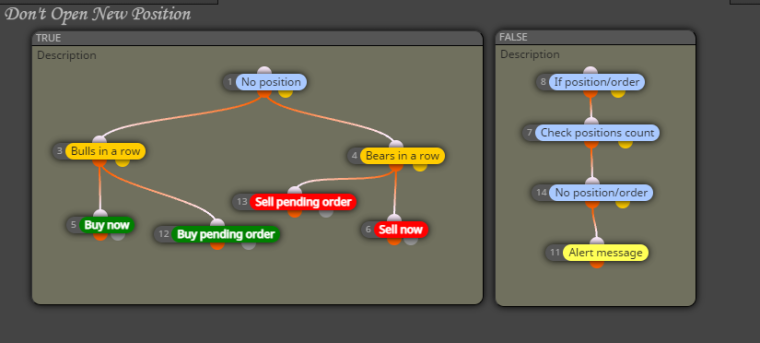
          @jstap Like this? And change the "No Position" to "No Position/Order"?
          0_1673624959230_forum001.png

          jstap 1 Reply Last reply Reply Quote 0
          • jstap
            jstap @jacque82 last edited by jstap

            @jacque82 Yes that should do it but you can't have no trade and if trade in same row.

            Learn fxDreema Without the Wait!

            My comprehensive book, available on Amazon, is packed with examples and invaluable insights to help you fast-track your learning journey.

            The paperback and hardback editions include MT4 & MT5 QR codes for easy access to all prebuilt projects and robots, including my latest gold trading robot!

            Don’t miss out

            Click here➡️ https://mybook.to/fxDreema to get your copy today!

            Enjoy! 😊

            J 1 Reply Last reply Reply Quote 0
            • J
              jacque82 @jstap last edited by

              @jstap Oh? If the "FALSE" area is placed below the "TRUE" area then it'll work? Didn't know rows play a part. Thanks again.

              jstap 1 Reply Last reply Reply Quote 0
              • jstap
                jstap @jacque82 last edited by jstap

                @jacque82 For anything to work there has to be trues, as soon as any block is false the path stops there.

                Learn fxDreema Without the Wait!

                My comprehensive book, available on Amazon, is packed with examples and invaluable insights to help you fast-track your learning journey.

                The paperback and hardback editions include MT4 & MT5 QR codes for easy access to all prebuilt projects and robots, including my latest gold trading robot!

                Don’t miss out

                Click here➡️ https://mybook.to/fxDreema to get your copy today!

                Enjoy! 😊

                1 Reply Last reply Reply Quote 0
                • T
                  Trade Journey @jstap last edited by

                  @jstap This should work out, right sir?

                  Edited Link: https://fxdreema.com/shared/4Uls7kWMb

                  jstap 1 Reply Last reply Reply Quote 0
                  • jstap
                    jstap @Trade Journey last edited by

                    @trade-journey No because you still have a no position and a if position in a row.

                    Learn fxDreema Without the Wait!

                    My comprehensive book, available on Amazon, is packed with examples and invaluable insights to help you fast-track your learning journey.

                    The paperback and hardback editions include MT4 & MT5 QR codes for easy access to all prebuilt projects and robots, including my latest gold trading robot!

                    Don’t miss out

                    Click here➡️ https://mybook.to/fxDreema to get your copy today!

                    Enjoy! 😊

                    T 1 Reply Last reply Reply Quote 0
                    • T
                      Trade Journey @jstap last edited by

                      @jstap Could you show me how could I connect them, please

                      Because Im not familiar with fxdreema yet.
                      I would really appreciate it.

                      jstap 1 Reply Last reply Reply Quote 0
                      • jstap
                        jstap @Trade Journey last edited by

                        @trade-journey There is no point, simply, if the tree needs to work when no position use no position, if it needs to work when there's a position use if position, there is no need to use both one after the other.

                        Learn fxDreema Without the Wait!

                        My comprehensive book, available on Amazon, is packed with examples and invaluable insights to help you fast-track your learning journey.

                        The paperback and hardback editions include MT4 & MT5 QR codes for easy access to all prebuilt projects and robots, including my latest gold trading robot!

                        Don’t miss out

                        Click here➡️ https://mybook.to/fxDreema to get your copy today!

                        Enjoy! 😊

                        T 1 Reply Last reply Reply Quote 0
                        • T
                          Trade Journey @jstap last edited by

                          @jstap Ok thank you, got it.

                          1 Reply Last reply Reply Quote 0
                          • S
                            Ssenyongacharl4 last edited by

                            https://fxdreema.com/shared/pgbvoQOWc there is the ea i made how can i limit the ea from entering a sell trade or trades when the stochastic main line crosses below 30 on the 30 min timeframe? and how can it close the protiable sell position automaticaly once price stochastic drops mainline drops below 30 on the 30 min timeframe?

                            1 Reply Last reply Reply Quote 0
                            • 1 / 1
                            • First post
                              Last post

                            Online Users

                            M
                            M
                            E
                            M
                            A
                            H
                            E
                            E
                            M
                            S

                            15
                            Online

                            146.7k
                            Users

                            22.4k
                            Topics

                            122.6k
                            Posts

                            Powered by NodeBB Forums | Contributors