fxDreema

    • Register
    • Login
    • Search
    • Back to the main page
    • Categories
    • Recent
    • Tags
    • Popular
    • Search

    Tutorial - Create Custom Blocks with "FXDreema Studio"

    Tutorials by Users
    9
    15
    3860
    Loading More Posts
    • Oldest to Newest
    • Newest to Oldest
    • Most Votes
    Reply
    • Reply as topic
    Log in to reply
    This topic has been deleted. Only users with topic management privileges can see it.
    • Q
      QuantEngineer last edited by

      Hello Developers,

      This is a simplified tutorial on how to build Custom Blocks using "FX Dreema Studio", which is part of "FX Dreema"
      Step 1 - Since The Studio works in a separate link, use your internet browser to navigate to https://fxdreema.com/studio/MQL5 .
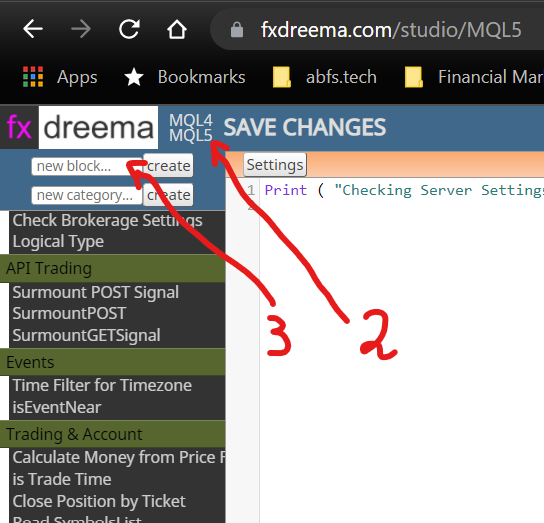
      Step 2 - Choose the platform you are using, by clicking MQL4 or MQL5
      Step 3 - Name and Create your new Block
      0_1636215900357_76365e94-a589-4595-a4af-212be0277d68-image.png

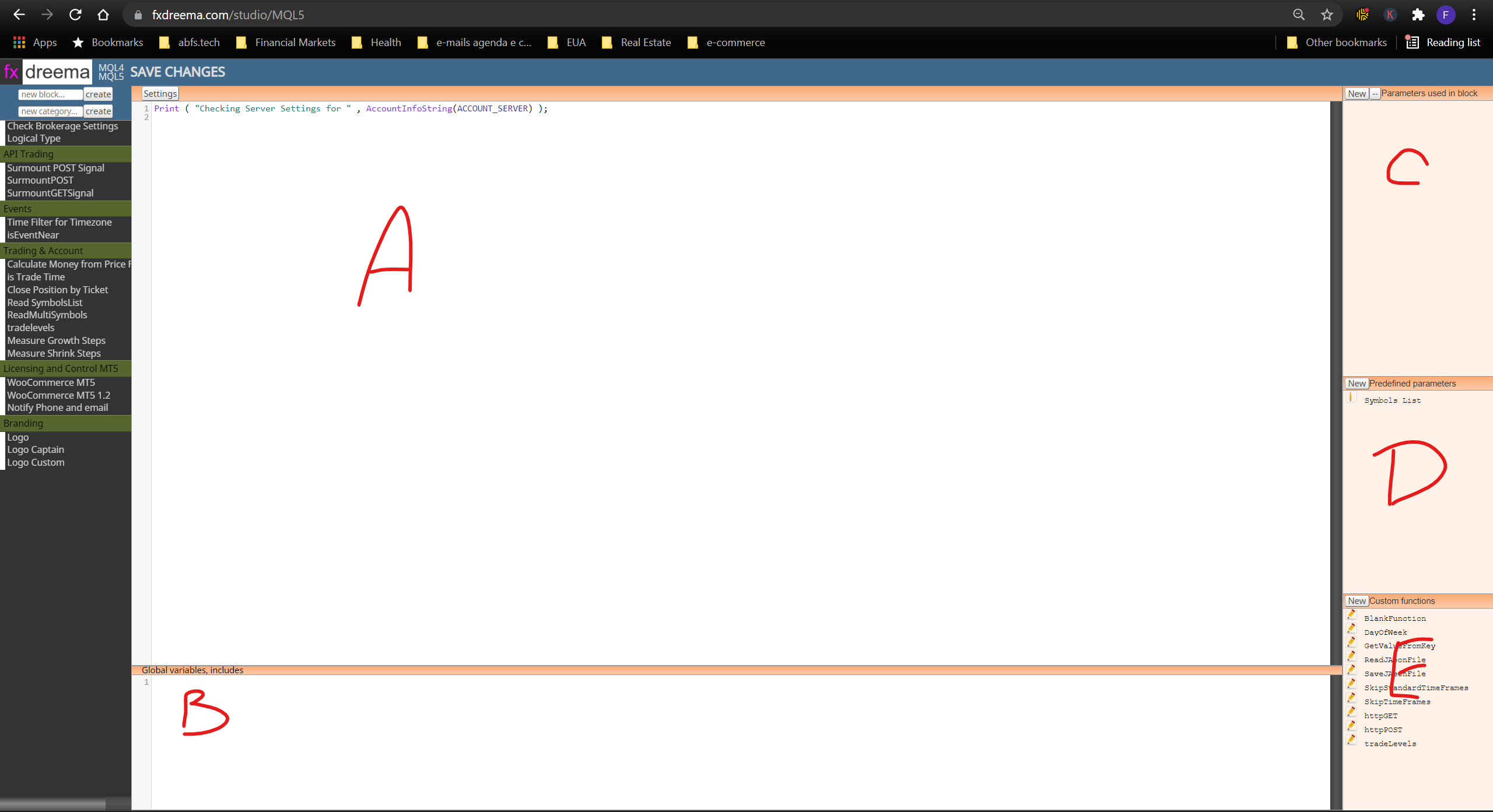
      Step 4 - Create your Block by writing your code on Region A, Put your Global Variables on Region B, Create Input Parameters for the Block on region c, Pre-defined parameters go in region D and Global Functions for all your custom blocks will go on region E.
      0_1636216071689_e11fb536-2e1d-4564-b94a-d53c087eefae-image.png

      Once you go through these basics, it is pretty straightforward.
      I hope you enjoy this intro tutorial, that will save time on getting your fingers moving.

      Quant Engineer
      www.abfs.tech

      l'andorrà T 2 Replies Last reply Reply Quote 6
      • l'andorrà
        l'andorrà @QuantEngineer last edited by

        @quantengineer Thank you very much for sharing.

        (English) I will try to help everyone in these fxDreema forums. But if you want to learn how to use the platform in depth or more quickly, I can help you with my introductory fxDreema course in English at https://www.theandorraninvestor.eu.

        (Català) Miraré d’ajudar tothom en aquests fòrums d’fxDreema. Tanmateix, si vols aprendre a fer servir la plataforma amb més profunditat o més de pressa, t’hi puc ajudar amb el meu curs d’introducció a fxDeema en català a https://www.theandorraninvestor.eu/ca.

        (Español) Intentaré ayudar a todo el mundo en estos foros de fxDreema. Sin embargo, si quieres aprender a usar la plataforma en profundidad o más deprisa, te puedo ayudar con mi curso de introducción a fxDreema en español en https://www.theandorraninvestor.eu/es.

        1 Reply Last reply Reply Quote 0
        • A
          andychau last edited by

          Nice simple steps thank you!

          1 Reply Last reply Reply Quote 0
          • T
            tec.nacks @QuantEngineer last edited by

            @quantengineer yeah,.. amazing tutorial but your custom functions are 10 mine is 8 for the News Filter, is there something/.? or am wrong?

            1 Reply Last reply Reply Quote 0
            • B
              Breeeeen last edited by

              Hi @QuantEngineer , I'm wondering if this tutorial could help me with not having to write my enumerations each time I export a file.

              Basically each time I want to export the file, I have to click the .mq5 button (not the .ex5) because of missing enumerations and then open the file in MetaEditor and add in the enumerations manually as per the picture below.
              image.png

              I tried adding a block using the tutorial above and adding it to the OnInit tab but every time I try clicking .ex5, I still get the same error that enumerations are missing.
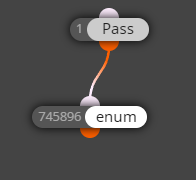
              image.png

              Any ideas how I might use a custom block to save me the hassle of having to manually add these enumerations each time I export?

              Breeeeen

              1 Reply Last reply Reply Quote 0
              • Q
                QuantEngineer last edited by

                Yes, I have found the same error with enumerations... I think the text parser that fxdreema uses on custom blocks prior to compiling the code is not compatible with enumerations ... The only way I could get enumerations into FX Dreema without having to copy-paste every time a new compilation was needed, was to place the enumerations into a custom indicator and import the indicator into the fxdreema EA via "My Indicators-> Add Custom Indicator" and use the indicator anywhere in the decision trees... once the indicator is part of the fxdreema project, now you can use any of it's enumerations freely...

                Quant Engineer
                www.abfs.tech

                1 Reply Last reply Reply Quote 3
                • B
                  Breeeeen last edited by Breeeeen

                  You're a genius, it works like a charm! Thanks for your help.
                  For reference if it helps others, I did it like this in the on Init tab, I can now use the .ex5 button:
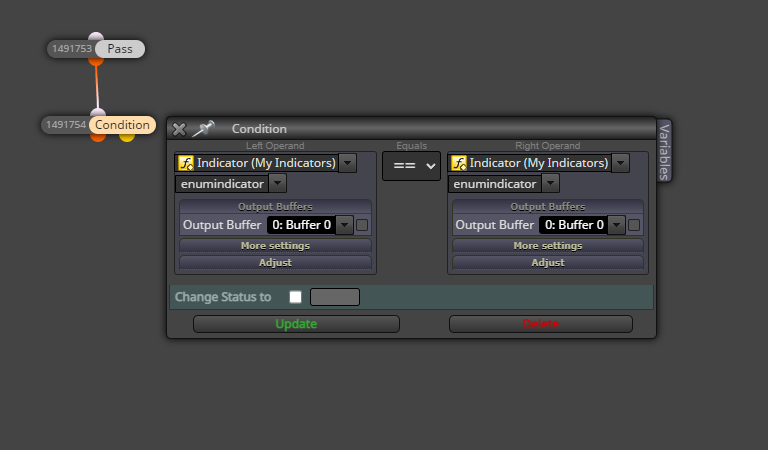
                  image.png

                  Breeeeen

                  U 1 Reply Last reply Reply Quote 1
                  • U
                    Uriel 0 @Breeeeen last edited by

                    @Breeeeen could you share the indicator? lol

                    1 Reply Last reply Reply Quote 0
                    • P
                      princeemezie last edited by

                      hello please i tried downloading an auto trendline bot that i created but it shows me compilation error please how do i resolve the issue

                      1 Reply Last reply Reply Quote -1
                      • D
                        doeveR last edited by

                        I don't understand how you can return a value from within the custom block - back to the calling FXD EA.....So if I define for example 2 input parameters into the Custom Block. I do a calculation for which I would need to write Custom code/function and based on that I want to return two values I can use in my EA ; I can't figure out how to do this. That is the purpose of a block in general, right; do something, compare etc. and then return a value that you can use in your logic.

                        1 Reply Last reply Reply Quote 0
                        • jstap
                          jstap last edited by

                          in the function save to a variable, create the variable in your EA project, read and use as normal.

                          Learn fxDreema Without the Wait!

                          My comprehensive book, available on Amazon, is packed with examples and invaluable insights to help you fast-track your learning journey.

                          The paperback and hardback editions include MT4 & MT5 QR codes for easy access to all prebuilt projects and robots, including my latest gold trading robot!

                          Don’t miss out

                          Click here➡️ https://mybook.to/fxDreema to get your copy today!

                          Enjoy! 😊

                          1 Reply Last reply Reply Quote 0
                          • D
                            doeveR last edited by

                            So in Visual studio I define a varable A (in the area Global Variables, includes or in the area where my logic is as a local variable ?) and in my EA I also create a variable and the value that is assigned in the logic in studio, in my custom block is the readeable in my EA in variable A ?

                            1 Reply Last reply Reply Quote 0
                            • jstap
                              jstap last edited by

                              In the studio I have added to in settings and functions once created this is part of the EA code so you can access in project.

                              Learn fxDreema Without the Wait!

                              My comprehensive book, available on Amazon, is packed with examples and invaluable insights to help you fast-track your learning journey.

                              The paperback and hardback editions include MT4 & MT5 QR codes for easy access to all prebuilt projects and robots, including my latest gold trading robot!

                              Don’t miss out

                              Click here➡️ https://mybook.to/fxDreema to get your copy today!

                              Enjoy! 😊

                              1 Reply Last reply Reply Quote 1
                              • D
                                doeveR last edited by

                                This is my code in Settings (Area A):
                                bool TradeActive,ReturnCheckVar;
                                ReturnCheckVar=Global_Check_Trade_ActiveLocal(Prefix,TradeActive);
                                Print(ReturnCheckVar,TradeActive);
                                ~next~
                                ReturnCheckVar is defined in my EA as a bool variable. In my Experts Tab I see from the Print, True True. However in my EA the check on TRUE for boolean ReturnCheckVar is not true.

                                1 Reply Last reply Reply Quote 0
                                • jstap
                                  jstap last edited by

                                  don't duplicate questions: https://fxdreema.com/forum/topic/1893/Library-Studio/28?_=1775737635020

                                  Learn fxDreema Without the Wait!

                                  My comprehensive book, available on Amazon, is packed with examples and invaluable insights to help you fast-track your learning journey.

                                  The paperback and hardback editions include MT4 & MT5 QR codes for easy access to all prebuilt projects and robots, including my latest gold trading robot!

                                  Don’t miss out

                                  Click here➡️ https://mybook.to/fxDreema to get your copy today!

                                  Enjoy! 😊

                                  1 Reply Last reply Reply Quote 1
                                  • 1 / 1
                                  • First post
                                    Last post

                                  Online Users

                                  2
                                  M
                                  M
                                  N
                                  B
                                  A
                                  B
                                  S
                                  E
                                  W
                                  M

                                  24
                                  Online

                                  146.6k
                                  Users

                                  22.4k
                                  Topics

                                  122.6k
                                  Posts

                                  Powered by NodeBB Forums | Contributors