builder doesn`t respond
-
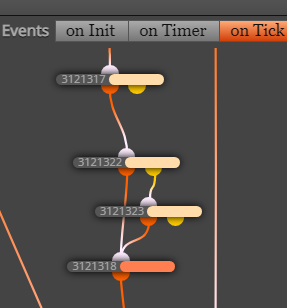
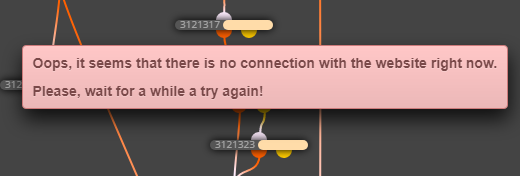
is there anyone who face this problem in the following photos:
i cant open blocks and name has disappeared , although iam connected to the internet
the problem still present when i use different web browser
-
i can download MQ4 file
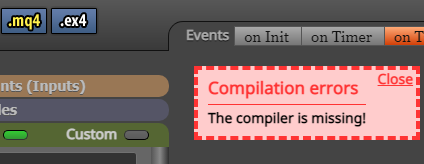
but i cant download EX4 file, as this message appear : compiler is missing
@l-andorrà -
not sure, you probably have a whole lot of stuff going on?
-
@tipsywisdom
thanks for your replayactually i made many EAs , all of them are in the same project, i just enable one EA and disable the rest EAs
by turning on/off specific blocks
total number of blocks is 400
i dont think its too much , as i used to it for long time
-
@tipsywisdom
anyway i have started a clean new project
and i will program it again from scratch (its a lot of work),fortunately i have saved a draft for every EA
now everything runs okey
thanks again tipsy
-
@ramos nice work, typically when projects are reusing blocks, sometimes information is just left in pieces when we cycle off of it to choose other settings of the block. Its best practice to always use a new block.
-
With me either a personal or FX internet issue causes these problems.
-
what is happening with fxdreema builder, mt5 and ex5 downloads not working, almost every night this problem comes back?
Clicking the download button does not exit processing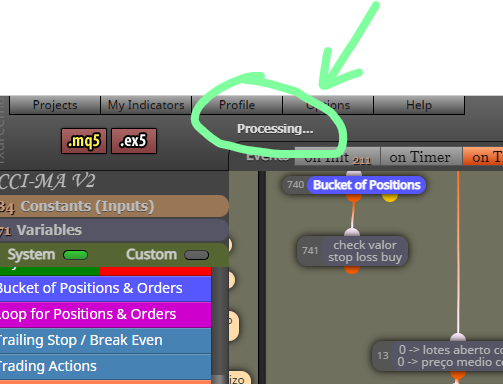
-
@laudemir This is a internet problem, either yours or FXDreema, keep retrying.
-
@jstap this problem happens every day and only at night, why is it?
-
I want the admin to answer
-
@laudemir, i'm not Admin.
But if you are the only person facing this problem,
then it's not fxDreema's problem. -
I sometimes have server issues, but I have dealt with them for over a year now so I an used to it.
Sometimes when you do something you must wait impatiently. Sometimes if you click to move or drop a block for instance and it gives an error, just refresh and resume and its usually fine for me. Other times it just requires waiting afew seconds, click on the background and the save file thing will pop up.
Those are my common issues and fixes.
-
-
@biztet I can confirm i experience same problem sometimes as i have many blocks on my project FYI same as many other users here. It seems like it is FXDreema performance-related bug. It fails to process too many blocks at once, so user must keep the backup mq4 file at all times to make sure not to lose the track of the project progress.
-
The suggested block quantity per tab is no more than 1000 pieces, based on my experience with the platform so far. Severe lags and other functional failures start to appear if this threshold exceeded. I guess that is the platform code capacity or maybe infrastructural limit when if exceeded, the performance drops significantly, so the errors start to occur
-
Also, the Load project option isn't reliable as it just keeps the last 1 project instead of let's say last 5, which is pretty much useless if the last one exhibits the problem in this topic for example, then it is useless as that last project is not recoverable
-
I bet, admin knows about these issues, but not doing much about it, so i always keep the last MQ4 saved aside and do backups as frequently as possible, especially after any major project change
-
Given the conditions, admin is not too active on improving on such fundamental bugs, I suggest a quick workaround : -> if users want to keep many blocks on the SAME project, ON DEINIT tab may be used as a storage buffer, where user can keep temp. unused, disabled blocks/chains of blocks for a future use. This setup allows to keep the block quantity on the ON TICK tab relatively low thus not compromising the performance too much. Hope, that suggestion will help all who struggle here with data loss and will save many working hours of rebuilding similar block-chains over and over again either after a project loss, or in the multiple EA programming scenario where the block-chains can be shared between the different EAs staying within the same project framework
-
In the past I've proposed to create something like a vault/buffer where the blocks could be temp. kept and shared between the projects, for the users to have under their finger tips and save their time and efforts, but admin not moving on that evident refinement. No argue, it can be challenging though for him, but i believe he should love challenges because he is a true dreamer same as we are all here..))
-
-
@geofx Thank you very much for sharing that info. Very appreciated.
-
-
Hi folks! To update this thread on bulky Project Saving/Syncing failures that may appear from time to time.
-
This typically happens to the extended Projects with more than 500+ connected Condition Blocks.
-
Not sure if the solution I've found was already described on this Forum or in any of the platform Manuals, but just for the Community contribution sake:
-
There is no need to store all the Condition blocks you've already built once in the same Project if those planned to be used for the future use on new Projects, as that entails that your Project will eventually become more bulky and unexportable.
-
In case anyone needs to use any of the older Condition blocks or some parts of the previous Projects you've already built, FXDreema actually supports Copy/Paste operations through the OS Default Clipboard BETWEEN THE DIFFERENT PROJECTS
-
Example: one can store his older Condition Blocks in a single "Archive project", occupying any of the Project tabs: OnInit/OnTick/OnDeinit etc for a later use on a new Project, and copy a certain Condition Blocks from the "Archive project" to any new Project through the clipboard, when required
-
The only requirement would be the "Archive Project" must remain exportable, to make sure you always keep a local recovery backup copy.
-
This allows keeping the new Project lightweight, while retaining access to the older Condition blocks through an "Archive Project", thus the building and syncing operations on a new Project will be performed much more efficiently and quickly
-
Additionally, by organizing a personal FXDreema workflow according to the scheme described above, user can significantly optimize the time spent on EA testing and building operations, as he can always use parts of his previous Projects to start with or enhance on the new Projects WITHOUT REBUILDING THE SAME BLOCKS FROM THE GROUND UP each time
-
Hope that will help many of the aspiring FXDreema users moving forward CC @l-andorrà
-


