fxDreema

    • Register
    • Login
    • Search
    • Back to the main page
    • Categories
    • Recent
    • Tags
    • Popular
    • Search

    Library Studio

    Questions & Answers
    6
    43
    7594
    Loading More Posts
    • Oldest to Newest
    • Newest to Oldest
    • Most Votes
    Reply
    • Reply as topic
    Log in to reply
    This topic has been deleted. Only users with topic management privileges can see it.
    • l'andorrà
      l'andorrà @jjegtrader79 last edited by

      @jjegtrader79 You can do that with standard variables. I don't think you need the Studio.

      (English) I will try to help everyone in these fxDreema forums. But if you want to learn how to use the platform in depth or more quickly, I can help you with my introductory fxDreema course in English at https://www.theandorraninvestor.eu.

      (Català) Miraré d’ajudar tothom en aquests fòrums d’fxDreema. Tanmateix, si vols aprendre a fer servir la plataforma amb més profunditat o més de pressa, t’hi puc ajudar amb el meu curs d’introducció a fxDeema en català a https://www.theandorraninvestor.eu/ca.

      (Español) Intentaré ayudar a todo el mundo en estos foros de fxDreema. Sin embargo, si quieres aprender a usar la plataforma en profundidad o más deprisa, te puedo ayudar con mi curso de introducción a fxDreema en español en https://www.theandorraninvestor.eu/es.

      1 Reply Last reply Reply Quote 0
      • D
        doeveR last edited by

        How do you delete your code from Studio if you want it to be removed ?

        1 Reply Last reply Reply Quote 0
        • D
          doeveR last edited by

          is there a tutorial on using the Studio. I tried to define a simple Custom Block that actually does nothing. A block with 2 paramters as simple as this: string XORCipher(string input, string key) {} I defined two parameters; input (a string) and key (a string). Compiling this gives me more errors than the definition itself.
          Compilation errors
          'input' - unexpected token
          'input' - unexpected token
          '=' - declaration without type
          function declarations are allowed on global, namespace or class scope only
          'input' - unexpected token
          '}' - not all control paths return a value

          Any ideas what is wrong here ? and perhaps an example of a simple piece with parameters that works. For me as a starting point ?
          Thanks!

          1 Reply Last reply Reply Quote 0
          • D
            doeveR last edited by

            I have found what I was looking for. Pls ignore my previous requests.

            1 Reply Last reply Reply Quote 0
            • D
              doeveR last edited by

              How do I "Return" values (into which variables) to FXdreema where you are using the custom blocks ? Do you use parameters defined in Parameters used in Block to return results ?

              1 Reply Last reply Reply Quote 0
              • l'andorrà
                l'andorrà last edited by

                I'm not a programmer, so this is not my field of expertise. My guess is that you can create those variables in fxDreema normally and then return the values from custom blocks via 'custom code' blocks, so not through the custom blocks themselves. But maybe I'm wrong here. 🙂

                (English) I will try to help everyone in these fxDreema forums. But if you want to learn how to use the platform in depth or more quickly, I can help you with my introductory fxDreema course in English at https://www.theandorraninvestor.eu.

                (Català) Miraré d’ajudar tothom en aquests fòrums d’fxDreema. Tanmateix, si vols aprendre a fer servir la plataforma amb més profunditat o més de pressa, t’hi puc ajudar amb el meu curs d’introducció a fxDeema en català a https://www.theandorraninvestor.eu/ca.

                (Español) Intentaré ayudar a todo el mundo en estos foros de fxDreema. Sin embargo, si quieres aprender a usar la plataforma en profundidad o más deprisa, te puedo ayudar con mi curso de introducción a fxDreema en español en https://www.theandorraninvestor.eu/es.

                1 Reply Last reply Reply Quote 0
                • D
                  doeveR last edited by

                  Ok, I get that - from within the custom block you can access variables than you defined in 'regular' FxDreema. So that should be able. I am thinking about the normal block for example Modify Variable where one of the parameters in the variable that you want to receive (from within the block) the value of for example MA period 14. So writing FROM a custom block to a variable in your FXD EA.

                  1 Reply Last reply Reply Quote 0
                  • D
                    doeveR last edited by

                    I don't understand how you can return a value from within the custom block - back to the calling FXD EA.....

                    1 Reply Last reply Reply Quote 0
                    • jstap
                      jstap last edited by

                      if the value is saved into a variable created in FA but written to from the custom block code you can reference it from your variable.

                      Learn fxDreema Without the Wait!

                      My comprehensive book, available on Amazon, is packed with examples and invaluable insights to help you fast-track your learning journey.

                      The paperback and hardback editions include MT4 & MT5 QR codes for easy access to all prebuilt projects and robots, including my latest gold trading robot!

                      Don’t miss out

                      Click here➡️ https://mybook.to/fxDreema to get your copy today!

                      Enjoy! 😊

                      1 Reply Last reply Reply Quote 0
                      • D
                        doeveR last edited by

                        I have the following variables defined in my EA
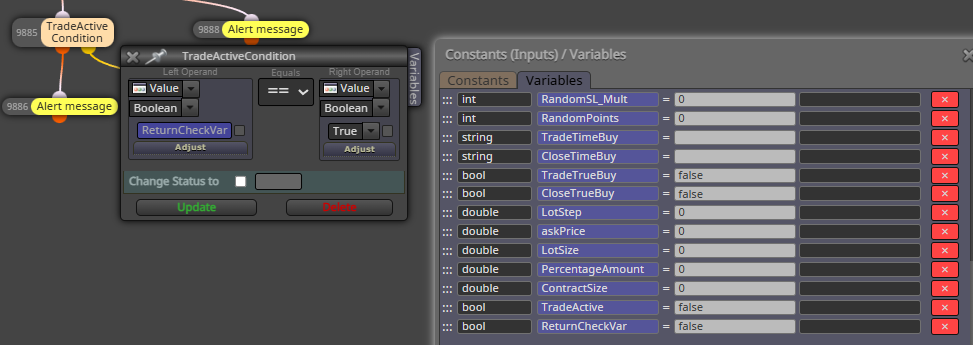
                        image.png
                        I Check ReturnCheckVar in my EA but I always get back false (I think it remains unchanged)
                        In studio I have this code: - ReturnCheckVar is defined as you describe. In the expert tab I see the print: true true
                        So it does not seem to work.
                        bool TradeActive,ReturnCheckVar;
                        ReturnCheckVar=Global_Check_Trade_ActiveLocal(Prefix,TradeActive);
                        Print(ReturnCheckVar,TradeActive);
                        ~next~

                        1 Reply Last reply Reply Quote 0
                        • jstap
                          jstap last edited by jstap

                          All I can say is I do it all the time

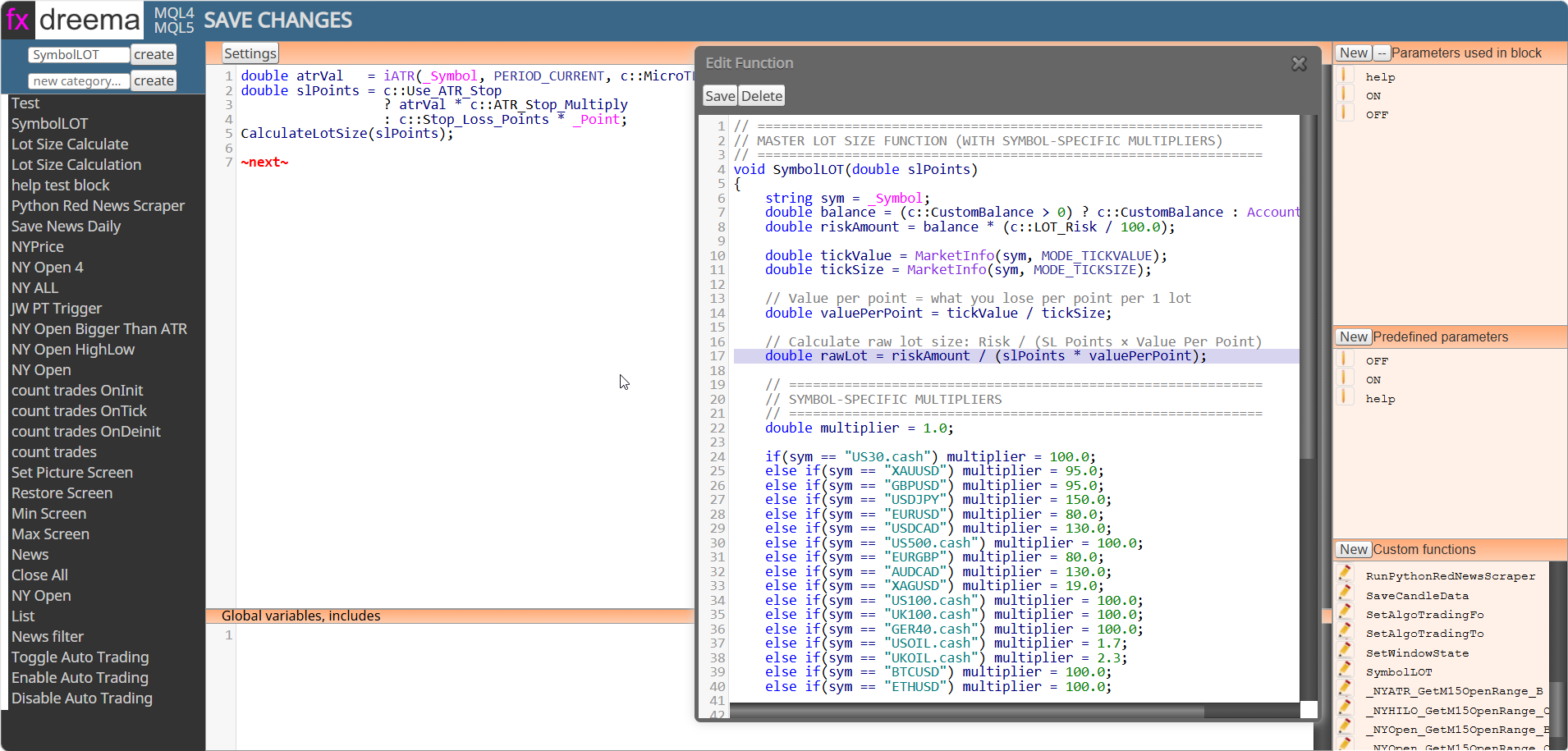
                          msedge_e8YBkBlYX7.png

                          calculatetlot is sent from function to variables:
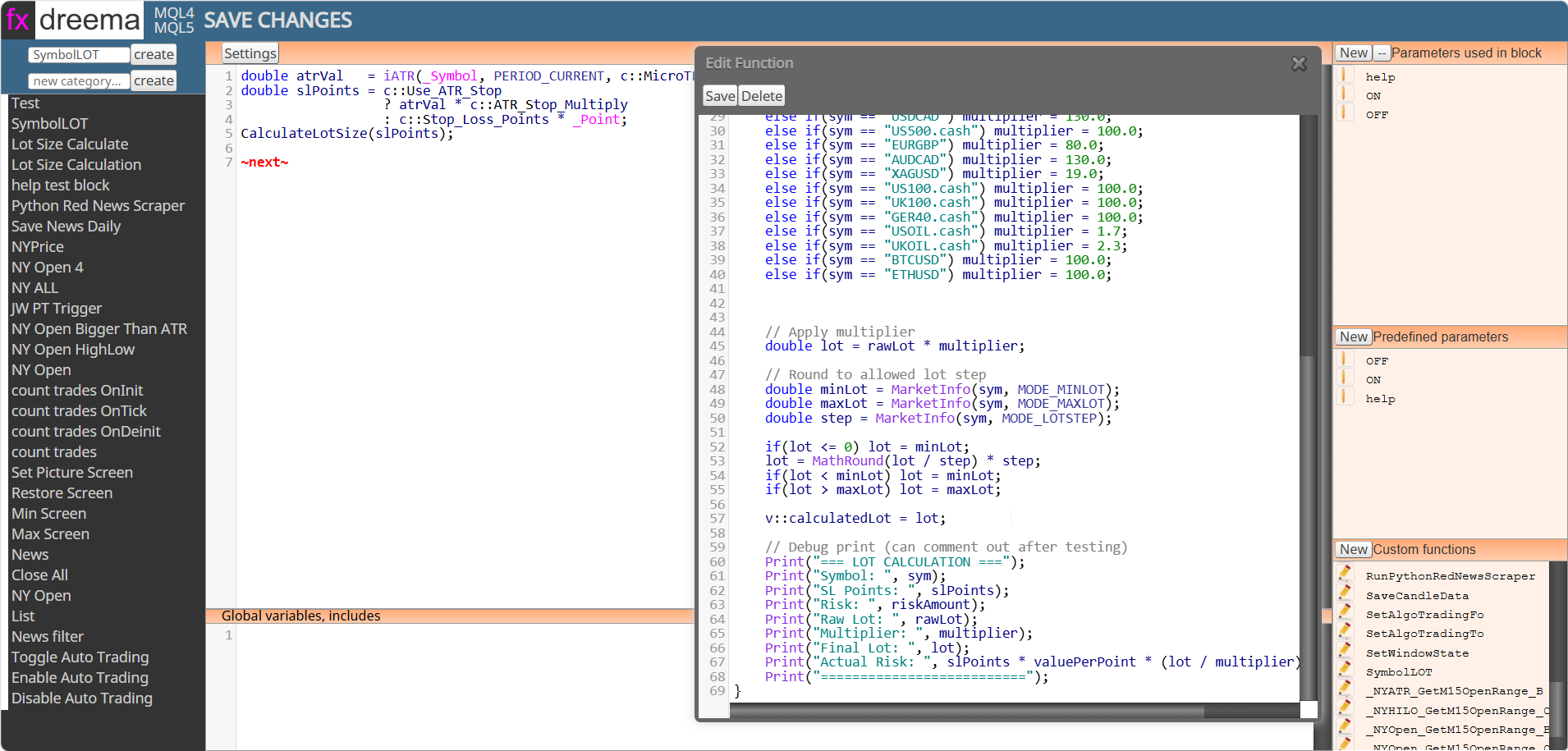
                          a6d9eaa6-0591-44f8-9295-aad5ddc30a4b-msedge_ik5e2d6odk.png

                          Learn fxDreema Without the Wait!

                          My comprehensive book, available on Amazon, is packed with examples and invaluable insights to help you fast-track your learning journey.

                          The paperback and hardback editions include MT4 & MT5 QR codes for easy access to all prebuilt projects and robots, including my latest gold trading robot!

                          Don’t miss out

                          Click here➡️ https://mybook.to/fxDreema to get your copy today!

                          Enjoy! 😊

                          1 Reply Last reply Reply Quote 0
                          • D
                            doeveR last edited by

                            OK, I understand that you send variable values from your Custom function to the Custom Block (code in Area A). I meant sending variable values to the EA in FXDreema where you used a Custom Block.

                            1 Reply Last reply Reply Quote 0
                            • jstap
                              jstap last edited by jstap

                              Thought I sent tis before, create it in FX, then you can use:
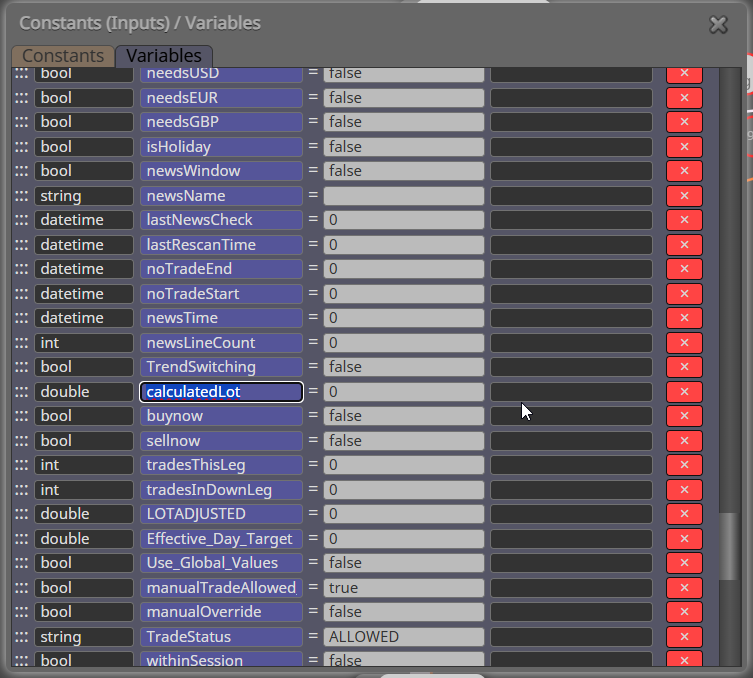
                              8dfe2362-9cdc-4614-955f-a92cb4c773c8-msedge_TSEKBeeeqQ.png

                              Learn fxDreema Without the Wait!

                              My comprehensive book, available on Amazon, is packed with examples and invaluable insights to help you fast-track your learning journey.

                              The paperback and hardback editions include MT4 & MT5 QR codes for easy access to all prebuilt projects and robots, including my latest gold trading robot!

                              Don’t miss out

                              Click here➡️ https://mybook.to/fxDreema to get your copy today!

                              Enjoy! 😊

                              1 Reply Last reply Reply Quote 0
                              • D
                                doeveR last edited by

                                Ok, so apparently that should work although it does not seem to work for me. In your example, you show calculatedLot as a double in your FDX EA, right ? I don't see this exact value in your previous screenshot but I gather thery are named EXACTLY the same ?

                                1 Reply Last reply Reply Quote 0
                                • D
                                  doeveR last edited by

                                  This is how I used in in Sudio and then called it (see previous screenshot)
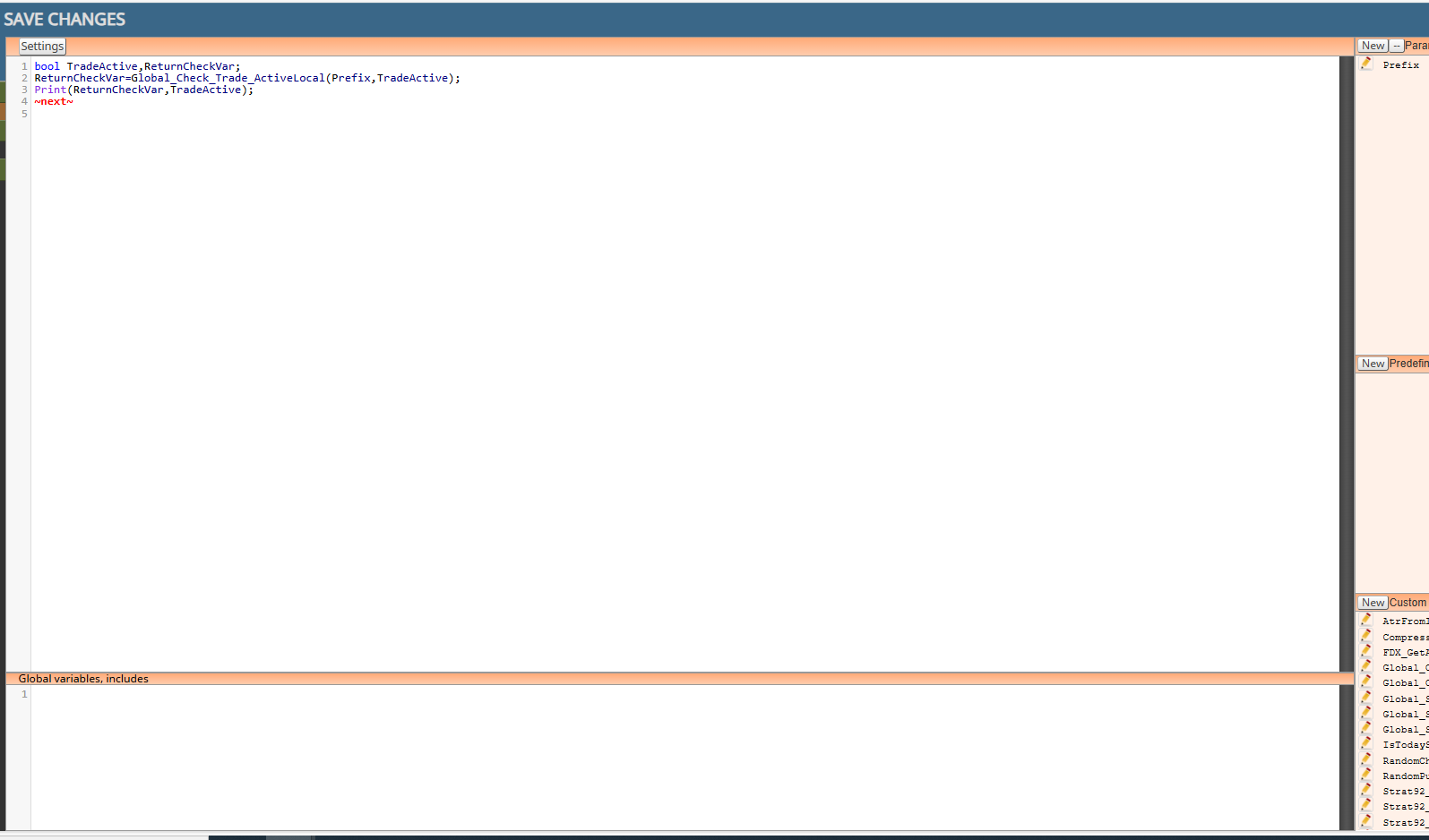
                                  image.png

                                  1 Reply Last reply Reply Quote 0
                                  • D
                                    doeveR last edited by

                                    Ah you use a Custom Function named CalculatedLotSize where you pass the value of slPoints to a variable named calculatedLot - which is then available in your EA. Correct ?

                                    1 Reply Last reply Reply Quote 0
                                    • jstap
                                      jstap last edited by

                                      the calculatedlot that is saved into the calculatedlot variable in the function is then used from the variable in the project EA

                                      Learn fxDreema Without the Wait!

                                      My comprehensive book, available on Amazon, is packed with examples and invaluable insights to help you fast-track your learning journey.

                                      The paperback and hardback editions include MT4 & MT5 QR codes for easy access to all prebuilt projects and robots, including my latest gold trading robot!

                                      Don’t miss out

                                      Click here➡️ https://mybook.to/fxDreema to get your copy today!

                                      Enjoy! 😊

                                      1 Reply Last reply Reply Quote 1
                                      • D
                                        doeveR last edited by

                                        Unfortunately the variable set in my function is not passed on to my EA:
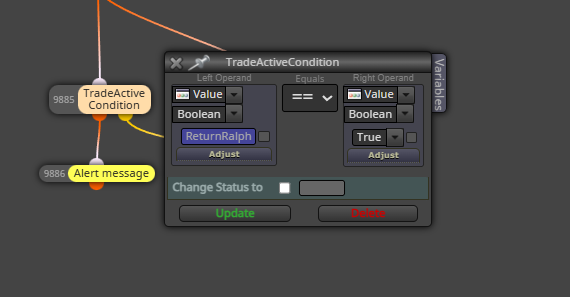
                                        image.png

                                        My printf in the function below says TRUE. The check in my EA gives false for variable ReturnRalph
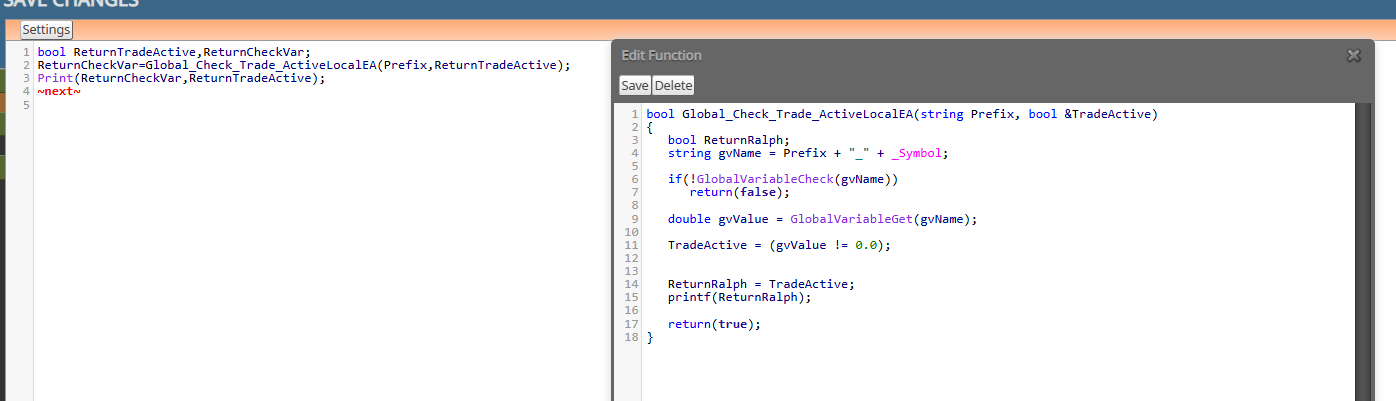
                                        image.png

                                        1 Reply Last reply Reply Quote 0
                                        • jstap
                                          jstap last edited by

                                          how is your global variable set? If it's not it can't return true.

                                          Learn fxDreema Without the Wait!

                                          My comprehensive book, available on Amazon, is packed with examples and invaluable insights to help you fast-track your learning journey.

                                          The paperback and hardback editions include MT4 & MT5 QR codes for easy access to all prebuilt projects and robots, including my latest gold trading robot!

                                          Don’t miss out

                                          Click here➡️ https://mybook.to/fxDreema to get your copy today!

                                          Enjoy! 😊

                                          D 1 Reply Last reply Reply Quote 1
                                          • D
                                            doeveR last edited by

                                            I think I am missing the point of your question (due to lack of knowledge). In the EA I have the variable ReturnRalph as boolean defined. I defined ReturnRalph as boolean in the Custom Fucntion GlobalCheck_Trade_ActiveLocalEA as shown on the screenshot. What is missing that allows a proper return ?

                                            1 Reply Last reply Reply Quote 0
                                            • 1
                                            • 2
                                            • 3
                                            • 2 / 3
                                            • First post
                                              Last post

                                            Online Users

                                            C
                                            I
                                            I
                                            E
                                            E
                                            O
                                            O
                                            D
                                            F

                                            22
                                            Online

                                            146.6k
                                            Users

                                            22.4k
                                            Topics

                                            122.6k
                                            Posts

                                            Powered by NodeBB Forums | Contributors