fxDreema Updating Now
-
-
I just fixed one problem with custom indicators. Their buffer's data was not correctly saved, so if anyone uploaded custom indicator in the last few days - reupload it
-
Why we can't have an "old" version until you finish the upgrade process? Because I have to modify some things on my EA and in these days it's impossible working on it.
Thanks!
-
Ok, here is it - http://fxdreema.com:8080/ (only http works, https doesn't) But I will probably stop it without warning

-
Sorry but...it doesn't work...blank screen
I've tried attaching a screenshot but seems that it doesn't work too. In the editor appear a line of code but here the image doesn't apper.
Other thing...forum notifications doesn't work too...I'm "watching" this topic and I haven't received any notification of new messages.
-
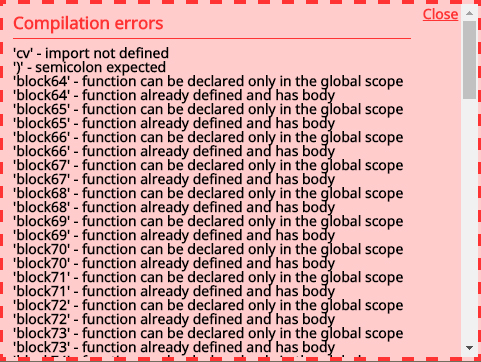
Hi Radoslav, I know you're working hard to finish this major upgrade. As the bugs continue on compilation process, my intention is to help you with screenshots of these errors as I watch them. Good luck and thanks for the effort.
-
@guille4 In block 64 and 208 - what should be in their "Put the result into this Variable"?
-
@fxDreema The new version of fxdreema modified by the letter "c" a previous variable that I had placed there. Now I correct it but it never happened before. Thanks for your support.
-
It would probably happen again. The problem here is that I use two classes - c and v - for Constants and Variables in the MQL4/MQL5 code. So if you have Variable with name MyVar, in the code it exists as v::MyVar. It's a long story, but something weird happened with the combination of these small letters c and v, and I think this could happen in the old builder also.
In short, don't use c or v for constant/variable name
-
My desktop version opened a pure white window. I downloaded version 100 again. It also showed a pure white window for a couple of minutes before asking for my credentials. I am logged in now. It shows I have 137 days left. That is nice for me but not for you as I should be about out of my subscription.
Dwight
BTW, you were wondering why we love the desktop version... I make rather large EAs... 300 or more blocks typically. They display small and manageable on the desktop version. Everything is much larger on the web version.
-
you can make smaller all in online version (ctrl+scroll mouse) and if you type a* into "find" above blocks, all blocks are unwrapped like in offline ...
I tried my offline and it is also waiting longer time (after update) to show login window ... -
@fxDreema Thank you so much! Uploading custom indicators is working now

-
I'am getting this error, very simple one:
-
@owneroxxor This problem appears to be old, it happens only when no parameters are entered. Look at this !iCustomParameters~ part, there are commas on both sides - http://prntscr.com/d90ydi
-
sorry my fault
-
@dscoles The white windows is I think because first the desktop version asks for a file from the server that contains the current version. I made that file accessible, but it still can't find it or something. I didn't investigate that particular problem so much, because it actually works after that. About the incorrect days left, I'm also aware of that as well. At first it slows less days, then more. But this is on my control after all, because this information is sent from the server and I can fix it if something is incorrect.
There is only one reason why I like the desktop version - if someone has giant projects, he can keep them all in it's own hard drive. The database on the server is already gigabytes

-
Hi Radoslav. Just a little question: the block ids cannot hide anymore after the upgrade, and I feel visually comfortable without them. Can you fix it? thanks again.
-
I totally forgot about this setting, it's currently off for everyone. I think I fixed it and it should be working