fxDreema

    • Register
    • Login
    • Search
    • Back to the main page
    • Categories
    • Recent
    • Tags
    • Popular
    • Search

    example: For each trade

    Tutorials by Users
    6
    22
    16114
    Loading More Posts
    • Oldest to Newest
    • Newest to Oldest
    • Most Votes
    Reply
    • Reply as topic
    Log in to reply
    This topic has been deleted. Only users with topic management privileges can see it.
    • M
      miro1360 last edited by miro1360

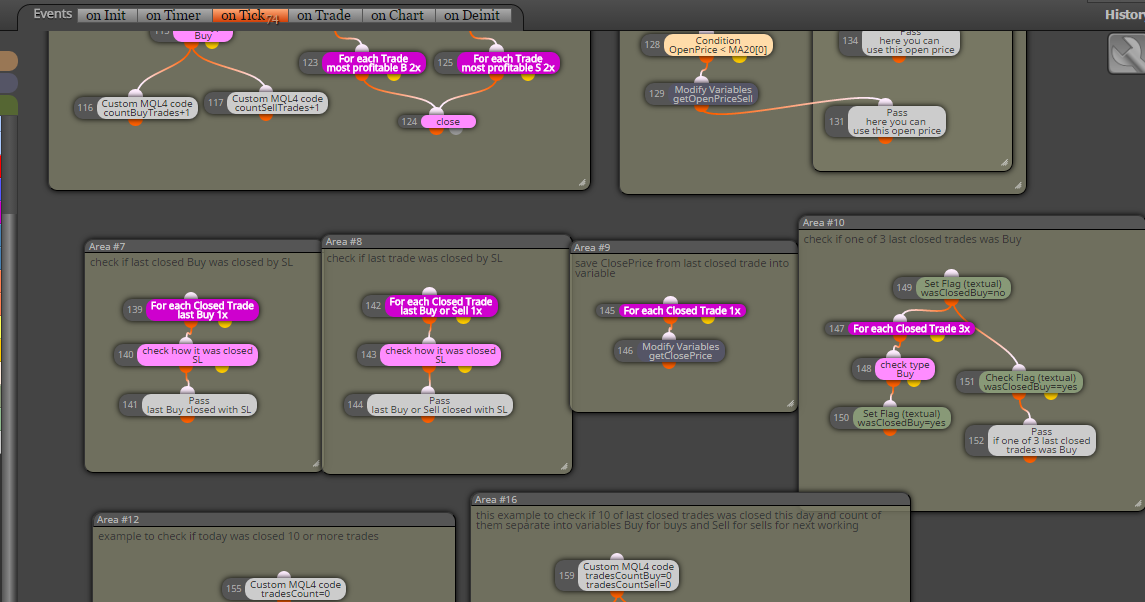
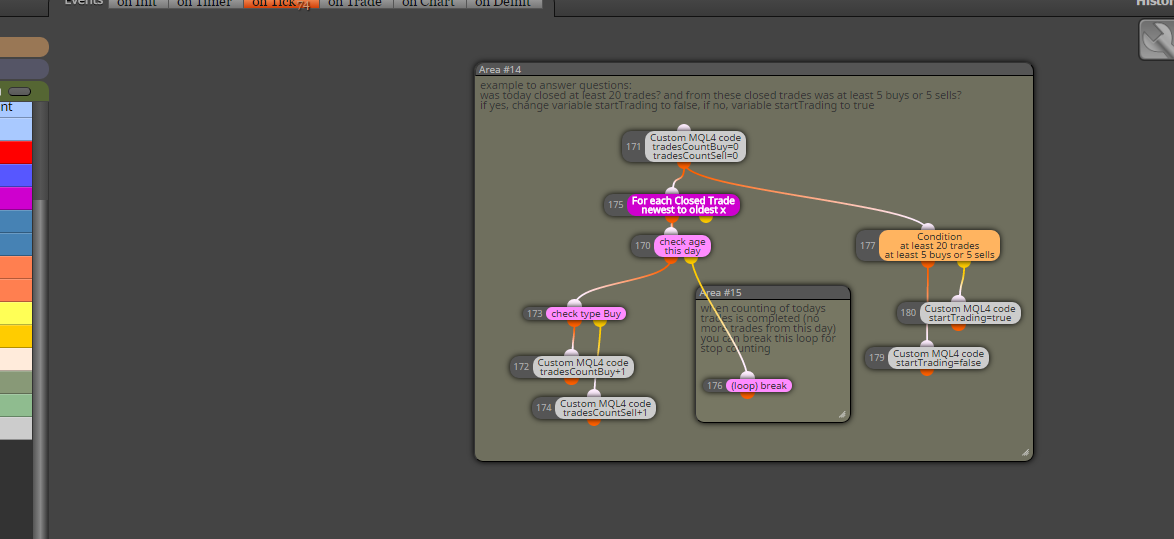
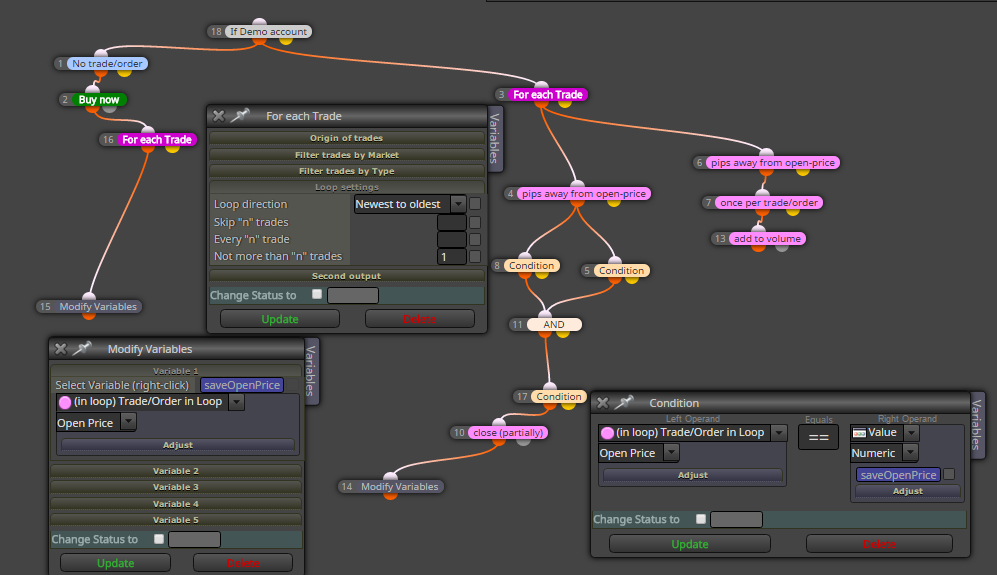
      Here I provide you few examples how to work with blocks For each Trade, or For each Closed Trade, you can also work with blocks for pendings ...

      https://fxdreema.com/shared/FRLmvb2Bb

      you can also download mq4 file and import it into your projects to have my provided original:
      0_1482090825721_example_loop_trades.mq4

      maybe something must not working and need some little change, I have not tried this my examples in tester, you can ... and here are other ways how to do this, better or worser, it is up to you and your invested time 😄

      have a fun ...

      0_1482090846854_upload-463c8517-a5d9-472e-985c-9741f67eb1c1

      0_1482090859640_upload-e2e3cb6a-3377-4fbe-9604-8807276eefc8

      0_1482090878682_upload-de26273f-a6bc-419a-8b31-053b415e802b

      Between trading and gambling is a very small gap, be careful.

      1 Reply Last reply Reply Quote 1
      • S
        shomefun last edited by

        Hi @miro1360 Thanks for this.really helpful, But I have some questions:

        1. What exactly does the Area do? Does it separate the trades... I mean the commands in Area #1 does not control the trades in Area #
        2. Also i will like to partially close a trade, add to volume (partial close should not apply).

        For example:
        Create a trade
        partially close 10%
        partially close 10%
        add to volume (i will not like to partially close this trade).

        Please any suggestions.

        Thank You.

        1 Reply Last reply Reply Quote 1
        • M
          miro1360 last edited by miro1360

          maybe add to lot size without close can be done in MT5 (I have not study how, you can 😄 ), but in MT4 it is not possible (not possible to modify the lot size of trades for original open price or recalculated open price), I mean when your trade is opened like 1.0 lot, you can not modify lot size to 1.5 into one trade

          but here in fxdreema you can do something as opening new trade with the same SL TP like parent one using "add to volume" (currently loaded using For each trade block) ...
          partially closing is working as you asked, here you can view some example to your question:
          https://fxdreema.com/shared/5XS8SPvIb

          or here you can work with ticket number ...
          https://fxdreema.com/shared/Y90zEfaFb
          there are many ways how to work with these numbers, you need try it ...

          instead of "add to volume" you can close trade, load its lot size into variable and add next lot size to this variable: closed was 1.0, you will add 0.5, so result save into variable like 1.0+0.5=1.5 and this 1.5 open as new trade on current price ... it is maybe not as you expected but can working with few compromises (like open on current price)
          ...
          rest what you asked for Area xy, it are only areas for separating examples, each area is each example ... and "area in area" - it is because of comment - I used it only for commenting main Area ...

          Between trading and gambling is a very small gap, be careful.

          1 Reply Last reply Reply Quote 0
          • S
            shomefun last edited by

            @miro1360 Hi, still having the same issue. This is what i am trying to achieve: shared/q1wdRiUPc
            I will like to take partial profit for the parent trade, but do not want to take partial profit for the add to volume. I cant differentiate both trades.

            Would appreciate your input.

            Thank You.

            1 Reply Last reply Reply Quote 0
            • S
              shomefun last edited by

              This is the project: https://fxdreema.com/shared/y6F1bWm9c

              1 Reply Last reply Reply Quote 0
              • M
                miro1360 last edited by miro1360

                no guarantee 😄
                https://fxdreema.com/shared/Vf2S0sctd

                0_1482297364901_upload-c5b94521-128a-41a3-8402-6f3051a2d6c0

                Between trading and gambling is a very small gap, be careful.

                S 1 Reply Last reply Reply Quote 1
                • S
                  shomefun @miro1360 last edited by

                  @miro1360 @administrators @fxDreema Nice. Works like a charm. Thank you so much.

                  My other question is: Can I save the open price for multiple orders (Buy and sell), and put them in a list for cross reference. like you did with the Condition with saveOpenPrice.

                  Thank You.

                  piotras10000 1 Reply Last reply Reply Quote 0
                  • M
                    miro1360 last edited by

                    you mean list as array like:
                    openPrice[0]=1.10
                    openPrice[1]=1.15
                    openPrice[2]=1.12
                    .....
                    openPrice[x]=y
                    ?
                    yes you can do this now ...
                    just define in variables these:
                    double openPrices[100]
                    double openPrice=0
                    int myInc=0

                    take 4 blocks:

                    1. reset variable myInc=0
                    2. For each Trade
                    3. Modify Variable block: save Open price into variable openPrice
                    4. custom code block where you put:
                      openPrices[myInc]=openPrice;
                      myInc=myInc+1;

                    after this you have open price from all trades in array openPrices[] and you can get values from it like:
                    openPrices[0] ... open price from first loaded trade
                    openPrices[1] ... open price from second loaded trade
                    .. etc
                    or using Loop/for where you use your increment variable myInc and you can get values one after another: openPrices[myInc]
                    of course you can resize this array using some functions from mql code, or all what you will do, all next is up to you ...

                    Between trading and gambling is a very small gap, be careful.

                    1 Reply Last reply Reply Quote -1
                    • S
                      shomefun last edited by

                      Great. Yes... I meant like an array.

                      Thank You. will try this out.

                      1 Reply Last reply Reply Quote 0
                      • piotras10000
                        piotras10000 @shomefun last edited by

                        @shomefun No working

                        1 Reply Last reply Reply Quote 0
                        • B
                          BHovens last edited by

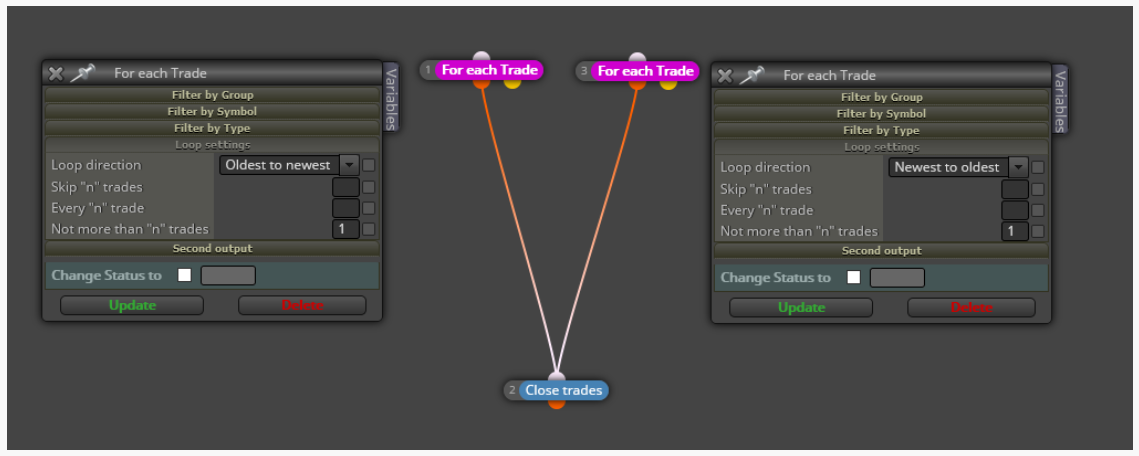
                          Thanks for the great examples on the For Each Trade block. However, I have still an issue when looking for solution to close the first and last trade when breakeven/small profit. The proposed solution as shown in the picture and coming from another tag in FxDreema does not seem to work as it still closes ALL trades. 0_1599913812752_40af43a5-0ad8-401d-89a1-ff99b6b7501e-image.png Does someone has the solution how to close only the first and last trade?
                          l'andorrà 1 Reply Last reply Reply Quote 0
                          • l'andorrà
                            l'andorrà @BHovens last edited by

                            @bhovens Your logic is correct. The problem is that this action is executed every single tick. This is why all of them are closed, because every single tick, both are closed. You need to move to the 'on Trade' tab. Probably you will also need to create a variable to identify when this calculation should be done.

                            (English) I will try to help everyone in these fxDreema forums. But if you want to learn how to use the platform in depth or more quickly, I can help you with my introductory fxDreema course in English at https://www.theandorraninvestor.eu.

                            (Català) Miraré d’ajudar tothom en aquests fòrums d’fxDreema. Tanmateix, si vols aprendre a fer servir la plataforma amb més profunditat o més de pressa, t’hi puc ajudar amb el meu curs d’introducció a fxDeema en català a https://www.theandorraninvestor.eu/ca.

                            (Español) Intentaré ayudar a todo el mundo en estos foros de fxDreema. Sin embargo, si quieres aprender a usar la plataforma en profundidad o más deprisa, te puedo ayudar con mi curso de introducción a fxDreema en español en https://www.theandorraninvestor.eu/es.

                            1 Reply Last reply Reply Quote 1
                            • B
                              BHovens last edited by

                              Thanks. I now added the blocks in the "On Trade" tab, but now when I backtest it is not executed at all. The C_Trade_DD_Red constant for the Check trades count is set to "4". Any solution?
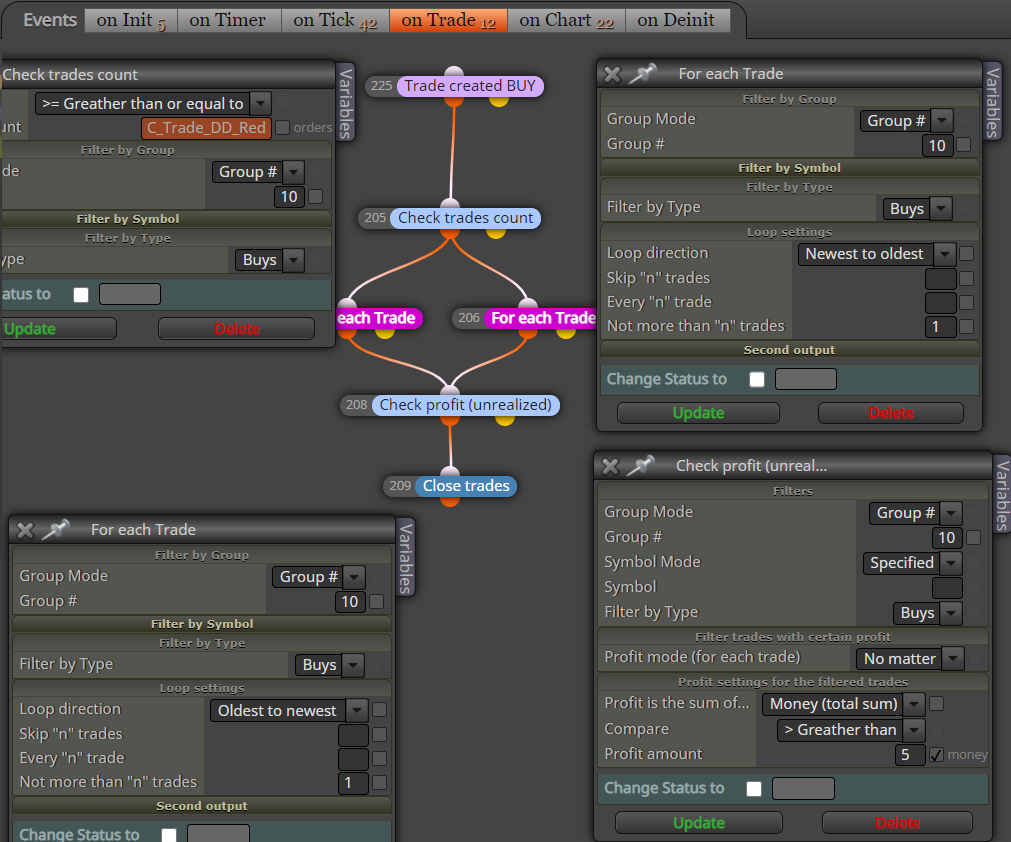
                              0_1599997930819_6b676d3f-c671-44f0-a32a-526ed29c6b74-image.png

                              l'andorrà 1 Reply Last reply Reply Quote 0
                              • l'andorrà
                                l'andorrà @BHovens last edited by

                                @bhovens I see this is a part of a much larger project. Can you please share it? Obviously there is something interfering with this part.

                                (English) I will try to help everyone in these fxDreema forums. But if you want to learn how to use the platform in depth or more quickly, I can help you with my introductory fxDreema course in English at https://www.theandorraninvestor.eu.

                                (Català) Miraré d’ajudar tothom en aquests fòrums d’fxDreema. Tanmateix, si vols aprendre a fer servir la plataforma amb més profunditat o més de pressa, t’hi puc ajudar amb el meu curs d’introducció a fxDeema en català a https://www.theandorraninvestor.eu/ca.

                                (Español) Intentaré ayudar a todo el mundo en estos foros de fxDreema. Sin embargo, si quieres aprender a usar la plataforma en profundidad o más deprisa, te puedo ayudar con mi curso de introducción a fxDreema en español en https://www.theandorraninvestor.eu/es.

                                1 Reply Last reply Reply Quote 0
                                • B
                                  BHovens last edited by

                                  This is the project: https://fxdreema.com/shared/hXFB1qJUb

                                  l'andorrà 1 Reply Last reply Reply Quote 0
                                  • l'andorrà
                                    l'andorrà @BHovens last edited by

                                    @bhovens I don't see any special issue with the whole project. I recommend you to duplicated the structue below both 'For each trade' block on the 'On trade' tab. Just create one variable for the oldest and another one for the newest open trades (as you are doing now) and store the amount of money of each one this way:
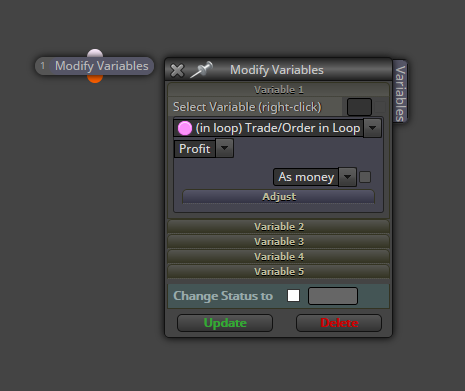
                                    0_1600270433423_01.png

                                    Then subtract one from the other in a 'formula' block and finally compare it with with value of 5. Not an elegant soluton but probaly effective.

                                    (English) I will try to help everyone in these fxDreema forums. But if you want to learn how to use the platform in depth or more quickly, I can help you with my introductory fxDreema course in English at https://www.theandorraninvestor.eu.

                                    (Català) Miraré d’ajudar tothom en aquests fòrums d’fxDreema. Tanmateix, si vols aprendre a fer servir la plataforma amb més profunditat o més de pressa, t’hi puc ajudar amb el meu curs d’introducció a fxDeema en català a https://www.theandorraninvestor.eu/ca.

                                    (Español) Intentaré ayudar a todo el mundo en estos foros de fxDreema. Sin embargo, si quieres aprender a usar la plataforma en profundidad o más deprisa, te puedo ayudar con mi curso de introducción a fxDreema en español en https://www.theandorraninvestor.eu/es.

                                    1 Reply Last reply Reply Quote 0
                                    • B
                                      BHovens last edited by

                                      Thanks for the proposal. As I understand it correctly I have adjusted the project as shown below.
                                      Still with no result as it always still closes ALL trades and not only the oldest and newest trade. 0_1600284457138_8c691b7a-b4e7-41a8-9c15-fa7a324af4c0-image.png
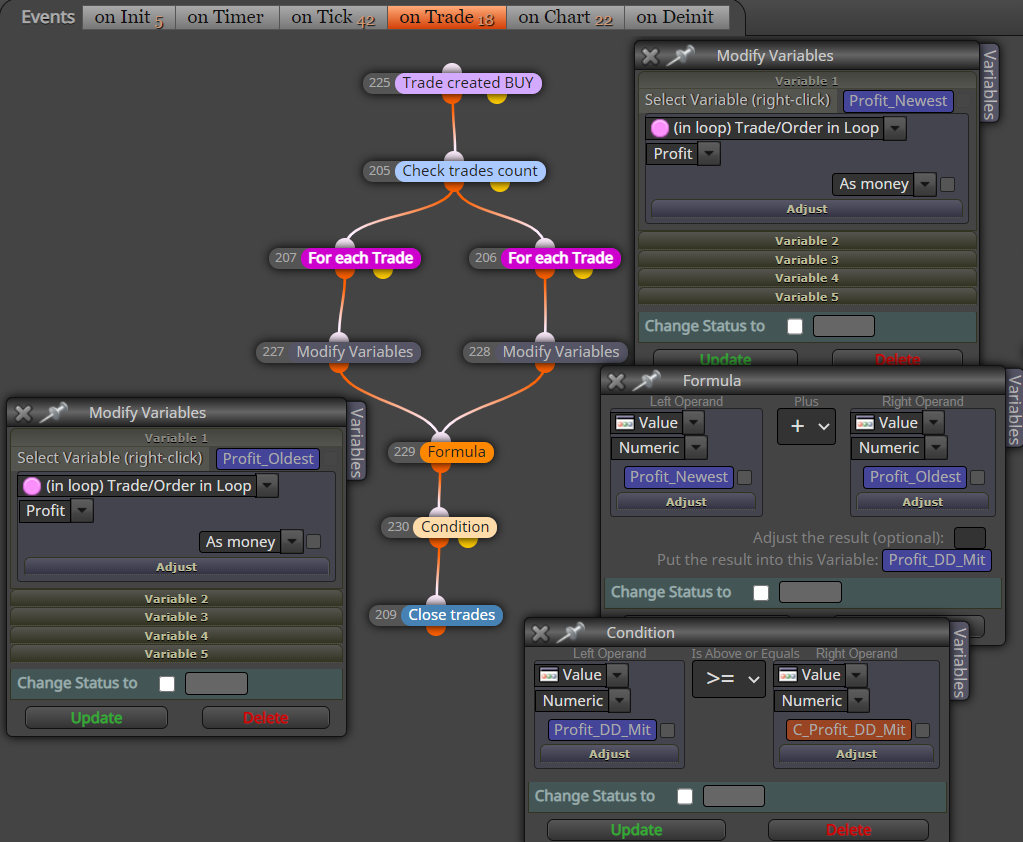
                                      It seems that the "For each Trade" block does not work properly where it should come back only with one trade, it comes back with ALL trades.

                                      1 Reply Last reply Reply Quote 0
                                      • B
                                        BHovens last edited by

                                        Anyone any idea how to resolve this issue?

                                        roar 1 Reply Last reply Reply Quote 0
                                        • roar
                                          roar @BHovens last edited by

                                          @bhovens
                                          0_1600341727489_a7ef4630-7bb7-4279-bb56-c87f2c93c37d-image.png
                                          This blue block doesnt care about the above loop or what trade is currently selected, it always closes all trades. Replace it with the pink close block, that one closes according to the loop.

                                          Need small help? Tag me in your post
                                          Need big help? https://www.fiverr.com/big_algo/automate-your-winning-strategy-in-mql4-or-mql5

                                          1 Reply Last reply Reply Quote 0
                                          • B
                                            BHovens last edited by

                                            Hi Roar, I implemented your suggestion as per below scheme. Still the same result as it does not close the first and last trade, when profit is 5 for both first and last trade, but still closes all trades as programmed in the "on Tick" section. Does it has something to do with the Group #???
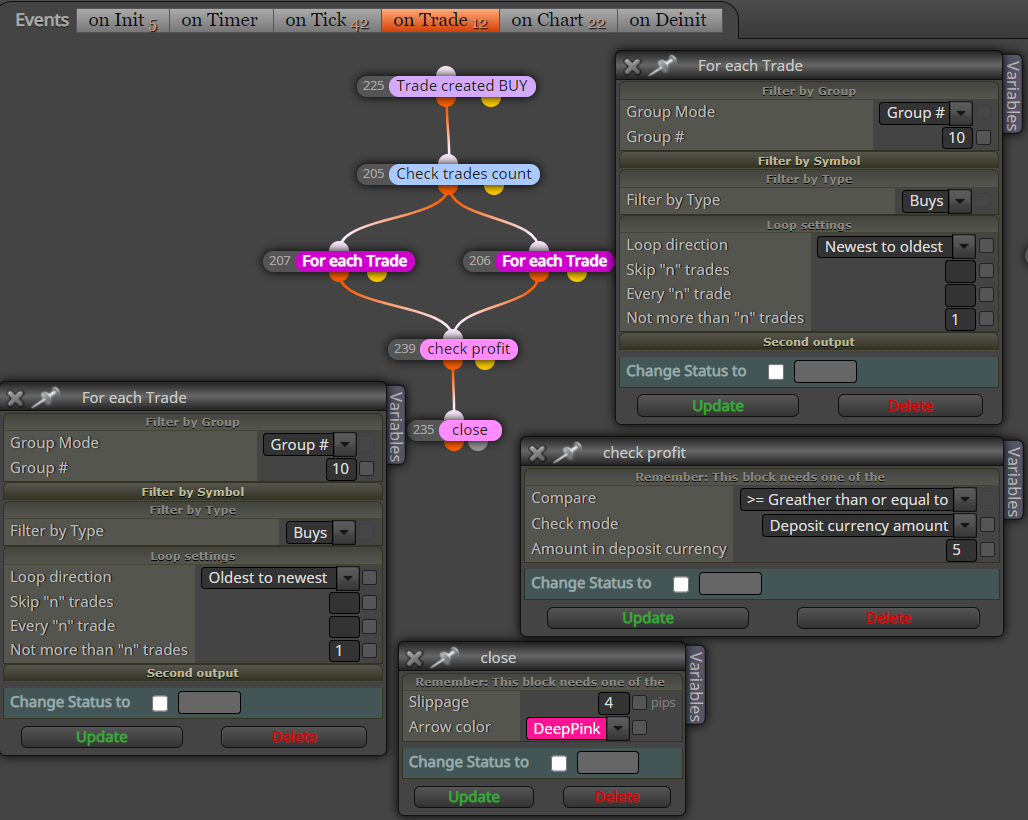
                                            0_1600452409594_155d4146-cdbe-42e7-aa53-ad197b0bb561-image.png

                                            roar 1 Reply Last reply Reply Quote 0
                                            • 1
                                            • 2
                                            • 1 / 2
                                            • First post
                                              Last post

                                            Online Users

                                            A
                                            A
                                            E
                                            B
                                            M
                                            J
                                            B

                                            18
                                            Online

                                            146.7k
                                            Users

                                            22.4k
                                            Topics

                                            122.6k
                                            Posts

                                            Powered by NodeBB Forums | Contributors