fxDreema

    • Register
    • Login
    • Search
    • Back to the main page
    • Categories
    • Recent
    • Tags
    • Popular
    • Search

    UPDATE time, write here if you have problems!

    Questions & Answers
    24
    101
    44827
    Loading More Posts
    • Oldest to Newest
    • Newest to Oldest
    • Most Votes
    Reply
    • Reply as topic
    Log in to reply
    This topic has been deleted. Only users with topic management privileges can see it.
    • fxDreema
      fxDreema last edited by

      You have "My Inidcators" up there in the menu 🙂

      M 1 Reply Last reply Reply Quote 0
      • M
        mohammad2232 @fxDreema last edited by

        @fxDreema
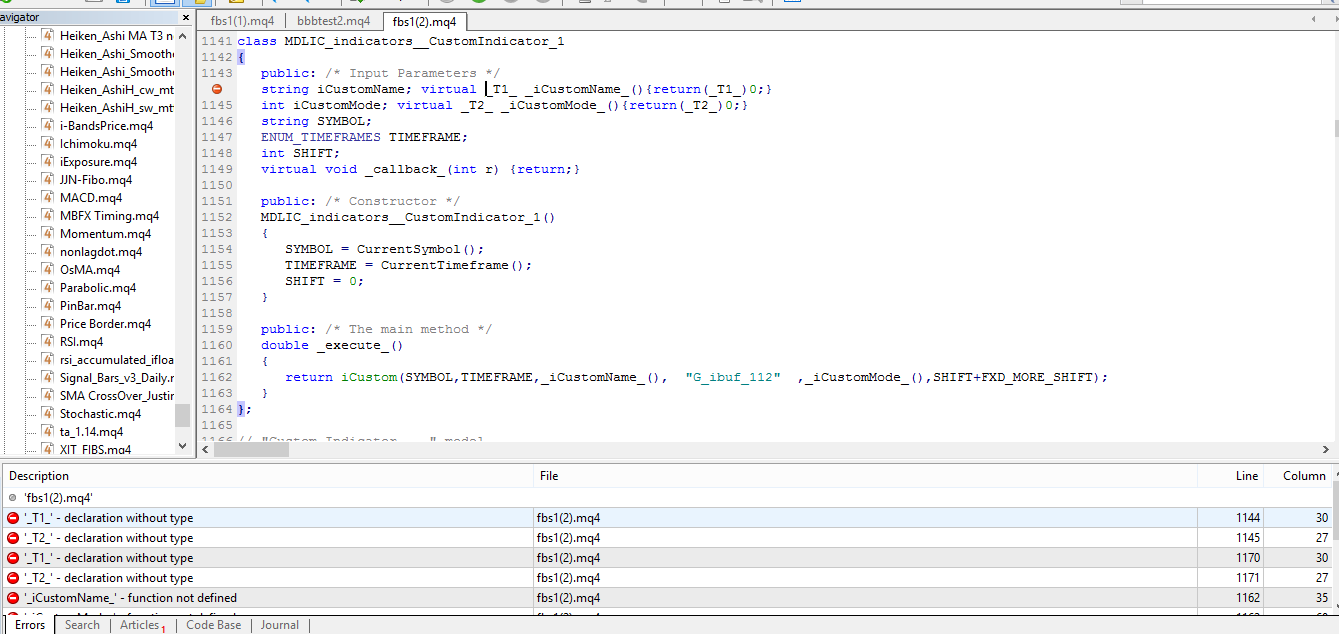
        Yes i know but in desktop version when i use this and click on yellow line was open page and i can select indicator , and because of this i used my indicator and then custom indicator and set name parameter and buffer but now when i use that it show me error that past time do not show me any errors !
        0_1503230154911_01aa.PNG

        1 Reply Last reply Reply Quote 0
        • A
          anse33 @fxDreema last edited by

          @fxDreema
          This is so bad!
          I can't work with FxDreema at the moment!
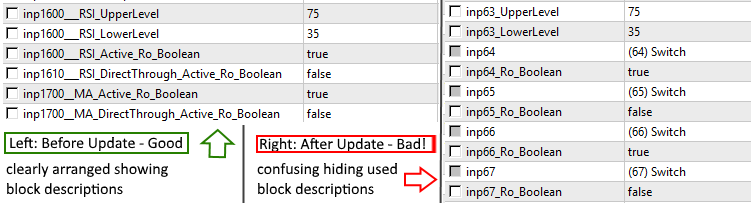
          Please look at the input field in my screenshots: After the update, there is just a mess witch is hardly or not to look through. Before the update, I could identify all fields easily by their block identification numbers/names.
          This is very important. Please make it work again as soon as possible!
          0_1503241200065_upload-c13f7a1a-a547-4b8b-b242-c2789de32287

          fxDreema D 3 Replies Last reply Reply Quote 0
          • fxDreema
            fxDreema @anse33 last edited by

            @anse33 I totally forgot about you, sorry. I will take a look at this now

            1 Reply Last reply Reply Quote 0
            • fxDreema
              fxDreema @anse33 last edited by

              @anse33 How is it now?

              A 1 Reply Last reply Reply Quote 0
              • A
                azazelio last edited by

                Very frustrating
                I had achieved everything works again, and since half an hour nothing is working.

                Still thinking there are something wrong with variables (could be globals, constanst o local, dont know, I use all of them)
                Still not printing nothing on the screen (draw text, etc..).

                Thanks

                fxDreema 1 Reply Last reply Reply Quote 0
                • fxDreema
                  fxDreema @azazelio last edited by

                  @azazelio I think I fixed that problem in block 20, it now says "distance: -5" on the chart. Block 19 prints "-5" (the value of the variable that is selected) and block 18 prints "sample text". I think this is what is expected to happen.

                  1 Reply Last reply Reply Quote 0
                  • K
                    keanzoe last edited by

                    About the buy block, customs sequence, it wont reset until it use all the sequences, can you make option as it reset automatically when the entry hit the TP..

                    fxDreema 1 Reply Last reply Reply Quote 0
                    • fxDreema
                      fxDreema @keanzoe last edited by

                      @keanzoe It works for me for some reason: http://prntscr.com/gaujaw I tried very basic example, simply "No trade -> Buy now" with all default settings. What is different on your side?

                      1 Reply Last reply Reply Quote 0
                      • K
                        keanzoe last edited by

                        is it...i see. maybe i was confused with other block.. thanks admin.

                        1 Reply Last reply Reply Quote 0
                        • A
                          anse33 @fxDreema last edited by

                          @fxDreema Perfect, it works again. Thank you so much! 🙂

                          1 Reply Last reply Reply Quote 0
                          • fxDreema
                            fxDreema last edited by

                            I finally found the problem with objects and I think I fixed it

                            1 Reply Last reply Reply Quote 0
                            • fxDreema
                              fxDreema last edited by

                              I just fixed another problem that appeared when more than one "Once per tick" blocks are used. Maybe the problem appeared in other blocks, I'm not sure. By the way, if you are using this block, you probably don't need to and you can remove it. People are probably fooled by it's name, but this block is not something that creates ticks, it's just a filter that has limited use case.

                              1 Reply Last reply Reply Quote 0
                              • E
                                edro77 last edited by edro77

                                Hello, since a couple of hours values > or < are giving contrary results, please check it
                                Thank you
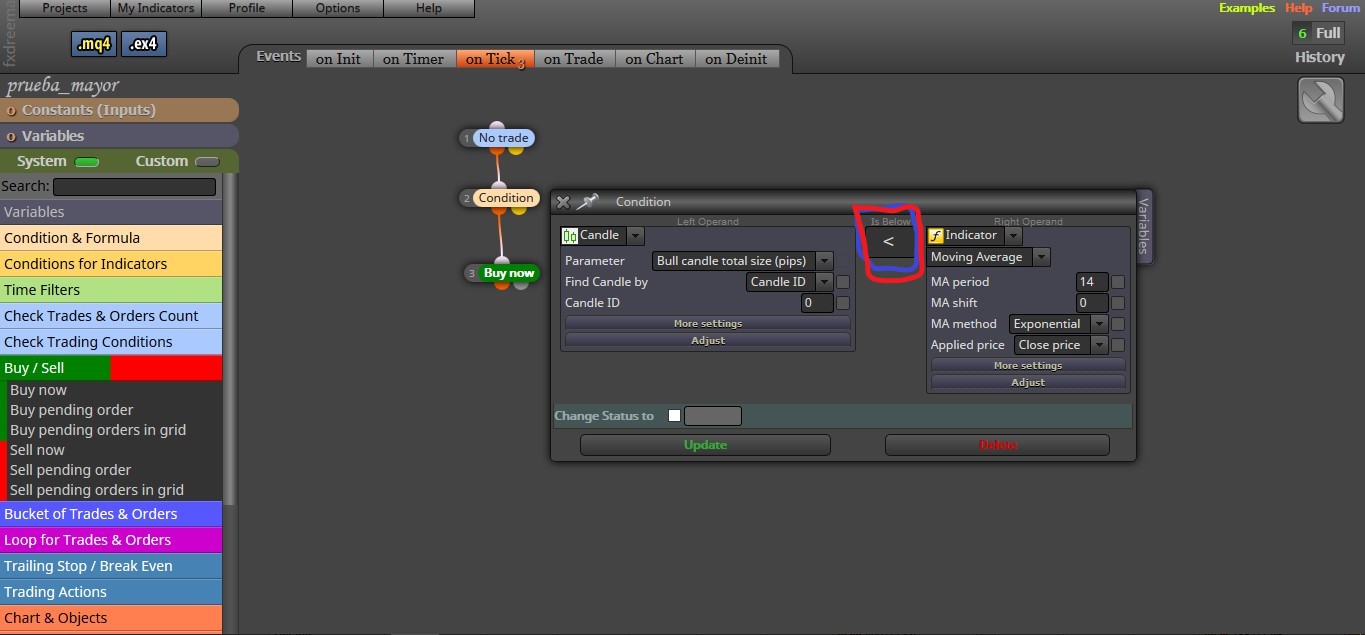
                                0_1503282587977_condition.jpg
                                0_1503282602706_result.jpg

                                UPDATE
                                This rare behavior happens with certain options but with others it behaves well as seen in the image
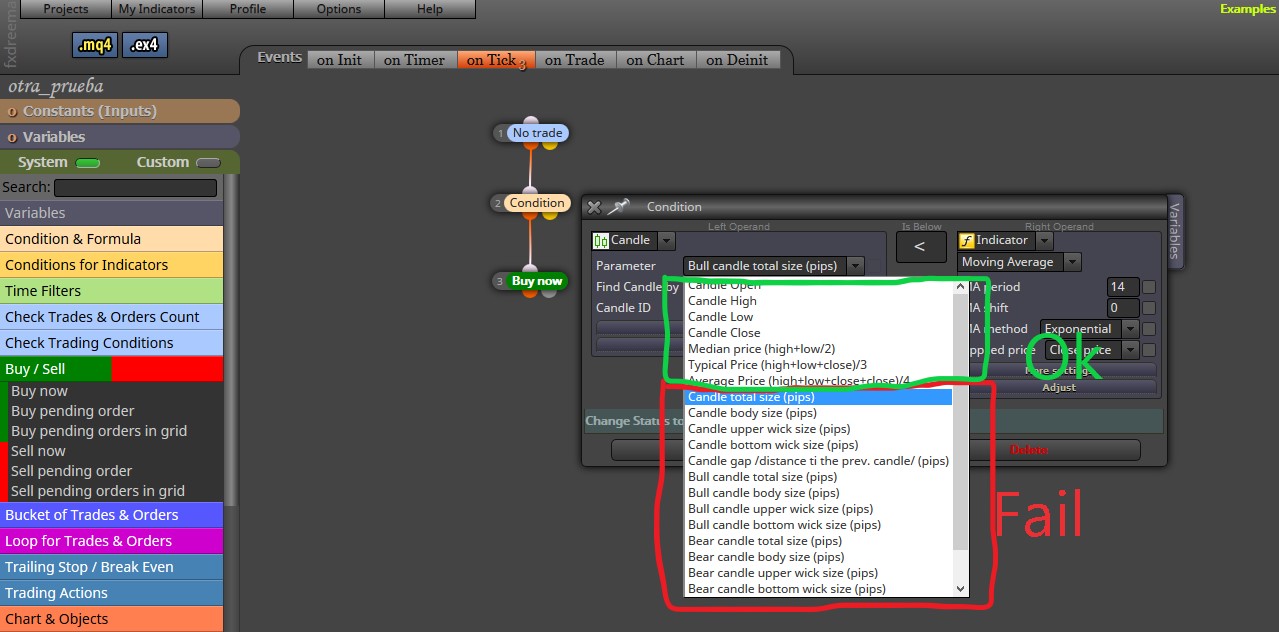
                                0_1503311365741_update.jpg

                                fxDreema 1 Reply Last reply Reply Quote 0
                                • D
                                  drewinbrissie @drewinbrissie last edited by

                                  @drewinbrissie

                                  I'm running an old version of MT4. The updates don't work with it

                                  1 Reply Last reply Reply Quote 0
                                  • fxDreema
                                    fxDreema @edro77 last edited by

                                    @edro77 In the first screenshot on the left side you have something in pips, the value is something like 10 (pips), but on the right side you have something that is like 1.2345. Basically you can't compare both.

                                    @drewinbrissie I don't know how old is your MT4, but now the output code is filled with classes (OOP) and they exist in MQL4 for a long time now.

                                    1 Reply Last reply Reply Quote 0
                                    • M
                                      mohammad2232 last edited by mohammad2232

                                      //////////////////////////////
                                      I think solved 🙂

                                      1 Reply Last reply Reply Quote 0
                                      • S
                                        shafifie last edited by shafifie

                                        Hi,

                                        Can you take a look at this warning.

                                        This warning came up after the update. Should I just ignore it? 😕

                                        0_1503322650979_error fxdreema 1.jpg

                                        Is this normal log when I remove the expert advisor?
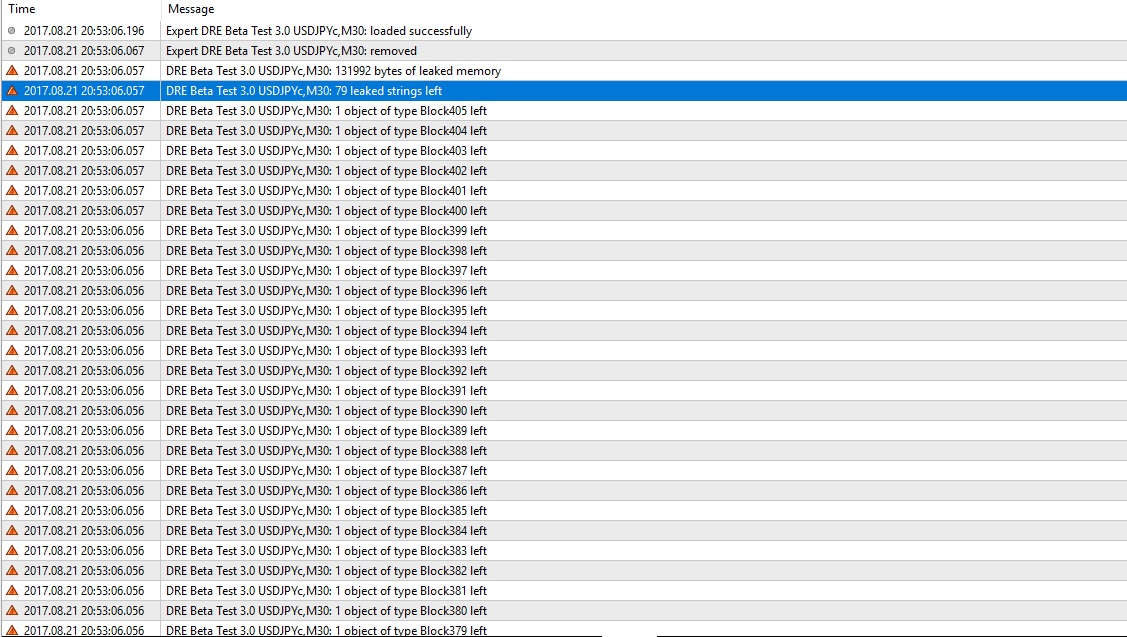
                                        0_1503326687058_error fxdreema 3.jpg

                                        Just let me know.

                                        Thanks.

                                        fxDreema 2 Replies Last reply Reply Quote 0
                                        • fxDreema
                                          fxDreema @shafifie last edited by

                                          @shafifie I can fix these issues. For the moment they are not fatal, only annoying.

                                          S 1 Reply Last reply Reply Quote 0
                                          • fxDreema
                                            fxDreema @shafifie last edited by

                                            @shafifie Actually the problem is like this: http://prntscr.com/gbllqq
                                            In the block there are 4 parameters - Time1, Price1, Time2 and Price3, but depending on what type of object is selected, 2 or 3 of them might be invisible. For your horizontal line you only see Price1, but Time1 is still over there (hidden) and for Time1 some price value is set 🙂 This is not fatal, because Time1 is not actually used, but it exists in the code and that's why you see the warning message.

                                            How do you remove that EA? I added and removed an EA, but I don't see these errors...

                                            S 1 Reply Last reply Reply Quote 0
                                            • 1
                                            • 2
                                            • 3
                                            • 4
                                            • 5
                                            • 6
                                            • 2 / 6
                                            • First post
                                              Last post

                                            Online Users

                                            K
                                            E
                                            D
                                            E
                                            M
                                            H
                                            C
                                            I
                                            I

                                            21
                                            Online

                                            146.6k
                                            Users

                                            22.4k
                                            Topics

                                            122.6k
                                            Posts

                                            Powered by NodeBB Forums | Contributors