Terminate other EAs
-
Is it possible to terminate other running EA's from within the EA? Here is an example what I am trying to do. I would have multiple EA's doing different things for the pair "EURUSD" When certain condition are met I want all EAs to be closed on all charts of "EURUSD"
-
Just an idea: you can assign a value (representing an EA individual number) to a terminal variable. This terminal variable is being read by all EA's in 'on tick'. If an EA sees its own number, then it stops.
-
Thanks for your help. But I am not an expert on this subject and still learning. Do you mind to provide more details with example please?
-
I am going to bump this since I really need this.
-
There is a function called ExpertRemove() to remove the current EA, but this function does not have any input arguments, so it works only for the current EA.
Technically it is possible to work with .dll files and in the past people did some extra stuff that way, but I don't like this method very much.
What I can suggest is to use those Terminal Variables (https://fxdreema.com/help/working-with/terminal-variables) to communicate between EAs. One EA can check for certain variable to be let's say 1, and then to run it's own "Terminate" block.
-
I did not find the block "Set Global variable in MT4" in fxDreema.
How do I modify the terminal variables? How to use them in any blocks? Can you please give an example?
-
I guess that I need to update some pictures
 Search for "Terminal variables"
 -
thank you so much. I was able to find the "Terminal Variable" block. I believe 1 last question is how do I use the terminal variables I declare in the block?
I use constant as c::variable name.....I use the regular variables as v::variablename.
I tried to use the terminal variable as t:variable name, but this didn't work for me. How do I call it in other blocks?
-
No, no, those variables are something entirely different. If you know what cookies are in browsers, those variables are almost the same. MetaTrader keeps them in a file somewhere, so they are stored for few days I think.
In MetaTrader click F3 and you will see them. There is a list of Variable (name) - Value pairs.
In "Terminal variables" you simply make pairs of such variables. You provide a Name, which is a string (text), for example MyVariable, nothing more. And the value is whatever you choose. The value should be something numeric. Then somewhere in Condition you can read them. Again, you provide the same name - MyVariable
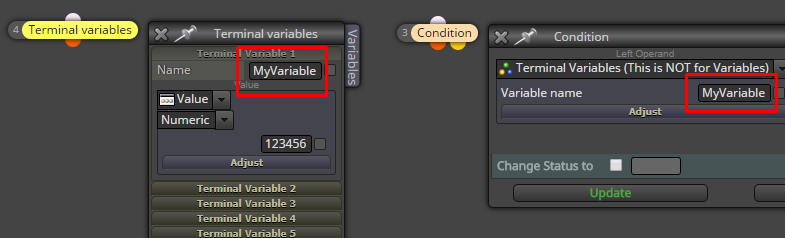
-
Thanks for all your help

