TP hit.. move stop loss to break even
-
so my EA opens two positions when the conditions are hit... 1st has a TP the 2nd has conditions for closing.
how can I make my 2nd position move its stops loss after the 1st trade hits its TP?
-

in theory, after the 1st position closes.. EA counts the remaining positions, then if count is = to one, the stop loss on the 2nd moves.. will this work? -
@trader-philipps Hi sir! :)))))
-
You can try this on the 'On trade' tab:
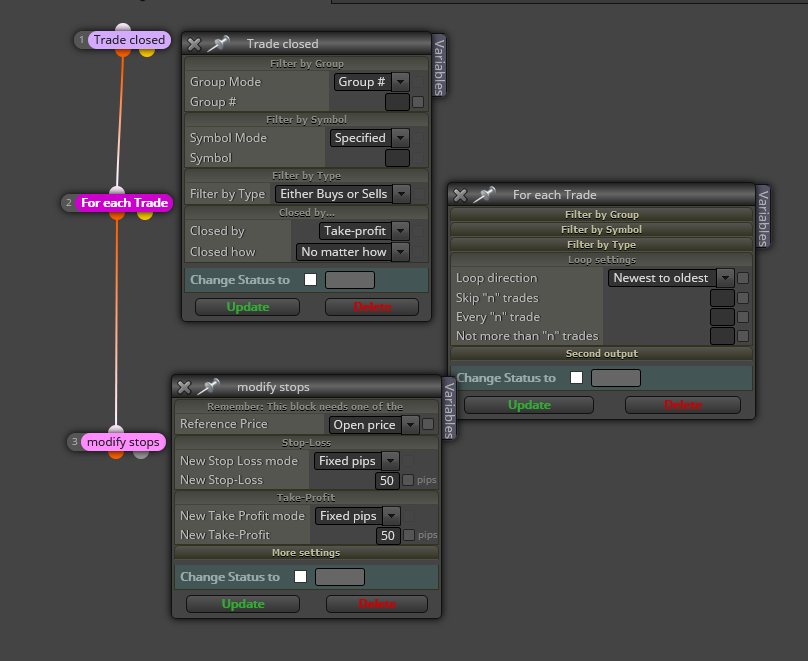
But that will only work well if only two trades are open at any time and one of them hits the TP. If you have more than two trades open at the same time, you will have to adapt the blocks.
-
@l-andorrà Thank you so much sir!! trying it now!
-
@l-andorrà it doesn't seem to work

-
@indaplace2be Work with groups! Group 1 with the trades that close on TP and group2 the ones without. If a condition is valid for both groups specify 1,2 in the groups field of the corresponding block.
@l-andorrà 's approach will work, if you put group 1 on the trade closed block and on the ones after group 2. But be aware you have to specifiy the groups on every block that offers the group # field !Go ahead and try and share your project here if you still have any issues.
-
@trader-philipps how can I do this on manually opened trades?
-
Will all trade be opened manually?
-
@l-andorrà how can I do this if all trades are opened manually? no trades opened by an EA..
-
@indaplace2be as far as I know each group gets an own magic number. As manual trades have magic number 0 the group's approach will not work
-
If I remember correctly, that can be possible by selecting 'All' on the display menu. I remember roar said something about it in another thread, but I couldn't find it. That's interesting, what magic number is applied when that option is selected?
-
@l-andorrà said in TP hit.. move stop loss to break even:
If I remember correctly, that can be possible by selecting 'All' on the display menu. I remember roar said something about it in another thread, but I couldn't find it. That's interesting, what magic number is applied when that option is selected?
I thnk you mean this here? https://fxdreema.com/forum/topic/8561/unreliable-ontrade-filter-events-on-mt5/14
-
Yes, that one. Thanks!
-
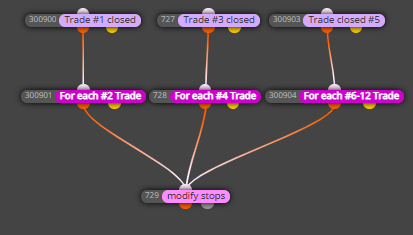
@l-andorrà I tried creating the On Trade tab blocks you suggested, but it isn't working correctly for me. I'd like to do as this topic says, my EA opens two trades with different take profits and I want to move the 2nd trade's stop loss to breakeven once the first trade is closed. There are multiple buy/sell actions with different strategies, but for each type of trade I'm looking to have it move the 2nd half of the trade to breakeven once the first half is closed. Thanks!
Here is my project: https://fxdreema.com/shared/Q2gMvw2O
-
@sauce Man, your project is huge! Honestly I don't have time to review it in detail. What I can tell is that the structure you used on the 'on trade' tab is correct. I guess (and it's just a guess) the problem is in block 300904. You are requesting that all trades belonging to groups 6-12 are moving its SL. This means that will happen to all of them no matter what. Is that what you need? Maybe you want some trades to be moved whereas other aren't?
(English) I will try to help everyone in these fxDreema forums. But if you want to learn how to use the platform in depth or more quickly, I can help you with my introductory fxDreema course in English at https://www.theandorraninvestor.eu.
(Català) Miraré d’ajudar tothom en aquests fòrums d’fxDreema. Tanmateix, si vols aprendre a fer servir la plataforma amb més profunditat o més de pressa, t’hi puc ajudar amb el meu curs d’introducció a fxDeema en català a https://www.theandorraninvestor.eu/ca.
(Español) Intentaré ayudar a todo el mundo en estos foros de fxDreema. Sin embargo, si quieres aprender a usar la plataforma en profundidad o más deprisa, te puedo ayudar con mi curso de introducción a fxDreema en español en https://www.theandorraninvestor.eu/es.
-
@l-andorrà thanks for advice, yeah I just wanted to make sure the On Trade tab structure was correct. I'm wondering if it's because I have the % from stop loss as 100%, should that be 0% to make it breakeven? (don't worry about the rest of the project, its too complicated haha)
For example, I've noticed that when Group #1 trade is closed, the stop loss for Group #2 trade is still at it's original stop loss and has not been moved to breakeven (I guess it doesn't matter that much since I have a different EMA cross profit stop coded so it would closed in profit before reaching breakeven again, but the fact that it isn't moving bothers me)
-
@sauce IMHO you should use different 'breakeven' blocks, one for each group.
(English) I will try to help everyone in these fxDreema forums. But if you want to learn how to use the platform in depth or more quickly, I can help you with my introductory fxDreema course in English at https://www.theandorraninvestor.eu.
(Català) Miraré d’ajudar tothom en aquests fòrums d’fxDreema. Tanmateix, si vols aprendre a fer servir la plataforma amb més profunditat o més de pressa, t’hi puc ajudar amb el meu curs d’introducció a fxDeema en català a https://www.theandorraninvestor.eu/ca.
(Español) Intentaré ayudar a todo el mundo en estos foros de fxDreema. Sin embargo, si quieres aprender a usar la plataforma en profundidad o más deprisa, te puedo ayudar con mi curso de introducción a fxDreema en español en https://www.theandorraninvestor.eu/es.
-
@l-andorrà thanks, but it seems it doesn't work even for the ones that are separate/single groups already (see Trade #1 closed > For each #2 Trade > modify stops (b/e))
@indaplace2be said in TP hit.. move stop loss to break even:
so my EA opens two positions when the conditions are hit... 1st has a TP the 2nd has conditions for closing.
how can I make my 2nd position move its stops loss after the 1st trade hits its TP?
@indaplace2be did you ever figure out a solution? I have the exact same issue, TP1 closed and I want to move my conditional TP2's stop to breakeven.
-
@sauce I'll be honest. Such a large project can have several parts that are maybe hindering that stops modification. What I can suggest is that you rebuild the project from scratch and check every new part one by one. It's a slow and annoying process, but effetive one.