Grid function bug
-
OK so I built a pretty big and complicated bot with a grid function. When I created the grid function alone it was working fine and I have since added more and more into the bot.
0
And now the grid function works sometimes and doesn't work sometimes.If it was just not working, I might be able to find the problem but I can't understand why it sometimes works and sometimes doesn't work.
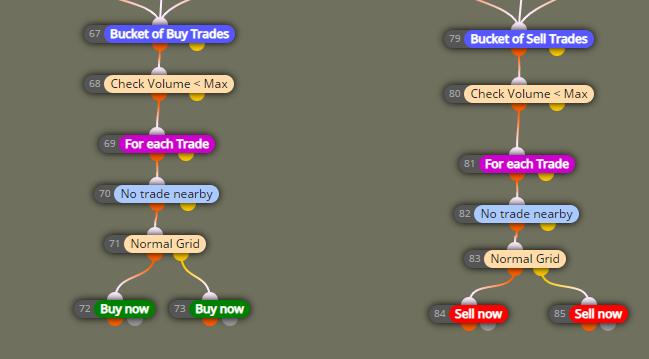
So this is the tree the governs the grid function
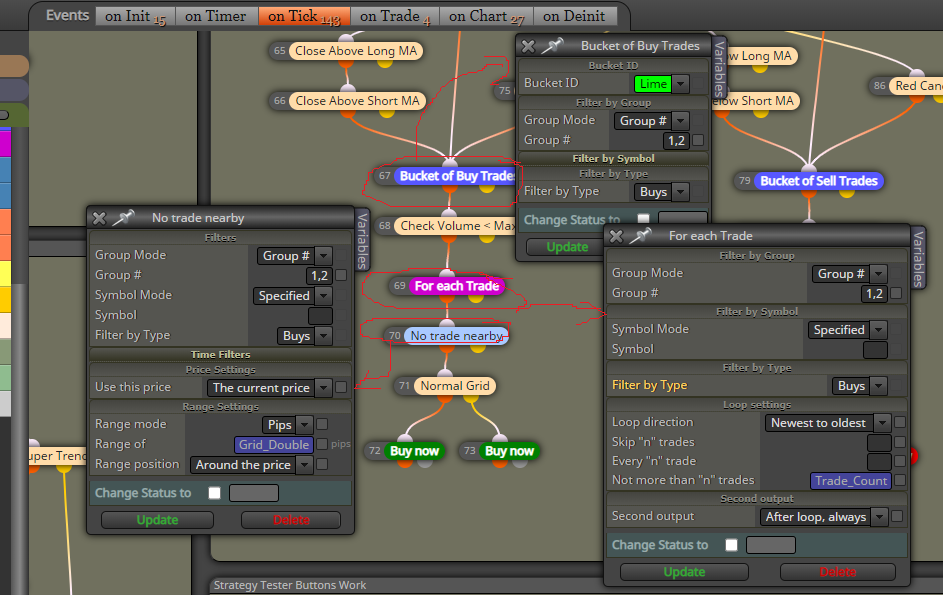
I first compiled the trade information in a bucket of trades.
Then the for each trade loop and the number of trades to check (Trade Count Variable) will always 5 trades more than the current trades.
Then a no Nearby trade function which checks for no trades above or below any of the trades from the trade count in the "For each Trade" loop.
This creates a grid and it works fine... Until it doesn't.
Sometimes it takes 2 trades at the same level at the same time. How can I stop this from happening?
The problem started 2 days after the bot was running fine. Suddenly the bot lost all sell trade information. The bot did not read any sell trades in the bucket and it opened multiple sell trades until the account could not open any more.
I am not sure if the block ID's have anything to do with the code but I previously had block ID's up to 14000+ in my code. I have since changed all block ID's to the lowest possible number in an attempt to simplify the code. ( not sure if this makes a difference or not?)
It hasn't lost the entire bucket of sell trades since this change. But it is opening double trades every now and then. Not all the time, Just sometimes. And I cant figure out why. I have been struggling with this all week.
Someone please help.
Thanks in advance for any feedback. -
@stantonhitz Yes, the order of number ID of blocks on top of each tree is DETERMINING in the EA execution. Honestñy, when dealing with huge projects like this the most efficient solution is deconstruct it and reconstruct it again module by module. The grid should be the first so that any later module can be identified as the origin of the issue.
Beyond that, I'm afraid I cannot be more helpful, sorry.
-
Thanks for all your answers. As I understand you are not affiliated with Fxdreema. Is that correct? And if yes then why is no one that IS AFFILIATED with Fxdreema available to answer any questions. The tree builder is awesome but to be honest since I found this tree builder, I found many other projects doing similar things. And if there is no one who is a real coder and who is from FXdreema that is available to help with problems, then who am I paying membership fees to every month and why are they npt available to answer my questions?
-
@stantonhitz My friend, I can confirm I am NOT affiliated to fxDreema. And your question has been asked many times in the past by many subscribers. The only thing I will say is that Mr. Rastev, (the owner and creator of this tool) does not consider offering a full support service a priority for his business. I know it is frustrating, but this is the situation right now, I'm afraid.

-
Understood thanks
-
So I started from scratch and I re-wrote all 139 blocks from the beginning. and the first thing on Monday morning the first trade I take immediately has the same problem. LOL

I don't understand because according to the logic, it should work. And in the actual EA, it works most of the time. But sometimes not. why that sometimes... I really don't know.
-
@stantonhitz Man, this should be sent to the admin. Just contact him and let him know.
-
@FXDREEMA-0 @fxdreema-1 @fxdreema-2 Good day Could you please assist with this problem?
-
@stantonhitz I'm afraid the most effective way to do it is via the support page.
-
I also have the same problem. So far, no solution... It's actually quite sad that such a great project is not being maintained anymore. This raises the question of whether it makes sense to continue supporting and learning this project or to just learn everything on your own.
-
@tswaldi Because this is an old project, and with no shared link it is impossible to say if it is good or not. Create a question, after starting your project, add a shared link and say what you are trying to do. This is a rough idea of how I create grids: https://fxdreema.com/shared/vu0xShJZ
-
@jstap Thank you for your support. I currently have two problems that I can't solve.
- When the terminal is restarted, the variables are deleted and the EA opens new grid positions with only 0.01 lot. It should actually continue with at least the previously set lot size...
- With the first trade, it often happens that the EA opens two trades at once.
I have shared the link accordingly:
https://fxdreema.com/shared/hrSJJHbjd -
as for placing 2 trades at once use a draw text block to know which tree has placed the trade, as for keeping the last used lot you will have to use global variables so it is always remembered.
-
@jstap Thank you for your support, that seems to be the right way.
-


