fxDreema

    • Register
    • Login
    • Search
    • Back to the main page
    • Categories
    • Recent
    • Tags
    • Popular
    • Search
    1. Home
    2. BlueMoon
    3. Posts
    B
    • Profile
    • Following 3
    • Followers 3
    • Topics 96
    • Posts 246
    • Best 5
    • Controversial 2
    • Groups 0

    Posts made by BlueMoon

    • RE: What do these errors and warnings mean?

      Thanks for your support and your reply. I really appreciate it.

      When will they be fixed? I am seeing all weird unexpected results when I run my scripts so I thought they are fatal.

      Also, I have never seen all such errors before? Do you think they have been newly introduced or is there something new I am doing that I never did before? If so could please point out what I could be doing and if there is alternate way to do the same?
      posted in Questions & Answers
      B
      BlueMoon
    • What do these errors and warnings mean?

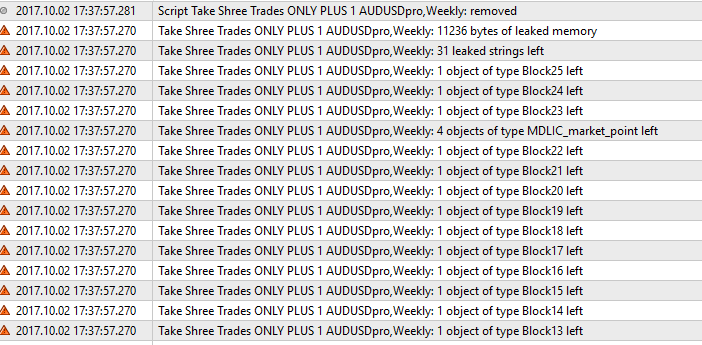
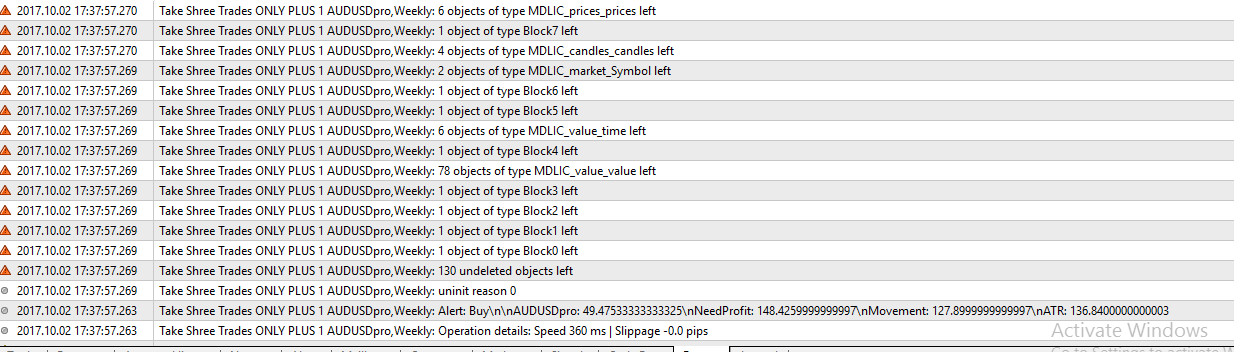
      I am seeing all these errors and warning in my Journal Tab when I run my script. I am not getting the expected results from my script so obviously things are not working here due to errors and all these issues. Can someone please point out what these errors mean? Why am I getting these? How do I take care of it?

      0_1507035598232_upload-0414511d-afab-45fc-a42b-ee3b4b29456f

      0_1507035641489_upload-4628d3e7-082a-4e63-82cb-2f621825c3f9

      posted in Questions & Answers
      B
      BlueMoon
    • zero divide in '11872-26913.mq4' (5750,31)

      Why am I getting this in my logs when I run my script? My script is showing all kinds of inconsistent weird results.

      What is happening here? How do I correct this problem?

      posted in Questions & Answers
      B
      BlueMoon
    • RE: any way to do this:

      @Jennifer said in any way to do this::

      @yalgaar
      thanks i tried it that way but how will be the variable be incremented each day automatically ?
      i tried using modify variable block but i must have been doing something wrong

      You can use the "Once a day" block to increment the variable each day

      posted in Questions & Answers
      B
      BlueMoon
    • RE: any way to do this:

      I think you can do this by easily by putting a condition before entering new trades. The condition should check the existing equity. If equity is above certain number...only then take new trades. You can decide whatever you want the equity number to be and put this in variables incrementing it each day.

      posted in Questions & Answers
      B
      BlueMoon
    • How to find this price of the specific candle?

      I am finding this hard to figure out myself so posting it here.

      I have a bucket of trade. I want the open price of the weekly candle which is before the oldest trade in this bucket of trades.

      What I mean:
      I could have several trades in a bucket that I can easily define. Lets find out which trade is the oldest trade in this bucket. Once we find out the Date/Time of this trade...we can easily know which week this trade was taken. I want the open price of the weekly candle before this.

      Can someone please help me with this?

      posted in Questions & Answers
      B
      BlueMoon
    • RE: 1 EA to check multiple accounts for equity

      OK lets say I have 10 accounts with FXCM, 10 accounts with Forex.com.

      I don't mind to run 2 MT at the same time. I want the EA to log in to each of the 10 accounts every minute, check equity if it is above the specified number and close all trades if that is the case.

      posted in Questions & Answers
      B
      BlueMoon
    • RE: 1 EA to check multiple accounts for equity

      Thanks for your reply. But I really need to be able to do this from 1 EA. I cannot have multiple EA's running at the same time due to many reasons.

      posted in Questions & Answers
      B
      BlueMoon
    • RE: 1 EA to check multiple accounts for equity

      Can someone please help me here?

      posted in Questions & Answers
      B
      BlueMoon
    • 1 EA to check multiple accounts for equity

      I want to create 1 EA which will do the following. I would appreciate any ideas to be able to achieve this:

      1. The EA will check equity on multiple accounts (over 20)
      2. If the EA finds the equity on the account to be more than a certain number(this number will be provided by the user for each account) then the EA closes all trades in that account and creates an Alert.
      3. The accounts will be with all different brokers.
      posted in Questions & Answers
      B
      BlueMoon
    • Once per bar but skip certain times

      Can someone please help me to achieve the following:

      I want my EA to do it stuff once per bar on a hourly timeframe. But I want it to skip the following hours:

      1. 3pm EST Friday
      2. 4 pm EST Friday.
      3. 5pm EST Sunday
      4. 6pm EAST Sunday.

      I want to EA to do its thing for every single bar that appears except for the above list.

      posted in Questions & Answers
      B
      BlueMoon
    • Is it possible to have a dropdown list for inputs?

      Is it possible to have a dropdown list for inputs?

      I would like the input to have a dropdown list from which I can select only one of the pre-decided value.

      posted in Questions & Answers
      B
      BlueMoon
    • RE: Terminate EA when Equity is above a certain number

      Yes I am 100% sure my equity didn't reach.

      Any idea what could have happened? Why did my EA terminate? Obviously my equity at some point even for 1 second might have reached due to whatever reason. What could be such reasons? Also even if that happened why my trades didn't close?

      I checked your blocks and code, how is it different than what I am doing?

      posted in Questions & Answers
      B
      BlueMoon
    • Terminate EA when Equity is above a certain number

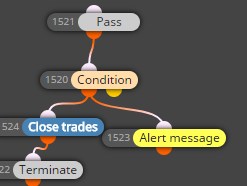
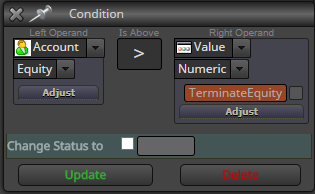
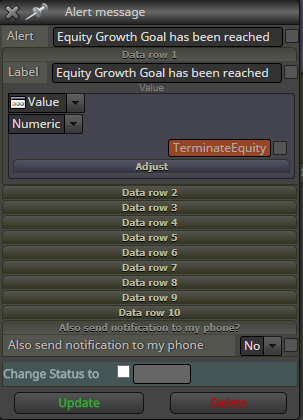
      I am trying to terminate my EA when my equity reached a certain number that I provide in the input of starting the EA. I also want to close all trades at this point.

      Something went terribly wrong with this code. I am not sure what happened. But I noticed the following:

      1. My equity has not reached the number that I had input.
      2. It still terminated my EA.
      3. It did not close any trades.
      4. I did get the Alert message so seems like the condition did pass.

      How is all this possible? Any ideas?

      0_1504788326348_upload-c303a411-23a5-4ee6-9036-e63bdf8d2a33

      0_1504788350111_upload-30738d84-d880-407f-adba-be9c49f79f58

      0_1504788558377_upload-012ea4bc-0622-4517-a19f-0665151e0ce8

      posted in Questions & Answers
      B
      BlueMoon
    • RE: Stop EA while not losing variable values

      That is not an option!
      I still need a way for the variables to not lose its value

      posted in Questions & Answers
      B
      BlueMoon
    • Stop EA while not losing variable values

      My EA is based on "Once per bar" so it stops working exactly at 5:00pm EST Friday . Even though the EA is still running. As soon as it sees the new bar on 5:00pm EST on Sunday it will start making the trading decisions based on my blocks.

      I would like to stop the EA making any decisions at 5:00pm EST since the spreads are very high at this time. I cannot just stop the EA since it will lose the values of all my variables that it is using internally.

      My questions are:
      How do I make the EA not do anything until I want it to? I do not want to use time filter since I don't have a fixed time in mind when I want it to stop working. I just want to be able to manually do this while not losing the values of my variables.

      posted in Questions & Answers
      B
      BlueMoon
    • RE: Where are my Alerts?

      I think I figured out what you meant. You meant to use "write to file" block instead of "Alert" block

      posted in Questions & Answers
      B
      BlueMoon
    • RE: Where are my Alerts?

      @pffx said in Where are my Alerts?:

      Hi,
      The alerts are holdings only in a memory during the MT4 session. After restart MT4 all previous Popup alerts are disappeared.
      If you want to hold/save these information from alerts the better way is to use a local file(s) or send an e-mail.

      Thanks for your help. What do you mean by use local files?

      posted in Questions & Answers
      B
      BlueMoon
    • RE: Where are my Alerts?

      You are right. Triggering an alert will open the alert window which will show me the current alert as well as all the past alerts. This does help me. Thank you very much.

      The question is still where are all these alerts stored? How and where can I access them without triggering a new alert?

      posted in Questions & Answers
      B
      BlueMoon
    • RE: buy stop and sell stop

      yes ofcourse.

      Use the Pending Order blocks and use whatever price offset you need to use.

      posted in Questions & Answers
      B
      BlueMoon
    • 1
    • 2
    • 3
    • 4
    • 5
    • 6
    • 7
    • 8
    • 12
    • 13
    • 6 / 13