Hello???
Is this an error?
Could you check it?
Thank you,
Hello???
Is this an error?
Could you check it?
Thank you,
Hello,
The block 'Modify Stops of Trades' is not working well.
When selecting the option "Price relative to" CUSTOM (PRICE LEVEL). The block does not show the fields to select the custom price level.
I attach the link to a picture of it.
https://www.screencast.com/t/OgRRFbCV9
Could you review it, please?
Thank you,
David R.
Hello,
I'm trying to use the 'Modify stops of trades block' and It doesn't show the boxes to choose the Custom Price level in the 'Price Relative to'.
Is it an error? If yes, could you repair it?
Thank you,
David R.
Ok, I think it's pretty clear...
Let's say, if connected to Every tick, the block for each object will iterate to check every object on every tick.
Thank you!
Hello,
I want to create an EA that checks if the price crosses some horizontal lines and then open/close trades. There are a lot of horizontal lines and I want not to have to rename all of them.
How can I do it? I’ve been trying with -For each object- but it does not work as I supposed it should. It skips some lines and does not open nor close the trades as it should.
Any idea?
Than you,
David
Hello,
I have a question regarding the block -For each object-.
Does it make a complete loop every tick (if connected to every tick block or every tick tab)? And, does it give the output we demand from it for every objet on the loop every tick?
Thank you,
David
Hello Nuria,
Candle ID 0 is for the current one, so its close value, for example, is dynamic.
If you use ID 1, you are working with the last closed candle.
Hope it helps,
David
Hello,
The same issue It's happening to me as well...
Hello,
I'm having the same issue.
I can't identify which is the block that contains the faulty code.
How can we solve it in fxdreema and not in the MetaEditor?
Thanks!
David
Hello,
I'm trying to count the short and long open trades and I'm trying to do it with the block "Check trades count".
But I think it only counts the pending orders (just as I suppose the block "Check pending orders count" does)
I've checked the blocks and they seem to be the same:
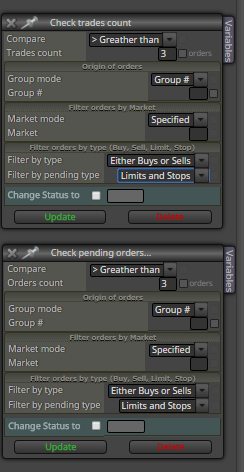
Is it normal? how can I check the open trades without making my own counter?
Thank you,
David R.
Hello,
I want to run ON/OFF blocks without making a lot of connections.
I'm trying to use RUN blocks to execute the ON/OFF blocks. Like this:
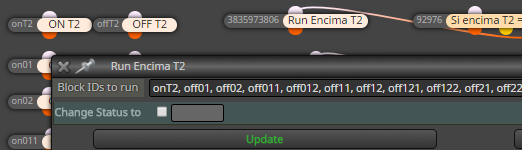
Would it be correct? have the RUN blocks or the ON/OFF to be connected by any "phisical connection?"
Something is not working on this step of my EA and I'm not sure how to use the blocks.
Thank you,
David R.
Hello,
I still have 2 questions:
how can the ID be a string and also be used to sort the execution of the blocks?
and, does the AND block add a significant amount of load to the processing of the EA?
Thank you,
David R.
@fxdreema
Thank you!
Now I'm a little confused, I thought the Block ID was the number on the left of the title of the block... isn't it?
that number is used for execution order management, right?
Thank you for the idea for avoiding the AND blocks, for the moment I will let them there because now I have a lot of other challenges to solve, but in the future maybe I will delete them, specially if it implies less calculation/load to the algorithm, do them add extra load to the EA?
Thank you,
David R.
So, have I to both linking AND writing the blocks ID?
thank you,
@timmyhanke Yeap, I tried, linking doesn't work.
Thanks
Hello,
In the "help box" from the Turn ON/OFF blocks it says that I have to indicate the ID of the blocks i want to swith ON or OFF.
Can I do it by linking the Turn ON/OFF blocks directly to the blocks I need to turn ON or OFF?
Thank you,
David R
@fxDreema
Hello,
I tested with +VarName pips and it didn't work...
should it work either with variables or constants?
thank you,
David
Hello,
When I use +ConstantName pips i get compilation errors.
Compilation errors
'pips' - undeclared identifier
'pips' - some operator expected
Screenshot (banda_arriba is the constant):

When I use +VariableName pips i get compilation errors, as well:
Compilation errors
'ancho' - undeclared identifier
'pips' - undeclared identifier
'pips' - some operator expected
Screenshot (ancho is the variable):

I don't know what I'm doing wrong...
Thank you in advance for your help.
David