fxDreema

    • Register
    • Login
    • Search
    • Back to the main page
    • Categories
    • Recent
    • Tags
    • Popular
    • Search
    1. Home
    2. drewinbrissie
    3. Posts
    D
    • Profile
    • Following 0
    • Followers 1
    • Topics 10
    • Posts 26
    • Best 1
    • Controversial 1
    • Groups 0

    Posts made by drewinbrissie

    • RE: Horizontal line price level not working

      @l-andorrà Thanks for the reply. I don't want it to re-draw every tick. I've worked out another way using variables and re-setting the TP and SL using "on trade" events - when either a new trade is opened, or a stop is modified. This works well and only when a trade event occurs.

      Thanks for your help, much appreciated.

      Drew
      posted in Questions & Answers
      D
      drewinbrissie
    • Horizontal line price level not accessible

      Hi all, I'm trying to use the price level of a drawn horizontal line to set take profit and stop loss levels. I want to use lines rather than variable as I want to be able to move the lines as the trades progress and have the TP and SL change with the lines.

      The problem is the price levels are not showing as "Price 1" when I select them as a condition. See link below to example. In the comments you can see the price levels show a Null value. I've tried using all the price options including "price 1" but nothing seems to work when backtesting.

      https://fxdreema.com/shared/xguYiQUib

      Any help to either fix the problem or work around it would be much appreciated.

      Thanks Drew

      posted in Bug Reports
      D
      drewinbrissie
    • RE: Horizontal line price level not working

      Here's a link with the line price set to "Price 1"

      https://fxdreema.com/shared/xguYiQUib

      posted in Questions & Answers
      D
      drewinbrissie
    • Horizontal line price level not working

      Hi all, I'm trying to use the price level of a horizontal line to set take profit and stop loss levels. I want to use lines rather than calculated level as I want to be able to move the lines as the trades progress and have the TP and SL change with the lines.

      The problem is the price levels are not saving correctly. See link below to example. In the comments you can see the price levels are not meaningful. I've tried using all the price options including "price 1" but nothing seems to work when backtesting.

      https://fxdreema.com/shared/BgqfXxprc

      Any suggestions would be much appreciated.

      Thanks Drew

      posted in Questions & Answers
      D
      drewinbrissie
    • RE: ATR value to Pips - Tutorial

      @jerkha
      What about working out ATR as a pip value for indices and other non forex instruments? Any ideas as the pip values can be difficult to calculate as different brokers present the data in different ways. I have found setting the FXDreema options doesn't always work consistently due to broker differences.

      Any help would be much appreciated.

      Thanks Drew

      posted in Tutorials by Users
      D
      drewinbrissie
    • RE: How to convert price fraction to pips?

      @ambrogio Thanks, much appreciated

      posted in Questions & Answers
      D
      drewinbrissie
    • RE: How to convert price fraction to pips?

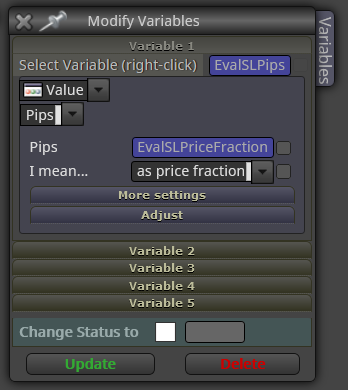
      Thanks for the reply @l-andorrà. I'm still not sure how I use these rules to convert a price fraction to pips for use as a SL. Do I use the Modify Variables block like this
      0_1602893974905_a8ad26e1-d57d-408c-b359-cbd1ff07a7ea-image.png

      posted in Questions & Answers
      D
      drewinbrissie
    • How to convert price fraction to pips?

      I have a calculated stop loss which is a price fraction (buy open - lowest low of last 5 bars). I want to convert this to pips to use in a move to breakeven block. How do I convert the price fraction to pips in a way that will work across all traded instruments (e.g. fx, index, CFDs)? I can't just multiply by 10,000 because that only works for USD based fx pairs.

      Thanks Drew

      posted in Questions & Answers
      D
      drewinbrissie
    • RE: Save lot size of open trade for use later

      I've got it working now as it should

      posted in Bug Reports
      D
      drewinbrissie
    • Save lot size of open trade for use later

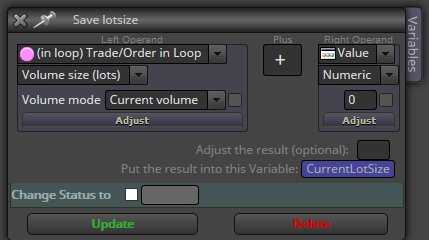
      I used to be able to save the lot size of an open trade by using the Formula block and choosing the Loop => Volume as shown below. However since the upgrade a few weeks ago this isn't working. Can anyone suggest a work around or fix?

      Thanks Drew

      0_1504926846729_upload-f38d4773-e936-4eaa-acf5-cdfedc3c1fa2

      posted in Bug Reports
      D
      drewinbrissie
    • RE: UPDATE time, write here if you have problems!

      @drewinbrissie

      I'm running an old version of MT4. The updates don't work with it

      posted in Questions & Answers
      D
      drewinbrissie
    • RE: UPDATE time, write here if you have problems!

      @drewinbrissie

      Here's an example
      This works OK because I generated the MT4 from the project yesterday
      0_1503193902797_170810dca03-3.mq4

      Same project exported to MT4 now (without any changes) has 205 errors in MetaEditor
      0_1503193946828_test2.mq4

      posted in Questions & Answers
      D
      drewinbrissie
    • RE: UPDATE time, write here if you have problems!

      @fxDreema
      There appears to be a compile error from this update. Same EA that worked fine yesterday, when saved as a different name today doesn't work

      posted in Questions & Answers
      D
      drewinbrissie
    • RE: Formula error

      @chiper
      There appears to be a problem with the compiler with the latest update. Nothing will compile when exporting to MT4

      posted in Bug Reports
      D
      drewinbrissie
    • Filtering conditions on a basket

      Hi all,

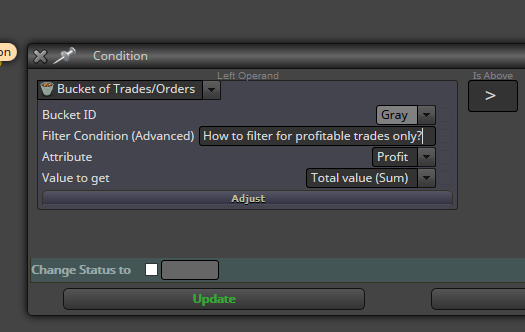
      I'm trying to filter a basket of trades based on whether each trade is in profit or not. Can anyone suggest the code to go in the "Filter condition (advanced)" field?

      I want to find the combined profit of only the profitable trades in the basket.

      Thanks Drew

      0_1502611584589_upload-c083dee2-5126-47f1-a689-41e740e29b23

      posted in Questions & Answers
      D
      drewinbrissie
    • RE: How to exit a basket of trades when the sum of the winners is double the sum of the losers?

      Got it worked out...
      0_1500089832925_upload-585f1e5b-9d97-44b3-a423-a80736ff8ba9

      posted in Questions & Answers
      D
      drewinbrissie
    • RE: How to exit a basket of trades when the sum of the winners is double the sum of the losers?

      This is how far I've got. Not sure what to put in the advanced filter
      0_1500087839858_upload-c8882240-dcdb-4bdb-8317-b3d8fc260249

      posted in Questions & Answers
      D
      drewinbrissie
    • RE: How to exit a basket of trades when the sum of the winners is double the sum of the losers?

      To do this I've worked out I can use the Condition block comparing the profit of 2 buckets, but can't work out the code for the "Advanced filter" to select trades that are currently in profit (or not) for each of the buckets.

      Thanks Drew

      posted in Questions & Answers
      D
      drewinbrissie
    • How to exit a basket of trades when the sum of the winners is double the sum of the losers?

      Hi all, I'm trying to build the logic so that when I have a basket of trades running, all are closed when the sum of all the winning trades is double the size of the sum of the losing trades. Any ideas how I can do this?

      Thanks Drew

      posted in Questions & Answers
      D
      drewinbrissie
    • Changing variable/constant names doesn't update

      When I change the name of a variable or constant, then press the update button, nothing happens. The name doesn't update. If I switch from variable to constant, or the opposite the change gets lost.

      The work around is to delete the constant/variable, then recreate it with the correct name.

      I really like the real-time ability to add variables/constants when creating formula blocks. Saves a lot of time.

      Thanks Drew

      posted in Bug Reports
      D
      drewinbrissie
    • 1
    • 2
    • 1 / 2