Anyone? Need your help please...
E
Posts made by engrled
-
RE: Custom TrendLine with 2 Prices only! (Please help!)posted in Questions & Answers
-
RE: Ichimokuposted in Questions & Answers
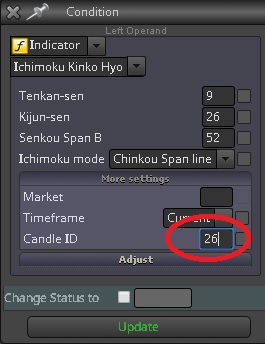
Hi @hytre , try to set candle id for Chikou Span with a value of 26 for 26 periods before.
-
Custom TrendLine with 2 Prices only! (Please help!)posted in Questions & Answers
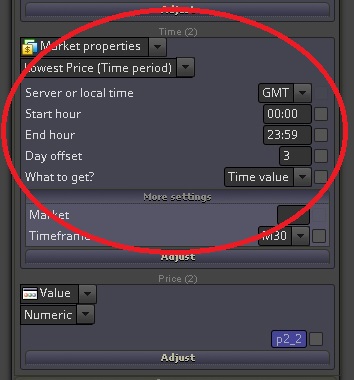
Hello @fxdreema, I'm trying to create a Custom Equidistant Channel for 2 time periods only.
We have the following variables:
p1_1= highest price 6 days ago
p1_2= highest price 3 days ago
p2_1= lowest price 6 days ago
pdiff= p1_1 - p1_2
p2_2= p1_2 + pdiffSo having the value of the second lowest price, i want to draw a lower trendline parallel to the higher trendline.
Shared link here: https://fxdreema.com/shared/NRMVtKcXc
I'm confused what to set for the time fields for the Second price's time?
Thanks Advance!
-
RE: Draw an EQUIDISTANT CHANNELposted in Questions & Answers
Any solution guys? @Andermaiden2nd ? @fxDreema ?
-
RE: Check trade type of existing tradeposted in Questions & Answers
Sorry didn't see it in the other group of blocks. Found the "Check Type" in Loop for Trades. Thanks!
-
Check trade type of existing tradeposted in Questions & Answers
Hello,
I just have a short question guys... Is there any block that I can determine the type of an existing trade? I can see Check Type for: 1. last closed 2. last loser and 3. last winner. I need the Type for an existing trade.
Thanks advance guys!
-
RE: Draw an EQUIDISTANT CHANNELposted in Questions & Answers
Hello,
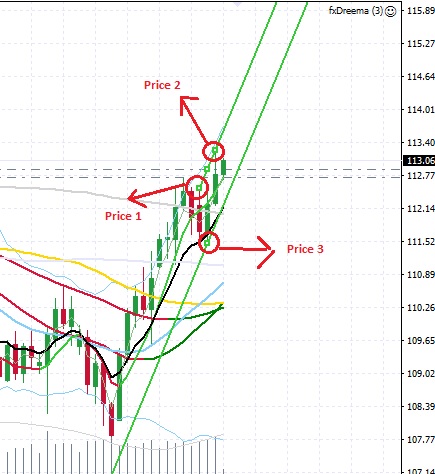
Given the prices that @Andermaiden2nd have drawn in the images above, how can I get the price for the upper and lower trend lines of the channel?
-
RE: Draw an EQUIDISTANT CHANNELposted in Questions & Answers
Thanks @fxDreema ! So given the prices that @Andermaiden2nd have drawn in the images above, then how can i get the price for the upper and lower lines of the channel if you have some workaround?
Thanks Advance!
-
RE: Draw an EQUIDISTANT CHANNELposted in Questions & Answers
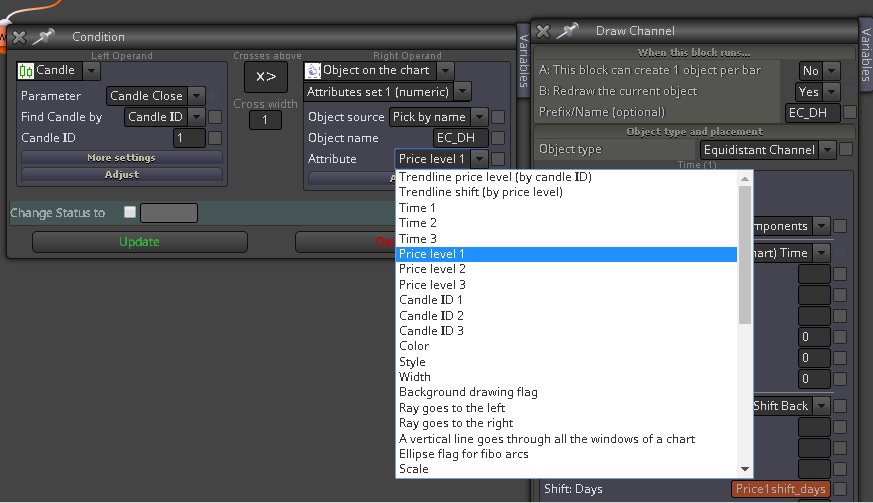
I have tried to select the ATTRIBUTE "Trendline price level (by candle ID") but the BUY and SELL only initiates when the candle crosses the upper line. I want to initiate BUY if the candle crosses the upper line and initiate SELL if the candle crosses the lower line.
Thanks Advance!
-
RE: Draw an EQUIDISTANT CHANNELposted in Questions & Answers
@Andermaiden2nd I really appreciate your help! And if it won't be too much to ask for a follow-up? I'm trying to determine as to what ATTRIBUTE should i select to compare if the Candle crosses the upper line or the lower line?
-
RE: Draw an EQUIDISTANT CHANNELposted in Questions & Answers
Wow!!!!! YOU ARE A-M-A-Z-I-N-G @Andermaiden2nd !!! I can see the channel now. You are the best. ALL THE BEST GUYS!
-
RE: Draw an EQUIDISTANT CHANNELposted in Questions & Answers
Hello,
Thanks for the time! I still can't find any channel being drawn in my charts with the suggested settings you mentioned. Can you send me a snapshot of the entire MT4 window when you did the backtest so I can see what settings you made?
Regards
-
RE: Draw an EQUIDISTANT CHANNELposted in Questions & Answers
Hello @fxDreema ! Yes it is not showing any Equidistant Channel lines as it should. Just strange because I have configured the same way with a Trend Line which shows a line. Please help! Thanks in advance.
-
RE: Draw an EQUIDISTANT CHANNELposted in Questions & Answers
@Andermaiden2nd I have tried reversing the price but couldnt see any channel still.
-
RE: Draw an EQUIDISTANT CHANNELposted in Questions & Answers
@Andermaiden2nd i think that is for the Draw Trend Line. I need for the Equidistant Channel line. It should show 2 parallel lines right?
-
RE: Draw an EQUIDISTANT CHANNELposted in Questions & Answers
You can find 2 objects in the link below. 1 for Draw Trend Line and 1 for Draw Equidistant Channel. Only the Trend Line shows line but not the Equidistant Channel.
-
RE: Draw an EQUIDISTANT CHANNELposted in Questions & Answers
Thanks but why the Draw Line object works? It draws line. Only the Draw Channel doesn't draw any lines.
-
Draw an EQUIDISTANT CHANNELposted in Questions & Answers
Hello,
Good day!
Can someone check my configuration to draw an EQUIDISTANT CHANNEL. It doesn't seem to draw anyline.
Shared link below: