Ok thanks, so if I understand it correctly the variable with that specific name will be overridden when a new order is placed as it uses the same variable name.
F
Posts made by Flip
-
RE: partial close based on candle size of the pastposted in Questions & Answers
-
RE: partial close based on candle size of the pastposted in Questions & Answers
Thanks for your response. Just a last question regarding your note, saying this will only work on one trade. Do you mean that if I have multiple orders each of them will not have their candle 1 stored separately? I thought the stored variable for one trade is is only connected to that trade, so being unique. Or am I wrong?
-
RE: partial close based on candle size of the pastposted in Questions & Answers
It is a fixed candle, so when order is opened candle 1 will be used. This same candle still needs to be used after other candles have formed.
-
partial close based on candle size of the pastposted in Questions & Answers
Hope you can also help me on the way with this one. I want to partially close an order when it has reached a certain profit level, this profit is based on a candle size from a past candle.
For example:
- I enter on a candle 1 high (buy order):
-When we reach a profit level that is equal to the size of candle 1 than I want to close 50% of trade.
I tried this, but it does not seem to work I used the blocks in the picture, where you see I stored the desired candle under Modify variables.
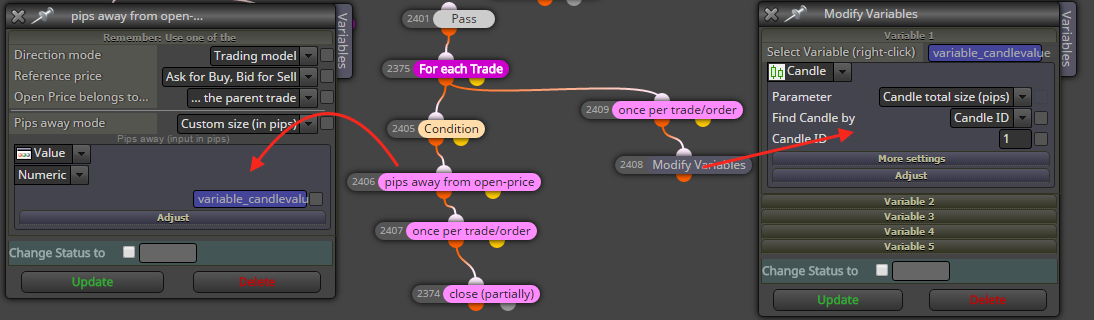
Hope this is clear.
Thanks in advance.
- I enter on a candle 1 high (buy order):
-
Trailing stop issueposted in Questions & Answers
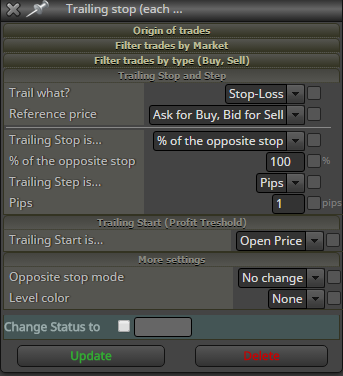
Hello, I am not able to get the right settings for the trailing stop block.
- At the start of the trade the Stoploss is at low of candle (buy order), entry is at high of candle.
- Once order gets triggered and moves into profit the stoploss should move a long.
- 1 pip profit means stoploss should have moved up, etc etc.
Can you help me please?
These are the settings I have now:
-
RE: Question about 'Adjust'posted in Questions & Answers
I wish I could tell you why it doesn't work with ConstantName pips. I also tried -(ConstantName) pips.
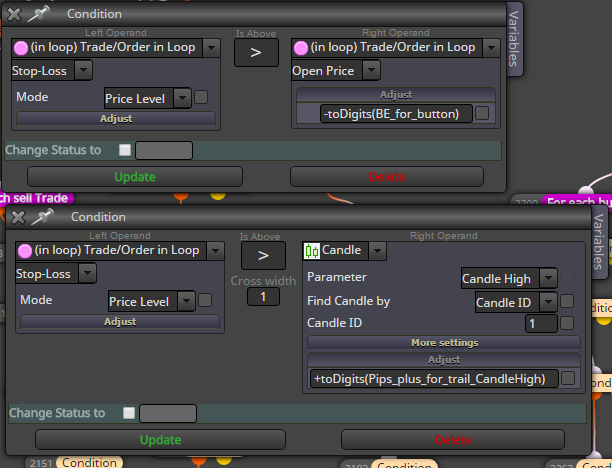
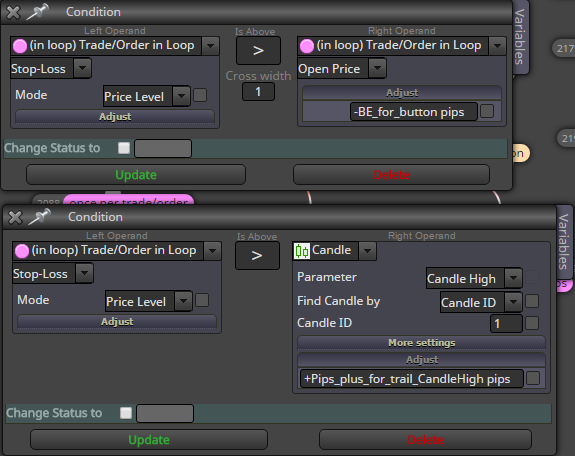
I use two conditions after eachother. Picture one shows it using toDigits, picture 2 shows it with ConstantName pips.
toDigits works correclty. With ConstantName pips, nothing happens. I didn't get any error though.
I hope this helps.
-
RE: Question about 'Adjust'posted in Questions & Answers
Unfortunately only the not recommended option worked. I ended up using: -toDigits(Pips_plus_for_trail_CandleLow)
I will have to keep this in mind for the future, if it is not supported anymore. Thank you!
-
Question about 'Adjust'posted in Questions & Answers
I have been spending hours trying to figure the following out, but I am still not getting it to work.
-
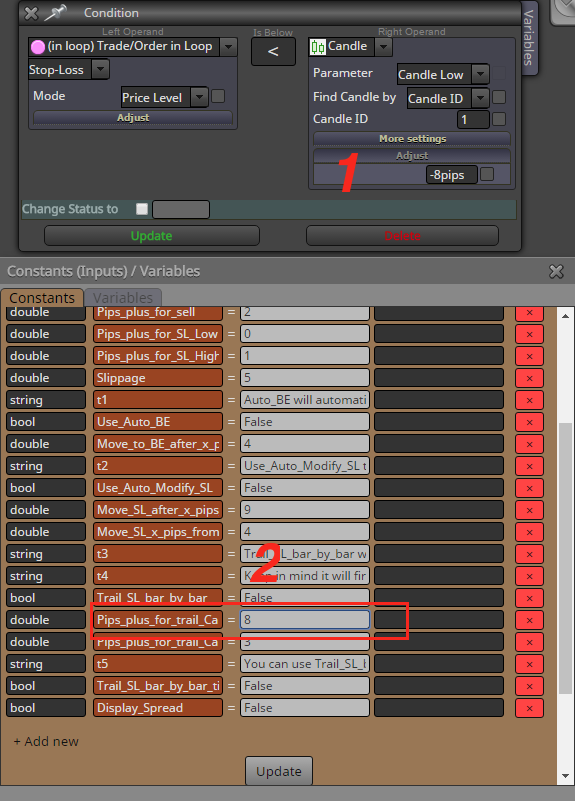
I am using a condition block where the Stop-loss is below Candle low 1, -8pips (see picture 1), this works correctly.
-
Now I want to replace -8pips by the Constant value (marked in picture 2), but it also needs to be multiplied by " -1" as it needs to check previous candle low -8pips (the constant value is 8, so it should become -8).
How can I achieve this best?
-
-
Defining constant for MA Methodposted in Questions & Answers
The MA method has got 4 options, can these be used with a Constant so that the user can select the preferred setting? What is the way to do this?
Thank you.

-
RE: Trade manager places trades using incorrect symbolposted in Questions & Answers
Thank you for your help, this seems to work!
-
RE: Trade manager places trades using incorrect symbolposted in Questions & Answers
Thank you for your help. I tried your suggestion, but it did not work. Here is the the project example, but only with the Buy button (with this you will also be able to replicate the issue). Maybe you know another solution?
Just place a buy order with the button on any symbol;
Then change symbol by dragging another one from Market watch on to the chart;
Then place another buy order with the button.It should now have 2 buy orders for 2 different symbols.
-
Trade manager places trades using incorrect symbolposted in Questions & Answers
Hello,
I have a major issue. I created a Trade Manager which includes buy/sell buttons. The tool seemed to work fine, until one of the users reported the following bug.
-In MT4 A symbol is loaded (fe EURUSD);
-The Trade manager is then loaded and you can place trades with the buttons on the screen;
-Now a new symbol (fe GBPUSD) is dragged from the Market watch window in MT4 on to the previous chart, so EURUSD is replaced by GBPUSD;
-All settings on the screen are still present, but if you now use the buttons from the Trade manager, it will place orders using the PREVIOUS symbol (in this example EURUSD).This means the Trade manager is not being refreshed for some reason. The only way to fix this is reload the template or the Trade manager.
This tool is used by multiple people so it is a serious issue for me.
Do you know what is causing this??
Hope you can help.
-
RE: Trail Stoploss behind previous candle low/highposted in Questions & Answers
I will simplify my question as it may have been a bit confusing I realize afterwards. I tried many things but it still won't work.
Can you tell me what blocks to use for this in order for it to work correctly?
For a buy trade:
- (Low of candle 1) - 2 pips > the position of current Stoploss level.
- If rule 1 is in place than new Stoploss = (Low of candle 1) - 2 pips .
This is what I have at the moment:
https://fxdreema.com/shared/djnbd6kvcCan you please help me.
Thanks!
-
Trail Stoploss behind previous candle low/highposted in Questions & Answers
Hello Fxdreema,
I am trying to accomplish the following situation, which is only partly working for the moment.
For a buy order:
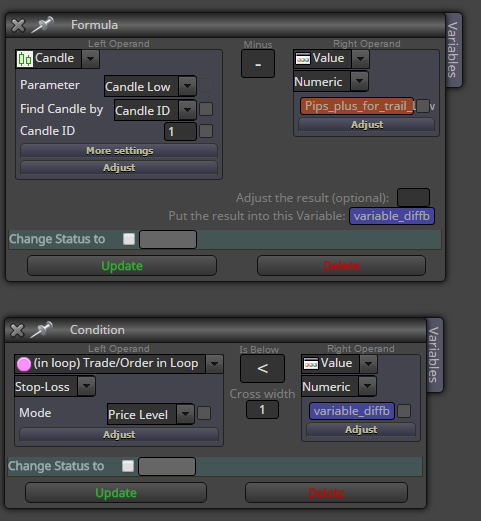
If (candle 1 low - a pip value) is above current Stoploss than move Stoploss to (candle 1 low - a pip value)My problem at the moment is: the check where the current Stoploss is, as it is moving the stoploss to each previous candle low for new stoploss. So the check is not being done correctly.
I have use a Formula block to store the value: (candle 1 low - a pip value). I also used a Condition to check if the Stoploss (in loop) is at correct level, but here I might have gone wrong.
Do you know how I should do this?
-
RE: What is the correct way to extend Stoploss?posted in Questions & Answers
Thank you for your help, I must have had some setting wrong before, as I now copied your settings and it seems to be working fine.
Appreciate the support.
-
RE: What is the correct way to extend Stoploss?posted in Questions & Answers
With this recommended block "For each pending order" I get another problem. When it is added and I click my pending sell order button multiple times, it does the following:
- adds pending sell order 1 - correct with Stoploss above last candle + the required amount of pips;
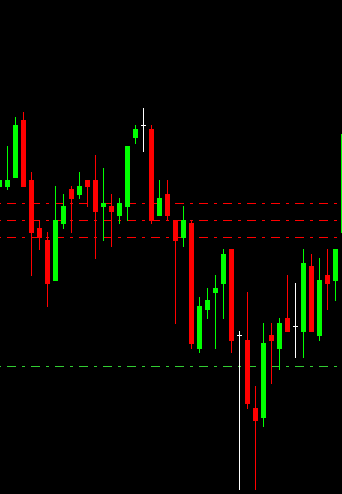
- if I than again click the pending sell order button (order 2) - it adds a Stoploss above the Stoploss of order 1;
- if I than again click the pending sell order button (order 3) - it adds a Stoploss above the Stoploss of order 2;
enz.
In this case it should just have put the order multiple times with the same Stoploss and entry. This problem is being caused by the "For each pending order" block.
Do you have any other ideas how to use the "Extend stops" correctly for pending orders?
This pictures shows what happens with my Stoploss after applying the "For each pending order" block.
-
What is the correct way to extend Stoploss?posted in Questions & Answers
I am facing an issue. I created a button, when pressed it places a pending buy order with a stoploss at the candle low.
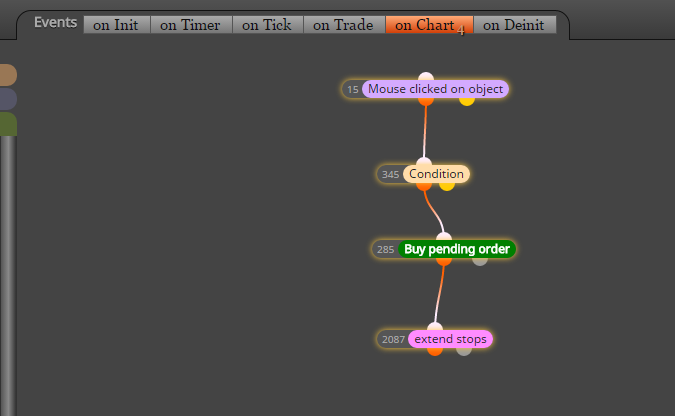
This Stoploss can be changed x amount of pip from the candle low. For this I used the 'extend stops' block.The button works and places the pending buy order with the stoploss. I noticed that when using this button over and over that sometimes the Stoploss does not get placed at the extended stop level. Instead it will just be place at the low of the candle.
This might be a bug, but I also wonder if there is another way of extending the stoploss? As it first seems to place a pending buy order (including Stoploss at low of candle) and then changes the Stoploss level (I see it moving on the screen).
I hope I explained this clearly.