fxDreema

    • Register
    • Login
    • Search
    • Back to the main page
    • Categories
    • Recent
    • Tags
    • Popular
    • Search
    1. Home
    2. fxDreema
    3. Best
    • Profile
    • Following 0
    • Followers 693
    • Topics 23
    • Posts 7308
    • Best 258
    • Controversial 18
    • Groups 1

    Best posts made by fxDreema

    • Server will be down at 19 Dec (not my fault)

      I got this message from my hosting:

      =======================================================================================================

      You are receiving this notification because your service WILL be affected by this maintenance.

      DETAILS:
      A power distribution unit in the rack is failing needs to be replaced. Your server will be down for the duration of the maintenance.

      THE MAINTENANCE IS SCHEDULED AS FOLLOWS:
      Start Time: Dec 19, 2016 - 8:00AM PST
      End Time: Dec 19, 2016 - 11:00AM PST (3 hours)

      We do not expect the work to take 3 hours, but we are scheduling the work for this long just in case we encounter unexpected issues. I apologize in advance for any inconvenience this may cause.

      posted in Questions & Answers
      fxDreema
      fxDreema
    • RE: When to stop OnInit()

      I probably put this code there when someone was having issues when changing the parameters of the EA, or changing the timeframe. I don't remember exactly.

      I think the only two possible uninitialize reasons in OnInit() are REASON_CHARTCHANGE or REASON_PARAMETERS, which means that the "else" statement is about REASON_PARAMETERS.

      It looks that I wanted to prevent re-execution of blocks in "on Init" when the user changes the timeframe or the EA parameters. Only if the symbol is changed, the blocks would run again, which was probably because I have some symbol-related functions just below this code.

      I guess it depends. Maybe the user wants to redraw his objects, maybe not.

      Actually these REASON_CHARTCHANGE and REASON_PARAMETERS are forming possible events, something like "on Timeframe Change", or "on Parameters Change". Sometimes I'm thinking about adding some more events in the EA builder, or better changing the way events are used in the EA builder, maybe allowing for making custom events. But at the moment there are only these standard events and the use of REASON_CHARTCHANGE and REASON_PARAMETERS in on Init is opinionated.

      By the way, I don't think this is a bug.

      posted in Bug Reports
      fxDreema
      fxDreema
    • RE: is there any support sound here ?

      No one 🙂 I am the support team, but I can only write in english. Here in Bulgaria no one speaks in english, including me, so I would sound very very bad. And to be honest, I don't even want to talk to people live, I'm not very communicative 🙂

      posted in Questions & Answers
      fxDreema
      fxDreema
    • RE: EA displaying error messages

      I think your MetaEditor is an old version.

      Lately I was touching some trading functions in MQL5, doing this on my local MetaTrader 5, which is updated automatically to the latest version. On the server I had old compiler (MetaEditor) and when it came time to upload the changes I made, I also noticed this error. So I updated the compiler on the server.

      The problem seems to be that not a long time ago MetaQuotes added these two identifiers - DEAL_TP and DEAL_SL for the HistoryDealGetDouble() function. They don't exist in your version of MetaEditor/MetaTrader and that's why you can't compile that EA.

      I wonder, if the EA is compiled by fxdreema, does it work on your MT5 at all? And if it works, does it work correctly?

      Otherwise the easiest solution to this problem will be to update MetaTrader 5.

      posted in Bug Reports
      fxDreema
      fxDreema
    • RE: how i can control in the spread ?

      EA 1 cannot control EA 2 directly, if this is what you want. Each EA is separate program and works independently from other EAs. If you want to send some information between EAs, you can do that with those Global Variables that appear when you click F3 (I call them Terminal Variables). This is pool of variables that can be read (and write) from all EAs in the same MetaTrader, but of course if EA 1 is not set up to read any of these variables, they just don't work for that EA.

      posted in Questions & Answers
      fxDreema
      fxDreema
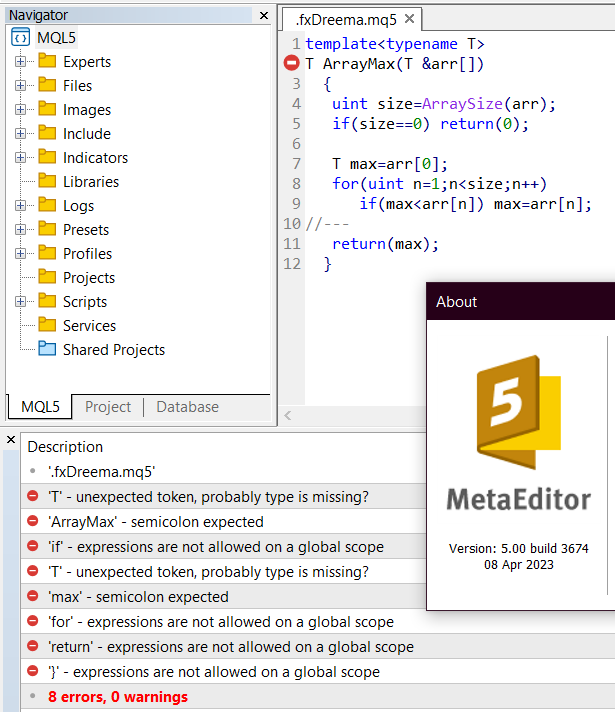
    • "T" - unexpected token, probably type is missing? In MetaTrader 5 build 3674

      It was just reported to me that there are compilation errors on the latest build of MT5 - build 3674. I tested it and it's true, if you try to compile (probably) any EA, generated by fxDreema in MetaEditor build 3674, you will get this error.

      It's about Function templates. See the documentation here: https://www.mql5.com/en/docs/basis/oop/templates
      So, even if you try the simplest example from the documentation, this error appears.

      4fa673e4-f3f1-48f1-8c82-905487508498-image.png

      I think they introduced a bug in their latest compiler. This problem is also reported in their forum, see this: https://www.mql5.com/en/forum/445197

      I also found this topic from yesterday (https://www.mql5.com/en/forum/445154), where another bug was reported in build 3672 that apparently has been fixed in build 3673. So I think the current "template" bug will be also fixed eventually.

      In short, for now I'm not going to try to fix anything, because I believe that it's a MetaQuotes bug that will be fixed in some of the following builds. The compiler on the website is older version and there are no problems there.

      posted in Bug Reports
      fxDreema
      fxDreema
    • RE: +10pips

      @miro1360 Or simply varName@pips

      posted in Questions & Answers
      fxDreema
      fxDreema
    • RE: Blocks with intermittent problems.

      I have to say this once again. If anyone suspects a bug, please, make a simple project with the minimum blocks required (should be no more than 4-5 blocks) to demonstrates the bug + short explanation of what is expected to happen.

      Sorry, but I don't have this will to dissect projects with 100s of blocks, and even worse - containing many input properties, which will probably be way different on my end.

      I ran your project in my tester for a period of 1 year and guess what - I got only 2 positions for the whole time. I don't know why, but I don't want to know why. I just want a simple example, that when I run it, it will fail.

      Don't forget that if you (I mean everyone) understand your project, this doesn't mean that I understand it.

      When there is a bug, I really want to fix it, but I don't want to explore anyone's projects, strategies and ideas, while searching for a bug that may not even appear on my side at all.

      How to make such example?

      • Download the project as .mq5 file, then import it back. A new project will be created. Maybe rename the new one. Still ensure that the original project is still there.
      • Start deleting blocks. First delete those blocks who surely have nothing to do with the problem. At this point maybe half of the blocks should be gone.
      • Continue deleting other blocks. While deleting blocks, test to see that the problem still remains. If the problem goes away, return one or more steps back (un-delete blocks).
      • Repeat this until very few blocks remain, and the problem still remains. Leave only the Buy or the Sell side.
      • If indicators are not necessary, delete them.
      • Remove all input parameters (Constants), because they often lead to unnecessary confusions.
      • Remove the Variables as well, unless they are needed for the problem to appear.
      • The final example should look nothing like the original project. It should contain less than 10 blocks for sure.
      posted in Bug Reports
      fxDreema
      fxDreema
    • RE: Applying an indicator to Previous / First Indicator's Data in fxDreema

      True. This was requested so many times since the beginning. Then I decided to implement it, but stucked in MQL4. I don't remember the exact reason why it was not possible, I only remember that it's just not possible because of MQL4

      posted in Questions & Answers
      fxDreema
      fxDreema
    • RE: Variables and Constants suddenly disappeared

      I feel this has something to do with having the project opened in more than one tab. This usually leads to such unexpected and catastrophic consequences for the project. Not the fact that the same project is opened multiple times, but when you start doing something on an older instance of the project, there would be discrepancies with the newer version that is in the database on the server.

      At the moment there is no functionality to auto-detect when the same project is opened 2 or more times at the same time, so personal attention is required.

      Don't work on the same project in 2 or more different tabs. It will be possible to work on different projects this way, but not on a single one. If you have one project opened in one tab, close the other tabs where it is also opened. Also, if you have a tab opened at a certain project hours ago, reload the page just to be sure.

      posted in Bug Reports
      fxDreema
      fxDreema
    • RE: Defining constant for MA Method

      You can try to give that constant data type of ENUM_MA_METHOD instead of int

      posted in Questions & Answers
      fxDreema
      fxDreema
    • RE: Is this a resolution to the error code=4806?

      I'm also not sure about the performance implications of using many indicators in MQL5, I never tested so much indicators at once. But in programming, when we want to read something over and over again, and the reading itself tends to be slow, we cache it and read the cache instead. Also, there is one basic rule in programming called DRY (Don't Repeat Yourself) - the idea is to write some functionality once in some function, and run that function over and over again, instead of writing the same code at many places.

      I see your project (the current one at the moment of writing this), which is a large project, and it's large because you have copied the same groups of blocks multiple times. This makes you a newbie in programming 🙂 Well, to be fair, sometimes it's not very easy or intuitive to make things the good way in fxDreema. Sometimes it's not even possible.

      But here are my suggestions.

      • If you are using the same indicator with all the same settings in multiple blocks, make a "double" variable. Then, in "on Tick" before all other blocks set the value of that variable to be the indicator's value. For this use "Modify Variables" block with low block number, so it runs before the other blocks. And then in the blocks where the indicator is used, use the variable instead.
      • Re-use the same group of blocks... if you know how. Unfortunately, this is tricky. If you know how a function works in any programming language, it's the same idea. You would have 1 block at the top of the group of blocks, which would be the block you run. The alternative for function arguments would be multiple variables. It's also possible to use arrays by the way.
      • If possible, limit the execution of some groups of blocks. This depends, but let's say you have a group of blocks that runs on every tick without a problem, but it will be the same if it runs for example once per block, it will not change the behavior. In such case, put some "Once per bar" block. This will boost the performance.
      posted in Bug Reports
      fxDreema
      fxDreema
    • RE: sell stop and buy stop ?

      I don't understand the idea here 🙂

      posted in Questions & Answers
      fxDreema
      fxDreema
    • RE: Is Fxdreema being updated or something similar or BUG?

      I think these problems are now happening because of the delays these days. I'm investigating the problem and I think it's because of users with giant projects. I noticed someone with almost 7k blocks, which is too big for this website. There are also users with 2k+ blocks, but most have smaller projects. I will have to put some limits on the creation of new blocks.

      By the way, this problem with the missing titles is something new that I'm seeing. Usually the blocks remain visible, but they are totally broken. With this problem, only the titles are missing, but the blocks are good.

      In any case, it's not a good idea to work on the same project from 2 places, 2 browsers, even 2 tabs in the same browser. But even if working from 1 place, now with these problems I think it's possible for the project to break.

      If a project is broken, go back in the History one or more steps back.

      posted in Bug Reports
      fxDreema
      fxDreema
    • RE: sell stop and buy stop ?

      Let's say that I don't understand your english. And my native language is not english by the way 🙂

      posted in Questions & Answers
      fxDreema
      fxDreema
    • RE: All Blocks Resized + Lost All Connections

      I think I found the problem. There is a very slow database query that I wrote after I updated the forum. This query searches for existing user by email. This query is used every time when someone registers a new profile, or when someone is logging in with email.

      The good news is that maybe huge projects are not so big of a problem 🙂

      posted in Bug Reports
      fxDreema
      fxDreema
    • RE: sell stop and buy stop ?

      I have some feeling that you want to have moving pending order, something like trailing pending order. And there is a block for this - https://fxdreema.com/demo/mt4-trailing-pending-orders

      posted in Questions & Answers
      fxDreema
      fxDreema
    • RE: All Blocks Resized + Lost All Connections

      I fixed this slow query, now I expect everything to be smooth. The CPU already looks low and beautiful.

      posted in Bug Reports
      fxDreema
      fxDreema
    • RE: "Buy/Sell Pending Order" block

      Pending order in fxDreema opens at different price than the current price. In the block you put the price and then the EA decides the type of the order. The easiest way... try with negative value for Price offset. But Open at price also matters... the combination of both is the actual open price.

      posted in Questions & Answers
      fxDreema
      fxDreema
    • RE: All Blocks Resized + Lost All Connections

      @Jim67, I'm not that surprized of the fact that sometimes projects are breaking, because this is not something new, it always happened. I must agree that the process of saving the project's current state it not very well polished. Basically, when you do some action (new block, blocks move, connection), everything in the browser (blocks, connections, areas) is read and sent to the server for saving. Ideally, what you see in the browser matches the records on the server. The problem is that if there is some mismatch, the project could break. And such mismatches could happen when there are problems with the communication between the browser and the server. I'm in a process of rewriting the whole website and eventually I will add different guardrails to prevent projects from breaking, but at this time projects are sometimes fragile.

      My concern is when there are problems with the communication with the server. I'm still noticing slow moments from time to time. Not as bad as it was days ago, but still noticeable.

      Otherwise I can suggest to reload the project more often. Personally I never experienced that moment when a project breaks, maybe because every time when something doesn't look right to me, I realod the whole page. But I probably do this because I know how a project could break.

      posted in Bug Reports
      fxDreema
      fxDreema
    • 1
    • 2
    • 3
    • 4
    • 5
    • 6
    • 7
    • 8
    • 12
    • 13
    • 6 / 13