It is too big project for the compiler at this point

It is too big project for the compiler at this point
It doesn't work in both for me, but because of an error coming from Buy and Sell blocks. It's about the chosen money management, which requires some Stop Loss to be set
@l-andorrà Global Variables (of the Terminal) are stored in a file called gvariables.dat for persistence. But MetaTrader updates this file when it closes normally. I just tried it. I added a new variable, hard-reset the computer, opened MetaTrader again... new variable gone. The same with objects on the chart.
@iftikhar123ali If your sequence is adding 0.1 every time, maybe try Martingale in the settings. I know Martingale sounds scary and not what you describe, but I added so much settings over there that you can change the behavior completely.
Otherwise, when we base our next lot size on the previous one, it's always better to get the information from the trades directly. Get the lot size of the last trade, calculate the lot size of the next and so on. So, if MetaTrader restarts for whatever reason, we are fine, we know what the last lot size was and we can continue.
But there is an issue here. How do we know if we are in the middle of the sequence, or we want to start with the initial lot? Well, it depends. Maybe the value of the last lot size can tell us that. If we want to have a sequence of 0.1 - 0.2 - 0.3 - 0.4 and then start over, then if the last lot size is 0.4, it's obvious that it's time to reset and start with 0.1 again. If we cannot use the lot sizes, then the next best would be to use the comment property of the trades... although you really have to double check if whatever information you put there, stays there. Or those Terminal (Global) Variables, but I'm not sure if they work properly in case of electricity failure. One more way of storing data I can think of is some object on the chart... and again, I'm not sure if they stay on the chart on energy failure.
I'm in a process of rewriting the whole website. Such version control is something I was thinking about and I'm making the new database structure with this in mind. My first target, however, will be to release the new version of the builder with almost the same features as we have now, with slight upgrades on the most used stuff. For example, the movement of the blocks around will be a little bit different - without the scrollbars, with zoom.
Technically, it's not an extension, but a Chrome App... not that this matters. The problem is that Google are removing support for the API (the functions with which it is written), from 2020 it seems. Maybe it still works for someone who still have it in the browser, maybe not. But it's not available in the Google Store - https://chromewebstore.google.com/detail/fxdreema-download-files/lnlppnklledgeaafojedgemkdhjdgdkp
If we go to the documentation page of the chrome.fileSystem API that is used in the extension, we can see that there is a deprecation message and a link to find out how to migrate to another API. And we can see there is something called File System Access API.
I tried this API, it's nice, it works directly in the browser, I wrote the whole functionality of the extension (and a little bit more) and everything works very good... in Linux... and for some directories in Windows, like Documents. The thing is that this API doesn't allow access to system directories, and it seems that they consider \AppData\Roaming\MetaQuotes\Terminal...\MQL4\Experts as such. And as you all probably know, this is where usually expert advisor files are.
At this point I don't know what API to use.
There is still a chance for the extension to work, but it needs to be installed locally. If you want to try:
Error 403 most probably means that I blocked the IP address. Bad guys are trying to copy, spam or hack the website almost daily, I have different ways to detect this, and I block many IP addresses often. If someone uses VPN, it's possible that I have blocked the IP address in the past, if someone else used that address for bad stuff.
I also have some rules to block requests on particular patterns of the HTTP headers.
If somebody is having this error, send me an email mentioning the blocked IP address, so I can look unblock it.
I found a bug that is very problematic when someone has slow connection to the website. When downloading a file, we know that "Processing" appears up there and in background the file is downloading. However, if the download fails, then the following clicks on the export buttons are not registered, the website stops communicating with the server at all. So it's very likely that a person with slow connection with the website is fooled by this bug, thinking that he is trying to download files, but actually downloading nothing. The quick fix is to reload the page and try again, but if the connection is slow anyway, who will want to reload all the time.
At the end of the day, I think the problem is a mix of issues. Something is probably wrong with the internet connection between Thailand and Europe, then many users of fxdreema are from Thailand at the moment, and then this bug.
I will try to see what can I do about the bug, and about working with the website when the connection with it is slow.
It was reported to me that the problem started on Saturday, 21th. Pretty much all people who reported this problem to me are from Thailand. Many of them I see are part of these courses, where multiple people are logging into the same account. For that reason I thought that this could be the problem, but it seems that some of the people who reported the problem have their own accounts, so I'm not sure. I was thinking that if it's a course, maybe bunch of people are generating projects at the same time and this overloads the server. But if this is the case, then after such intense moments the server will be fine. However, in the reports I see that people are experiencing slow website in general, like the whole time. And it's just strange to me that the server appears slow for specific group of people, while for others it works fine. There must be something different that happens to these accounts, I just don't know what.
These problems seems to happen for the span of few days, like a week or so. Currently, something started to happen on Saturday. Maybe some new course or something. I think it's something external to the website and not just the server.
I did some fixes in many files, I hope it is ok now. If there were similar bugs in other blocks, maybe I fixed them as well.
At this point I'm convinced that even MetaQuoted don't know what they are doing with their Positions/Orders/Deals functions.
This bug happens in a code that I rewrote months ago. I was very careful to write everything properly, and I believe I did. I also made some tests to ensure that everything is good, and it was.
Since then, I didn't touch any MQL5 code, so this bug (and possibly other bugs) is introduced after some of the newest MT5 builds.
I wanted to explain what the problem is and why I think it makes no sense, but I think it's too complicated and maybe no one even cares.
But in short, now it seems that when we want to use for example this function:
long  HistoryDealGetDouble(
  ulong ticket_number, // Ticket
  ENUM_DEAL_PROPERTY_DOUBLE property_id  // Property identifier
);
... first we have to use this one to select the deal:
bool  HistoryDealSelect(
  ulong  ticket      // Deal ticket
);
... which is crazy, because why do we have this ticket_number property in HistoryDealGetDouble(), if not to select the deal and get whatever data we need?
It's probably the same mess with HistoryOrderGet... functions.
One way for me to fix this is to scan the code I wrote for any usages of HistoryDealGet... and HistoryOrderGet... functions, and put some HistoryDealSelect() and HistoryOrderSelect() functions on top. Then hope to remember in the future that I have to do every time, because it's not intuitive at all.
And the other way is to write overloads for all HistoryDealGet... and HistoryOrderGet... functions without the ticket_number property. But then if MetaQuotes decide to to the same, there will be errors.
This problem is one of these that is hard to spot. The problem (and the way I solve it temporarily) is that when I restart the server, it's gone. And when it's gone, and I don't know how it started, I don't know how to replicate it. The way I fix such issues is by waiting for the problem to happen again while collecting some logs. This is what I'm doing currently. So the problem is not fixed yet, it may appear again. At some point I will fix it, but the problem is that It will need to appear again few more times.
Note that the blocks have numbers. Most of the time these numbers doesn't matter, but sometimes they do.
Take a look at this: https://fxdreema.com/documentation/builder/builder-basic-rules#block-numbers
If you have 10 blocks connected one after another, their numbers doesn't matter, because the order of execution is from the first block to the last, and there is only one possible path.
However, things are a little bit different when there are 2 or more possible paths. If you have a block that is connected to 2 or more blocks after it, which of these block should run first? They can't run at the same time, because the code is synchronous.
This is what you have in your last example:
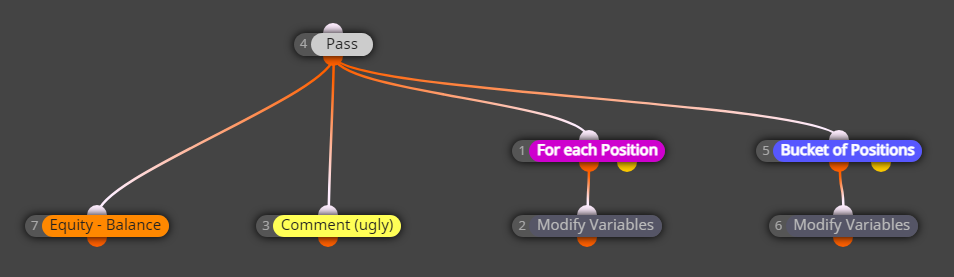
Here block 4 doesn't even matter, it just passes. But what follows block 4? Blocks 7, 3, 1 and 5. Ok... let me rearrange the blocks just a little bit:
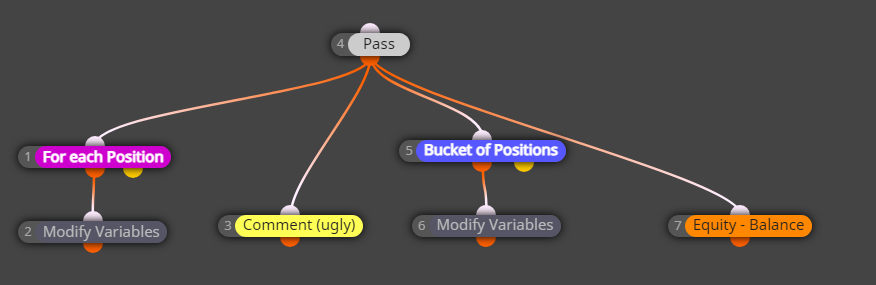
Now there is a visual difference, obviously, I changed the position of the blocks. Will this example produce different results in the Tester? If the position of the blocks mattered, yes. But the position of the blocks doesn't matter, so the results will be absolutely the same, and in your opinion - wrong. What matters is the number of blocks. The lower number runs first. This means that the order of execution of blocks is 1, then 3, then 5, then 7.
Let's imagine that you already have one position. Let's look at what happens on the very first run of these blocks.
Change the number of block 3 to say 30 and the bug will be fixed.
I think I fixed it.
By the way, usually it's not possible to set hard expiration lower than 10 (or 11) minutes for pending orders, MetaTrader (or the broker, I'm not sure) doesn't allow it. That's why instead of a hard expiration, a virtual one is set, which is a hidden arrow on the chart. The problem happened that when the pending order is triggered, the result trade has the same ticket number, and the hidden arrow that was placed for the pending order worked for the trade as well.
Hackers are not sleeping these days. The website is currently being attacked from 2 different hackers.
One is loading bunch of forum pages, similar to search bots, but more aggressive. It doesn't seem dangerouns, but it's rude and I wonder why. It's interesting that this guy has few accounts here, one of which is ancient, from the very beginning.
The other one is trying to brute force user emails and passwords from 1000+ different IP addresses at the same time. I know one account that used one of these IPs, and it was paid just before this attack started. It could be his account, or it could be hacked, I don't know. Anyway, I'm blocking almost all of his attempts now, he is just generating traffic. But in any case, my advice is to have strong passwords and as usual - keep the important projects locally as .mq4 or .mq5 files.
I think it works fine in general. During the day there are more active people (especially lately with the Persian guys) and maybe things are getting slower, sometimes even inresponsive for few seconds. But it should work relatively fine, especially for small projects.
If someone is working on a small project and the website appears too slow at any time of the day, my guess is that this is a network problem.
@OntradingX, I can see that at the moment you are working on a project with almost 500 blocks. It's quick to open the blocks. I can export .mq5 file in ~ 1 second, and .ex5 file in ~5 seconds. What are your times when you do the same?
Possible solution would be to try to download the history data again. The data files are located in history/%TheNameOfYourBroker%. But if you are testing, also delete the files from tester/history - the .fxt files there are the generated ticks.
Or maybe use another broker for the tests. Different files are downloaded from each broker.
Today I investigated this error a little bit more. One user sent me his history data and I was able to get the error myself. At the end, I don't know how to fix the problem, but this is what I understood.
Each candle has OHLC, Volume and also Time. "Once per bar" works by reading the Time from the candle, remembering that time and then when the time changes (when a new candle is added), it can pass again and remember the new time. Do this over and over and the block passes once per bar.
To get the time I used a function called CopyTime. This function would read the data from just one candle, and then it would put the result in a dynamic array, which initially has size of 0. When the data is put into the array, its size would automatically change to 1. Then, that single value from the array would be read, which usually happens without problems. But when the function fails, the array doesn't change, its size remains 0 and that's why later it shows "array out of range".
While the error says "array out of range", the problem comes from the inability to read that candle. And in the tests I did today, CopyTime wasn't able to read any candle.
First I did a fix, so that when CopyTime fails, it won't even try to read the value from the array, it would just do nothing and "Once per bar" won't pass. Muted error, the EA just tried to do what it can.
Then I tested iTime, which seems to be able to get the time from the previous candle somehow. However, then I realized that if lower timeframe is selected in "Once per bar", then iTime (and also CopyTime) could fail.
So the whole situation happens because something in the history data is not right. But I don't really know how to fix the problem with these functions. I can mute the error so it won't appear, or print another more descriptive error.
It seems that the problem started to happen after some MT5 update, because I haven't changed this code where I found the problem now. I believe I fixed it. But the Trade detection code is a little bit complicated, so I would not be surprised if there is another bug. I hope ther is not.
Here is a little tip for being able to see what is going on in these Trade events in case there is a problem like this. There is a big class where the Trade detection happens, and I added few methods to print out information about the events. Normally this information does not appear, but this can be enabled. In the source code search for "debug" and you will find this:
public:
	/**
	* Default constructor
	*/
	OnTradeEventDetector(void)
	{
		debug = false;
		isRepeat = false;
		eventValuesQueueIndex = -1;
	};
Change debug = false; to debug = true;. Now in MT5, in the logs, information about every trade event will be printed.