fxDreema

    • Register
    • Login
    • Search
    • Back to the main page
    • Categories
    • Recent
    • Tags
    • Popular
    • Search
    1. Home
    2. fxDreema
    3. Posts
    • Profile
    • Following 0
    • Followers 693
    • Topics 23
    • Posts 7308
    • Best 258
    • Controversial 18
    • Groups 1

    Posts made by fxDreema

    • RE: Is Fxdreema being updated or something similar or BUG?

      I think these problems are now happening because of the delays these days. I'm investigating the problem and I think it's because of users with giant projects. I noticed someone with almost 7k blocks, which is too big for this website. There are also users with 2k+ blocks, but most have smaller projects. I will have to put some limits on the creation of new blocks.

      By the way, this problem with the missing titles is something new that I'm seeing. Usually the blocks remain visible, but they are totally broken. With this problem, only the titles are missing, but the blocks are good.

      In any case, it's not a good idea to work on the same project from 2 places, 2 browsers, even 2 tabs in the same browser. But even if working from 1 place, now with these problems I think it's possible for the project to break.

      If a project is broken, go back in the History one or more steps back.

      posted in Bug Reports
      fxDreema
      fxDreema
    • RE: are experiencing the same?

      I think the server was out of RAM or something. On the server I'm running Chrome for some scripts, and after some days of working it tends to eat the memory. I closed them (plus some other old processes) and I think it works better now.

      Maybe there is also someone working on a big project, because I notice some spikes that could be related to this.

      posted in Questions & Answers
      fxDreema
      fxDreema
    • RE: All Blocks Resized + Lost All Connections

      Take a look at this: https://fxdreema.com/forum/topic/16588/variables-and-constants-suddenly-disappeared

      posted in Bug Reports
      fxDreema
      fxDreema
    • RE: Is this a resolution to the error code=4806?

      I'm also not sure about the performance implications of using many indicators in MQL5, I never tested so much indicators at once. But in programming, when we want to read something over and over again, and the reading itself tends to be slow, we cache it and read the cache instead. Also, there is one basic rule in programming called DRY (Don't Repeat Yourself) - the idea is to write some functionality once in some function, and run that function over and over again, instead of writing the same code at many places.

      I see your project (the current one at the moment of writing this), which is a large project, and it's large because you have copied the same groups of blocks multiple times. This makes you a newbie in programming 🙂 Well, to be fair, sometimes it's not very easy or intuitive to make things the good way in fxDreema. Sometimes it's not even possible.

      But here are my suggestions.

      • If you are using the same indicator with all the same settings in multiple blocks, make a "double" variable. Then, in "on Tick" before all other blocks set the value of that variable to be the indicator's value. For this use "Modify Variables" block with low block number, so it runs before the other blocks. And then in the blocks where the indicator is used, use the variable instead.
      • Re-use the same group of blocks... if you know how. Unfortunately, this is tricky. If you know how a function works in any programming language, it's the same idea. You would have 1 block at the top of the group of blocks, which would be the block you run. The alternative for function arguments would be multiple variables. It's also possible to use arrays by the way.
      • If possible, limit the execution of some groups of blocks. This depends, but let's say you have a group of blocks that runs on every tick without a problem, but it will be the same if it runs for example once per block, it will not change the behavior. In such case, put some "Once per bar" block. This will boost the performance.
      posted in Bug Reports
      fxDreema
      fxDreema
    • RE: Variables and Constants suddenly disappeared

      I feel this has something to do with having the project opened in more than one tab. This usually leads to such unexpected and catastrophic consequences for the project. Not the fact that the same project is opened multiple times, but when you start doing something on an older instance of the project, there would be discrepancies with the newer version that is in the database on the server.

      At the moment there is no functionality to auto-detect when the same project is opened 2 or more times at the same time, so personal attention is required.

      Don't work on the same project in 2 or more different tabs. It will be possible to work on different projects this way, but not on a single one. If you have one project opened in one tab, close the other tabs where it is also opened. Also, if you have a tab opened at a certain project hours ago, reload the page just to be sure.

      posted in Bug Reports
      fxDreema
      fxDreema
    • RE: Blocks with intermittent problems.

      I have to say this once again. If anyone suspects a bug, please, make a simple project with the minimum blocks required (should be no more than 4-5 blocks) to demonstrates the bug + short explanation of what is expected to happen.

      Sorry, but I don't have this will to dissect projects with 100s of blocks, and even worse - containing many input properties, which will probably be way different on my end.

      I ran your project in my tester for a period of 1 year and guess what - I got only 2 positions for the whole time. I don't know why, but I don't want to know why. I just want a simple example, that when I run it, it will fail.

      Don't forget that if you (I mean everyone) understand your project, this doesn't mean that I understand it.

      When there is a bug, I really want to fix it, but I don't want to explore anyone's projects, strategies and ideas, while searching for a bug that may not even appear on my side at all.

      How to make such example?

      • Download the project as .mq5 file, then import it back. A new project will be created. Maybe rename the new one. Still ensure that the original project is still there.
      • Start deleting blocks. First delete those blocks who surely have nothing to do with the problem. At this point maybe half of the blocks should be gone.
      • Continue deleting other blocks. While deleting blocks, test to see that the problem still remains. If the problem goes away, return one or more steps back (un-delete blocks).
      • Repeat this until very few blocks remain, and the problem still remains. Leave only the Buy or the Sell side.
      • If indicators are not necessary, delete them.
      • Remove all input parameters (Constants), because they often lead to unnecessary confusions.
      • Remove the Variables as well, unless they are needed for the problem to appear.
      • The final example should look nothing like the original project. It should contain less than 10 blocks for sure.
      posted in Bug Reports
      fxDreema
      fxDreema
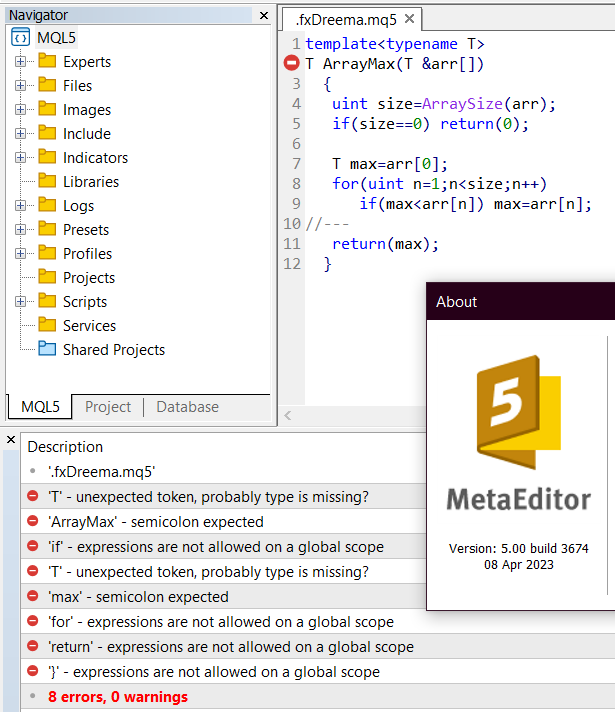
    • "T" - unexpected token, probably type is missing? In MetaTrader 5 build 3674

      It was just reported to me that there are compilation errors on the latest build of MT5 - build 3674. I tested it and it's true, if you try to compile (probably) any EA, generated by fxDreema in MetaEditor build 3674, you will get this error.

      It's about Function templates. See the documentation here: https://www.mql5.com/en/docs/basis/oop/templates
      So, even if you try the simplest example from the documentation, this error appears.

      4fa673e4-f3f1-48f1-8c82-905487508498-image.png

      I think they introduced a bug in their latest compiler. This problem is also reported in their forum, see this: https://www.mql5.com/en/forum/445197

      I also found this topic from yesterday (https://www.mql5.com/en/forum/445154), where another bug was reported in build 3672 that apparently has been fixed in build 3673. So I think the current "template" bug will be also fixed eventually.

      In short, for now I'm not going to try to fix anything, because I believe that it's a MetaQuotes bug that will be fixed in some of the following builds. The compiler on the website is older version and there are no problems there.

      posted in Bug Reports
      fxDreema
      fxDreema
    • RE: remove expert dal grafico

      I just tested it, and it seems that when you decide to close MetaTrader 4, just before it closes it calls the Deinit event on EAs. I just placed "Pass -> Play sound" in "on Deinit", closed my MetaTrader and I heard a sound.

      However, when I tested "Pass -> Terminate" in "on Deinit", it didn't really worked. After I stared it again, the EA was still in the chart.

      I also noticed that MetaTrader hanged for a while at the Terminate block, which is probably because it has additional ChartRedraw() function there, so I tested the native function ExpertRemove() in a "Custom MQL code" and this time it didn't hang, but still, after restart the EA was still in the chart. I don't really know how to remove EAs from the charts when you close MetaTrader.

      posted in Questions & Answers
      fxDreema
      fxDreema
    • RE: Forum update

      Someone getting "Forbidden" error message when trying to submit a post?

      posted in Questions & Answers
      fxDreema
      fxDreema
    • RE: partial exit not working correct on reporting with new fxdreema updates

      Here is an example I just did: https://fxdreema.com/shared/wCVSsE1Ib

      It creates a position, then after 1 hour it closes half of it, then after 1 more hour it closes it fully.

      In "on Trade" I placed some blocks to see what is going on. I want to detect partial close, full close, and a close in general (partial of full), and for each of these I print a text on the chart.
      Additionaly, in the logs I print some information with that Alert block.

      I think this works correctly.

      Your example is a little bit... it contains blocks that can be removed from there. But it's very possible that I fixed some wrong behavior. Yes, lately I was doing some changes and it looks that this changed the way your EA works. I wonder... did I broke something or did I fixed something. I don't fully understand the intention of your project, and that's why I can't tell what is the problem in it. But maybe you can get an idea from my project.

      posted in Bug Reports
      fxDreema
      fxDreema
    • RE: Forum update

      The website was down today for 2 hours and 40 minutes. Hosting maintenance I guess, because it went down at exactly 12:00 UTC. At the moment there is still a notification about this issue at this page (look at London): https://status.vultr.com/

      posted in Questions & Answers
      fxDreema
      fxDreema
    • RE: When to stop OnInit()

      @roar I had parthership proposals from brokers, and not only brokers, but I always decline. I'm very anti-parthership for some reason, so much that I don't even want to hire someone to do something instead of me. But lately, and especially after the hack, I started to realize that I'm probably not enough for this project and my strong anti-parthership shell is starting to crack a little bit.
      But brokers... I look at them as the enemy, although without them this website would not exist.

      posted in Bug Reports
      fxDreema
      fxDreema
    • RE: Go back and continue from this trade volume

      There is also this "Betting: Custom Sequence" option if the sequence of lots is too crazy.

      Variables are easy, they just hold values. The most complicated thing about them is their types. But most of the time the type is int for whole numbers, double for floating numbers, string for text or bool for true/false. In MQL4 and MQL4 there are also bunch of enumerations, they are a little bit more complicated types, but their names start with ENUM_... and once you kinda understand how to use them, you can easily find them in MQL's documentation.

      posted in Questions & Answers
      fxDreema
      fxDreema
    • RE: Position Created block with failure.

      I confirm that there is a "bug" when after some of the "For each..." blocks a non-pink block is used. Like in the example in my previous post, where "Buy pending order" changes the values of "(in loop)...".

      I tried to find if this is a new problem, but I think the problem is ancient, it has always been like this. I guess this explains why very often people are using pink blocks after buy/sell blocks without problems - those buy/sell blocks are acting like "For each...". So even if I find a way to fix this bug, maybe it will broke some people's projects. It looks to me like a bug, so old that it turned into a feature.

      posted in Bug Reports
      fxDreema
      fxDreema
    • RE: When to stop OnInit()

      @roar said in When to stop OnInit():

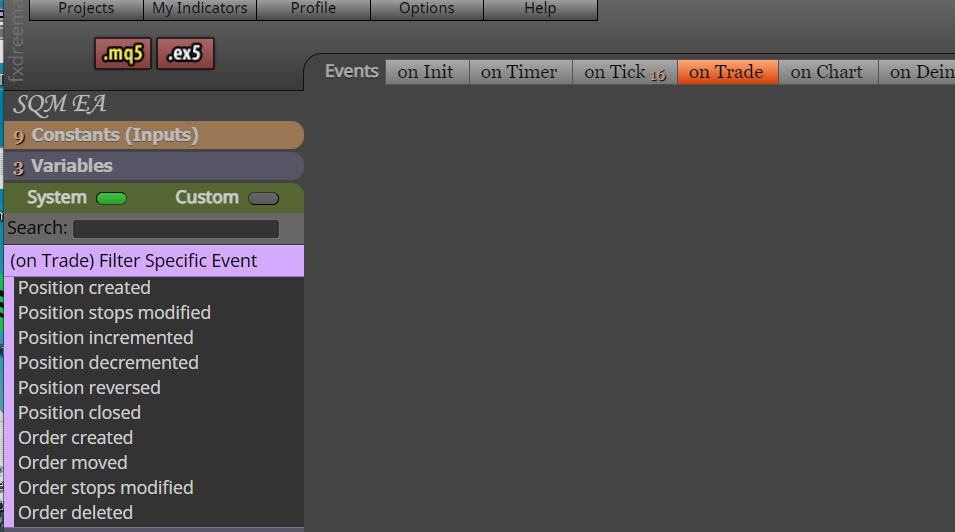
      Some event tabs have those specific filters, maybe the OnInit could have similar blocks too...

      03725474-f6ae-4b34-9338-99d6e7ce34fc-image.png

      The problem with this is that if I want to add such blocks, I should remove this code and allow the whole OnInit() body to run always, which can change the behavior of the EAs for some people.

      There are such problems everywhere in the EA builder where if I want to change or remove something, unexpected things could happen to many user's projects. And this is not like fixing a bug. If it's a bug, at least I can say "Yeah, but it worked wrong before and now I fixed it".

      I think I should somehow make a whole new version of the EA builder, incompatible with this one, on a different link. Like 2.0 or something. Similar to how MT4 and MT5 exist in parallel. But I don't think I have enough breaking changes in mind to justify this.

      posted in Bug Reports
      fxDreema
      fxDreema
    • RE: When to stop OnInit()

      I probably put this code there when someone was having issues when changing the parameters of the EA, or changing the timeframe. I don't remember exactly.

      I think the only two possible uninitialize reasons in OnInit() are REASON_CHARTCHANGE or REASON_PARAMETERS, which means that the "else" statement is about REASON_PARAMETERS.

      It looks that I wanted to prevent re-execution of blocks in "on Init" when the user changes the timeframe or the EA parameters. Only if the symbol is changed, the blocks would run again, which was probably because I have some symbol-related functions just below this code.

      I guess it depends. Maybe the user wants to redraw his objects, maybe not.

      Actually these REASON_CHARTCHANGE and REASON_PARAMETERS are forming possible events, something like "on Timeframe Change", or "on Parameters Change". Sometimes I'm thinking about adding some more events in the EA builder, or better changing the way events are used in the EA builder, maybe allowing for making custom events. But at the moment there are only these standard events and the use of REASON_CHARTCHANGE and REASON_PARAMETERS in on Init is opinionated.

      By the way, I don't think this is a bug.

      posted in Bug Reports
      fxDreema
      fxDreema
    • RE: Is the admin modifying the code on variables?

      @roar Nice to see someone else asking for isolated examples 🙂

      @l-andorrà Yesterday I was touching a little bit on the Trade events. Now minutes ago I touched that again. But I don't see how this is related to the variables.
      I would also like some isolated project.

      posted in Bug Reports
      fxDreema
      fxDreema
    • RE: Position Created block with failure.

      I rewrote some functions and I uploaded the changes. I did this for MQL4 and MQL5. What is different is the way events are detected, basically now the detection should work when there are multiple events happening at the same time.

      Here is a project that I used to produce these events at the same time: https://fxdreema.com/shared/CKK1K7bQ What is different than your project is that initially I'm creating 2 positions and 2 pending orders. SL for both positions is the same and OpenPrice for both pending orders is the same. So all these 4 events would happen at the same time.

      I used this sllevel variable, because I noticed anothe problem that I consider a bug. It's that if I use (in loop).... Stop-Loss in both Buy pending order blocks, the value that we get in the second block is wrong. I think Stop-Loss becomes the Stop-Loss of the pending order from the first Buy pending order block.

      Here is a little trick that can help you see the data of the events. In the generated source code find debug = false; and change it to debug = true;. This will allow printing of some data in the logs, it's very nice.

      posted in Bug Reports
      fxDreema
      fxDreema
    • RE: Position Created block with failure.

      I did one more change and I got a little bit more success, in particular when 2 positions and 1 pending order is created, but it doesn't work correctly when 2 positions and 2 pending orders are created. It seems that I have to rewrite the algorithm for detecting Trade events. This will probably take days.

      posted in Bug Reports
      fxDreema
      fxDreema
    • RE: Position Created block with failure.

      I think I fixed the problem, and the good thing is that now I don't expect something else to break because of this. As I mentioned, I have this class to detect Trade events, and there was a place in this class where I just printed some message instead of trying to detect anything, it was kinda unfinished. But it was unfinished, because I didn't even expect to ever reach this place. Well, I guess in MQL5 every strange and unexpected situation is possible.

      And the issue was that while the pending order is triggered at the same time when SL of the position is triggered, my Trade-detecting class detected this as a single event (instead of two), and not just any event, but one that it could not resolve.

      Now I have to fix the situations when I try to open two pending orders at the same price, or to create two positions initially. These situations doesn't work.

      @QuantEngineer Damn, you have so many custom blocks, you have like another EA builder.

      posted in Bug Reports
      fxDreema
      fxDreema
    • 1
    • 2
    • 3
    • 4
    • 5
    • 365
    • 366
    • 3 / 366