fxDreema

    • Register
    • Login
    • Search
    • Back to the main page
    • Categories
    • Recent
    • Tags
    • Popular
    • Search
    1. Home
    2. hjmr
    3. Posts
    H
    • Profile
    • Following 2
    • Followers 0
    • Topics 10
    • Posts 36
    • Best 2
    • Controversial 0
    • Groups 0

    Posts made by hjmr

    • RE: Trade one currency pair at a time multi-currency

      @l-andorrà Thank you very much for always showing interest and trying to help. I appreciate your suggestion, the only detail is that it would be for more than two currency pairs. It could be at least 10 to 20 pairs trading in a multicurrency ea, so whichever pair signals first during the time period, that would be the only pair opening trades. Then reset, time period starts again, a different currency pair may get an entry signal.

      Haven't sat down yet, but I'm thinking maybe using a flag to change if I can manage to store in a variable the currency pair of the first entry signal. If the flag is false then trades of others currency pairs will not open trades during time period. Reset flag to true at end of time period. Let see if it works. For sure you may have a better solution, I'm just learning little by little. thanks again.
      posted in Questions & Answers
      H
      hjmr
    • Trade one currency pair at a time multi-currency

      Hi, Trying to figure if I have a multi-currency ea, how to trade one pair at a time. Ex. Trade for EURUSD is opened, only open trades fro EURUSD for a certain period of time. Then reset for next trading session which next trade could be maybe USDCAD, etc.. thanks

      posted in Questions & Answers
      H
      hjmr
    • RE: Compare equity of two different mt4 accounts to close all trades of both accounts

      Thanks for checking. I can post if I find something. Thanks

      posted in Questions & Answers
      H
      hjmr
    • Compare equity of two different mt4 accounts to close all trades of both accounts

      Hi, would anyone know if with fxdreema I can create some blocks that can compare the equity of two different mt4 accounts and when the combination of both equity reaches a certain combined equity all trades close for both accounts? Ex. when the sum of the equity of the open trades of both accounts equal or more than 5 percent, close all trades. Or any multi account manger you may know that does this? thanks

      posted in Questions & Answers
      H
      hjmr
    • RE: Chart scale adjustment

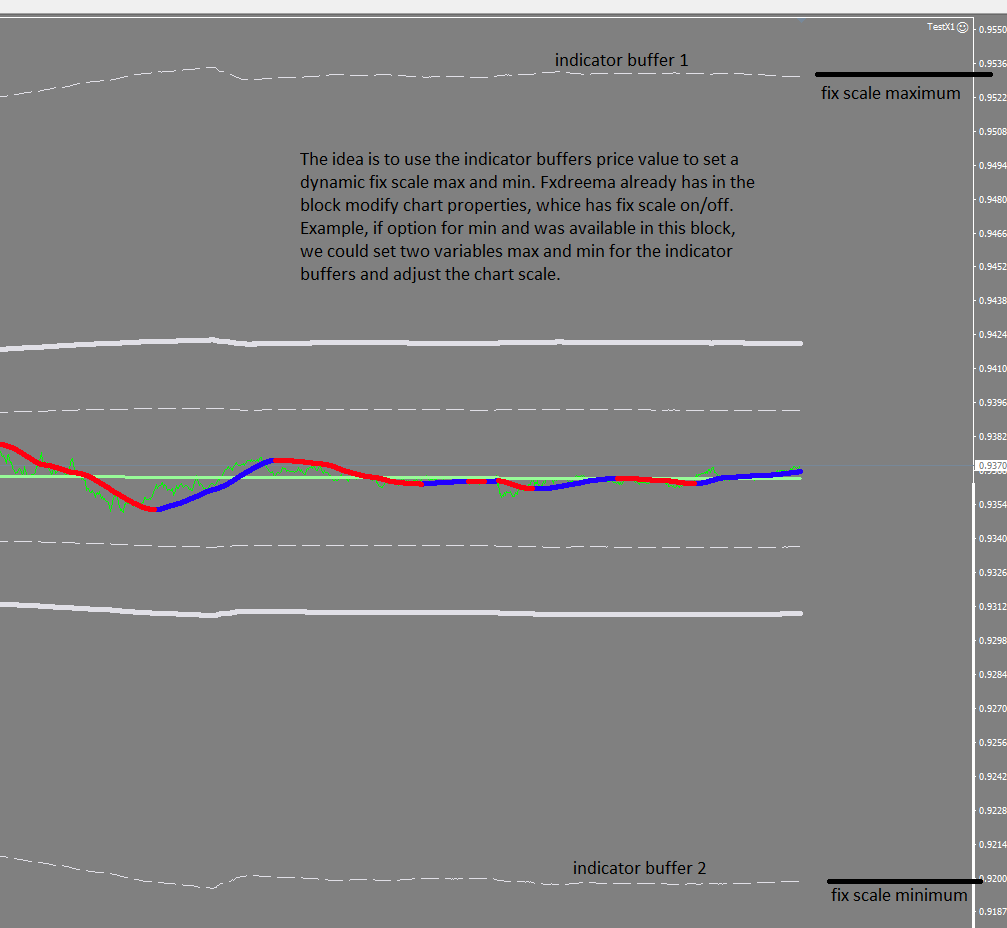
      @l-andorrà Thanks for your response and interest. Here is an image explaining better what I'm trying to do. The idea is to use the indicator buffers price value to set a dynamic fix scale max and min. Fxdreema already has in the block modify chart properties, which has fix scale on/off. Example, if option for min and was available in this block, we could set two variables max and min for the indicator buffers and adjust the chart scale. So if I change timeframe or pair symbol in the chart, the scale will adjust accordingly to the view I would like to see.

      thanks again.

      0_1623810766009_ade70105-0969-42d2-9676-9bfbd3e45c11-image.png

      posted in Questions & Answers
      H
      hjmr
    • RE: Layer order of objects on chart

      @q8carpenter Thanks for your help. I tried the concept you mentioned using mirro's array dashboard presented in his tutorial. Can't make it work, any suggestions considering I using arrays in the timer tab? Thanks
      0_1623722295954_pic.jpg

      0_1623722307231_pic1.jpg

      posted in Questions & Answers
      H
      hjmr
    • Chart scale adjustment

      Hi, I'm trying to figure out how to adjust the scale of the chart based on an indicator. Example, If can control with variables the fix scale min and max, I can use an envelope indicator to provide the min and max based on the bands price reading. Thanks

      posted in Questions & Answers
      H
      hjmr
    • Layer order of objects on chart

      Would anyone know how to place objects behind other objects on the chart? I'm working on a dashboard and wanted to place a square shape behind some edit fields. The shape would also be in front of the chart candle bars. The purpose is to avoid the candle bars to be seen behind the dashboard. Thanks

      posted in Questions & Answers
      H
      hjmr
    • RE: Additional columns for trade details and buttons ( dashboard array )

      @l-andorrà Thanks for responding. No worries. I kept passing the thread pages and found and found a project miro was helping out someone and it has helped me to start filling the gaps of what I'm trying to accomplish. That's how we learn. Thanks

      posted in Questions & Answers
      H
      hjmr
    • Feature Requests - Scale Fixing and Screen Shot

      @fxdreema Hi, I’m trying to set my ea so that when changing pairs in the same chart the chart is in the proper scale. My idea is to use the fix scale maximum and minimum to adjust the proper scale. If I can place a variable on the fixed scale maximum and minimum based on an indicator I can have the pairs chart have the ideal scale. Found this old thread, that you mentioned if the max and minimum needed to be added to modify chart properties block. Thanks

      posted in General Discussions
      H
      hjmr
    • RE: Additional columns for trade details and buttons ( dashboard array )

      @l-andorrà

      Sorry for the mistake, I changed the link to the tutorial thread if that's what you meant. Thanks

      posted in Questions & Answers
      H
      hjmr
    • Additional columns for trade details and buttons ( dashboard array )

      @miro1360 said in Video Tutorial - Signals Dashboard EA [advanced] - looping Objects, arrays:

      Hi,

      Would anyone know how to add more columns for this dashboard for profit and buttons? A column per currency pair for PROFIT. And other columns for buttons for BUY, SELL and CLOSE. This would be buttons that you can click per currency row. I can draw the buttons and manage to place profit but its not working.

      thanks.

      posted in Questions & Answers
      H
      hjmr
    • How can you see on chart the signals history (eg. Arrows, boxes) for an EA Indicator created in FXDREEMA?

      How can you see on chart the signals history (eg. Arrows, boxes) for an EA Indicator created in FXDREEMA? When creating a regular indicator it normally by default shows the history on chart for past candle bars. But when creating an EA on FXDREEMA history is created as the EA runs in the chart. Thanks

      posted in Questions & Answers
      H
      hjmr
    • RE: Video Tutorial - Signals Dashboard EA [advanced] - looping Objects, arrays

      @hadees Thanks, I will study Miro ArraySort function example and try to modify something for my needs. Thanks for your help.

      posted in Tutorials by Users
      H
      hjmr
    • RE: Video Tutorial - Signals Dashboard EA [advanced] - looping Objects, arrays

      @miro1360 Thank you very much for your help, I completly understand that you are busy. I appreciate the tutorial you posted for dashboard, that was of great help. I’ll keep trying since you mention it is possible to do. Thanks

      posted in Tutorials by Users
      H
      hjmr
    • RE: Video Tutorial - Signals Dashboard EA [advanced] - looping Objects, arrays

      @miro1360 Hi Miro, Sorry for the bother, I have been working with the dashboard one column at a time and been able to make it work. The only thing I’m struggling how to do is to hold a signal. In a normal EA I have been using a lookback condition to see if a signal occurred x amount of bars ago. Haven‘t been able to make it work in the array dashboard. Is there a way I can lookback or freeze the signal in the dashboard? Show signal for amount of bars age. Ex. RSI overbought arrow 100 bars ago is still visible in the dashboard. Thanks

      posted in Tutorials by Users
      H
      hjmr
    • RE: Video Tutorial - Signals Dashboard EA [advanced] - looping Objects, arrays

      @miro1360 Thanks again for your help. Since a few signals to be shown on the dashboard are not candle id 0, but could be up to 150 bars ago, I am trying to see how I can hold the signal once it appears for a certain amount of time or bars. Or make a lookback up to 150 bars ago and see if the signal still appears. Thanks again, I will continue to work on it.

      posted in Tutorials by Users
      H
      hjmr
    • RE: Video Tutorial - Signals Dashboard EA [advanced] - looping Objects, arrays

      @miro1360 said in Video Tutorial - Signals Dashboard EA [advanced] - looping Objects, arrays:

      add

      Thank you Miro for your help. Would it be possible to ask if arrays permit the use of signal lookback or hold its value on dashboard for certain amount of time ( signal age). I adjusted your dashboard with a column with lookback for signals. shared/WSo2MRyN

      Thanks for taking time in helping.

      posted in Tutorials by Users
      H
      hjmr
    • RE: Video Tutorial - Signals Dashboard EA [advanced] - looping Objects, arrays

      @miro1360 Thanks Miro for your help. I really tried to manage on my own but was blinded in the errors you found. thanks again.

      posted in Tutorials by Users
      H
      hjmr
    • RE: Video Tutorial - Signals Dashboard EA [advanced] - looping Objects, arrays

      @hjmr Sorry, Tried to delete message, wasn‘t aware Miro answered my question. Thanks Miro for your help.

      posted in Tutorials by Users
      H
      hjmr
    • 1
    • 2
    • 1 / 2