Use break even point block

Use break even point block
@tipsywisdom Hi, I'm also interested in your discord. I'm looking for a community to share my work and get improvement ideas
@felixnr You're welcome. Glad I could help!
If you can know in advance the open price of the next candle let me know ;).
If you want to close position when new candle start use "once per bar - if position/order - close positions"
I use ugly for debugging.
Anyone can help on how do I round off in the variables ?
Hi,
Since today I cannot link blocks.
I tried to delete cache, incognito mode, refresh but nothing of it fixes it.
Has someone already encoutered this ?
Video screenshot : https://youtu.be/4L-IbzK9yZc
Solution : It was due to a block who had a "+" character in block ID
@sinister wow I didn't know about this! Thanks I'll give it a try. Aren't you able to verify this on a backtest?
When you buy or sell you do it at a certain price with a certain TP and was SL (level or distance) set when you open your order. If TP or SL is hit it will execute whether your time filter passes or not.
What is the difference between a TP/SL and a "virtual" one?
@gauss you could use a VPS (virtual private server). It allows you to store and run your EAs on a distant server which can get you a better ping and let you turn off your computer. I use Admiral market as a broker and with a 2000€ deposit I can have it for free. If your broker doesn't offer this you can always rent one on MQL5
Make a formula that does close-open and store result in a variable. Test if variable is negative, would mean a bearish candle. Make it work on 1hr time-frame.
@ibrahim-3 something is not right in your conditions because one hour after opening it might not be profitable and you cannot move your SL between the actual price and your opening price.
@jstap This is a good one and might be helpful, thank you !
My issue is mostly storing value of each dot to make calculations.
I did what I said in first post even if it is redundant. Maybe one more elegant solution will be found.
Hi,
I guess it has something to do with slippage. You can choose a maximum slippage for your opening order but not for TP and SL. Try negotiating with your broker a faster execution of your trade or threat to try somewhere else.
As @TipsyWisdom said I'd rather use Real ticks than Every ticks.
Chose a broker that provide a good history (shouldn't be below 99%) and backtest on a real account rather than on a demo one.
I first use real ticks to make sure that visually it does what I want then I optimize and backtest with real ticks as well.
My fear with 1m OHLC is the spread hunting that could be "unseen" by the backtest.
@jstap I did one with fractals : https://fxdreema.com/shared/2NDyXbqI (DM me if needed)
It was easier because fractals have the option "fractal mode" to filter if it is above or below
Hi everyone !
Can someone help me about the "text (code input)" option ?
My plan is when I read parabolic sar value to sort them if the dot is above or below the candle on the lasts 50 candles.
I could do a lot of loops like :
if candle ID read is 0 store value in psar_dn_0 or psar_up_1
if candle ID read is 1 store value in psar_dn_1 or psar_up_1
50 times...
Or I feel like text code input is my way to go to increment the variable where it is stored but I cannot find anything about it.
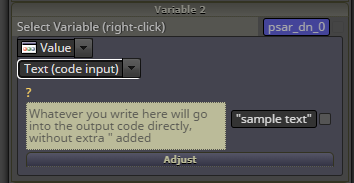
Thanks for reading me
Hi everyone,
I've been Backtesting my latest project but something seems off, I don't know if it is because of the MT5 build version or my computer but has anyone encountered something like this:
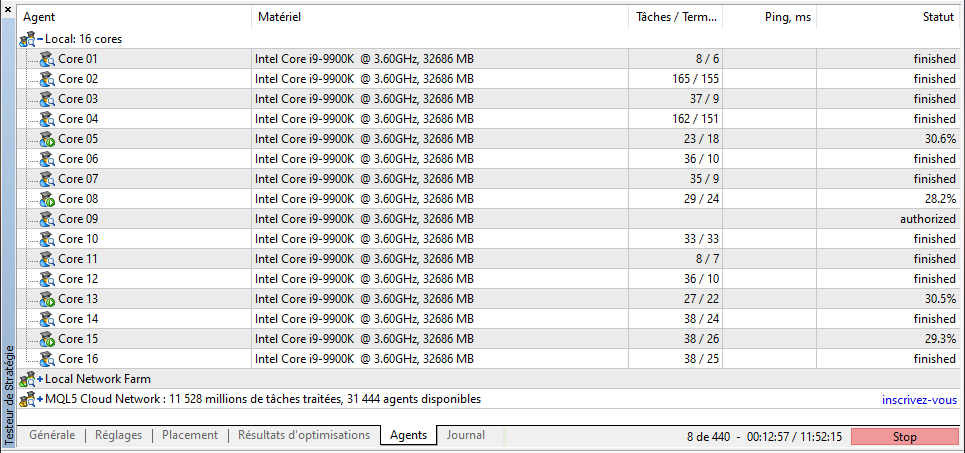
Some cores have a lot more to do (evenly distributed before)
Some are marked finished but has done 6/8 tasks (so, not finished)
Please help before I go full retard and reinstall everything including windows...
@unicornmadness I don't see how you could get BB bands value without it included in the EA. Including it doesn't mean it has to interfere with your entry or exit signals.
However you can get BB bands values (or calculations) when a trade is closed and store it in a CSV file. Use a boolean variable to check if trade was profitable and store it in the file as well.
I just can't believe how easy it was actually...
Here is the shared project : https://fxdreema.com/shared/vauFi9zNd
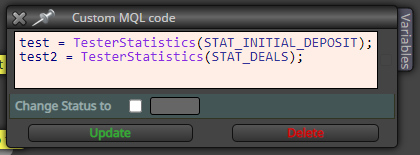
You just have to call the "TesterStatistics(STAT_whatever needed)" and store in a variable then put it in your write to file.
This is a big game changer for me and I hope it would help others !
I put the topic on solved.
BONUS : If like me you think that 10 columns in write file isn't enough, use a custom block to put all your constants & variables in a string separated with a comma (like this)
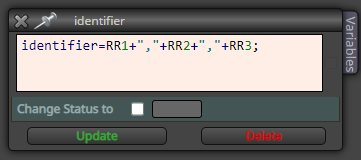
Then in Excel use the "convert" option :
Highlight the column that contains your list.
Go to Data > Text to Columns.
Choose Delimited. Click Next.
Choose Comma. Click Next.
Choose General or Text, whichever you prefer.
Leave Destination as is, or choose another column. Click Finish.
I found a way that I have to dig into : https://www.mql5.com/en/docs/constant_indices
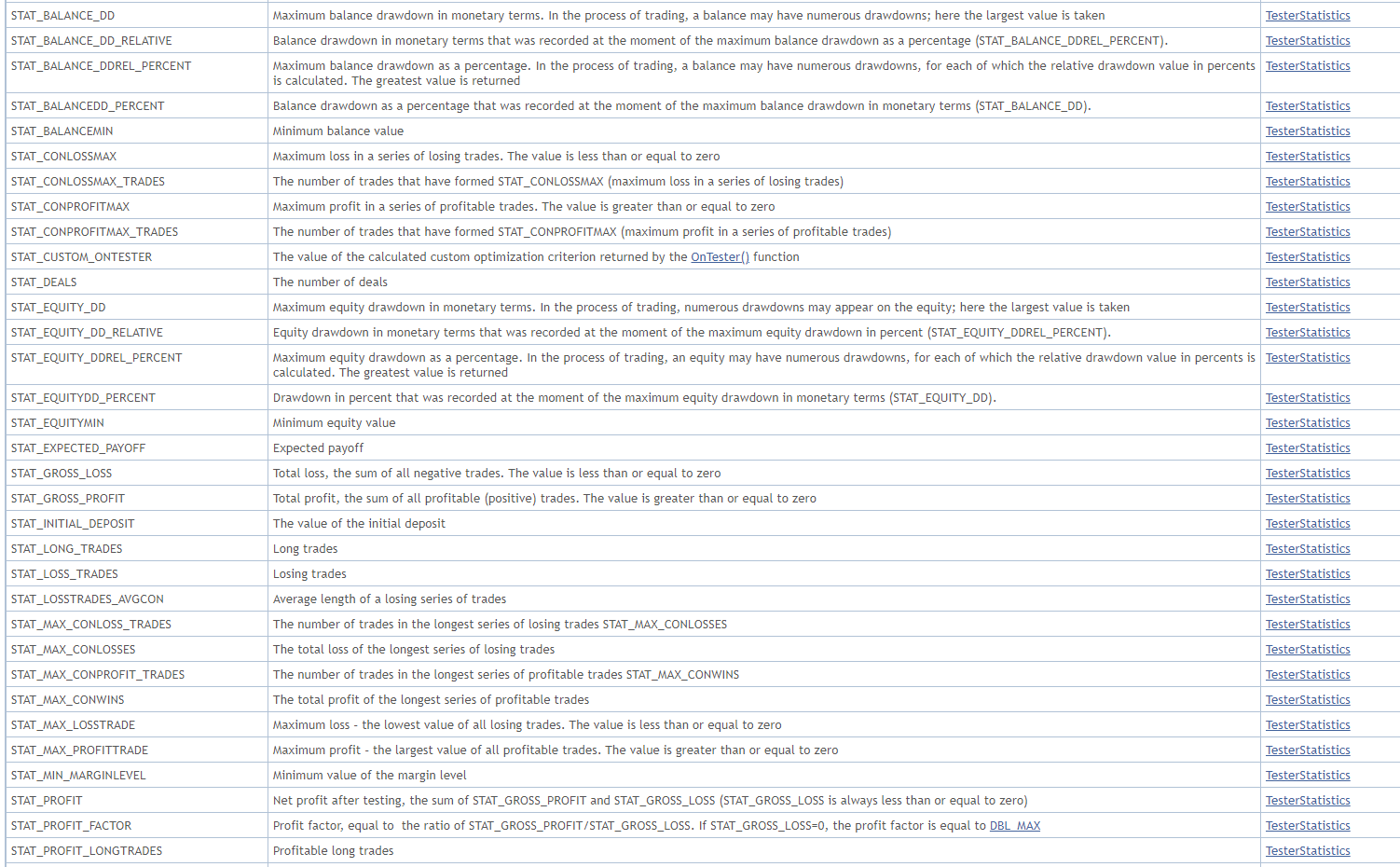
I now have to create a custom block to be able to call these constants. Don't know how to (yet) so if anybody has mql5 capacities to help it would be awesome.