Good morning. Please can you share the solution. I am interested. Thank you.
K
Posts made by kayzworld
-
RE: Count bulls/bears in x number of last bars?posted in Questions & Answers
-
RE: custom code to output minimum value in an array - Please helpposted in Questions & Answers
@l-andorrà: Thanks... Hopefully, I will get someone to assist.
-
custom code to output minimum value in an array - Please helpposted in Questions & Answers
https://fxdreema.com/shared/Xlx4czrDb
Please someone should kindly help with custom code that will enable me to store the minimum value from an array of support and resistance values, pivot point as well as the open and close values of the previous day 4 candle and output it on log or comment blocks. Included is the link to my sample code. Kindly help me correct this. Thank you
-
RE: buy does not workposted in Bug Reports
pLEASE DO NOT IGNORE ADMIN. bUY ORDERS/ ENTRIES DO NOT EXECUTE ON MT5
-
RE: MQ4 EA -> MQ5posted in Questions & Answers
@cbot-0 Yes, interestingly in fxdreema, it has always worked out for me. I copy blocks from MT4 => MT5 without problems. roar is right, give it a try.
-
RE: ANYONE WITH SUCCESS USING CUSTOM INDICATOR ON FXDREEMA MT5 VERSION WITH BUFFERS AND INPUT PARAMETERS KINDLY PUT ME THROUGHposted in Questions & Answers
I have meticulously tried the Magic candles and it worked after several attempts. Now I am repeating all procedures for the PipFinite Trend pro but it is still not working.
This is the project - attempt 1.
https://fxdreema.com/shared/GrdmQ1NJc
I get this errors
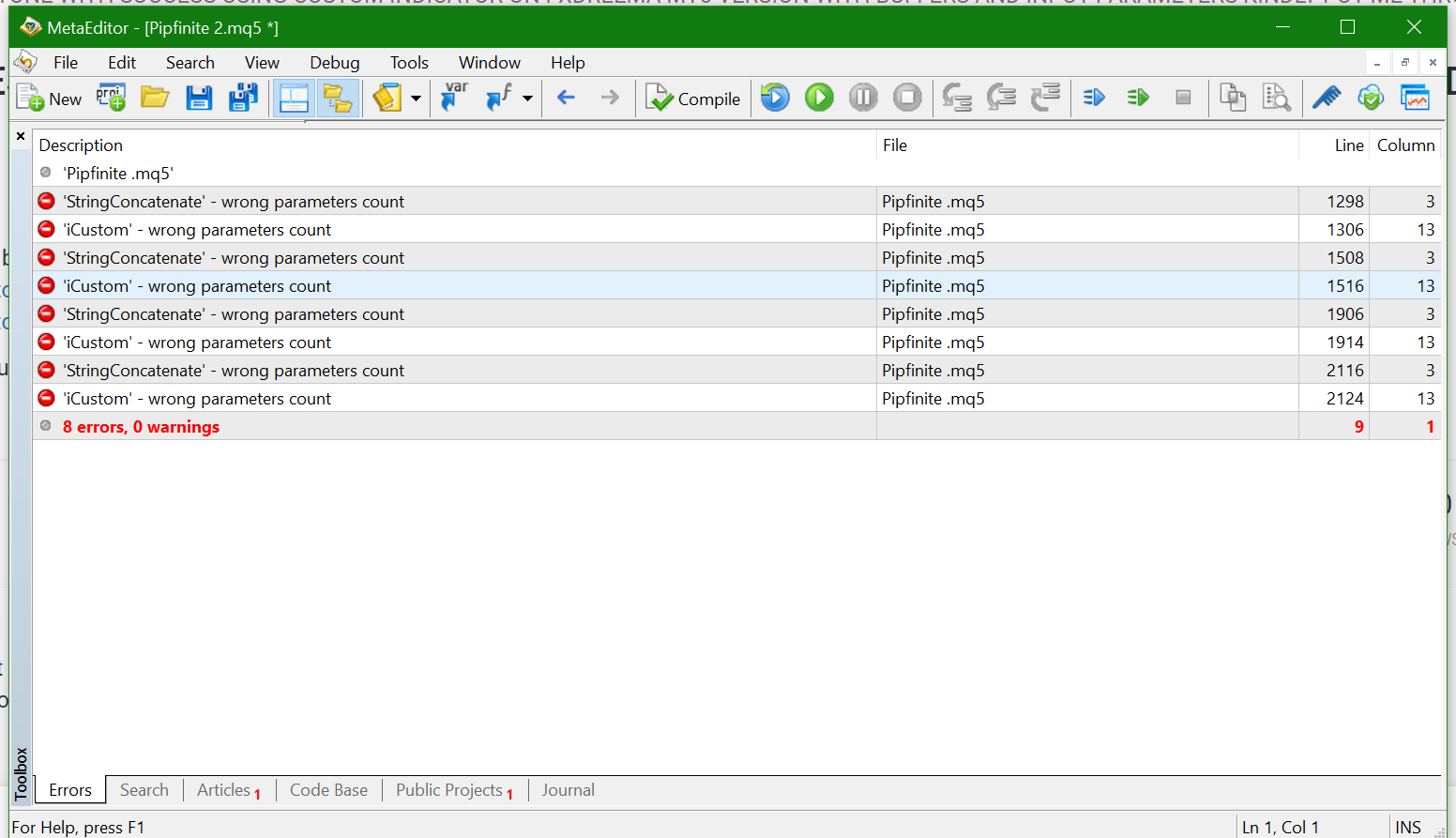
This is the same project - attempt 2.
https://fxdreema.com/shared/rgxk1wW9b
This one compiles without errors but when being tested returns this error
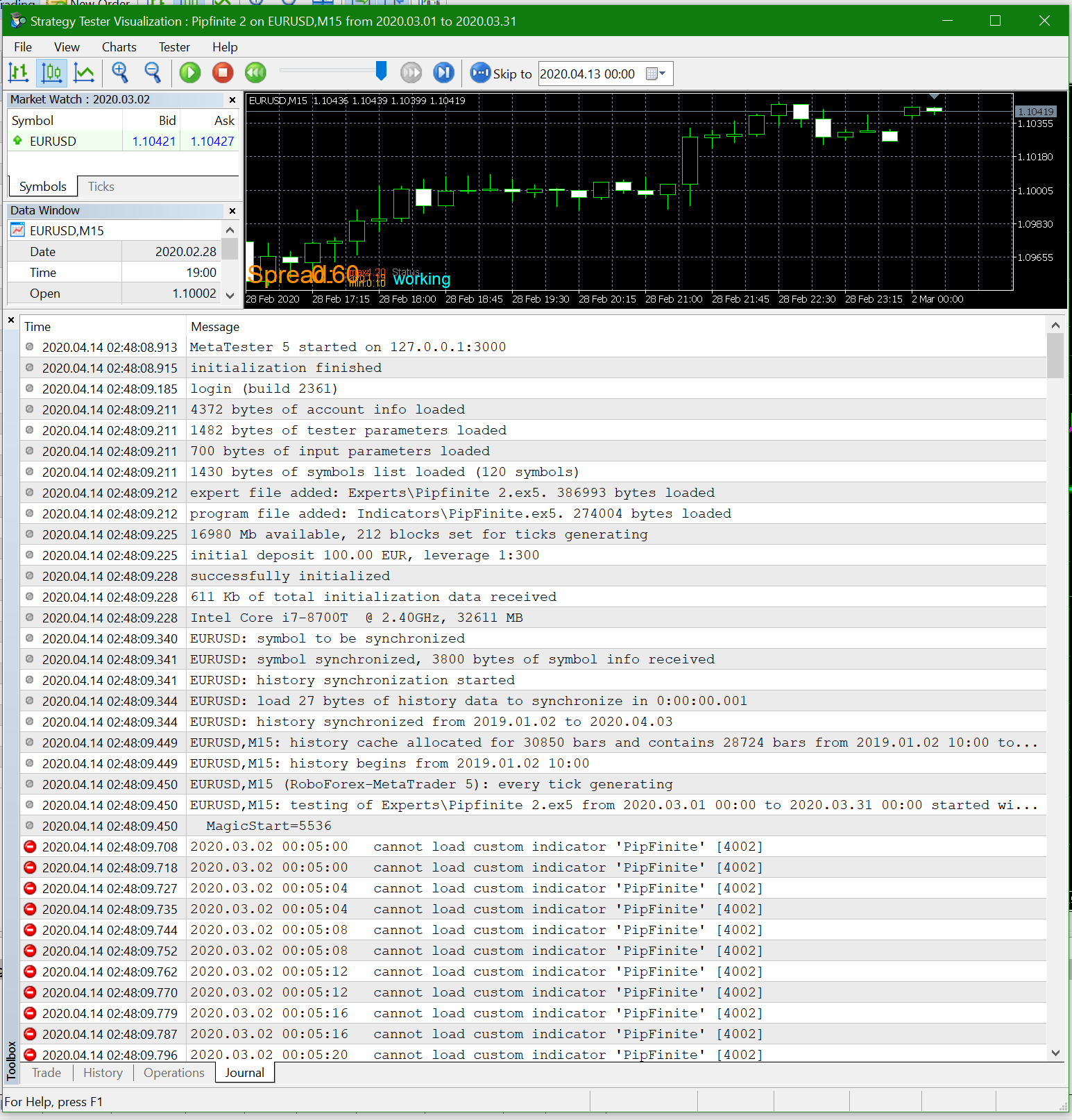
I tried this second attempt because the sample code given to me is like this
//+------------------------------------------------------------------+
int OnInit()
{
//---//Load EX5
handle_icustom = iCustom (NULL, 0, "\\Market\\PipFinite Trend Pro MT5", //File Path of indicator //NEXT LINES WILL BE INDCATOR INPUTS " ", 3, 2.00, 3000 //END FOR INPUTS );//---
return(INIT_SUCCEEDED);
}
//+------------------------------------------------------------------+These are the buffers for the indicator
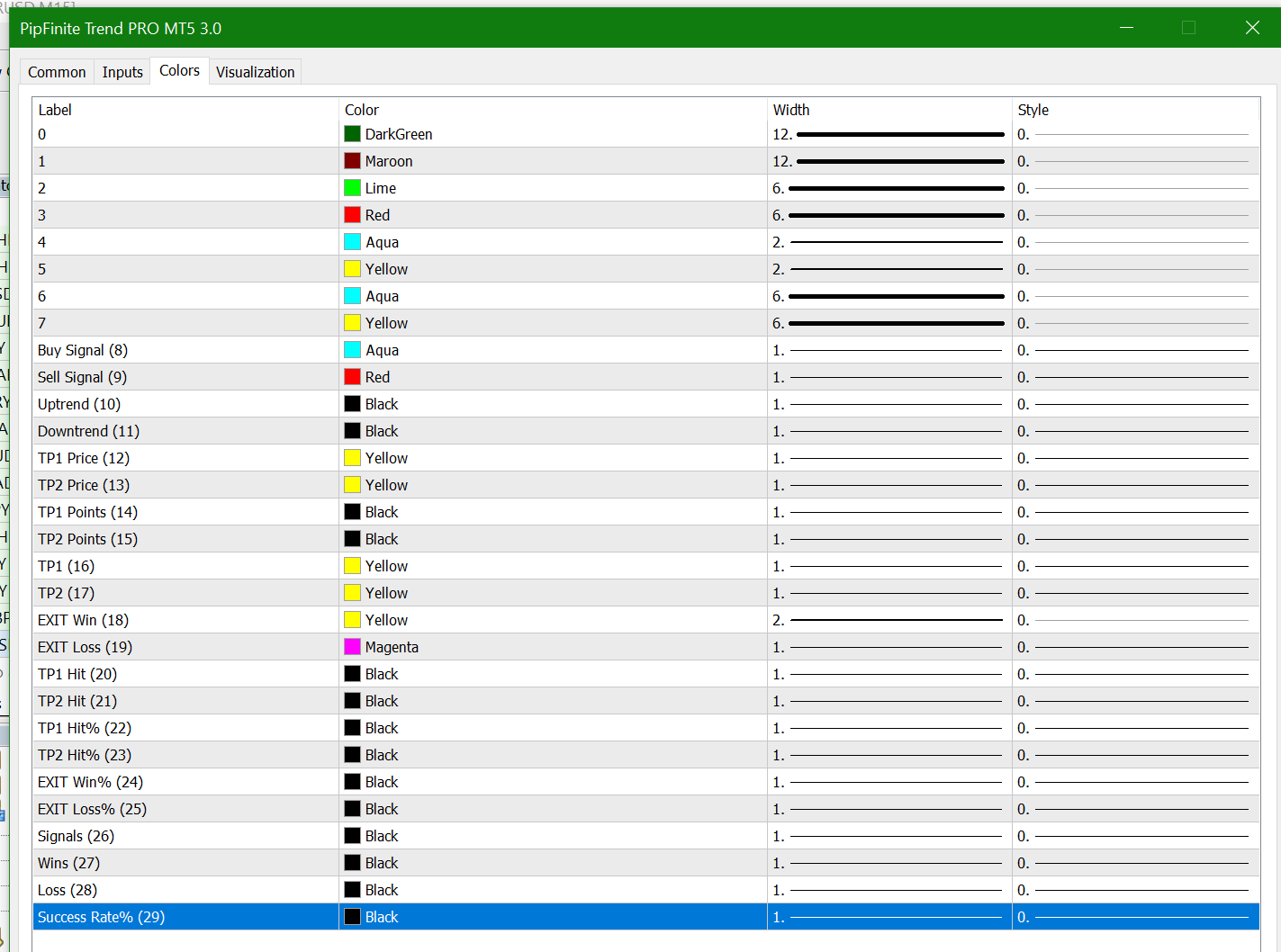
These are the input parameters

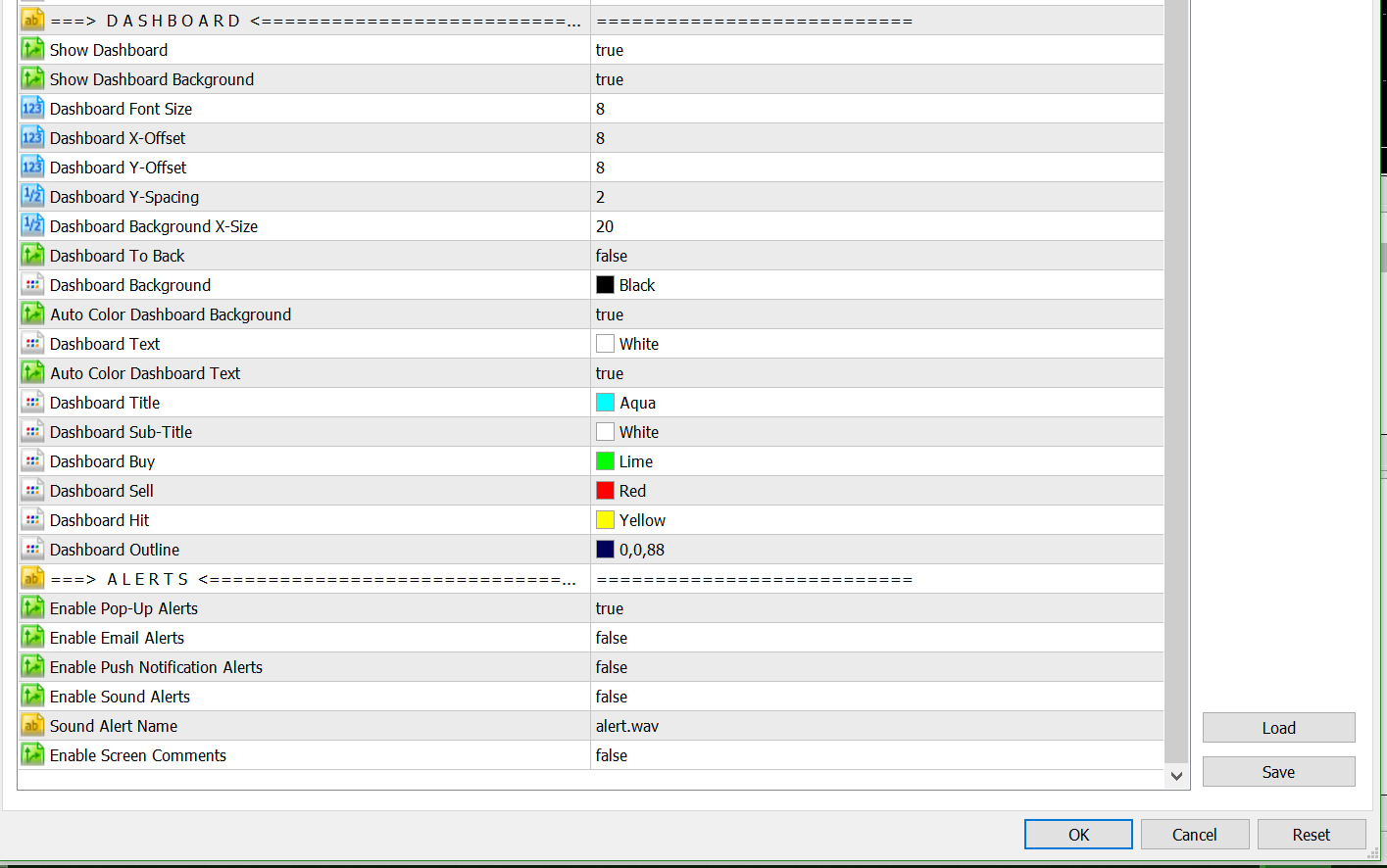
This is what the indicator looks like
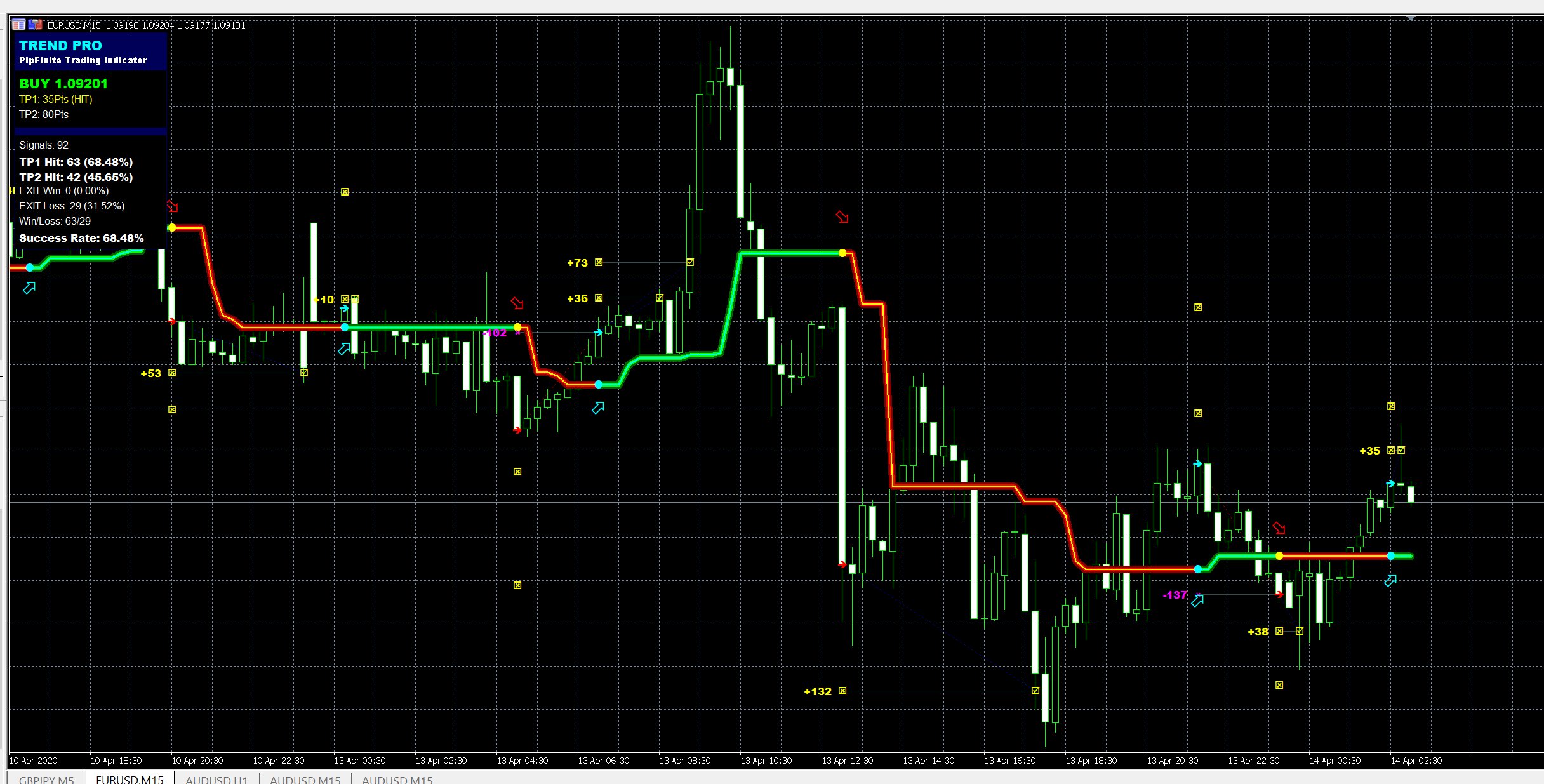
I would have shared the indicator itself but the license is limited.Thank you for the support.
-
ANYONE WITH SUCCESS USING CUSTOM INDICATOR ON FXDREEMA MT5 VERSION WITH BUFFERS AND INPUT PARAMETERS KINDLY PUT ME THROUGHposted in Questions & Answers
I have followed these tutorials below on custom indicators and no custom indicator have worked for me on MT5.
https://fxdreema.com/forum/topic/9105/tutorial-working-with-ex4-ex5-indicator-file
https://fxdreema.com/forum/topic/4208/tutorial-06-my-indicators-in-fxdreematry this demo magic candles custom indicator for AUDUSD on MT5 https://www.mql5.com/en/market/product/29342 and kindly update me. Thank you.
-
RE: If you have successfully used pipfinite pro trend in your EA, please come to my rescue dicatorposted in Questions & Answers
@l-andorrà I sincerely have followed that detailed instructions several times. But its not working. I am on MT5 so I really don't know.
-
RE: If you have successfully used pipfinite pro trend in your EA, please come to my rescue dicatorposted in Questions & Answers
@l-andorrà Yes you are right. I downloaded from the market. Moreover, I just remembered, the reason it possibly did not work on your metatrader was probably because you were supposed to run the demo version on AUDUSD pairs only. Can you please try running it under the fxdreema custom indicator settings again and let me know the outcome. I have tried it as earlier mentioned but could not enter trade with it though it was painting the colours. Thanks.
-
RE: If you have successfully used pipfinite pro trend in your EA, please come to my rescue dicatorposted in Questions & Answers
@l-andorrà The indicator works on mine Metarader but does not work with Fxdreema so I needed someone to try it and show me how it can work on fxdreema... it paints the bars and it is MT5 file. Probably try getting it through the market. It is free. Thanks
-
RE: If you have successfully used pipfinite pro trend in your EA, please come to my rescue dicatorposted in Questions & Answers
0_1586564960282_Magic Candles Free for MT5.ex5
Thank you for all your support. Can you try this magic candle indicator and let me know if it is working. When I uploaded it on the custom indicator and used the count block, visible block and buy block to test it. It was painting but not opening trades. I got it free from MetaTrader5 Market. https://www.mql5.com/en/market/product/3577
Kindly try it out, let me know your feedback. I have practiced following Tutorial 5 & 6 on Custom indicator on FXDreema site that is why I am wondering if the problem is with custom indicators on MQ5 on FXDreema or something.
Your observations and suggestions will highly be appreciated. Thank you -
If you have successfully used pipfinite pro trend in your EA, please come to my rescue dicatorposted in Questions & Answers
I seem not to be able to successfully upload pipfinite pro trend indicator on fxdreema. I have uploaded some other simpler indicators before but this one has proven quite challenging. Kindly assist if you have done it before. Thank you.
-
RE: Please kindly Help - Pipfinite Pro Trend custom indicatorposted in Questions & Answers
@kayzworld Additionally, the "shift =1" I guess is where the problem is but I don't know how to insert it.
-
Please kindly Help - Pipfinite Pro Trend custom indicatorposted in Questions & Answers
I just purchased the pipfinite pro trend indicator https://www.mql5.com/en/market/product/26888. I have uploaded it to my custom indicator but having compiler errors. Below is my project.
https://fxdreema.com/shared/PObMcZrBdThese are the repeated errors
lines columns
'StringConcatenate' - wrong parameters count 1486 3
'iCustom' - wrong parameters count visible6.mq5 1494 13Below is line 1486 from metatrader editor:
// turn the input parameters into a key
string key = "";
StringConcatenate(key, Symbol, Period, "Market/PipFinite Trend PRO MT5" , (string)"===========================", (int)3, (double)2.0, (int)3000, (string)"===========================", (bool)true, (bool)true, (bool)true, (bool)true, (string)"===========================", (bool)true, (bool)true, (bool)true, (bool)true, (bool)true, (bool)true, (bool)true, (bool)true, (bool)true, (int)8, (bool)true, (bool)false, (string)"===========================", (color)clrDarkGreen, (color)clrMaroon, (color)clrLime, (color)clrRed, (color)clrAqua, (color)clrYellow, (color)clrAqua, (int)3, (color)clrRed, (int)3, (color)clrAqua, (int)1, (color)clrRed, (int)1, (color)clrYellow, (int)1, (color)clrYellow, (int)1, (color)clrYellow, (int)1, (color)clrYellow, (int)3, (color)clrMagenta, (int)2, (color)clrDarkSlateGray, (color)clrNavy, (color)clrDarkSlateGray, (color)clrMaroon, (color)clrYellow, (color)clrMagenta, (string)"===========================", (bool)true, (bool)true, (int)8, (int)8, (int)8, (double)2.0, (double)20.0, (bool)false, (color)clrBlack, (bool)true, (color)clrWhite, (bool)true, (color)clrAqua, (color)clrWhite, (color)clrLime, (color)clrRed, (color)clrYellow, (color)0,0,88, (string)"===========================", (bool)true, (bool)false, (bool)false, (bool)false, (string)"alert.wav", (bool)false);Below is line 1494 from metatrader editor:
// if we don't have a handle, then create one
if (array_key == -1)
{
handle = iCustom(Symbol, Period, "Market/PipFinite Trend PRO MT5" , (string)"===========================", (int)3, (double)2.0, (int)3000, (string)"===========================", (bool)true, (bool)true, (bool)true, (bool)true, (string)"===========================", (bool)true, (bool)true, (bool)true, (bool)true, (bool)true, (bool)true, (bool)true, (bool)true, (bool)true, (int)8, (bool)true, (bool)false, (string)"===========================", (color)clrDarkGreen, (color)clrMaroon, (color)clrLime, (color)clrRed, (color)clrAqua, (color)clrYellow, (color)clrAqua, (int)3, (color)clrRed, (int)3, (color)clrAqua, (int)1, (color)clrRed, (int)1, (color)clrYellow, (int)1, (color)clrYellow, (int)1, (color)clrYellow, (int)1, (color)clrYellow, (int)3, (color)clrMagenta, (int)2, (color)clrDarkSlateGray, (color)clrNavy, (color)clrDarkSlateGray, (color)clrMaroon, (color)clrYellow, (color)clrMagenta, (string)"===========================", (bool)true, (bool)true, (int)8, (int)8, (int)8, (double)2.0, (double)20.0, (bool)false, (color)clrBlack, (bool)true, (color)clrWhite, (bool)true, (color)clrAqua, (color)clrWhite, (color)clrLime, (color)clrRed, (color)clrYellow, (color)0,0,88, (string)"===========================", (bool)true, (bool)false, (bool)false, (bool)false, (string)"alert.wav", (bool)false, PRICE_CLOSE);Presently I can place a screen shot because I don't have enough privileges to do that according to FxDreema site.