@jstap You're right. The problem must be there. I decided to work with standard Unix times and it works, but definitely candles are not correctly identified that way.

@jstap You're right. The problem must be there. I decided to work with standard Unix times and it works, but definitely candles are not correctly identified that way.
@Fazelfx you need to specify those are pips. Like this: '-1000 pips'.
I'm afraid I don't speak your language. I also speak Catalan and Spanish if that helps.
Not sure what you exactly mean. Can you please upload a screenshot as example?
@alok You need to add a pink 'once per trade' block before block 5. Otherwise you'll get multiple partial close per tick.
Block 21 options is correct. You simply forgot to type something on the 'label' box. Do it and you will see the value you're looking for.
For how long you need to search for that higher ligh? One hour? One day?
@kestra Ok. Let move step by step. The condition block 3 is the condition telling your EA that trades can be open today. I created a variable called 'activate' that can have just two values, true and false. I decided that it should be true for the trades to be open. Please remember that thsi block is supposed to be on top af all your blocks deciding when a buy or a sell are open. If this condition move to false, no more trades will be open.
And that is what block number 6 is doing. Once the EA gets as much money as you want, all trades are closed by block 5 and then the variable is changed to false again. It will not be true again until tomorrow (Block 1).
Do you understand do far?
Is this the whole project? Because there is no issue here. It should work normally.
You need to use three separate 'buy now' blocks, one for each lot size. Then, on top of each block you need to use the condition blocks specifying those RSI limits.
You current settings will open infinite new trades if the pips away distance is right. In order to avoid that, you should use a pink 'once per trade' block above both 'buy/sell now' blocks.
Trailing stop is the maximum distance there will always be betwee the current price and the SL. In no case that distance will be higher. It can only be shorter. Trailing step is the diatance the SL will be moved on the chart every time price is at the exact trailing stop distance from SL. You can create 2 constants to select both values.
@jzfusion The you need something like this:
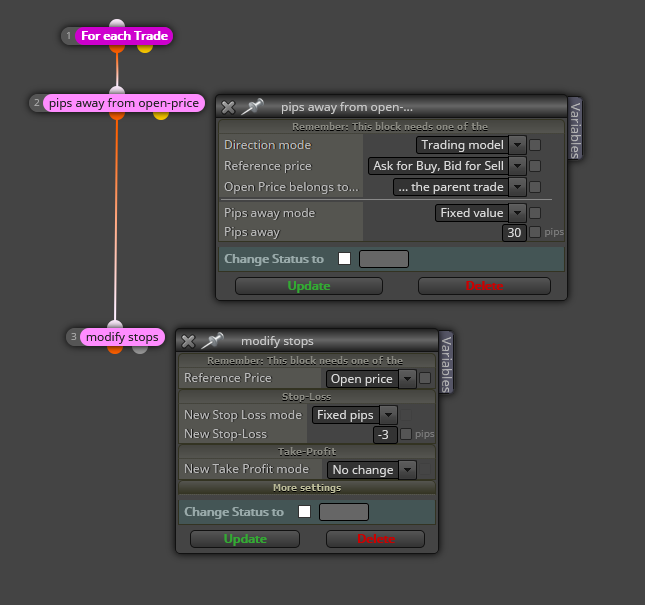
In my examople, when proce is 30 pips in profit, SL is moved 3 pips above (for a buy) open price.
@biztet You said the answer. You need to use different group numbers, one per expert.
@vijithtr This is one way to do it:

Blocks 10 and 11 can never be true at the same time. You need to change the logic there. What do you exactly need?
@Mani13 You can create 2 variables, one for each value and then use them this way:

In my example, you'll get the value for the last 10 candles.
I'm afraid fxDreema cannot be used to create indicators. Only EAs can be created.
@bigfoot This is the way add/subtract pips to the high/low prices:

I don't fully understand what you mean by deleting pending orders while creating new ones. Do you mean moving them maybe?
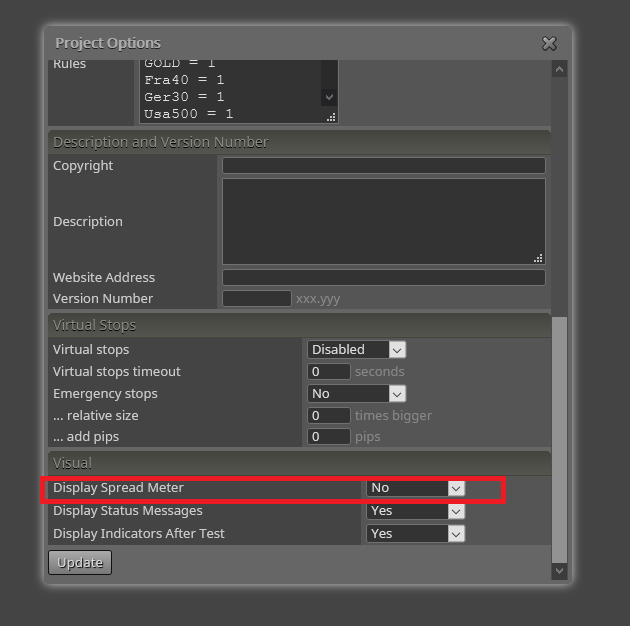
You need to select each of your projects, then go to its project options and there select this: