@MT4stefano If you are not changing the time period (if it is always the same every day), you can do this too:

@MT4stefano If you are not changing the time period (if it is always the same every day), you can do this too:
You can do it with variables, but you need to specify all the detailed sequence. If I understand it correctly, you need lot size to be 0.1 from balance 10k to 19.9k, but what lot size should be used from 20k to 29k?
No, they don't. They work perfectly fine on both types of accounts. This has happened to me before. The problem is the broker. They are using different functionality rules for demo and real accounts. Some restrictions are applied to real accounts in this case that are not applied to demo accounts. Try asking them what's the case here. More than probably they will deny any restriction applied. In that case the only solution is moving to a different broker, I'm afraid.
@Konstantin85 This is the second thread you created for the exact same question. Please don't duplicate threads.
@lolomax Well, in that case you will have to dedicate some time to learn how the platform works, and I'm afraid it is not as intuitive as it looks. I'll be glad to help, but you will have to put effort on your end.  Are you ready?
Did you follow all steps described in this custom indicators tutorial?
https://fxdreema.com/forum/topic/4208/tutorial-06-my-indicators-in-fxdreema
If you followed them correctly and it doesn't work yet, you'll have to find another indicator. Sadly, not all custom indicators work on fxDreema.
@bb-2 You need to use a 'time filter' block in which you specify when trade can be open:
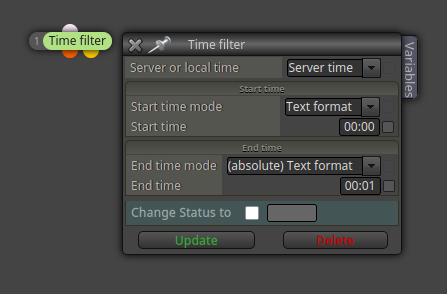
For example, from 08:00 to 23:59.
This is how it works if I understood what you said correctly. Your initial SL is 300 pips. Then, as soon as the trade is in profit:
What KLG said is correct. Single blocks don't work infxDreema. Simple connect a grey 'pass' block on top of the blue trailing stop block with the right configuration and it will work correctly.
Can you please share the duplicate version? I will take a look at it.
Could you please open a new thread with your question instead of using this one?
This happened once long time ago, while using a previous version of fxDreema. I remember the admin did some changes and never happened to me again. I'm using Firefox all the time, so probable the issue is the project itself. Just in case you could contact the admin himself and let him know.
The most efficient way is finding a custom indicator doing so. You will save a LOT of time and effort.
I'm afraid I don't speak your language, sorry. I also speak Catalan and Spanish, if that can help.
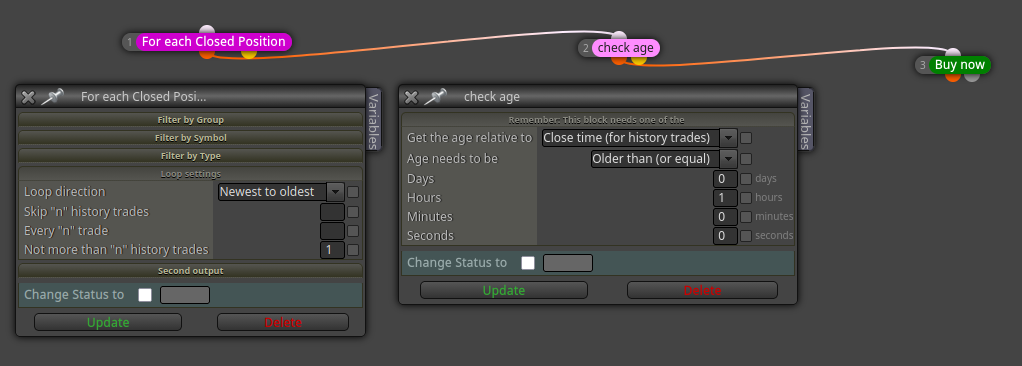
@SMCT You can use these two blocks between your opening condition blocks and the 'buy/sell now' blocks:
I guess the problem is the indicator. Could you please select the higher timeframe directly on the fxdreema display menu (not via constant as it is now)? Then use the bot on the lower timeframe. That would discard any potential indicator issue.
@Reyhaneh77 I mean this:
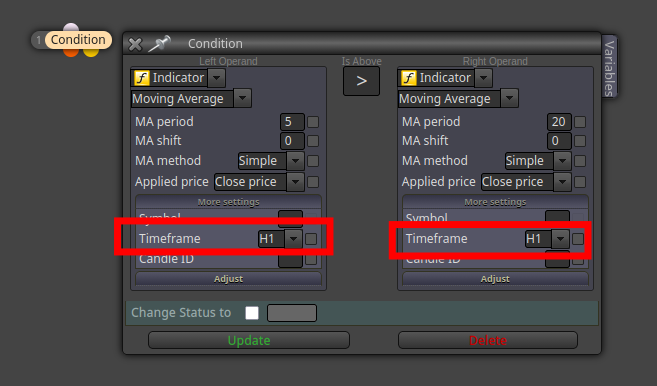
Just select H1 on the block instead of using a constant, as per your screenshot.