@Ren12 You need to add these blocks in ALL your EAs:


@Ren12 You need to add these blocks in ALL your EAs:
This is the second thread you created for the exact same question. Please don't duplicate threads.
What do you exactly mean by 'a candle closes a moving up or down'? Do you mean when it is a confirmed bull or bear candle maybe?
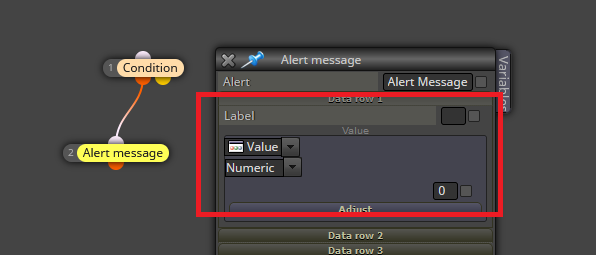
@Xeta50 You need to fill the fields for the block to create the alert:
Sadly, this is a a known issue. For some reason that goes beyond my comprehension, you need to use much bigger numbers in the 'how much' box. Try to begin with 101 instead of 1.
@Vortrexcian Your settings are correct. I would just add this in the 'adjust' tab to make the arrow appear on a higher position:
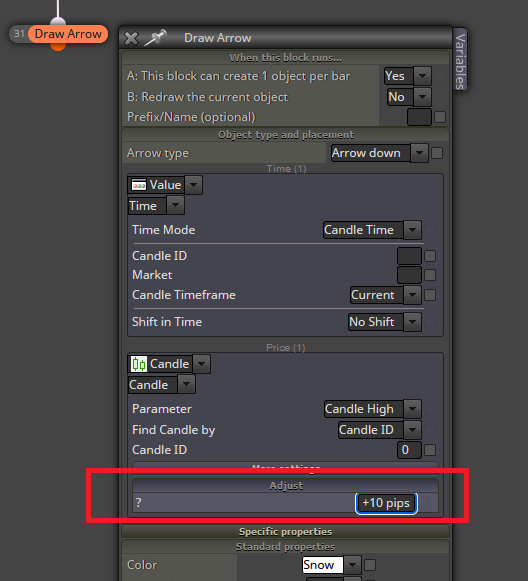
You should use a negative number to position it in a lower position, though.
You need to separate those blocks. Blocks 1 and 2 are correctly connected. However, blocks 3 an4 need to be used in a separate block tree that needs to be headed by a pink 'for each position' block on top.
@krushna You can use this option here:

Did you pay with crypto? All crypto payments are confirmed some days later.
@MTAB Based on the selected blocks, I see no issue there. I recommend testing those blocks only on the tester and use a 'comment' block to visualize the value of all those variables used. If everything works fine, then the problem is somewhere else
What do you exactly mean by 'default time'? Do you mean beginning to work at the open of the NY session maybe? You can simply use a time filter block, for example.
@sajadhmz-vp-phd Good for you! Congrats. 
@DragonZueloTrends You can insist as much as you need on one thread only, please.
@eranger This is the second thread you created for the exact same question. Please don't duplicate threads.
