@Gerardoppj1029 You can do something like this:
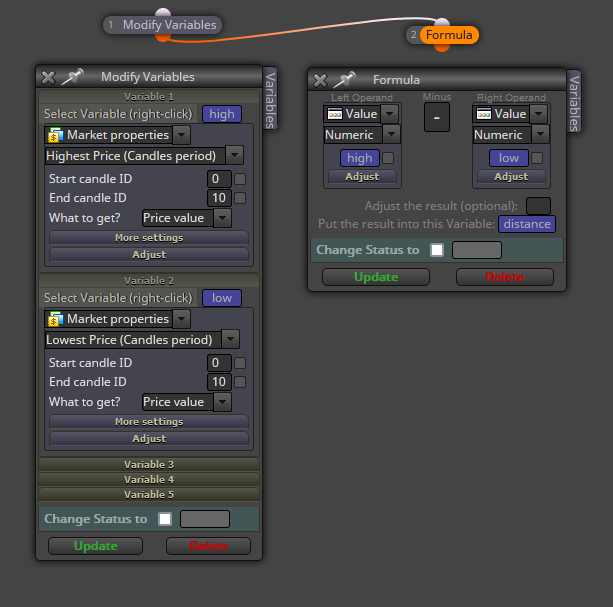

@Gerardoppj1029 You can do something like this:
Can you please share the link to the project?
Man, that goes beyond my knowledge, sorry. 
@polo3187 This is the second thread you created for the exact same question. Please don't duplicate threads.
Try that on forward testing for one year and bring the results back. If the chart is even close to that, I will put my money on it. Meanwhile, thank you for the info, but it's too good to be true.
What do you exactly mean by 'fixed distance'. Do you mean fixed 'lot size' maybe?
Yes, all of that is possible in fxDreema. However, requesting someone else to do all the job without any effort on your side is considered as impolite here.  Did you try any initial project? We can help you if we see you are trying.
@wensalz Your basic logic is correct. However, I'm not sure that combination of conditions can happen on the chart very often. I'm trying to understand the logic you are looking for through the screenshots. Could you please elaborate?
You need to use variables. Each point should be stored into a different variable. Then you subtract the lower value from the higher into a third variable and that can be visualized via the 'comment' block.
@jstap Just curious. How can you do that on tester? Backtest is using tick data, not real time. If there are no ticks for 3 seconds, for example, the timer will be wrong.
@Morpheus_0 Did you select the correct variable type for it? Is it integer instead of double maybe?
@Morpheus_0 The 'once a day' block at the bottom is supposed to be connected to additional blocks below it. Otherwise it's doing nothing there. Just adding my 50 cents.
@vijithtr But wasn't that exactly what you wanted? I'm afraid I don't get it.
The problem is that you need a variable to define lot size. In your example you're using fixed lot size volume. You'll have to create two variables, one for buys and another one for sells. Calculations will update the value of the variable as new trades are open. Have you created something like that?
All information in this block will be sent according to its current description. 'Subject' will be the text you will see as a subject in the incoming mail, 'message' will be the text body and so on. However, the bloc is NOT used to configure the receiving email address. You need to specify that on the MT4 terminal itself through the 'Tools' tab, then you select 'options' and finally 'Email' tab.
Then you found a bug, because the logic is correct. You should contact the admin to let him know.
@wensalz It is always recommended to share links instead of screenshots of your projects. You can do it this way:

Could you please share it?