@rodrigo-ortuzar You can do it here:

Don't forget to click on the 'Update' botton at the bottom of that window.

@rodrigo-ortuzar You can do it here:
Don't forget to click on the 'Update' botton at the bottom of that window.
@prasa1000 You are using a purple dot on the condition block. That dot only works on the 'On trade' tab. You need to substitute of for a pink dot (in loop) instead.
@tonyramirez AFAIK, no. I'm afraid optimization cannot be modified from the EA itself. However, I may be wrong, of course.
@khalids222 Both 'For each trade' blocks have an ID number lower than both 'If trade' blocks. This means those variables will never catch the open price AFTER the trade is open. They should have hight ID numbers than both 'if trade' blocks.
@jsauter86 Correct, but he should select 'Any symbol' on the 'Symbol mode' option of block ID 1. That way all open trades for all symbols will be considered.
Use this block on the highest position of your project:

You can type all symbols you need comma separated as per in the image. And be sure ALL your blocks are connected BELOW this one. Otherwise it will not work properly.
Can you please share the latest version of the EA?
That amount is very low. Are you sure your broker will allow that?
@maco You can create a structure like this:
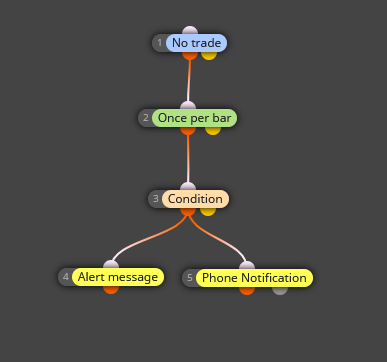
This cindition block is exactly the same you show in your post. Just ann a 'once per bar' block and those two yellow blocks at the bottom for alert and notification. However, I don't know how to chage cabdle colour. Jsauter's suggestion should be used as an option.
@mantadiver You cannot gete those through a 'Bucket of trades' block. You will need a 'For each trade' block and below it you can connect this:

@barko Can you please share your project?
@philostam You can get that by adding a 'No trade' block immediately below the 'Once per bar' block. That way the first condition to be met will open a trade and there will not be a second one until it is closed.
@philostam The logic is correct. Are you sure those custom indicators are properly identified by fxDReema?
@khalids222 Do you mean you need the value of the open price of the last trade? Or the close price?
Your current setting are specifying that the current candle (candle ID 0) should move above/below the high/low value of the previous 13 candles. Is that exactly what you want? I mean, the current candle can be above the high value for 150 ticks. That means you will get 150 alerts. Can you please confirm is that the kind of EA you are looking for?
The only (easy) way I can imagine right now is having the same EA on those three different charts and when a potential entry is identified, an Alert message pops up and let you know which one it is. Then you can take the decission to open the trade manually.
Obviously you can also create a fully automatic way but the human decission (your decission) is apparently required no matter waht so I would not dedicate time and efforts to implement such an EA. The previous option gets the same result with a lot less effort.
@profaalaa Can you please share your project to check it?
@jsauter86 Exactly. Try the mq4 file and not the ex4, please.
@jsauter86 said in How to make a block for trend-detect?:
that is the purpose of using indicators and technical analysis...to find the trend to enter trades. If you find a easy 1 size fits all, please let me know! haha
Me too, LOL 
