I mean you should type the following numbers here:

I mean you should type the following numbers here:
Yes, more details about conditions would be appreciated.
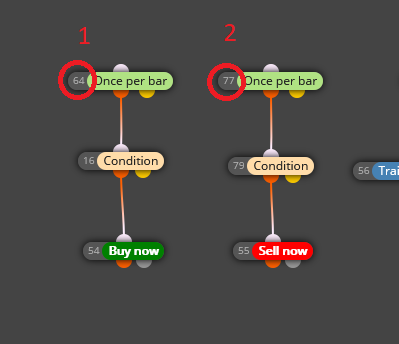
This is one option for buys:
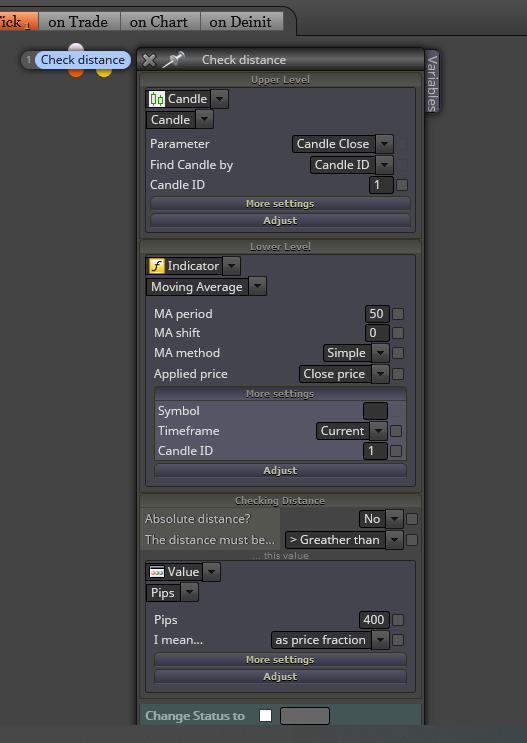
For sells you should reverse the order of upper and lower level values, obviously.
Well, everything you considers as relevant for your trading. It depends on the trader. What is important for you?
Okm so my logic is what you are looking for but your modifications are not working. Right? Let's begin with your project. Can you please share it?
Select the 'More settings' tab inside each block and you will find a timeframe display menu.
You will never know the exact crossing point. Remember that both are lines drawn on a chart. I recommend you to find an alternative way to identify that price level.
Point 2 is missing and I'm not sure about your new stop loss configuration. Have you tested it?
@roar Ooops. Didn't see that! Thank you. 
@roar Really? Didn't know that. What problems have you found?
Begin doing this:
Try that and let me know.
Never connect pink blocks without a 'For each trade' block above them. They will simply not work correctly. You should create a whole new tree blocks for them. And what about those blocks on the 'On init' tab?
I see you configured the 'For each trade' block for all trades (manual and automatic). Can you confirm which one was the wrong one? I guess the manually opened.
Could you please share your project instead of offering the mq5 file?
Remove the 'Once per bar' block and add a 'No pending order' block below the 'No trade' one.
Forget that loop. Try this:
