Thank you @iamtaaaro and @ambrogio I appreciate

Thank you @iamtaaaro and @ambrogio I appreciate
@ambrogio Thank you so much for providing answer to this question. I also need to set this up for my EA but please I cant find blocks for "Account" and "Broker Name" as you described above. Please can you show me how to find this? Thanks you.
Hi everyone!
Please help me look into this EA project. Its a buy and sell EA the sell is working perfectly well but the buy is not working. its only picking first buy trade and stop picking all other buying trades after conditions have been met.
This is the same conditions and indicators used for sell which is working well, I dont why BUY refuse to work. Please help me look into it.
Here is the project link: https://fxdreema.com/shared/EhJwe5ewe
Also attached is the custom indicator that was used in case you need it to check.
0_1609258909669_silvertrend_signal-1.Ex5
Thank you so much.
@l-andorrà , @miro1360 please help me look into it sirs.
@ambrogio hi, it seems this type of setup is not possible with fxdreema right?
@ambrogio
First, I thought it was the same color settings that you used when you uploaded your last screenshoot?
Secondly, to make you understand exactly what I am trying to do. I am actually trying to convert a strategy to trade manually into an EA. The way it works is that, once the 2 indicators have the same color the same time a trade should be placed immediately. It does not matter whether the bar is above or below the 0 level.
You can see the following screenshots for more details:
For sell signal
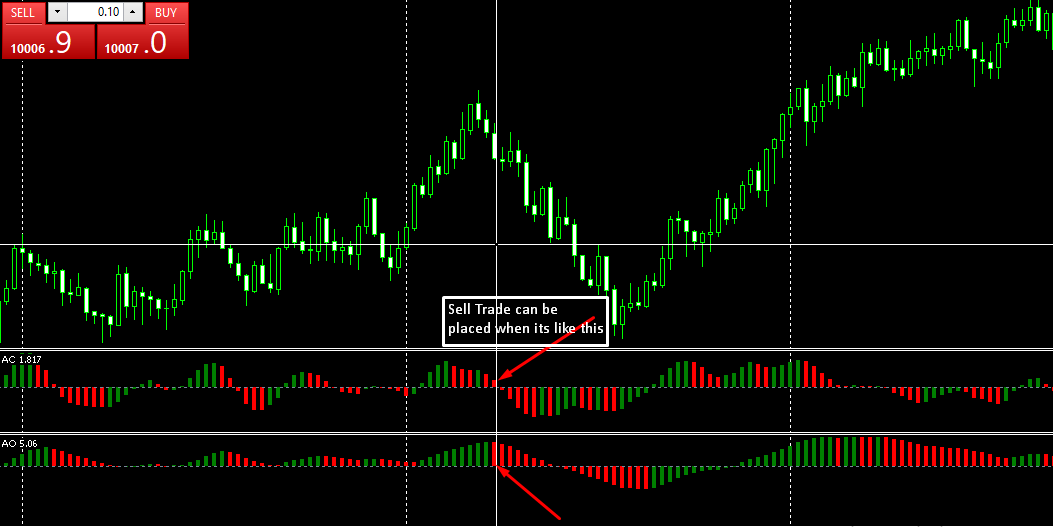
For buy signal

This is exactly what I am try to setup
@ambrogio hello sir,
The error is still the same, I have even had to create the EA all over again to be sure nothing is wrong with my set up but to my surprise the problem is still the same.
Here is the new one I created >>>> https://fxdreema.com/shared/K9izXsOvd
It is not placing trades and only one indicator is displaying on the chart.
Please help me take a look again.
Below is the screenshot of how it displayed on my strategy tester.
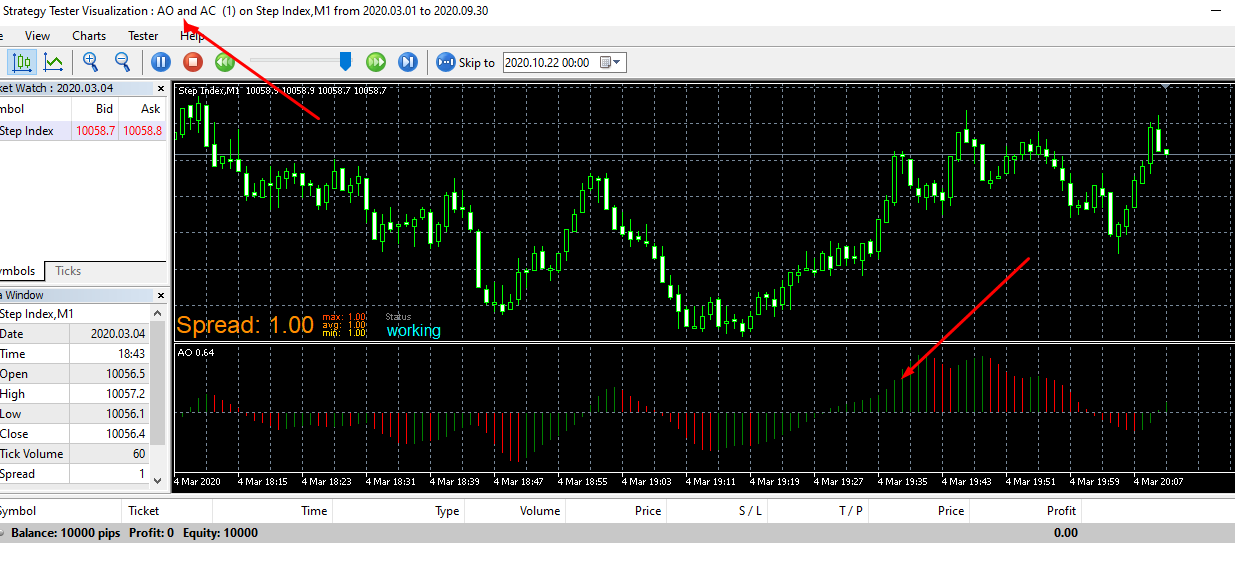
Please help me take a look again. Thanks
@ambrogio Thank you so much sir. Problem solved.
I really appreciate.
@ambrogio Thank you so much for your reply.
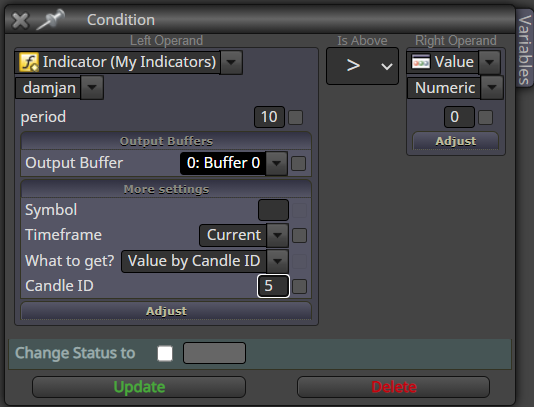
I have added the candle ID as advised but the EA is still not working.
https://fxdreema.com/shared/VBtuGYQub The EA is not placing trades.
Also on the strategy tester chat, its only the Accelerator Oscillator that is showing. The Awesome Oscillator is not showing.
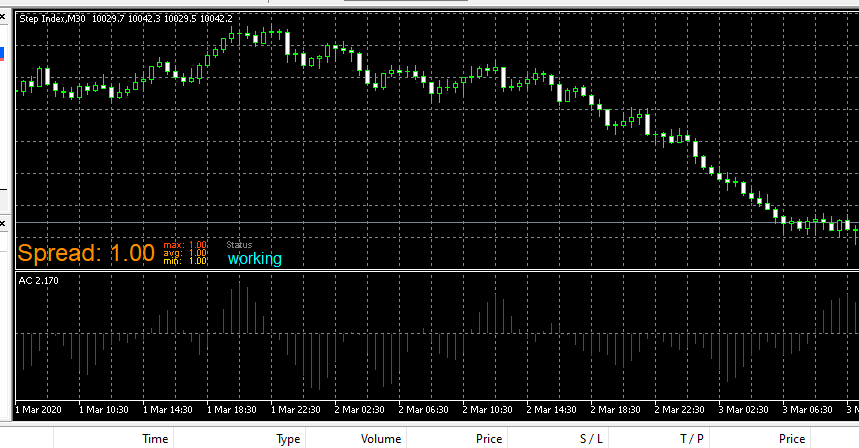
Please help me have a look again. >>>> https://fxdreema.com/shared/VBtuGYQub
Hello everyone,
Please I would like anyone to help me on how to setup Awesome Oscillator And Accelerator Oscillator in an EA. The 2 of them work in very similar ways.
I have tried what I think should be the best settings but its not working.
You can check out this project to understand what I want to create: >>> https://fxdreema.com/shared/Y8FxcbJpe
I just need the EA to be able to buy immediately the 2 indicators turns green and sell immediately they change to red at the same time.
Any help on this will be appreciated @l-andorrà and @ambrogio Thank you.
Hello everyone,
Please I need help on how to set up martingale for my EA in fxdreema, I have searched for tutorials that can help me on this but couldn't find anyone that can help.
So please, any help in this regard will be very helpful.
For example, lets say I want to create martingale for this project: >>> https://fxdreema.com/shared/iWlzrXaSb Please explain/show me how to go about it.
@ambrogio , @miro1360 , @l-andorrà I will appreciate if you can help on this.
@miro1360 please I would like you to help me with how to set up Awesome Oscillator and Accelerator Oscillator for an EA.
I have tried the options that I know but but I couldn't get them working.
Please help, I just the EA to be able to place buy order when color is green and sell what n color is red.
Thanks in anticipation.
@miro1360 Alright. Thanks for the enlightenment. I understand better now.
lol @ the youtube video
@ambrogio said in How Do I Create An EA With This Type of Custom Indicator?:
@lanrayy Sorry but I can't get it to work, the tester doesn't move
Alright thanks
@miro1360 said in How Do I Create An EA With This Type of Custom Indicator?:
this indicator code recall me an indicator which repaints, fisher ... not bad one for a visual analysis but a wrong choice for EA ... it repaints on a fifth candle or so
anyway, the condition is simple, if indicator is more or less than null
Thank you so much @miro1360 for the insight provided. I was able to use it to create EA according to your instruction. But I am still having some challenges with it. The EA is able to place trade after changing color using candle 1 (like I want it to be). But the issues am having is that :
I don't know if this problems are due to the nature of the custom indicator or there is something I did not set right.
Here is the link to the project : https://fxdreema.com/shared/Nsng5FtKb
please have a look and advice me on what to do.
@l-andorrà and @ambrogio please help me have a look as well on what is missing from the setting. Thank you.
@lanrayy said in How Do I Create An EA With This Type of Custom Indicator?:
@l-andorrà said in How Do I Create An EA With This Type of Custom Indicator?:
@lanrayy Working with ex5 files is alway risky in fxDreema. Don't you have the mq5. version?
I have it sir @l-andorrà, here it is.
Thank you so much @l-andorrà .
@miro1360 Please come to my rescue , I need your help on this.
@l-andorrà said in How Do I Create An EA With This Type of Custom Indicator?:
@lanrayy Working with ex5 files is alway risky in fxDreema. Don't you have the mq5. version?
I have it sir @l-andorrà, here it is.
Hello Everyone
Please have a look at this attached custom indicator and advice me on how to use it to create an EA in FXdreema. I have tried all I know but its seems I missing something.
Please help, I want the EA to take buy orders when the indicator color is green and sell when the color is red.
Thank you.
@ambrogio and @l-andorrà please help have a look.
@ambrogio said in My EA kept Opening Too Many Trades.:
@lanrayy the right way to use this kind of indicator
https://fxdreema.com/shared/93jk5c0uc
@ambrogio Thank you so much, I really appreciate. You have just solved my problem.
I wish I could  ️ thank you
  a million times.
@ambrogio Oh, that's true. Here is the correct one.0_1602160452652_silvertrend_signal-1.Ex5
0_1602153693149_non-repaint star Alternative.ex5
@ambrogio thats the custom indicator. But just to let you know, the problem is not peculiar to the custom indicators alone. The same issue still occurs when using ordinary indicators too with the same settings.