fxDreema

    • Register
    • Login
    • Search
    • Back to the main page
    • Categories
    • Recent
    • Tags
    • Popular
    • Search
    1. Home
    2. max_well
    3. Posts
    M
    • Profile
    • Following 1
    • Followers 0
    • Topics 13
    • Posts 29
    • Best 0
    • Controversial 0
    • Groups 0

    Posts made by max_well

    • Custom Indicator

      Has anyone ever encountered a situation where you're trying to use icustom() to access indicator buffer values but it is restricted by the programmer somehow (I bought the indicator but got the exe file only and the vendor also stated that they do not provide the ability to access data through iCustom).

      But I wanted t incorporate it in my EA but I'm stuck here.

      Any walkaround to this problem?

      posted in Questions & Answers
      M
      max_well
    • RE: Custom Indicator- Compilation error

      @sktsec the buffer names are same as in the indicator.

      It's working fine now with nothing changed, was a glitch in fxdreema itself I guess.

      posted in Questions & Answers
      M
      max_well
    • Custom Indicator- Compilation error

      94b87729-6a24-4454-849e-a547b8e9fbdf-image.png

      I'm using a custom indicator, but I'm unable to download the exe file-getting this compilation error when trying to download exe file.

      I've declared the input/output buffers as shown:
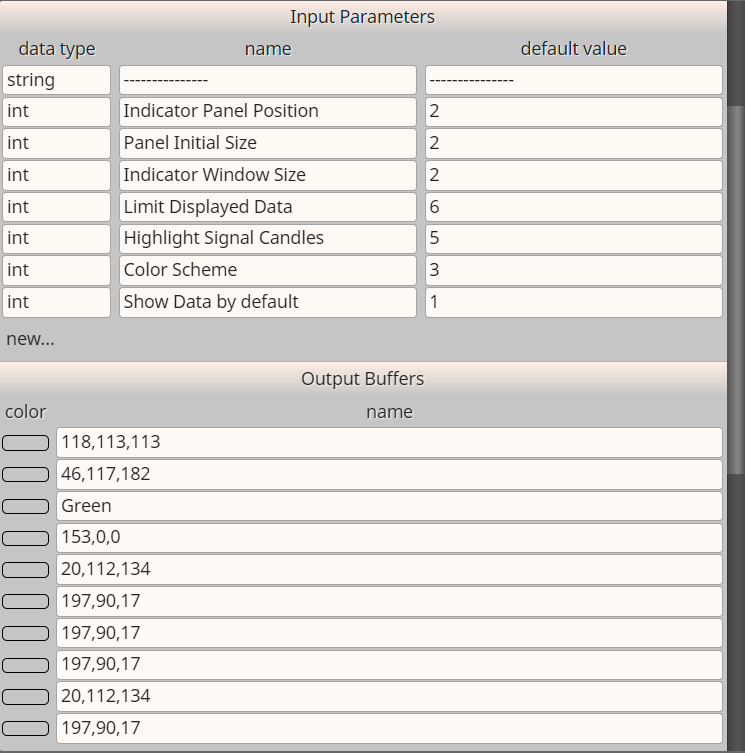
      6edb2c3f-bd9f-440f-8293-a3e50ec4ce0f-image.png

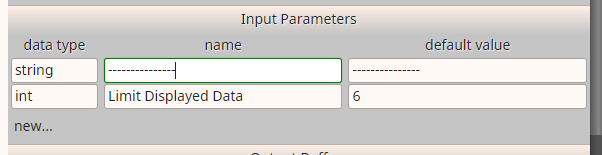
      In my custom indicator the first input is actually set as "---------------". Like this:

      dac7fb95-274b-4aca-8493-6ebf4300d6f4-image.png
      So I'm not sure if i need to actually declare it in the Input parameters or not, however, i did it but I'm getting that error message.

      I tried removing it, still i get the same error message.

      Few days back it was working fine but today the indicator got cleared from the list while updating the relative path, and so I'm trying to bring it back all again.

      I'm able to download the mq4 file, so I had a look at iCustom() part, this is what its like at the moment:

      iCustom(symbol, timeframe, "Indicators/custom_indicator" , (Str)0, buffer, shift);
      

      which I believe is incorrect.

      This is what it actually should be I guess (unsure):

      iCustom(symbol, timeframe, "Indicators/cutom_indicator" , (int)2, (int)2, (int)2, (int)6, (int)5, (int)3, (int)1, buffer, shift);
      

      I made these changes, it compiles successfully but doesn't work when I pull it on the chart.

      Any help on this please!!

      posted in Questions & Answers
      M
      max_well
    • RE: OR block

      @l-andorrà thanks

      posted in Questions & Answers
      M
      max_well
    • OR block

      Which block can I use as "OR" block?

      posted in Questions & Answers
      M
      max_well
    • RE: Indicator in the subfolder of indicators folder

      @jstap I tried that and the EA gives me this error message;
      "Indicator path or name is invalid. Must be \MQL4\Indicators\Market\IndiName (currently \MQL4\indicators\Market/IndiName)"
      From that error message I could see the problem could be with the different slash sign so I tried to change it here on fxdreema indicators section but when I save it, the relative path automatically changes this backward slash to forward slash. And also my indicator works in it's subfolder only. So any solution?

      posted in General Discussions
      M
      max_well
    • Indicator in the subfolder of indicators folder

      How should I write the relative path if my custom indicator is in the subfolder of the indicators folder? "Market" is the subfolder name;

      1. Market\indicator_name
      2. Market/indicator_name

      1 or 2?

      posted in General Discussions
      M
      max_well
    • RE: Adding Custom Indicator with drop down menus

      @jstap okay but by default it was set as 1 month which should be 1 in the default value, but here while adding the parameters I wrote 6, so would it affect in anyway? or is everything okay? And are you sure the counting starts from 1 or does it start with 0?

      posted in General Discussions
      M
      max_well
    • RE: Adding Custom Indicator with drop down menus

      @jstap okay and what if I want to use 4 months of data which is fourth in the drop down list. So should I write "4" here;
      0_1631326287178_Capture.PNG

      posted in General Discussions
      M
      max_well
    • RE: Adding Custom Indicator with drop down menus

      @jstap Hey, I wrote the parameters, from the drop down menu I counted there were 6 options (counting from 1) so I wrote like this;
      0_1631324101241_Capture.PNG
      Is everything correct for both the Input Parameters?

      posted in General Discussions
      M
      max_well
    • RE: Adding Custom Indicator with drop down menus

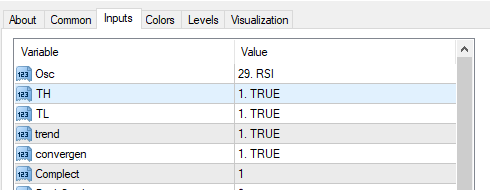
      @l-andorrà hey I don't have the mq4 file of the indicator so I have to manually add all the parameters, but could you please tell me what to do when a single parameter has drop down menu? How can I add that parameter? For example if a parameter has two options which has some custom text not Boolean, so am I supposed to write that parameter name twice, one for first text and second one for second option? or should I just write the parameter once and give the default value? For example look at the pic below. It has several text inputs like 1 month, 2 month, 3 month, etc.
      0_1631272908113_Capture.PNG

      posted in General Discussions
      M
      max_well
    • Adding Custom Indicator with drop down menus

      Does anyone know how can we add custom indicator which has drop down menus like True and false or some which has even more options than just true and false. Example;
      0_1631245773227_Capture.PNG

      posted in General Discussions
      M
      max_well
    • Looping once per new object

      Hey, how can we loop only once and only when a new object is created?

      posted in General Discussions
      M
      max_well
    • RE: Once per Object block

      @l-andorrà Hey yes i have backtested it in visual mode and it doesn't repaint.

      posted in Questions & Answers
      M
      max_well
    • RE: Once per Object block

      @jstap Sorry, updated

      posted in Questions & Answers
      M
      max_well
    • Once per Object block

      Hey, I have an indicator that creates 2 different colored objects on the chart(Red and Blue). So whenever a new object is created on the chart, I want the EA to draw "Up Arrow" if the object drawn is color Red and "Down Arrow" if the object is Blue. I tried it, but something seems wrong. Could anyone please tell me what's wrong. Here's the link to my project; https://fxdreema.com/shared/0Lc6KD6Mb

      posted in Questions & Answers @l-andorrà @fxdreema
      M
      max_well
    • RE: Custom Indicator- Object based

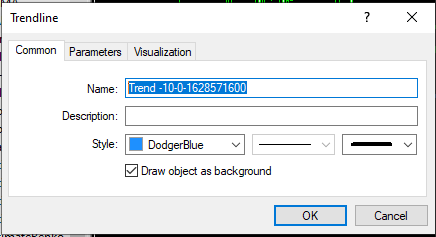
      @jstap when I open object list on the chart...this is what the properties look like...
      0_1630712330733_Capture1.PNG

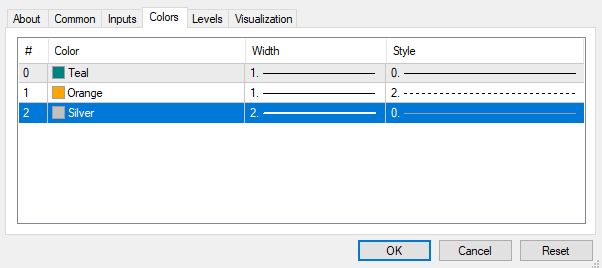
      And these are the buffers of the indicator, however its not being used anywhere I think...
      0_1630712407537_Capture2.PNG

      And this is how the object is drawn on the chart...
      0_1630712449590_Capture.PNG

      posted in Questions & Answers
      M
      max_well
    • Custom Indicator- Object based

      Hey, I have an object based custom indicator which draws 2 trend lines, which has styles of color Red and Blue which acts as buy and sell signal for me respectively. And the trend lines are drawn from any past candle to candle ID 1, depending on its own criteria. So could anyone please tell me how to identify which color trendline it is and open trades respectively. Thanks!

      posted in Questions & Answers
      M
      max_well
    • RE: Arrows on crossover

      @l-andorrà you got me wrong bro. I know it's not possible to draw the arrow in between the candles neither do i want that. Did I not explain well enough of what I want?

      posted in General Discussions
      M
      max_well
    • RE: Arrows on crossover

      Hey, thanks for you help!
      I deleted the LAST conditions for both buy/sell, as I don't mind if the candle closes below 50 MA in buy signal (and opposite for sell). I tested the EA and the problem is that I get multiple arrows on one candle. sometimes I get two buy arrows on one candle and sometimes I get buy and sell both arrows on one candle and also the placement of the arrows are not where they should really be. Could you please have a look and see where the error is? Is that a timeframe problem? Please do have a look at the photos below.
      0_1621582591114_p2.PNG 0_1621582332476_p1.PNG

      posted in General Discussions
      M
      max_well
    • 1
    • 2
    • 1 / 2