Just realized my indicator was named differently in my MQL folder so the EA didn't detect it. Now it is taking trades but seems like it's not off of the correct levels, not sure yet still testing.
M
Posts made by Mitchp
-
RE: Importing indicator, then using it as a specific condition.posted in Questions & Answers
-
RE: Importing indicator, then using it as a specific condition.posted in Questions & Answers
@l-andorrà That thread made me realize what buffers are.
Seems like the MT5 version is finding them correctly.
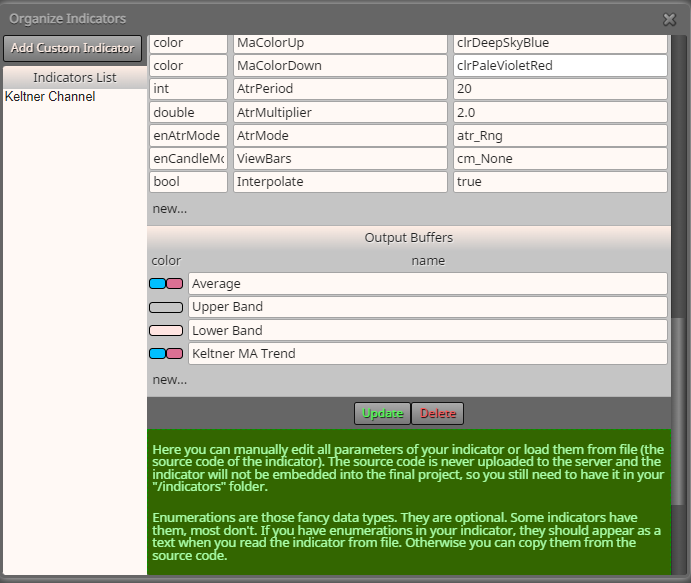
The colors are black in the condition block, but they are correct here.
(I changed the buffer names to represent what it is)
However, when I actually try to use it it doesn't seem to work.
Here's a quick demo project: https://fxdreema.com/shared/DUm2642cb
It doesn't take any trades at all.
-
RE: Importing indicator, then using it as a specific condition.posted in Questions & Answers
@l-andorrà Oh that's unfortunate.
Did you mean "while MT4 can accept more?"
I'll just make it for MT4 first then. If it's any good I'll get it fixed for MT5.
https://fxdreema.com/shared/fvRTyJ6uc
Here's the MT4 version
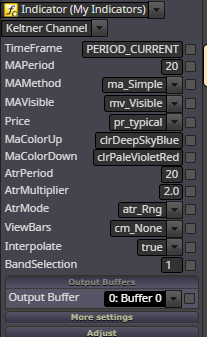
The "band selection" option wasn't there before, I'm assuming that's to refer to upper, lower and middle band. Just gotta find out which number refers to which I think.
Thank you for your time.
-
RE: Importing indicator, then using it as a specific condition.posted in Questions & Answers
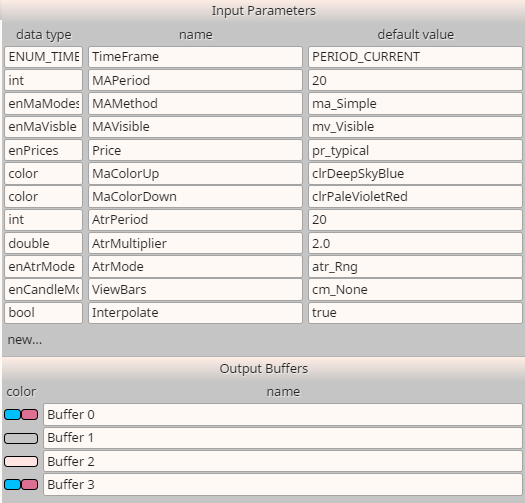
It does have these 4 buffers, is that suppose to be referring to the channels?
There's 4 buffers, but 3 channels though.
Thanks.
-
RE: Importing indicator, then using it as a specific condition.posted in Questions & Answers
Try this: https://fxdreema.com/shared/w8yPBKIgb
It's just one condition block but you may be able to see the Keltner channel settings there.
-
RE: Importing indicator, then using it as a specific condition.posted in Questions & Answers
@l-andorrà Well, it's not exactly a project yet.
I'm trying to import it properly before the creation of the project.
Does sharing a project also share my own imported indicator?
-
Importing indicator, then using it as a specific condition.posted in Questions & Answers
So I imported an indicator, Keltner Channels, which is very similar to bollinger bands (just uses different method to calculate the positions of the bands)
It imported fine, but it doesn't have the ability to select lower band, middle band or upper band.
So it is essentially useless in the context of condition blocks.
Does anyone here know how I add it to the Keltner Channel indicator?
Perhaps some code I have to add to the indicator's source code?
Thanks.
-
RE: Need help to complete this as a indicatorposted in Questions & Answers
It indeed cant be used as an indicator.
However, I see nothing stopping you using an EA as an indicator as long as you're not trying to run another EA alongside it.
-
RE: EA almost finished, can't seem to fix two things.posted in Questions & Answers
Fixed that as well. No longer in need of help.
Thanks for your time, always appreciated!
-
RE: EA almost finished, can't seem to fix two things.posted in Questions & Answers
I finally fixed it. Thanks for your time.
Only thing I need to do now is make it so it wont open a buy and a sell in the same day. Only one trade per day.
As of now, I have a "once per day" bar for sells and buys separately.
-
RE: EA almost finished, can't seem to fix two things.posted in Questions & Answers
Current version: https://fxdreema.com/shared/qCcgtzZ7e
I think my problem is that the condition under the flags has to remain true, therefore price has to remain above or below the asia range before it executes.
Not sure how to fix it yet.
Using x> instead of > doesnt work.
-
RE: EA almost finished, can't seem to fix two things.posted in Questions & Answers
It's suppose to be a pretty simple EA.
For buys:
Price crosses below "Asia" low, and when a candle closes above a 5 bar fractal go long at market.But it only enters when the 5 bar fractal is below "Asia" low for some reason, no matter what I do.
Vice versa for shorts.
-
RE: Fibonacci Expansion Price Levelsposted in Questions & Answers
I got it but clearly I over-complicated it with a bunch of formula blocks haha. Thanks for your time.
-
RE: EA almost finished, can't seem to fix two things.posted in Questions & Answers
@l-andorrà That's odd. No, the EA does it.
The "Asia" lines are plotted based on a time window in inputs though.
-
RE: EA almost finished, can't seem to fix two things.posted in Questions & Answers
This is driving me nuts, must've spent 15-20 hours trying to fix this
-
RE: What am I doing wrong here?posted in Questions & Answers
I fixed it, thanks haha. The time difference gives a delay. But you responded to my "EA almost finished" thread, which I'm still having issues with. The project is shared there.
-
RE: EA almost finished, can't seem to fix two things.posted in Questions & Answers
Forgot to mention, it should close beyond the pink line. Not just cross it.
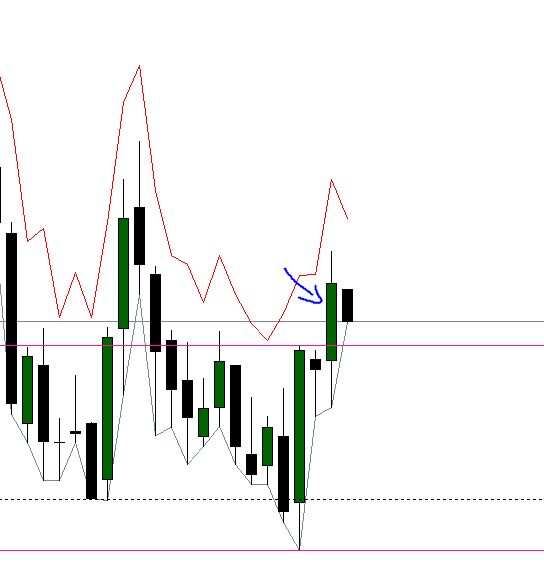
It should've executed once this candle closed.
-
RE: EA almost finished, can't seem to fix two things.posted in Questions & Answers
https://fxdreema.com/shared/6zrQPo77e
This is the current version.
I'll show you example from the MT5 visual tester
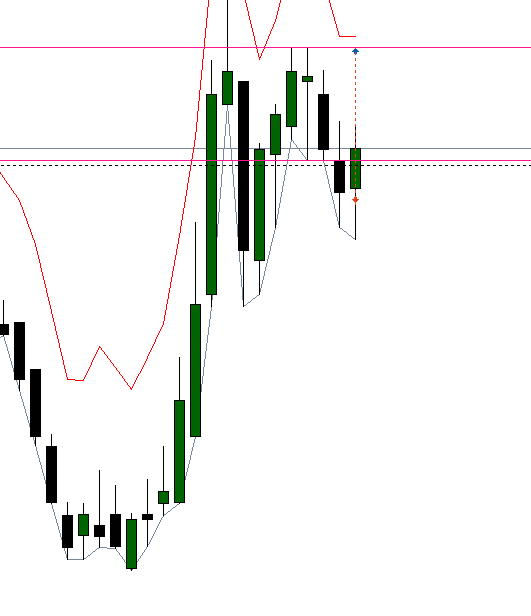
When it crosses what I refer to as Asia high/low (the dotted horizontal line) it should enter a trade in the opposite direction as soon as the most recent swingpoint has a candle close past it (the pink horizontal lines).
In this example, it executed correctly.
Now an example where it doesn't execute.
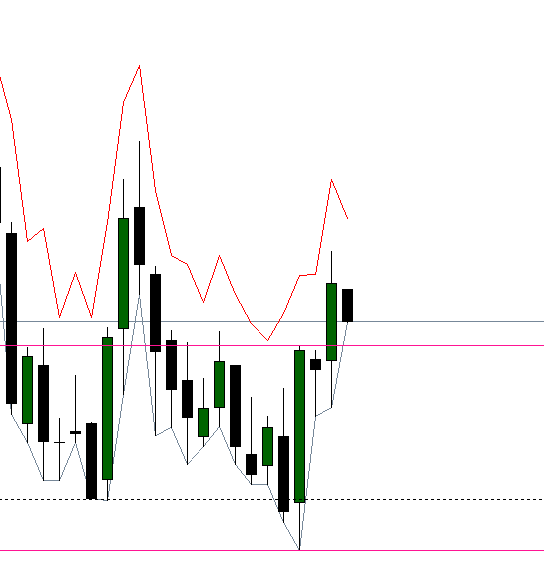
Here it went below "Asia low", and it seems to recognize that since I've set it up to change the color from LimeGreen to Black when it's broken.
Then it closes above the pink line, which is a swingpoint. But it does not execute.
An hour or so later, it goes below the asia low again, but a lot lower and closes above another swingpoint. Then it does execute.
I think it is because the swingpoint for some reason has to be outside of the "Asia" range.
-
RE: Fibonacci Expansion Price Levelsposted in Questions & Answers
@l-andorrà Could you give me some details on how to do that?
I'm quite new to fxdreema.
How do I calculate Fibo levels with variables?
Any help is much appreciated!