@l-andorrà That was for a previous version where I used limit order. I wanted limit order 0.25ATR under the open of the candle.
M
Posts made by Mitchp
-
RE: Why does this script sometimes open positions with MAX lot size?posted in Questions & Answers
-
RE: Why does this script sometimes open positions with MAX lot size?posted in Questions & Answers
@DragonZueloTrends No no, it isn't martingale. Risk should be consistent (0.25% in this example)
I'm not able to re-produce the issue either, it just happens sometimes.
The risk is suppose to be consistently 0.25%, the stop-loss is calculated based on volatility using the average true range indicator. The multiplier is to calculate stop-loss position, not risk.
-
Why does this script sometimes open positions with MAX lot size?posted in Questions & Answers
https://fxdreema.com/shared/pmD96sI2d
This script works fine most of the time. Sometimes however it ignores the risk settings and just opens a position with the max allowed lot size with the broker.
I've already lost quite a bit of money through this bug, since it just opened 40 lots instead of around 0.2.
Anyone know why this is happening?
The script is suppose to open a trade with the correct risk %, SL and TP (based on ATR and RR).
-
RE: Sells not working, need help.posted in Questions & Answers
I got it to work. I just referred to the lines in the condition block instead of market price.
Even though it works now, I still don't understand why it worked for longs but not for sells.
-
RE: Sells not working, need help.posted in Questions & Answers
@jstap https://fxdreema.com/shared/N37zK7q6d
The line gets drawn correctly.
-
RE: how i can close first trade when third trade openedposted in Questions & Answers
Maybe you can use loop.
"For each position"
Loop direction: Oldest to newest
Not more than "n" trades: 1Then link it to a "Close positions" block.
Put the loop after your Buy and Sell block, then every time a position is opened it should theoretically close the oldest position.
And since you want it separate for buys and sells, you create 2 of these identical loops and connect one to Buy block and one to Sell block. Also filter each loop by type for Buys or Sells.
I hope this works for you.
-
Sells not working, need help.posted in Questions & Answers
https://fxdreema.com/shared/mO4db2YGc
"N" day breakout strategy. Buy when we get above the high of "N" days (and close out sells), and sell when we get below the low of "N" days (and close out longs).
For some reason, it does not detect the "N" day low.
I added a log message to it, to identify the problem. It does not print the message (it does for the high), indicating the problem is within the condition block. I don't understand, since the long trades do work and it's just the exact opposite.
In it's current state it takes one long trade and holds it forever.
-
RE: For each object bug (MT5 only, works fine in MT4)posted in Bug Reports
@l-andorrà This one isn't a question. It is a bug report?
-
RE: Need drawing to disappear once price went through it.posted in Questions & Answers
@l-andorrà I created a bug report and tagged admin.
-
RE: Need drawing to disappear once price went through it.posted in Questions & Answers
Seems to only be an issue for MT5, compiles fine in MT4.
I think I'll make a bug report for it.
-
RE: Need drawing to disappear once price went through it.posted in Questions & Answers
@JayPhillbrooks Thanks for your help. I am having an issue with it though.
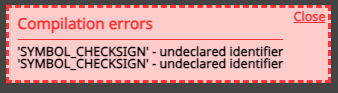
I get this error for some reason.
-
RE: Need drawing to disappear once price went through it.posted in Questions & Answers
@JayPhillbrooks Never used loops before, but I'll give it a shot. Thanks!
-
RE: Need drawing to disappear once price went through it.posted in Questions & Answers
@jstap That works when using one drawing.
I don't think it's as simple as that in my case.
There might be 15 of the same drawing on the chart, at different price levels. Only the ones that are priced through need to disappear.
-
Need drawing to disappear once price went through it.posted in Questions & Answers
https://fxdreema.com/shared/lXUBANQPd
These are 5 bar fractals.
I need each individual drawing to disappear once price goes beyond it.
I know how to do that when it's only 1 drawing, but not in this manner with loads of drawings with the same prefix.
There can be 10 drawings with the same prefix, but only the ones that have already been broken should be deleted.
Thanks in advance for your help.
-
RE: Importing indicator, then using it as a specific condition.posted in Questions & Answers
@l-andorrà Yes, I only need those. But can't get them to work for some reason.
-
RE: Importing indicator, then using it as a specific condition.posted in Questions & Answers
@l-andorrà It's the whole project as of now, just to test the functionality of the Keltner channel.
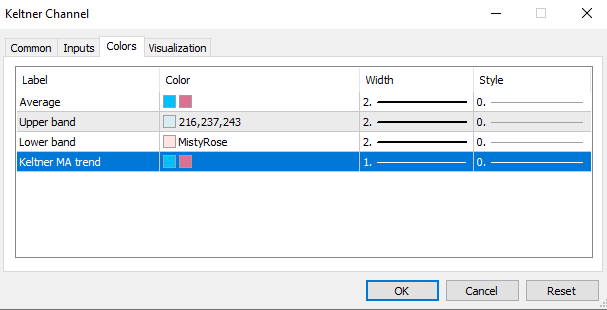
Should be correct.
-
RE: Importing indicator, then using it as a specific condition.posted in Questions & Answers
https://fxdreema.com/shared/LTwMmKoQc
Yeah so now it is just taking trades at random with a complete disregard for the keltner bands.
It is always in a position, so if a position is closed it just opens another one instantly (randomly buy or sell) even if it's inside the bands.