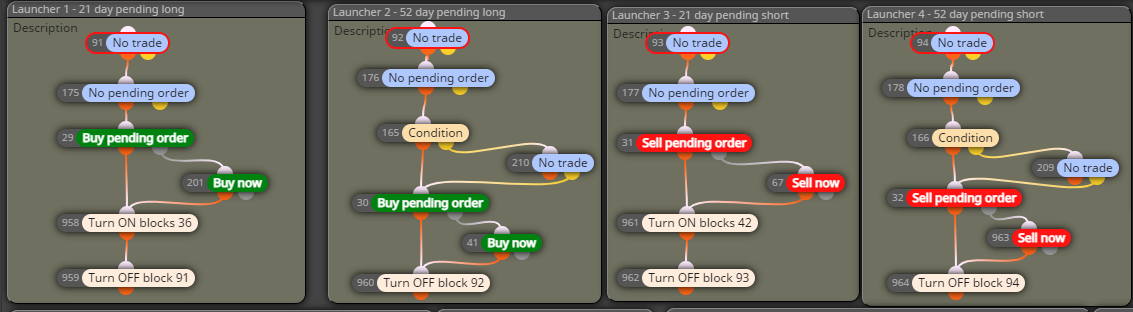
Hi @l-andorrà ! Yes, because if for some reason the pending order is created too close to the current price or there is an error, it might not be allowed to be created, in which case I want it to open a buy/sell now market order.

Hi @l-andorrà ! Yes, because if for some reason the pending order is created too close to the current price or there is an error, it might not be allowed to be created, in which case I want it to open a buy/sell now market order.
correct, the switched on/off blocks just dictate when a pending order can be created (and only happens once a day) so it shouldn't have any affect on the SL for a pending order that fills. sent you a link to the project and just bought your book! can't wait to read it.
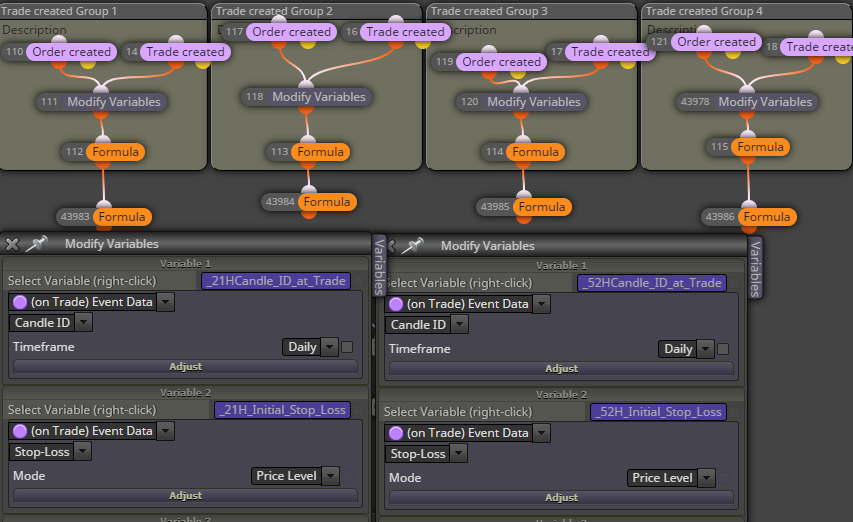
Everything is organized by group (1, 2, 3, and 4.) 21H is for group 1 and 52H is for group 2. The only thing I could think of is that the SL variable wasn't updating because it was an "order created" and not a "trade created", but ether one separately or together (as shown) don't fix the issue. I'm stumped.
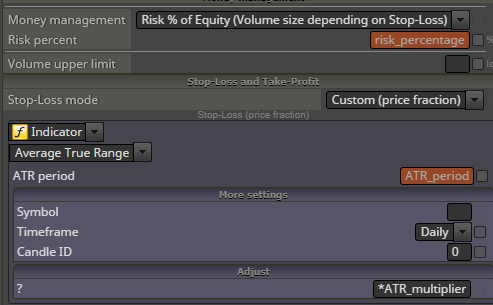
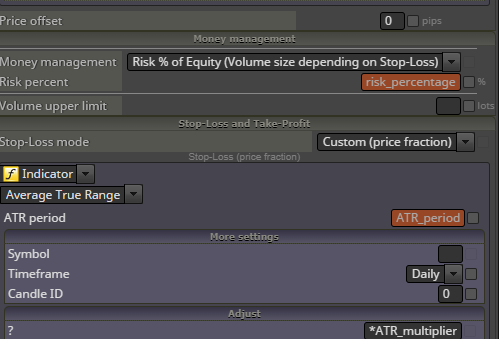
Everything else works perfectly, so no clue if this is a bug or I coded it wrong, but when I have two pending orders (a buy pending order for group 1 and a buy pending order for group 2), I set their SL as different variables and they are correct when I look at MT4. Both of the buy pending orders have different fill prices, and different SLs, which are correct in MT4. When the group 1 order fills, it has the right price and right SL, but when the group 2 order fills later (because it is at a different price), the price is right, but the SL for the group 2 order changes to match the SL for the group 1 order. There are no adjustments to the SL for either filled orders for many days after after they fill, so I cannot figure out why the group 2 SL seems to change to the group 1 SL. (Same thing happens with sell pending orders, meaning a second sell pending order will fill but change to match the SL of the first sell pending order).
I saw a similar post about this (https://fxdreema.com/forum/topic/16217/position-created-block-with-failure/22) but I don't know if it was fixed.
Any ideas?
Fairly simple project that I can use in the custom mql code block(s). When a pending order is placed or the pending order gets filled, I need the values for all the variables and constants to be stored in a file that can be retrieved should the EA crash so that the EA can pick up where it left off. It would need to be able to distinguish between multiple trades on the same chart, knowing that the same variables are being used with the EA executing on other charts as well.
Please respond with suggestions or DM me, and thanks in advance!
Understood, thanks so much, @jstap !
Wow, so ok thank you very much for that explanation. If I understand you correctly, I'm using the "Terminal variables" block to store the variables that I'm using for the EA like in the image below. Very clever way to solve this problem! A question I have now is based upon your back test comment: Since the variables will be the same on each chart, but their associated values will obviously be different on each chart, will running my EA simultaneously on Chart 1 and then Chart 2 (during live forward testing) overwrite the Chart 1 variables' values in the MT4 platform into the Chart 2 variables' values? If that makes sense...? Thanks in advance!
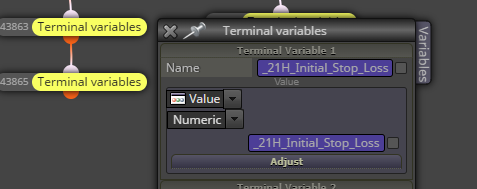
@jstap Thank you so much for taking the time to respond! At the risk of sounding dumb, how exactly does one do that? I actually opened up my EA on the MetaEditor and it seems my variables are already listed under "Variables (Global Variables)" so should I assume this isn't what you mean?
Thanks @l-andorrà, I was hoping there was another way but oh well! 
I have tried to research this online but I get multiple answers. Here is my question: After an EA crashes (or MT4 crashes or my system crashes) is there a way to use the magic number to have the EA "pick up where it left off?"
More information: Like most EAs, it uses multiple variables to control what to do, whether it is a pending trade or an executed order. However, if my EA crashes after a pending order has been placed or an order has been executed, my EA will not "recognize" them to continue on with the strategy, even after I restart the EA.
I don't mind deleting pending orders so that the EA can start again with those, but I do not want to have to close out executed orders just because the EA or MT4 or my computer restarts. Aside from using a VPS, is there a way to use the magic number to have the EA "pick up where it left off?" Or any other suggestions?
@l-andorrà I don't even know what I did but I am at least getting the candle ID number, but now it won't show the value of the indicator on that candle ID.
https://fxdreema.com/shared/HclKs9PPc
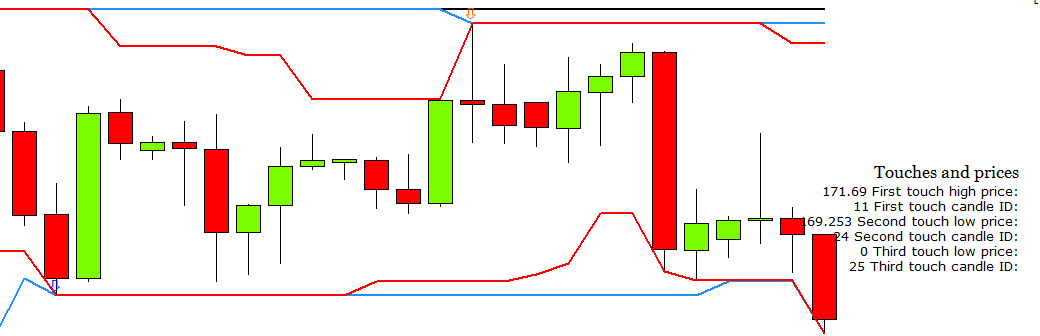
Hi @l'andorra, yes I did, and I have been tinkering around trying to simplify things. I finally have the third candle ID identified, but it won't give me the value of my indicator using that candle ID.
See block 45 (first variable). Isn't this how I would get the value of the indicator? We can talk Wednesday.
https://fxdreema.com/shared/otbKJ3dQb
https://fxdreema.com/shared/ZcyCUyb0b
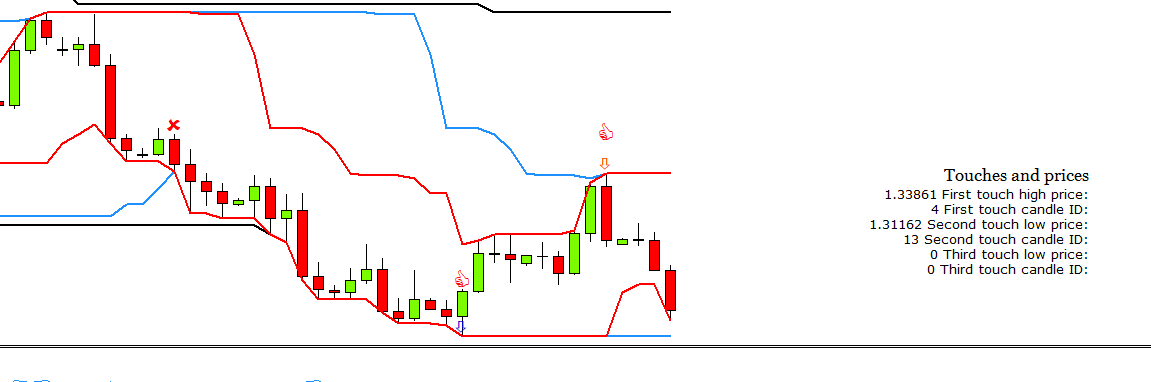
That's the link to one part of my project (you can ignore the single blocks). The first two areas work great. The third area is where I am having trouble.
Here is what I am trying to do:
First Area: detects the first touch of the 21 high indicator (draw red arrow)
Second Area: detects the first opposite touch of the 21 low indicator (counting back from the day the first touch happens) (draw blue arrow)
Third Area (where I am having trouble): I want to identify where the "trend began" from the first opposite touch (from the second area), sort of like thinking, "if there was a skier, where would he START to go down to hit the first opposite touch (from the second area). (draw a green arrow) (I placed a red "X" over the candle where I want the candle ID and the value of the blue line, which won't necessarily always be touched by part of the candle).
As I said, the first two areas work great (you can see the arrows with thumbs up and the displayed data), but for the life of me I cannot the third area to work. Any ideas? I'm thinking it is something I am doing wrong trying to get the value of the indicator. Any advice would be appreciated, as I have been spinning my wheels for days on something so simple, I just know it.
Wow, @sktsec, I am truly appreciative of you taking so much time to help me with this. I'm a relatively new programmer (@l-andorrà is an incredible teacher) so it might take me some time to figure out exactly what your demo is doing and how I can modify it to try and get my results. I will keep you both updated!! Have a great weekend and truly thanks again to you both!
Thank you @l'andorra! So there is no way to get that information from the past, and instead you have to start with the current information and start to accumulate the information you want. I was hoping there was a way to get the past information using the EA. Thank you both!
Thank you @sktsec ! I really appreciate your advice. Can you explain in a little more detail what you mean? I think I understand what you mean about using 2 bool variables (one for when the price is above the upper line and one for when it is below that line), so would you then store that value for the "above the upper line" candle ID into a variable?
I'm preparing myself for a "dude, just hire a programmer" answer, but I'm trying to figure out how I can automate the "last theoretical closed trade" test as one of my conditions to buy. Simply put, I know the traditional use of a condition block to determine when the current ask price goes above some level (like when the current price crosses above an indicator) to trigger a buy signal, but is it possible to identify conditions that already took place in the past and then use that information to make a current buying decision?
As an example, is it possible to use FXDreema to identify the most recent touch of a line (in the past), then the most recent touch of the opposite line (in the past) and then the next touch of the opposite line (in the past). Something like below:
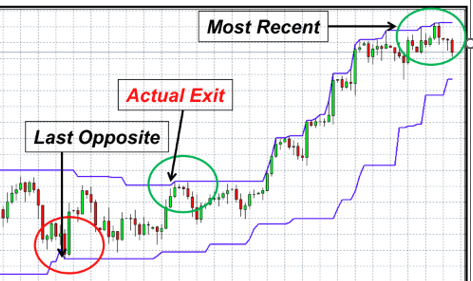
I know this doesn't sound trivial, so any advice pointing me in the right direction would be much appreciated...even if that advice is "dude, just hire a programmer"
https://fxdreema.com/shared/N9yGRXNce
@l'andorra
here it is. BTW it's Mike from your class
It works now, but only after I changed the name of the project.
@Soltee371 thanks! that still didn't work. I have the same settings, but just changed the name of my EA and that worked for some reason?