@cdwilder1 lets go through each block from top to bottom, just to clear any misunderstandings (using the same example link https://fxdreema.com/shared/ov3z3743b
Block #2 (once per bar)
- Firstly, its often good to have this block on top of your project, as it saves your CPU when backtesting. You rarely need to run your code on every new tick, especially when youre only interested in the past candles.
- I also reset all the variables here, so the following loop structure resets for every new candle.
- Take exit from the orange output, that activates on the first price updates on each candle. The yellow output would activate for all the other price updates on each candle.
Block #1 (condition) (sorry for the silly numbering lol)
- The condition restricts the loop to max 500 iterations. Otherwise your tester might run into endless loop and crash
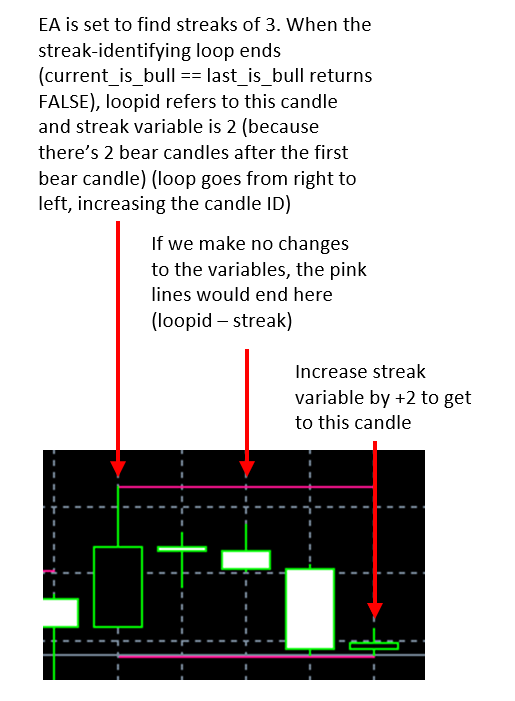
- This block also increases the ID number for each cycle. At the beginning, loopid is 0, and it grows by 1 on each cycle (until we break the loop or reach 500)
"V1+1" is shortcut for "loopid+1", either way works. - We have 2 variables for the bull/bear status of successive candles, current_is_bull and last_is_bull. Here I save the "current" variable value into the "last" variable, before the "current" value gets updated again in the next blocks. This part is probably a bit difficult to grasp, but hopefully it becomes clear later.
- Take exit from the orange output (TRUE)
Block #3 (condition)
- Here we check the bull/bear status of some history candle, identified by the loopid variable.
- If candle is a bull, modify the variable to 1. Otherwise (so its bear), modify variable to 0.
- Take exit from either of the outputs, orange or yellow
Block #4 (condition)
- This block is a text-based condition, but it behaves just like the "normal" condition.
- Here we check if there are successive bull-bull or bear-bear pairs (so the two variables are either both 1 or both 0).
- If the condition is true, increase streak by 1 and continue to next block with orange exit.
- If false, reset the streak and go back to the beginning of the loop through yellow exit (block #6 is just some "cable management", would make more sense in a bigger project)
Block #5 (condition)
- Here we check if the loop has found 4 successive bulls or bears
- If true, proceed to orange exit
- If false, go to next loop iteration through yellow exit
Block #7 (modify variables)
- This block just finds the highest and lowest prices
- As you can see, we can use variable calculations in any edit field, for example "loopid - 4" for the starting candle ID
Blocks #8 and #9 (draw line)
- Draw lines to the highest and lowest point of each bull/bear streak, just for visualization purposes

 MQL4/5 documentation is great help as well