fxDreema

    • Register
    • Login
    • Search
    • Back to the main page
    • Categories
    • Recent
    • Tags
    • Popular
    • Search
    1. Home
    2. roar
    3. Posts
    • Profile
    • Following 0
    • Followers 184
    • Topics 35
    • Posts 2394
    • Best 420
    • Controversial 6
    • Groups 0

    Posts made by roar

    • RE: Making fxDreema better

      Yes, fxdreema has a learning curve, as it is that versatile a tool. But once you get used to it, it is actually pretty intuitive and uses the basic logic of all coding languages.
      This forum has very good chance of giving you answer to any problem, using the search function. What would you suggest to improve, for example?

      posted in Questions & Answers
      roar
      roar
    • RE: Question about 'on trade (Event Data)'

      When you find yourself copying the same block over and over again, there is usually a way to loop the process:
      0_1531850415421_54579295-345a-4684-b5e3-caf1af62268e-image.png
      This method creates as many trades as you want, and assigns a special number for each one.
      That number (group #) can then be used to control the trades.

      Doesn't really answer to your question though, just wanted to give another way of doing it 😄

      posted in Questions & Answers
      roar
      roar
    • RE: Close newest and oldest trade

      @ambrogio For changing a minus sign to a plus sign.
      Lets assume the "profitSum", thats the sum of the positive profit trades, example $12
      Then the profit of the losing trade can be -$57. Positive is always bigger than negative, so we have to -1 * -57 to make it +57 so we can better compare

      posted in Questions & Answers
      roar
      roar
    • RE: Close newest and oldest trade

      Mine works differently.
      0_1531746592329_70c4c77b-6b92-4250-be98-5fbd0efc6576-image.png
      Here, take this .mq4 and import it to fxdreema so you get the exact same project. I also added a trade count condition for comfort.
      0_1531746692796_hedge.mq4

      posted in Questions & Answers
      roar
      roar
    • RE: Here, take this profitable ea

      @richard96816 Agreed, fxdreema has some very versatile functions. It's very good to see other's ideas too, avoiding "tunnel vision" with the alone development.

      Some say that sharing good eas doesn't happen because nobody would give away free money like that. I don't believe that approach at all - no matter how profitable your system is, there is always a risk present with trading, and the risk is higher if you don't even know the system you are using. So you have to learn the system, and thus you can also develop it further. Collaborative effort is the way to go

      posted in Tutorials by Users
      roar
      roar
    • RE: Close newest and oldest trade

      0_1531739563431_220104d2-5ce7-4b7d-b1e1-25365d4aafac-image.png
      The variables need to be reset at some point, otherwise the sum just piles up. Shared link somehow dropped that. I did that on the first loop block.
      Tbh, I didn't actually do any test run with this ea, could still be faulty 😄

      posted in Questions & Answers
      roar
      roar
    • RE: Close newest and oldest trade

      https://fxdreema.com/shared/fceTizc8
      This one first calculates the amount of profitable trades. Then it checks the most losing trade against that profit sum, and if profit sum is bigger, close them all. Small losing trades will stay open.

      posted in Questions & Answers
      roar
      roar
    • RE: Close newest and oldest trade

      It's a bit odd to pick oldest and newest, but this should do:
      https://fxdreema.com/shared/QRnvqa97

      posted in Questions & Answers
      roar
      roar
    • RE: Close the oldest/farthest trade

      Maybe using the blue blocks is easiest way here:
      0_1531567688835_dacf3273-a864-4c42-9222-e8ec2258aac3-image.png

      This will close n (set to 3) most profitable trades, and immediately after that, the least profitable.
      https://fxdreema.com/shared/2HwUCstX

      posted in Questions & Answers
      roar
      roar
    • RE: Close the oldest/farthest trade

      Hi!
      What is the "first" losing trade? Is it the oldest, most pips, or most $ ?
      https://fxdreema.com/shared/2TwfqkIod
      https://fxdreema.com/forum/topic/6019/how-to-select-least-profitable-trade
      For finding the least profitable trade, check this post and example. It requires a bit tricky process (maybe there is some simpler one, idk)

      posted in Questions & Answers
      roar
      roar
    • RE: Profitable Startegy

      @moreirajbn
      I like your thinking, I recognized myself there 😄
      Trading with robots is very different than manual trading - robot can never have the human ability to see beyond the price data, consider aspects outside the standard strategy, it just follows its path.
      On the other hand, that is also something humans can never do: we can't analyze millions of price points in our heads. That is why robots should not follow the traditional price action rules, but to find some statistical edge, for example buying at 10 and selling at 4 🙂

      posted in General Discussions
      roar
      roar
    • RE: Dynamic "Pips Away" (Each Trade)

      Lets use a variable 🙂
      https://fxdreema.com/shared/MuBthInob
      0_1531085133974_d38c62c5-1e94-4cf5-91d1-5f6bea6fccdf-image.png

      posted in Questions & Answers
      roar
      roar
    • RE: filtered by group

      You can add a group number to each trade from the "buy now" block, and use that to filter trades to groups 1-6

      posted in Questions & Answers
      roar
      roar
    • RE: Add a Position to a Current Winning Position

      @ronniethetrader said in Add a Position to a Current Winning Position:

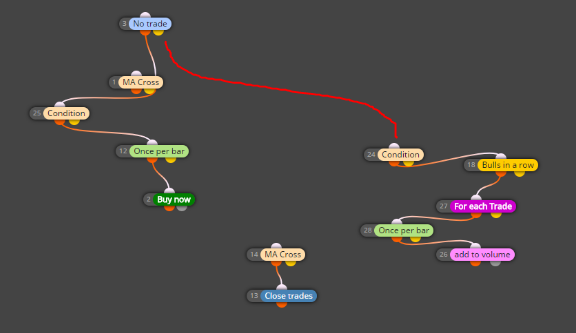
      The screenshot is everything I have so far, original entry is pretty much an MA Cross Is there a way to specify to start the count after I am in the original trade and not before?

      This connection should do the trick 😄
      0_1530952173218_d8cfe389-681a-43ef-afa4-7c09a9365ce3-image.png

      posted in Questions & Answers
      roar
      roar
    • RE: New user! MQ4 file won't run.

      The .ex4 file is in the correct folder but the 'Start' button won't press, or any of the buttons above it, such as 'Expert Properties.'

      This sounds like a problem with your terminal, does it run the other EAs properly?

      Check this example, I think this is close to what you want.
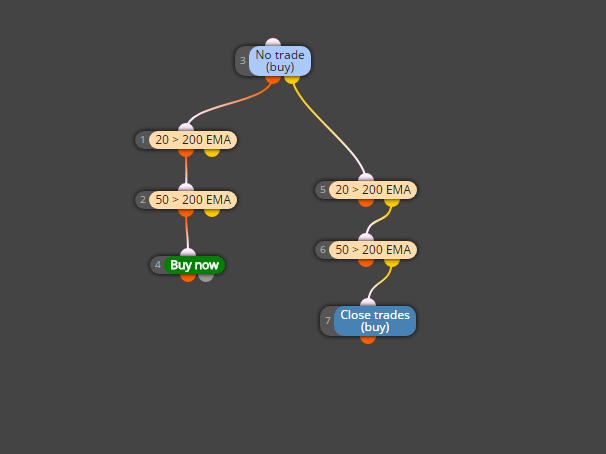
      https://fxdreema.com/shared/Ossluy54
      First it checks if there is no buy

      • if true, it checks if both 20 and 50 emas are above 200, and then opens buy
      • if false (trade is running), it checks if both emas are below 200, then closes.
        0_1530896051978_6dc84aa8-9f7e-4495-8746-0cc567a0c9e0-image.png
      posted in Questions & Answers
      roar
      roar
    • RE: New user! MQ4 file won't run.

      The algorithm runs on every tick, from start (block 1) to finish (block 8).
      You probably don't want your trades to be closed on the same tick as you open it 😉

      Try connecting the closing logic to the yellow (false) output of "no trade" block.

      Also, be careful with multiple crossing conditions - they rarely happen on the same candle.

      posted in Questions & Answers
      roar
      roar
    • RE: Once per bar but selected bars

      Connect the hours filter and once per bar blocks together 🙂

      posted in Questions & Answers
      roar
      roar
    • RE: How to Select "Least profitable trade"?

      @rafaelgrecco said in How to Select "Least profitable trade"?:

      What I was missing was:

      • Reseting the variable "smallestprofit" on every new loop

      We must reset the variables at some point, so the ea don't get "stuck" to some big loss that is already closed. Now it resets the variable on every tick, and also calculates it again so we always have the correct value. It is not the most cpu-optimal way but should work fine.

      • Using the second output of "Each Trade" to wait for all trades to be checked

      I think this is the correct way, we must first check all trades in order to find the lowest profit.

      The looping blocks work a bit different than other blocks, go ahead and test different logic builds 🙂

      posted in Questions & Answers
      roar
      roar
    • RE: How to Select "Least profitable trade"?

      https://fxdreema.com/shared/2TwfqkIod
      Well, I have an idea but its not the simplest one 😄
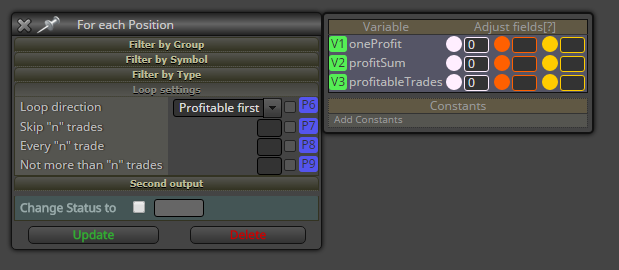
      We could use a position loop that goes through all your open trades, it finds the lowest profit and the trade number (loop id) - after that loop we have the amount and trade number identified and so we can select that individual trade, and also use the basic condition block.

      If you copypaste the blocks, you will need to create these variables to your project:
      0_1530636572822_bb986a9a-41a8-446a-bf09-6781aeabe4f1-image.png

      Hope you get the idea 😄

      posted in Questions & Answers
      roar
      roar
    • 1
    • 2
    • 102
    • 103
    • 104
    • 105
    • 106
    • 119
    • 120
    • 104 / 120