fxDreema

    • Register
    • Login
    • Search
    • Back to the main page
    • Categories
    • Recent
    • Tags
    • Popular
    • Search
    1. Home
    2. roar
    3. Posts
    • Profile
    • Following 0
    • Followers 184
    • Topics 35
    • Posts 2394
    • Best 420
    • Controversial 6
    • Groups 0

    Posts made by roar

    • RE: Delete comment

      Hi!
      Creating another comment block will not work, because then the comments will just overlap.
      You need to update the existing comment. This needs a text variable:
      0_1530526182656_d214b7ff-5c0d-4578-82e5-36220afae3e9-image.png

      Creating the variable:
      0_1530525885719_aa705214-9a26-4161-a8cd-4ab38e39d26d-image.png

      Now you can just comment the "status" variable, and you will see whatever is stored inside it.
      https://fxdreema.com/shared/DSbRDedY

      posted in Questions & Answers
      roar
      roar
    • RE: how to martingle below than 1.5 multiplier

      You can find the martingale in the "buy now" block with adjustable multiplier
      0_1530139382601_c320acaf-d92f-4299-92d8-3caec9d841c2-image.png

      posted in Questions & Answers
      roar
      roar
    • RE: Only open new trade if last trade is closed x minutes before

      This is easy using a variable.

      For instance, a variable called minutes

      • on every minute, modify minutes to minutes + 1
      • OnTrade -> position closed -> modify minutes to 0
      • now you can check from the variable minutes how many minutes have passed since last close
      posted in Questions & Answers
      roar
      roar
    • RE: Not sure how to draw multiple objects at same time

      No need to apologize, that was a very good question actually.
      Its great you sorted it out!

      posted in Questions & Answers
      roar
      roar
    • RE: Conversion

      No, I don't think so.
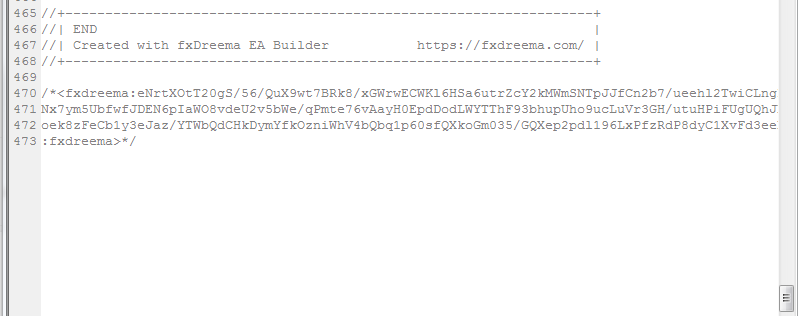
      My understanding is the projects are imported to fxdreema via the hash at the bottom of the script, and not using the actual mql code.
      0_1529934690728_4265f117-060a-4990-959f-8e57b931dd58-image.png

      posted in Questions & Answers
      roar
      roar
    • RE: problem when rich TP open onother position...

      You have a fixed pips tp?
      Then you don't need those "close position" blocks.

      posted in Questions & Answers
      roar
      roar
    • RE: Different RESULTS

      @antonio-0 Offset can surely be 0.
      Well, I don't really know what is happening with your testing.
      I assume you have a scalping strategy, because they are so sensitive to testing parameters. I recommend live testing, because mt4 backtesting is never good for scalping.

      posted in General Discussions
      roar
      roar
    • RE: Different RESULTS

      Okay, can you pinpoint any major differencies to other EAs? Market execution vs pending orders?

      posted in General Discussions
      roar
      roar
    • RE: Different RESULTS

      Mt4 or Mt5 ?
      Difference may be history data or perhaps execution delay. In any case, I'd say profit factor is very poor measure of EA profitability. Number of trades per year and max equity drawdown tell much more.

      posted in General Discussions
      roar
      roar
    • RE: problem when rich TP open onother position...

      So you want the first signal to close the sell, and second signal to open new buy?
      This will be closer to your strategy: https://fxdreema.com/shared/ktzx108Lc
      But I'm afraid you will have to define the "signal" in more detail

      posted in Questions & Answers
      roar
      roar
    • RE: Conflicting conditions

      You have a typo in the lower picture, 2100.

      posted in Questions & Answers
      roar
      roar
    • RE: Calculation to close all trades not triggered

      Do you have trades on multiple pairs? Check that closing block, it has default setting to only close the trades on the pair it is attached to.

      posted in Questions & Answers
      roar
      roar
    • RE: Are Variables restricted to Magic Number?

      Yes, I believe so, if you mean the fxdreema variables. Then there are the terminal variables (global variables) that can be shared among eas.

      posted in Questions & Answers
      roar
      roar
    • RE: Here, take this profitable ea

      @drayzen Nice thought, haven't used tick indicators before.

      Anyway, I'd say it is not very fruitful to determine quiet periods and not trade in them. That is because of the quietness is very relative, and so you also have to sacrifice some good opportunies if you set a fixed quietness treshold.
      I think it is better to let the trades open in all conditions, but implement a different risk managing and exit systems for the quiet periods.

      posted in Tutorials by Users
      roar
      roar
    • RE: Silly question. Please don't laugh at me...

      @sydneyfox I think you are talking about the constant inputs, and not precisely variables.

      I have solved this variable problem with global (terminal) variables (create corresponding global variable for each fxdreema variable and keep them in sync), but that is not very elegant a solution 😄

      For your specific situation, I would just create a boolean variable terminated, set it to true when you want the virtual termination, and put this condition before everything else: terminated == false

      posted in Questions & Answers
      roar
      roar
    • RE: Compiling?

      Those 2 warnings come with basically every project, nothing to worry about there - the problem is most likely elsewhere.

      Metaeditor puts the compiled .ex4 files to your expert advisor folder, something like "...../MQL4/experts/"
      The folder is nowadays in the metatrader install location.
      You should see the ea in your metatrader navigation panel, remember to refresh it.

      posted in Bug Reports
      roar
      roar
    • RE: Compiling?

      This sounds like some general software problem, maybe antivirus checking the download...
      If you download the .mq4 and open it, it should open in metaeditor by default. In metaeditor, hit the button "compile" in the top row, and it gives you information about possible errors.

      posted in Bug Reports
      roar
      roar
    • RE: My Grid type EA project

      https://fxdreema.com/shared/jX8wezXxc
      This seems to work. I see fxdreema has implemented some nice new blocks, makes things easier 🙂

      0_1529231575041_multicurrency.mq5

      https://fxdreema.com/shared/LDVAFZSMd
      0_1529308139027_7050fbbb-8e13-4fd5-a41d-2fdf34b07bfe-image.png
      0_1529308148211_e4ca2926-56ac-4e24-8612-948aed4c614e-image.png

      posted in Questions & Answers
      roar
      roar
    • RE: My Grid type EA project

      Oh, yes, I used the candle ID in just one block, others are id 0.
      That one block is meant for randomization; it compares upper wick of candle 55 to candle 67 or something, the outcome is very random (50:50 buys and sells). That condition can of course be something else as random, or perhaps some custom random function.
      Personally I would trade in direction of some long period moving average, its not random and its not perfect trading analysis, but it is something in between...

      The ea will trade instantly you run it.

      posted in Questions & Answers
      roar
      roar
    • RE: My Grid type EA project

      https://fxdreema.com/shared/OG5F0mdB
      Here's the core grid system as you described.

      You can just open this into a new tab and then copy all blocks to your new project.
      Remember to set constants and variables like this:
      0_1528808539481_53d6bafb-8548-4b14-96b2-6b3abb1b587e-image.png
      0_1528808548909_8ffc8770-7808-45d4-a700-762472ec8f68-image.png

      posted in Questions & Answers
      roar
      roar
    • 1
    • 2
    • 103
    • 104
    • 105
    • 106
    • 107
    • 119
    • 120
    • 105 / 120