I would make it simple as this:
https://fxdreema.com/shared/uMSCVTa6c
dunno if it works 

I would make it simple as this:
https://fxdreema.com/shared/uMSCVTa6c
dunno if it works
Agreed. In mt5 tester there is optimization by the recovery factor - that has served me pretty well.
hmm... how about using the trade group number, set it as a variable - when you need to "restart", increase that variable by +1, so the group number will be different from there on
why can't it be like
above upper line -> close
below lower line -> close
in that case the trades will close also when the price is suddenly 0.0001 pips above the upper line - the current project would leave the trades open, because it is not exactly there (==)
I'm no expert on objects, but its not usually good to use the == sign when comparing price. The price rarely is exactly something - use the > and the < instead
check the tab - we are OnTrade, not OnTick
orange = True (when there is no trade, thats where the flow continues in block #6)
yellow = False (when there is trade, the condition at block #6 is false, so continue to yellow)
the fxdreema project works on every tick, the whole process is repeated on every tick from top to bottom. if the process stops at the top, bottom blocks will never matter anything
For each Trade -block executes once for each trade, as the name says. So each individual trade needs to be 10 profit.
Your logic has some mistake in it. Because of the top block (no trade), the system can check the profit only immediately after buy, and never else - there is never 10 profit immediately after opening
Put the looping block (For each trade) to the "no trade" block's yellow output, so it is active when there is a trade
this shouldn't be that hard, given your information... if you measure the profit by equity-balance, it always combines the profits from all trades
when you click some name in the shoutbox, it doesn't go to the user profile - the link is broken, i think
I guess the money loss uses entirely different mechanism than chart-based stops. With money loss you don't have to use any charts, but just calculate your equity values around - maybe thats why you cant put a visible line to your chart
Here. It's just a guess, I haven't actually done that..
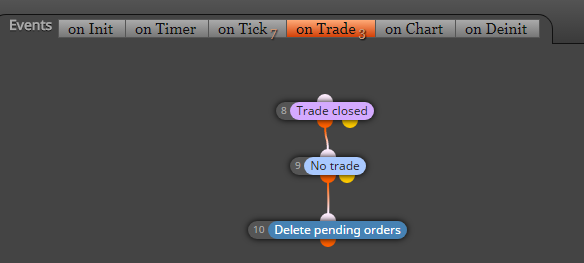
sure there is plenty of way to do that. try something like this
OnTrade -> position closed -> delete pending orders
https://fxdreema.com/shared/GEUH4hBoe
Maybe this helps.
I didn't really understand your example, but I think I know what youre meaning
In your example, connecting that AND block back to the "once per bar" creates a loop which never changes - thats bad
Create some variable which "remembers" that the first condition passed.
Example: bear bar -> modify variable bigbear to value 1
condition: bigbear = 1
-> proceed to 2nd condition
(reset bigbear back to 0 so it signals only once per time)
How about this
once per bar (M15) ->
close all trades ->
your condition -> buy/sell
Seems you have set the CustomVolume variable as value 0,1 - use 0.1 instead
You can troubleshoot the code errors by opening and compiling the .mq4 with metaeditor, it makes it quite easy to guess what's wrong, even if you dont have particular coding knowledge (like I dont)
If your volumes and tp follow some linear, simple logic, the grid block should work.
Test this
https://fxdreema.com/shared/S86qs94dd