fxDreema

    • Register
    • Login
    • Search
    • Back to the main page
    • Categories
    • Recent
    • Tags
    • Popular
    • Search
    1. Home
    2. roar
    3. Posts
    • Profile
    • Following 0
    • Followers 184
    • Topics 35
    • Posts 2394
    • Best 420
    • Controversial 6
    • Groups 0

    Posts made by roar

    • RE: Automatically add lot volume when trade goes wrong..similar to martingale but not exactly.

      Youre describing some kind of grid system.. Take a look at those "buy/sell pending orders in grid"
      I think those blocks open stop-type orders by default, so you need to put a negative number somewhere (grid size) to set the block putting limit orders.

      posted in Questions & Answers
      roar
      roar
    • RE: Hello I wanted to know how to close and open two mobile media each time they cross Thank you

      mobile media ?

      posted in Questions & Answers
      roar
      roar
    • RE: I need help

      Sorry, I don't know much about zigzag

      posted in Questions & Answers
      roar
      roar
    • RE: I need help

      So the signals happen at different price?
      You need another variable, and store the price to that variable.
      After the looping process, that variable should contain the last signal and you can continue with that

      posted in Questions & Answers
      roar
      roar
    • RE: I need help

      https://fxdreema.com/shared/bhDHS63Qc

      Here's the principle

      posted in Questions & Answers
      roar
      roar
    • RE: I need help

      you have to set the ID as some variable, and then use loop to check every id.
      loop1: id1 -> check condition ->
      loop2: id (1+1) -> check condition ->
      loop3: id (1+1+1) -> check condition ....

      its pretty complicated shet if you're inexperienced

      posted in Questions & Answers
      roar
      roar
    • RE: Deleting pending order

      set different group numbers for them, and then use "pending order exist" separately for each number
      -> then you can close the other one.

      or simplier, check if theres less than 2 pending orders -> delete pending orders

      posted in Questions & Answers
      roar
      roar
    • RE: Once per bar

      https://fxdreema.com/shared/EmCNQTnbd
      This should help, it counts the bars and condition passes when the count is above 1

      posted in Questions & Answers
      roar
      roar
    • RE: How do I make 10 seconds stop between 2 blocks?

      delay-block?

      posted in Questions & Answers
      roar
      roar
    • RE: SL is just a previous candle..

      yes, you would have to store that level to a...
      you guessed it....
      variable

      posted in Questions & Answers
      roar
      roar
    • RE: how can i have multi order at same time (same hour and minute and second )

      oh sorry, i used the wrong block...
      well, i think you will anyways have some latency towards your broker - i wouldn't expect any ea to work in milliseconds in order to make profit

      posted in General Discussions
      roar
      roar
    • RE: how can i have multi order at same time (same hour and minute and second )

      ---nevermind---

      posted in General Discussions
      roar
      roar
    • RE: How to code that my candle is between support and resistant?

      @timmyhanke
      Youre right, that works - but if you want to automate the whole process, drawing the lines in right places will be some problem

      posted in Questions & Answers
      roar
      roar
    • RE: How to code that my candle is between support and resistant?

      This is (also) done with variables, but first you have to set up the process finding those lines, thats the hard part and I cannot help with that 😄

      posted in Questions & Answers
      roar
      roar
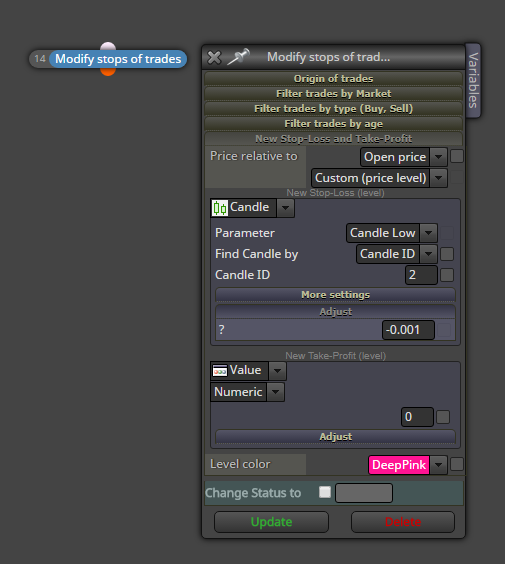
    • RE: SL is just a previous candle..

      This should help
      0_1501762384536_upload-cfb7e07b-72e8-47ee-acf2-e7ed6dfb9bca

      posted in Questions & Answers
      roar
      roar
    • RE: Save information of certain candlestick for future references.

      https://fxdreema.com/help/working-with/constants-and-variables

      Here's some info about constants and variables.
      You can create your variables to the variable list, which is on the left in builder, above the search box.
      Just create some system with "modify variables" block, test it around, you will (eventually) see how they work 😄

      You can replace nearly any value with a variable or constant, by right-clicking the number

      posted in Questions & Answers
      roar
      roar
    • RE: Stop Loss and close all order

      I tested it with live account, works fine for me 😕

      There's surely other ways to do this, but thats the best I came up with

      posted in Questions & Answers
      roar
      roar
    • RE: Save information of certain candlestick for future references.

      All right, so create variables for each piece of info (openprice etc....)
      To use only on special bar, you need condition, like if openprice = 0, only then modify it
      and then reset it back to 0 every day or whatever fits 😄

      posted in Questions & Answers
      roar
      roar
    • RE: Stop Loss and close all order

      https://fxdreema.com/shared/8Ts9mzJ0e

      This example doesn't care if the trades are buy or sell, but
      it checks if there is any stop-loss, and
      when there suddenly isn't any stop-loss anymore (because that position closed)
      -> it closes all remaining trades

      You need couple variables with that setup, StopExisted which is used to "remember" that there was a stop-loss, and StopsNow

      posted in Questions & Answers
      roar
      roar
    • RE: Save information of certain candlestick for future references.

      Use variables to store any information, with the "modify variables" block.
      Although you need some logic to reset the data and restrict its process, you probably dont want replace the data on every bar?

      posted in Questions & Answers
      roar
      roar
    • 1
    • 2
    • 110
    • 111
    • 112
    • 113
    • 114
    • 119
    • 120
    • 112 / 120