fxDreema

    • Register
    • Login
    • Search
    • Back to the main page
    • Categories
    • Recent
    • Tags
    • Popular
    • Search
    1. Home
    2. umbrellamaker
    3. Posts
    • Profile
    • Following 2
    • Followers 0
    • Topics 9
    • Posts 44
    • Best 2
    • Controversial 0
    • Groups 0

    Posts made by umbrellamaker

    • RE: Why do I get the wrong fibo price value?

      Hey mate,

      under "Specific Properties" you define the Fib levels ("Levels comma separated").
      For your purpose you would need to put in something like 0.618 and 0 to get two price levels.

      And you have to know that the first level has the name "0" not "1" đŸ™‚

      posted in Questions & Answers
      umbrellamaker
      umbrellamaker
    • RE: Adjust Fibonacci Levels/ Object Levels

      @l-andorrĂ  To make the price level recognizable for the EA

      posted in Questions & Answers
      umbrellamaker
      umbrellamaker
    • RE: Adjust Fibonacci Levels/ Object Levels

      @l-andorrĂ 
      https://fxdreema.com/shared/cdPSaTMEc

      Here you see how the EA is placing the Fibs and saving them into variables. It is only an illustration, otherwise it would be too messy.

      posted in Questions & Answers
      umbrellamaker
      umbrellamaker
    • RE: Adjust Fibonacci Levels/ Object Levels

      @l-andorrĂ  Yes. The EA knows exactly where and when to place the 0% and the 100% level. The EA is also able to save the price levels of these levels. Now, the next challenge is the adjustment of the fib levels. Do you need more information?

      Will answer as fast as possible!

      posted in Questions & Answers
      umbrellamaker
      umbrellamaker
    • RE: Adjust Fibonacci Levels/ Object Levels

      @l-andorrĂ 

      The 100% level does not adjust to candles which follow after.

      The 0% level of the fib need to be adjusted when price closes above the 0% price level of the fib.

      I would be already happy to get an approach how to adjust the price level of an already drawn object đŸ˜…

      Somehow with the MOVE block and variables?

      posted in Questions & Answers
      umbrellamaker
      umbrellamaker
    • Adjust Fibonacci Levels/ Object Levels

      Hello guys,

      Introduction:
      The EA draws Fib levels at 0% and 100%.
      The EA knows exactly how and when to draw the 100% and 0% level.

      I did not find any approach to adjust an already drawn Fib level or redraw a Fib.

      The Task:
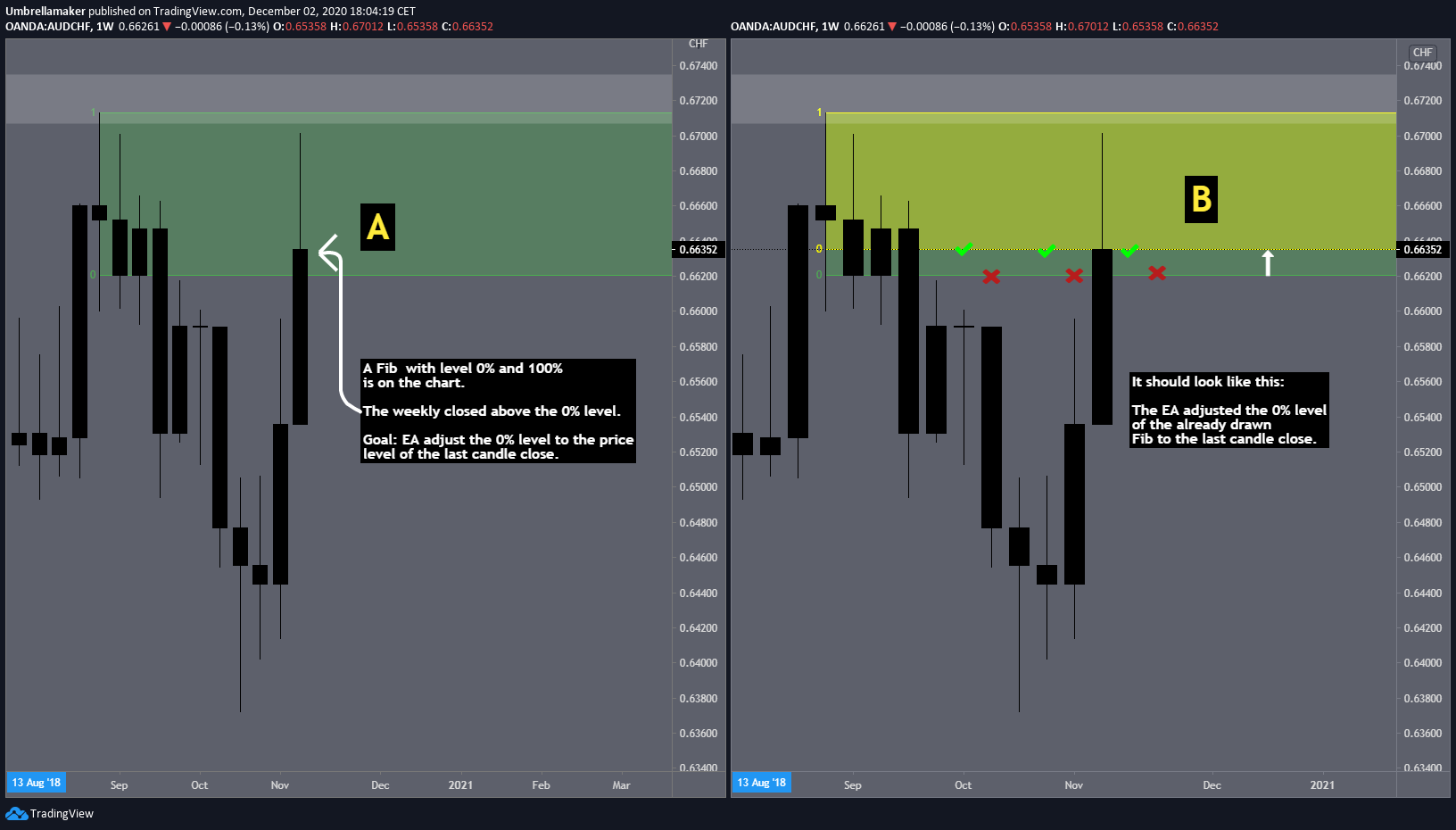
      The EA shall adjust the 0% level to the latest candle close above it (see screenshot).

      Any other approach or thoughts to that approach are very welcomed!

      Thanks for your efforts in advance!!!

      0_1606928964307_57b82f61-2583-47de-b0f2-4d9134e2bb07-image.png

      posted in Questions & Answers fib fibonacci level adjust object
      umbrellamaker
      umbrellamaker
    • RE: Modify Level of an already drawn fibonacci

      How? Could you post that part of your project, please!

      posted in Questions & Answers
      umbrellamaker
      umbrellamaker
    • RE: Updating Variables dynamically when Price hits Horizontale

      @l-andorrĂ  I tried that already, the EA is naming objcts wrong anyway even if the prefix is edited.

      I replaced the horizontales with another object. So everything works for my purposes. Thank you!

      posted in Questions & Answers
      umbrellamaker
      umbrellamaker
    • RE: Tutorial 07 - Read prices from indicator objects

      @miro1360 Hey guys,

      I am wondering if there is access to the code of the indicator, so I could adjust it for my purposes.

      I am not a coder, but familiar with FxDreema. Appreciate any help or hints!!

      posted in Tutorials by Users
      umbrellamaker
      umbrellamaker
    • RE: Updating Variables dynamically when Price hits Horizontale

      I just posted a more accurate illustration how the horizontales are drawn.

      You can also click here:
      https://fxdreema.com/shared/0ffAvPyId

      posted in Questions & Answers
      umbrellamaker
      umbrellamaker
    • RE: Updating Variables dynamically when Price hits Horizontale

      @l-andorrĂ  Would it help to show you when exactly the horizontales are drawn? In case it takes too much time of yours, let me know and we will find a solution. The implementation of that strategy into an EA breaks my head, but it works already.

      I already tested the strategy for years and it produces good results.

      I would be willing to hand you the trading plan in case we get it up and running...

      posted in Questions & Answers
      umbrellamaker
      umbrellamaker
    • RE: Updating Variables dynamically when Price hits Horizontale

      @l-andorrĂ  it is just the (shortened) part, in which the EA draws the horizontales.

      posted in Questions & Answers
      umbrellamaker
      umbrellamaker
    • RE: Updating Variables dynamically when Price hits Horizontale

      @l-andorrĂ  The EA is than still numbering objects wrong. So when the EA looks only for the name (which includes numbers, which are in the wrong order as the objects were created) sometimes the false objects get picked by the EA. That is why I was thinking about an approach, which makes a horizontale definitely picked wright by the EA.

      posted in Questions & Answers
      umbrellamaker
      umbrellamaker
    • RE: ---

      @l-andorrĂ  no problem! Appreciate your efforts! Have you got an idea?

      posted in Questions & Answers
      umbrellamaker
      umbrellamaker
    • RE: ---

      Oh I thought because my questions evolved during the other thread, this thread is asking what I need on point. Will delete it, if necessary!

      posted in Questions & Answers
      umbrellamaker
      umbrellamaker
    • RE: Updating Variables dynamically when Price hits Horizontale

      @l-andorrĂ  I researched a bunch of threads which are working with these kind of block, but I am still uncertain.

      It makes always an error, when I am trying to implement it.

      This is the project in its core. The EA draws two kind of horizontales (Red and orange ones). The lowest red belongs to the lowest orange. The second lowest red belongs to the second lowest orange and so on. Now the EA should recognize the lowest horizontales of its kind dynamically (for example for every bar, check for that). If price is above the red line, the lowest horizontale of every kind shall be deleted.

      https://fxdreema.com/shared/yQxtJ0rhc

      Current problem: Working with objects name is failing hard, because the EA is naming them wrong many times and several errors occur than.


      posted in Questions & Answers
      umbrellamaker
      umbrellamaker
    • ---

      posted in Questions & Answers zones horizonale variable variables dynamically
      umbrellamaker
      umbrellamaker
    • RE: Updating Variables dynamically when Price hits Horizontale

      @l-andorrĂ 

      Appreciate your efforts! But I think the solution is still a bit off.

      That loop is constantly drawing new horizontales and I do not know how I can refresh the variable "price_level2" (aka price level of the lowest horizontal) if a lower horizontal is drawn. Could you give an example?

      That also works if the object is drawn by the EA?

      posted in Questions & Answers
      umbrellamaker
      umbrellamaker
    • RE: Updating Variables dynamically when Price hits Horizontale

      @l-andorrĂ  Alright! The horizontales are created in a loop and several horizontales are created (one after another, not all in once). Could you propose a loop in which the EA modifies the variable only if a new lower horizontale is created?

      That would be awesome!

      posted in Questions & Answers
      umbrellamaker
      umbrellamaker
    • RE: Updating Variables dynamically when Price hits Horizontale

      I am just not good at variables and failed copying "somehow similar, but not the same" projects, which were already discussed on FxDreema and included variables.

      posted in Questions & Answers
      umbrellamaker
      umbrellamaker
    • 1
    • 2
    • 3
    • 2 / 3