V
Posts made by Vortrexcian
-
RE: TRENDLINE BREAKOUT EAposted in Questions & Answers
Hi
Under MyIndicators

Select the custom indicator that you want to use.
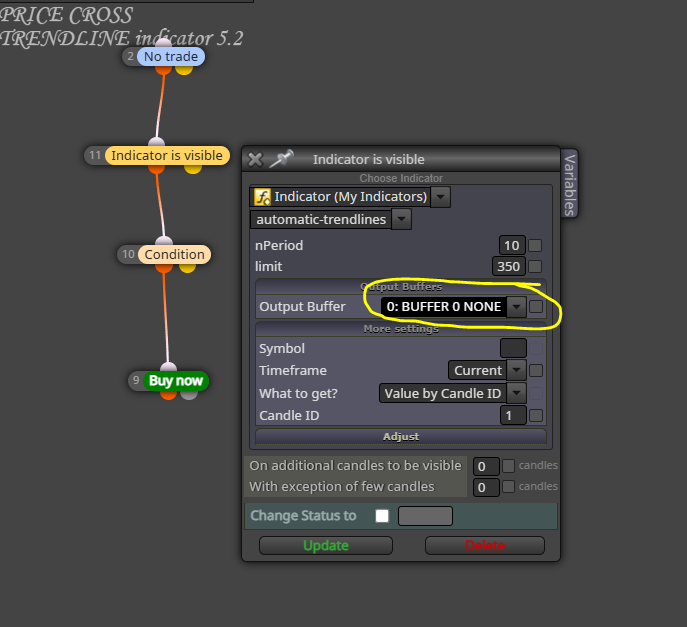
And add the output buffers
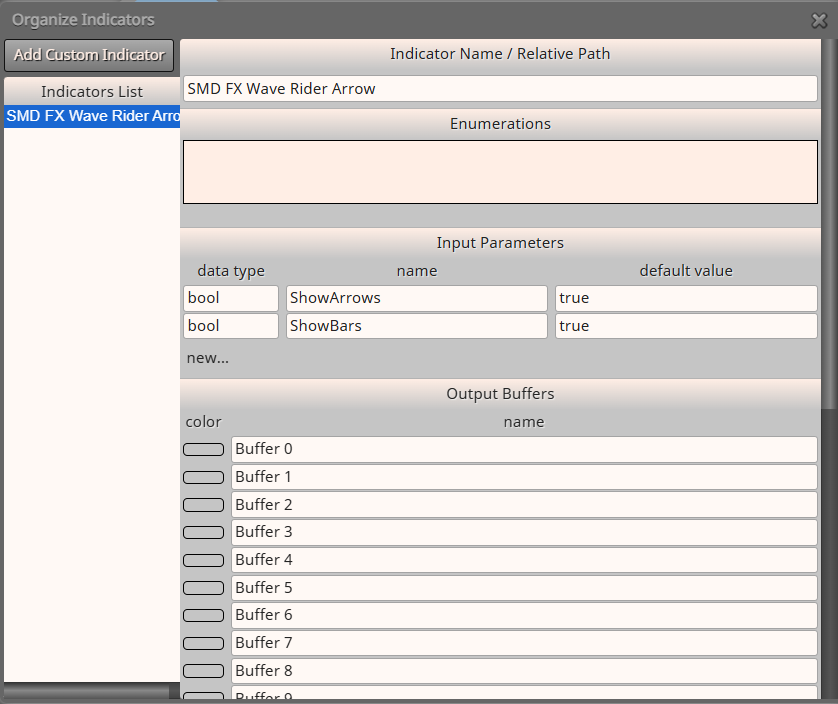
As seen on the image, my custom indicator had 10 buffers
The arrow signals were buffer 8 and 9, which I had to use to open a buy and sell trade.Not knowing which buffer on your custom indicator activates the "BUY" signal, you would need to add a lot of buffers, and keep on changing and testing, untill a buy order opens
I'm not that good with this and still new myself.
You might want to ask for assistance from
@l-andorrà
@jstap
@roarOr some of the other L337 guys...
Hope this helps a bit...
-
RE: TRENDLINE BREAKOUT EAposted in Questions & Answers
Hi Bud
I would say, make sure your setup is correct, first of all ( that it would open and close when conditions are met )
Then, and this is the "YEET" part, you will have to add buffer 0 to 10, then test again, if not working, change buffer 0 to 1 and so on, till a trade opens.
Do this only for buy at first, till you find the right buffer, then do the same for sell.
Did you create the indicator or do you at least have the source code, cause the buffer will be there, otherwise, if not, the above method is the only thing I can think of at this point to find the right buffer.
-
RE: Friends, who wants to help me improve this semi-automatic EA to operate trend candles in Crash 500?posted in Questions & Answers
Hope you are doing well.
How far did you get with this project?
Also, would you mind explaining in detail what you are trying to do, please!
Looks like you want to buy on Crash 500
This is a Synthetic market from Deriv, therefor, normal conditions would not really apply as there is no outside influence on these type of markets as they run on a Algo, which changes from time to time.To try and find a trend, MA’s would be 1 option amongst trend line breakout.
If I could understand your conditions a bit better, I might be able to give some insight on it.
-
RE: TRENDLINE BREAKOUT EAposted in Questions & Answers
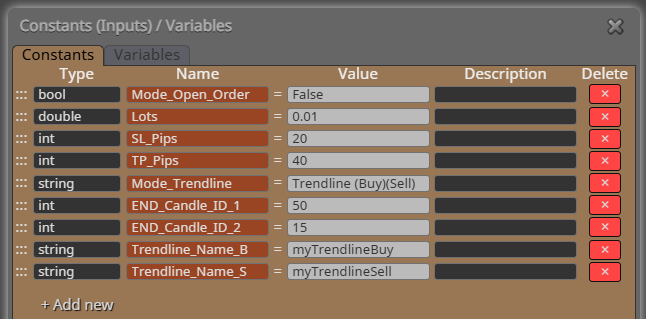
You can change the Candle ID , 50 and 15 is the amount of bars it would read to draw the trendlines.
Alternatively, look at the construction of it, to see if you might have missed something, because this definitly opens trades.
Also, I do not have MT4, so cant see your personal trendline indicator, the reason your project might not be opening trades, could be incorrect buffer as well.
Maybe @l-andorrà could shed some light on this
-
RE: ช่วยฉันอยากทราบวิธีทำให้ EMA <x RSI ใน Fxdeema มีวิธีการอย่างไรบ้าง?posted in Questions & Answers
Hi
Need some more information!
However, from the question, I would think you are talking about when,
EMA either is below or crosses other EMA
and
when RSI is either below or crosses a level.Here is a very basic example and I hope I understood your question correctly.
https://fxdreema.com/shared/AA46rdJueMerely change block 2 and block 3 around for EMA to be first condition and RSI second condition.
I might be incorrect, but 1 condition doesnt have to ( <x ) as this is ( cross over ), you could merely use ( < ) as 1st condition should be "below"
and then 2nd condition ( <x ) "cross below"Eample link explained:
When RSI is ( < ) "below" level 30
and
50EMA (<x ) "crosses below" 200EMA open buy trade.I hope this helps a little, I'm still new here, sorry if this is not what you were looking for.
-
RE: TRENDLINE BREAKOUT EAposted in Questions & Answers
Hi
Sorry for the delay in response.
Been super busy.Here is a previous post that might help you in the right way.
https://fxdreema.com/forum/topic/4233/example-trendline-eaHave a look and see if this is what you're loking for.
Play around with it on your demo ( or tester ).Unfortunately, I do not operate on MT4 ( for the moment )
Therefore, I cant open that indicator to test and see.However, I do hope the link guides you in the right directions.
-
RE: How to change minimum lot size from 0.01 to 0.001?posted in Questions & Answers
For the most part 0.1 or even 0.01 are used, have a look at your broker first.
Not all brokers support a 0.001 Lot sizes.Please post a link with the project as well, makes it easier for people to see it and try to assist...
Hope something like this helps.
https://fxdreema.com/shared/FLIjzp0UdBut first have a look at your broker.
-
RE: TRENDLINE BREAKOUT EAposted in Questions & Answers
From looking at these other pictures you posted, why is your trendline breaker standing still and not moving with the trend?
Is it a indicator or did you draw the trendlines yourself?
Are you looking at wanting to create a EA Trendline Breakout or are you looking at creating a EA that will open orders at crossing of manual drawn trendlines?
-
RE: TRENDLINE BREAKOUT EAposted in Questions & Answers
The TRENDLINE BREAK indicator, did you build it?
Was it done on FXDreema?If so ( by looking at your picture )
Its static ( stays in place ) as seen on the picture, it did not adjust to the HH pricing after the break.If this is the case, ( from looking at the picture ) the 2nd condition for the trendline break indicator would be your trade option.
If you created it and willing to share the link or even the indicator, it would make it easier for people to be able to asssist you.
-
RE: Buy / Sell on Custom Indicatorposted in Questions & Answers
Hay l-andorrà.
Managed to fix the popup's though.
I re-coded the custom indicator's notifications to "False" ( Switched off by default )I then opened a new chart, loaded the custom indicator first and then the EA.
This seemed to work slightly, experienced some "Server connection" issues, where it would not open new trades every now and then.Ran a check on my internet connection and did not pick up any connection issues.
( I ran a looped ping test as well, trying to see if there's any packet loss or delay in connection and there were none )I wouldve have liked to used my custom indicator, since the MA's changes colour as the cross, indicating a price direction, especially on higher time frames, but to fix the issue, I ended up re-coding the EA, merely using the bases for buy and Sell, excluded the "My Custom Indicator"
This works great, simple as well.
I also switched back to ID 1, to prevent false readings , however, on higher time frames this seems to have more losses, as by the time it would open the trade in that direction ( for the most part ) the movement has already ran its course and reversing.
Between M5 and m15 for most markets, its yielding high potential, I would need to look extra conditions to try and prevent unnecessary losses, for example, maybe look at adding something in such as: only take buy signals when price is above a 50 or 200 MA and sells when below.
Or something in the lines of only take signals when 50 is above or below 200.I’ll play around with a few methods and see what I can come up with.
On the one market ( year to date ) it made over $23 000, but also took $21 000 in losses, so there’s definitely something, merely need to look at a decrease in loss method.
As always, thank you all, for always assisting….
-
RE: Buy / Sell on Custom Indicatorposted in Questions & Answers
New issue
On MT5 tester, it works.
Can see MA's
Can see arrows
Opens Sell and Buy trades
Any timeframe.However, on live account.
No MA's
No Arrows
No opening trades either. -
RE: Buy / Sell on Custom Indicatorposted in Questions & Answers
Hi
You are a #Legend
It worked.Thank you so very much, truly do appreciate it.
So, yes, the smallest thing was Buffer starts with 0 and I started with 1.
Cant believe I missed it.Thank you again for the assistance.

-
RE: Buy / Sell on Custom Indicatorposted in Questions & Answers
Hi
Yes, I have.
ID1 was the first and ID0 the second.
Still nothing.I could, re-write the conditions for buy and sell without the additional MA's, however, I do like problem solving.
But this is beyond me at the moment.Everything looks in order, but I think it's something small that I'm missing somewhere.
Again, thank you very much for your input, appreciate it.
This is going to give me sleepless nights...

-
RE: Buy / Sell on Custom Indicatorposted in Questions & Answers
Hi
Thank you for your reply.
I see what you mean.
I have amended and still no buy or sell trade opens.
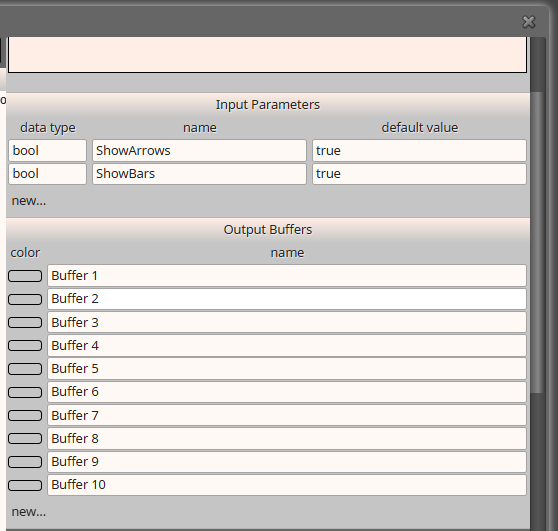
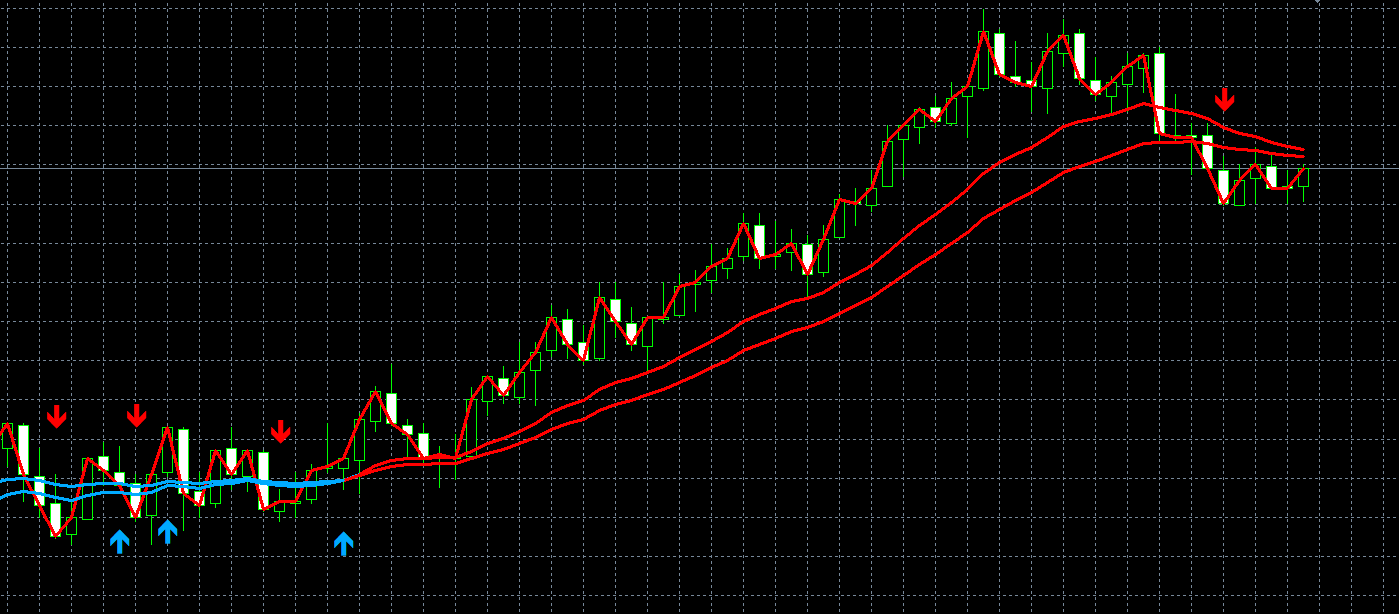
However, still only getting 3 MA's shown on the test as to 4 MA's ( as seen on previously posted picture )
Again, not sure what I'm doing wrong.
https://fxdreema.com/shared/C9BObqO3c
If anyone could maybe have a look at your own time, and let me know, it would greatly be appreciated.
Thanking you in advance for your most valuable time & assistance.
-
RE: Buy / Sell on Custom Indicatorposted in Questions & Answers
okay, somwthing is wrong, you're right.
The indicator did not load correctly.I only noticed this on the retest ( which didnt work with the 0 candle, either )
On the retest, there are only 3 MA's as where my indicator has 4
Tester Example:
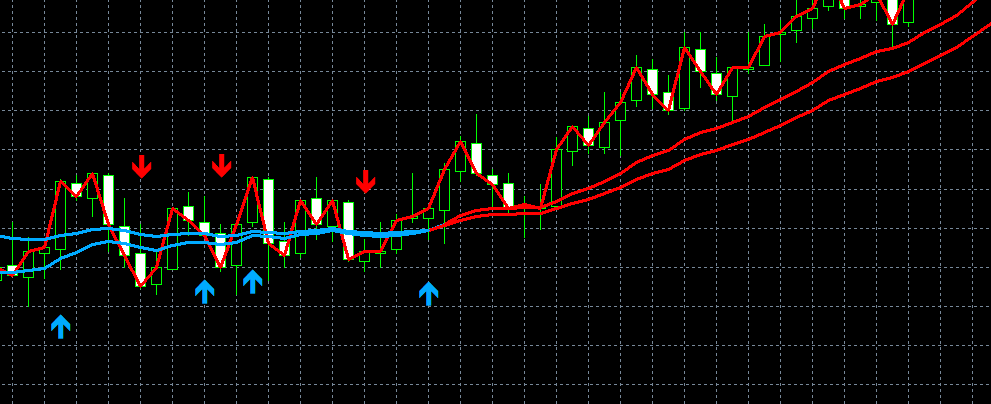
My indicator example:
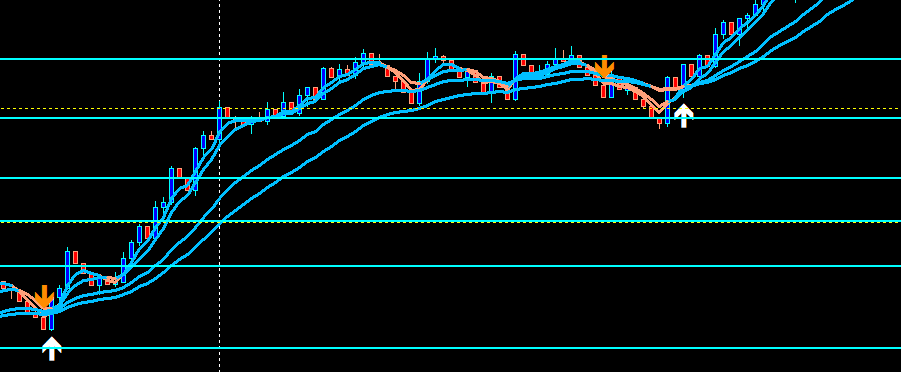
So, yes, something is wrong and I have no idea what it is.
Any help would be greatly appreciated.
Thx
-
RE: Buy / Sell on Custom Indicatorposted in Questions & Answers
Hi
Thank you for your response.
I'm pretty sure the Buffers are correct.
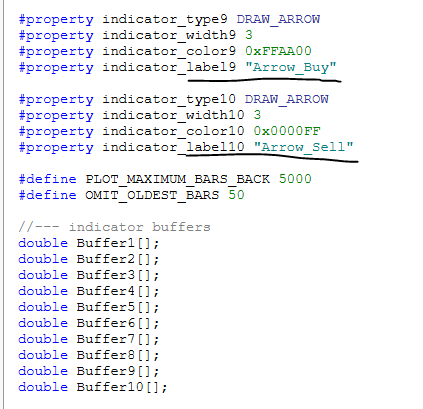
Please do have a look and let me know if I did this incorrectly.
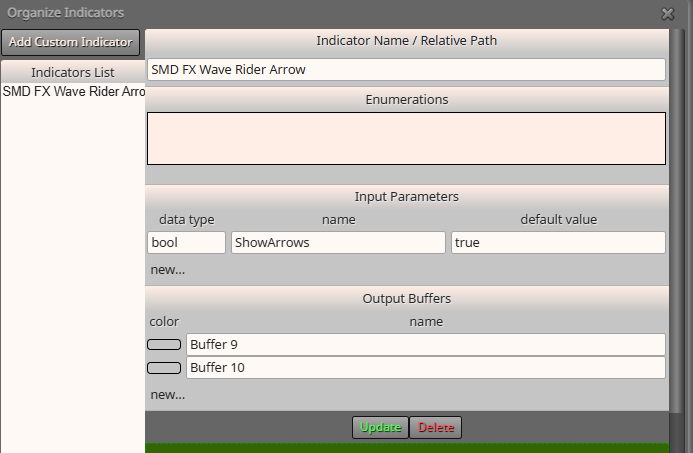
I might have tested it with Candle 0 before, however, would retest and revert.
I'm not 100% sure if the arrows repaint, I guess it does on volatile markets.
Example:
2 MA's that cross, price sometimes just goes to a point, where the arrow would signal and then price moves the other way, so the arrow disappears, this does not happen all the time, but also why I choice 1 instead of 0, so after arrow appears to take the next candle opening.Again, always appreciate your @l-andorrà feedback and will definitely retest with your suggestion
Thank you
-
RE: Buy / Sell on Custom Indicatorposted in Questions & Answers
Hi
Thank you very much for your reply.
I found this thread regarding the issue I am experiencing and used the same setup.
https://fxdreema.com/forum/topic/11832/buy-sell-when-arrow-of-the-indicator-appears
As it worked there, with the assistance of @l-andorràI'm using the same layout and still do not understand why trades are not physically opening.
I know, I'm missing something somewhere, just cant put my finger on it LOL.