fxDreema

    • Register
    • Login
    • Search
    • Back to the main page
    • Categories
    • Recent
    • Tags
    • Popular
    • Search
    1. Home
    2. Vortrexcian
    3. Posts
    V
    • Profile
    • Following 5
    • Followers 1
    • Topics 8
    • Posts 68
    • Best 1
    • Controversial 0
    • Groups 0

    Posts made by Vortrexcian

    • Buy / Sell on Custom Indicator

      Hi Guys

      I'm struggling to get this to work.
      I have my custom indicator that shows arrows for Buy and Sell conditions.
      I have laoded my custom indicator and set it up as seen on some examples on this forum, but the EA still does not want to open a buy or sell trade.

      At first, in the tester, the custom indicator did not even show.
      So fixed it as my custom indicator was under a custom folder, merely compiled it under the normal indicator folder and then it showed on the tester.

      As yet, no buy or sell trade has opened.

      Could someone please guide me into the right direction, what did I miss.
      As always, guidance is always appreciated from this community.

      Project link:
      https://fxdreema.com/shared/1ygmkwQG

      Tester Image:
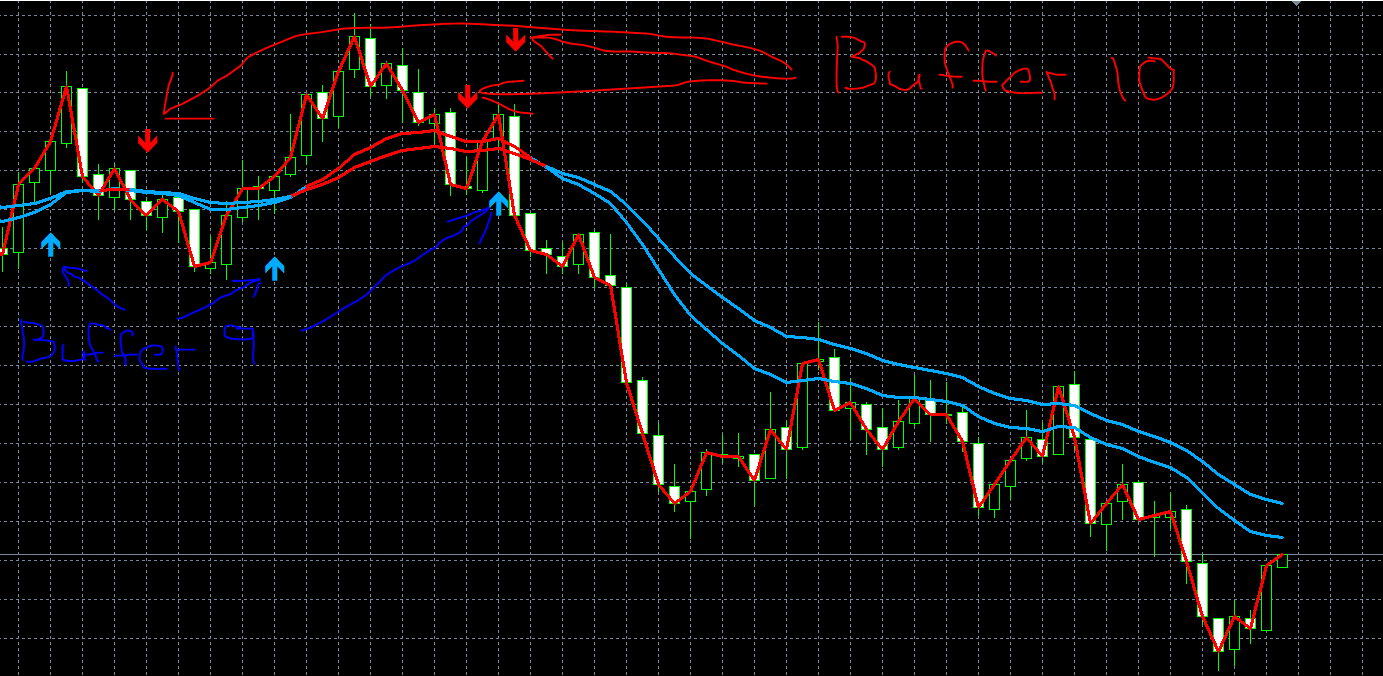
      a383192f-72ea-4d14-859f-b96d4e397f0d-image.png

      Thx in advance

      posted in Questions & Answers
      V
      Vortrexcian
    • RE: Using ATR for SL,TP

      @traderthomas

      Have a look at something like this, but get others opinion as well, such as
      @jstap

      https://fxdreema.com/shared/LAslnLNde

      posted in Questions & Answers
      V
      Vortrexcian
    • RE: Using ATR for SL,TP

      @traderthomas

      ATR Level x 1.5 or 2.0

      EURUSD as an example:

      Calculate the ATR-Based Stop-Loss Distance:

      Start with the current ATR value, let's say 0.00147 for EURUSD.
      Decide on an ATR multiplier. Let’s use 1.5x for this example.
      Multiply the ATR by 1.5 to determine the stop-loss distance:

      1.5×0.00147=0.002205
      This means your stop-loss should be set 0.002205 away from your entry price.

      Set the Stop-Loss Based on ATR:

      If you’re entering a long (buy) position:
      Place your stop-loss 0.002205 below your entry price.
      If you’re entering a short (sell) position:
      Place your stop-loss 0.002205 above your entry price.

      Example in Action:
      Suppose you enter a buy position on EURUSD at a price of 1.08335. Using an ATR of 0.00147 and a 1.5x multiplier, your stop-loss calculation would be:

      1.08335−0.002205=1.081145
      So, your stop-loss would be set at 1.08115 (rounded to 5 decimal places for precision).

      This approach places your stop at a volatility-adjusted distance, reducing the likelihood of being stopped out by typical market fluctuations.

      Hope this helps.

      posted in Questions & Answers
      V
      Vortrexcian
    • RE: EA Closing Wrong and More

      Example Image

      367964dc-7c00-4aa8-82b3-cc3dbc948d0e-image.png

      posted in Questions & Answers
      V
      Vortrexcian
    • EA Closing Wrong and More

      Hi
      @l-andorrà
      @jstap

      I’ve developed a simple EA that opens a Buy order when specific conditions are met, but I’m encountering a few issues and am unsure of where to start troubleshooting.

      1. Backtesting Discrepancies on MT5
        In backtesting, MT5 is showing a Buy order (with a small blue arrow) as soon as conditions are met, but since these conditions are based on the closing of the candle, the Buy order should only trigger at the closing ( top ) of the candle, not within the body.
        This gives False reading on MT5 Back test.

      2. Live Testing – Inconsistent Trailing Stop Activation
        During live testing, the first trade behaves as expected: it opens at the top of the candle, sets the stop loss, activates the profit trailing when in profit, and closes correctly based on trailing conditions. However, on subsequent trades, even after conditions are met, the profit trailing doesn’t activate as expected, and some trades close much earlier than the trailing stop conditions dictate.

      3. Unexpected Trade Closures in Live Testing
        In another live test, the EA opened a trade correctly, set the stop loss, and worked as expected initially. Partway through, however, the trade closed automatically without reaching the stop loss or profit target. The EA then opened a new trade when conditions were met, but the profit trailing didn’t show.

      Could there be something in my setup causing these issues?
      As always, your insights or suggestions would be greatly appreciated!

      https://fxdreema.com/shared/Sb8HvGV8e

      posted in Questions & Answers
      V
      Vortrexcian
    • RE: EA only opens 1 trade, when there are 5 conditions, what am I doing wrong

      @jstap

      Hi Bud.

      Appreciate the feedback, like always.
      I managed to get it right, so that it would open 1 entry per condition and will not open another, untill it has closed.
      I also managed to get the Stoploss trailing to work for each entry.

      Thank you so very much for all the assistance..

      posted in Questions & Answers
      V
      Vortrexcian
    • RE: EA only opens 1 trade, when there are 5 conditions, what am I doing wrong

      @jstap
      Thank you for your response, but I do not understand.

      Would you mind forwarding a link as an example.

      posted in Questions & Answers
      V
      Vortrexcian
    • RE: EA only opens 1 trade, when there are 5 conditions, what am I doing wrong

      I managed to get the StopLoss trainling in order.

      But still struggling with how to open 1 entry of each condition to open.

      Here's what I have so far.

      https://fxdreema.com/shared/SxxXQ936

      posted in Questions & Answers
      V
      Vortrexcian
    • RE: EA only opens 1 trade, when there are 5 conditions, what am I doing wrong

      @l-andorrà
      Thx bud, so how do I fix it.
      So that each condition would open a trade, but not another trade when the same condition is met.

      I'm trying to open 1 entry per condition, and only open again once that trade has closed.

      Also, any advice on stoploss trailing?

      I would like the SL to trail to, 20% of whatever profit was gained.

      Example:
      Let's say, there's a spike on a $0.20 entry and the spike gives a $1 profit, I would like to SL to trail and close at $0.80.
      So whatever the profit is, it needs to calculate to take ( close at 80% of the profit )

      Sorry to ask this, and truly do appreciate the assistance.

      posted in Questions & Answers
      V
      Vortrexcian
    • RE: EA only opens 1 trade, when there are 5 conditions, what am I doing wrong

      @jstap
      Thx
      https://fxdreema.com/shared/290sUW2xc

      posted in Questions & Answers
      V
      Vortrexcian
    • RE: EA only opens 1 trade, when there are 5 conditions, what am I doing wrong

      Apologies guys, it was late and I actually thought that I did add it...

      https://fxdreema.com/builder

      I hope this is how to do it.

      I merely copied the HTML link in the browser

      posted in Questions & Answers
      V
      Vortrexcian
    • EA only opens 1 trade, when there are 5 conditions, what am I doing wrong

      Hi All

      Hope someone couls please assist, fairly new and have had a lot of assistance and guidance from this group.
      Wondering if someone would be able to guide me on this topic as well.

      I have 5 conditions, but when back testing, only 1 trade keeps on opening.

      Also, I would like guidance on the stoploss trailing.

      I actually gave up as I do not understand it as well, so gave the trade a fix pip SL, however, would like it the SL per trade entry to move SL to 50% when trade is in profit per entry.

      Main thing is that not every condition is opening, only the first.

      Some guidance / assistance as always would greatly be appreciated.

      Thx

      posted in Questions & Answers
      V
      Vortrexcian
    • RE: ARROWS NOT DISPLAYING ON CHART MT5

      @l-andorrà @jstap

      You guys are #Legends.

      Thank you so very much for this, can't believe it was staring me straight in the face "OOF"

      Greatly appreciate it guys, thank you...

      posted in Bug Reports
      V
      Vortrexcian
    • RE: ARROWS NOT DISPLAYING ON CHART MT5

      Here's the link https://fxdreema.com/shared/mv14M3h9d

      posted in Bug Reports
      V
      Vortrexcian
    • RE: ARROWS NOT DISPLAYING ON CHART MT5

      @jstap Hay, hope you are well.

      Again, thank you for the help man, it's much appreciated.

      I'm extremely new to this and struggling to place the arrow above the "Candle Bars"

      Could you please explain ( in detail ) where do I go ( in the settings and where exacly ) to set the arrow/s to display above the "candle bar"

      Your assistance would greatly be appreciated!

      posted in Bug Reports
      V
      Vortrexcian
    • RE: ARROWS NOT DISPLAYING ON CHART MT5

      Thx bud, appreciate it.

      posted in Bug Reports
      V
      Vortrexcian
    • RE: ARROWS NOT DISPLAYING ON CHART MT5

      Now I have to try and get the arrow to appear above the candle and not below

      posted in Bug Reports
      V
      Vortrexcian
    • RE: ARROWS NOT DISPLAYING ON CHART MT5

      Hay Bud @jstap

      No idea what happened, but its working now.
      The Algo is switched off as well and its displaying the arrow...

      Dude, whatever it is, thx man...

      posted in Bug Reports
      V
      Vortrexcian
    • RE: ARROWS NOT DISPLAYING ON CHART MT5

      Thx, will give it ago and see what happens, if it fails, will do as you suggested.
      Thx again for the assist.

      posted in Bug Reports
      V
      Vortrexcian
    • RE: ARROWS NOT DISPLAYING ON CHART MT5

      Also, should I leave the Algo switched on and allow the EA to trade or would it work if the Algo id off as well?

      Since there's no Sell or buy, from what I understand, it should still display the arrow though or am I wrong?

      posted in Bug Reports
      V
      Vortrexcian
    • 1
    • 2
    • 3
    • 4
    • 3 / 4