@mhmd This combine with proper logic will solve your problem I think.
If it's not, just shared the project.
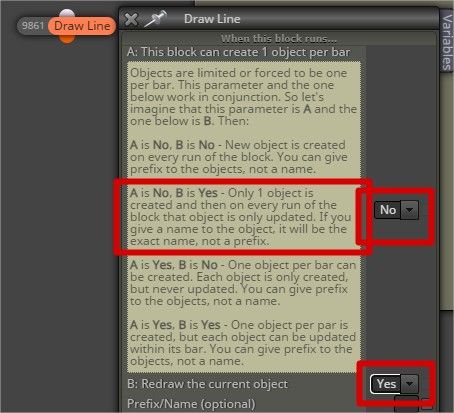
@mhmd This combine with proper logic will solve your problem I think.
If it's not, just shared the project.
@jstap Thank you for reminding me, it is just that the current market condition of all JPY pairs is in a loop hole of my logics, so I have found the problem after checking again.
Thank you sir !!!
Guys and @fxDreema ,
I have a block to copy value from input constant to variables that is working well just like the picture of AUDUSD below (like working well for a month already)
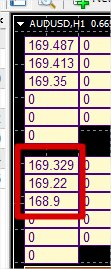
However, today I just notice that for CADJPY with the same input and of course same EA  the numbers that should be in the red rectangle is not there and the middle one is at the total different place.....
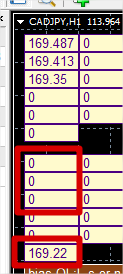
After some trials, I've found that all of JPY pairs have the same problem..... any idea please 
@aaronjohn0530 as @ambrogio said and my explanation in the first reply, please cut and paste your project to be small on show only the discussing part here.
Else I could only guess that you may connect your block in the wrong order or store the variable in the wrong sequence.
What do you mean to set your SL at buffer1 between;
and to make other people understand you better, please also share your project here.
@Wilmabon It depends on what you really need (mean) by that designated wick length (such as last bar upper wick, 5 times of H1 ATR, wick of the highest price from last cycle of RSI overbought and etc.) , so some is already in the built-in functions of fxdreema

, some can be done like what @jstap reply and some is a little bit more complicated.
We have so many great guys around here (I'm also asking help from them and also jstap :D) so I think it is not too hard for you to learn. But you should be more specific with your question and a shared project URL would be even better for them to assist you.
@YASI-AZ your indicator might be for MT4 only (mq4 format) so you can't use it with MT5 as they are difference.
You need to convert it to MT5 first.
@h3am I think all the value that you need are collected in "Buffer" of the indicator, so you just need to know which Buffer is for cloud, cloud width or cloud upper limit and lower limit then you just get the necessary number into variables and write the code according to your logic.
And if you mean Ichimoku of fxdreema then you just need to know which of those 5 variables that you need (sorry that I can't explain more as I'm not familiar with Ichimoku, if you can tell me "cloud"
that you mean is which one and "cloud width" is which one or can get by which one minus which one I could explain it more in detail).
@Wilmabon Yes, it can with proper variable setting and logics
try the VPN setting to be 8.8.8.8 and 8.8.4.4 (just google it), it's getting better for me today but don't know for a long term
You must put those block in "on Tick" not "on Trade" as on Trade is for the moment your EA just have a trade whether Buy or Sell.
just change What to get? from "Candle ID" to "Price Value"
I have the same problem, which country's are you using ?
I think only once per bar block should be enough, it might be a problem of your other blocks in your actual project.
However, you may try the one in the below link that should also solve your problem (be careful with the sequence of Block ID, Turn On Block ID must be lower than Buy Now Block ID)
If my understanding is right something like in the below link should work or give you enough idea.
@jstap I did try every possible combination from variable type (bool and double), True/False instead of number for bool, number for double but the warning is still there, even with the current project in the link below (X_X)

However, if I manually delete "0 | and | 0 " from both side of the code below, then the warning disappear....

Do your code have these "0 | and | 0" ?
Could you please show me some of your blocks with this condition block and variable setting 
Guys,
I have found the warning from using if() code in the darker condition block although it seems to not effecting operational of the EA but it might be in the future 
Do you know how to fix this warning with fxdreema ?